Fabric.js: Canvas area exceeds the maximum limit in iPad even though it doesn't.
Version
2.2.3
Test Case
http://jsfiddle.net/bst4fn0L/3/
Steps to reproduce
Use an iPad version 10.3.3 in Safari.
Set width and height of the canvas to 3364 x 2376. I get the warning Canvas area exceeds the maximum limit (width * height > 16777216). in the console. 3364 x 2376 is much smaller than 16777216.
Expected Behavior
It runs without warning and the circle should be drawn.
Actual Behavior
Circle isn't drawn, and there is that warning.
 phuwin
All 16 comments
ipad has a high dpi scaling logic.
you need to disable fabricjs from using it if you want to create a 3364x2367 ( that will be painfully slow on a mobile cpu anyway for handling operations ).
when initializing canvas, in the options object use enableRetinaScaling: false
 asturur
on 4 May 2018
asturur
on 4 May 2018
Hi all,
Did what's advised above, but I get a new error:
WebGL: INVALID_VALUE: texImage2D: width or height out of range
[Error] WebGL: INVALID_VALUE: texImage2D: width or height out of range
    texImage2D
    createTexture (fabric.min.js:1:197863)
    getCachedTexture (fabric.min.js:1:198092)
    applyFilters (fabric.min.js:1:195858)
    applyFilters (fabric.min.js:1:189855)
    (anonymous function) (all.LANG.m.js:995)
    (anonymous function) (fabric.min.js:1:122802)
    (anonymous function) (fabric.min.js:1:121609)
    _setBgOverlay (fabric.min.js:1:122120)
    (anonymous function) (fabric.min.js:1:121395)
    (anonymous function) (fabric.min.js:1:122486)
    o (fabric.min.js:1:8876)
    (anonymous function) (fabric.min.js:1:9031)
    (anonymous function) (fabric.min.js:1:192527)
    (anonymous function) (fabric.min.js:1:191107)
    o (fabric.min.js:1:8876)
    (anonymous function) (fabric.min.js:1:9037)
    forEach
    enlivenObjects (fabric.min.js:1:8923)
    _initFilters (fabric.min.js:1:191088)
    (anonymous function) (fabric.min.js:1:192446)
    _initFilters (fabric.min.js:1:191140)
    (anonymous function) (fabric.min.js:1:192365)
    s (fabric.min.js:1:8211)
Please advise. Thanks!
 ickata
on 27 Aug 2018
ickata
on 27 Aug 2018
Can you tell us on what device are you working and if you are also using filters? Please tell us more of what are you doig
asturur
on 27 Aug 2018
Hi, I’m reproducing on Safari/iPhone 6/iOS 11.3. I am also reproducing it on iOS simulator (iPhone X). I’m trying to apply some filter (Sepia for example) to a photo taken by the iPhone.
ickata
on 27 Aug 2018
@asturur : Do you want me to provide some code?
ickata
on 28 Aug 2018
@ickata would be curious to hear about your case. I'm running into something similar, but unfort used a heavily modified version of fabric from years ago, so can't upgrade to the newest one to make things compatible.
 onassar
on 30 Aug 2018
onassar
on 30 Aug 2018
Hi all,
The problem was because I am cloning the canvas, and by default enableRetinaScaling is not cloned.
This works:
canvasobj.clone( copy => {
   // ... do some stuff with the clone
}, [ 'enableRetinaScaling' ])
Can you actually clone the canvas?
asturur
on 3 Sep 2018
Yes, you can:
canvasobj.clone( copy => {
   document.body.appendChild( copy.wrapperEl );
}, [ 'enableRetinaScaling' ])
Not sure if accessing the wrapperEl property is a good idea...
ickata
on 3 Sep 2018
did not know that. let me see if the code is sort of lost somewhere.
enableRetinaScaling should be cloned in my opinion
asturur
on 3 Sep 2018
If set enableRetinaScaling to false, it looks fuzzy on iPad. If not set, it doesn't even show because exceeds the maximum limit.
Any help for this?
 shallinta
on 16 Jul 2020
shallinta
on 16 Jul 2020
What ipad do you have?
asturur
on 17 Jul 2020
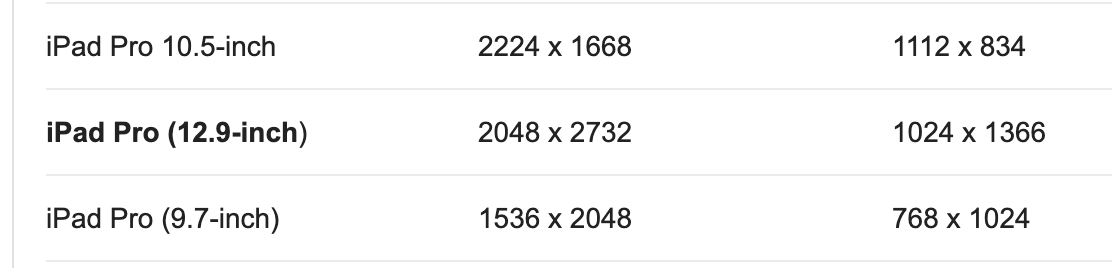
Those are screen resolution of ipads.
So we are well below the 16mp problem that is 4k by 4k ( or 2k x 2k with retina on )
Please just keep the canvas as big as the screen and not more.
Not sure if with offscreen canvases you can go bigger
asturur
on 17 Jul 2020
iPad Pro 12.9-inch
The set size is 1000 * 5000. result 2000 * 10000
(P.S. not my website.. )
shallinta
on 17 Jul 2020
is too big.
is 20Mega pixels when the limit is 16Mega.
Use smaller canvases when possible, and if you need bigger export, see if an offscreencanvas work or find something else.
Canvas cannot scale infinitely
asturur
on 17 Jul 2020
i see. thank you
shallinta
on 20 Jul 2020
Related issues
 AbhijitParate
·
3Comments
AbhijitParate
·
3Comments
 Vivek-KT
·
3Comments
Vivek-KT
·
3Comments
 bhaskardas9475
·
4Comments
bhaskardas9475
·
4Comments
 semiadam
·
3Comments
semiadam
·
3Comments
 bevacqua
·
4Comments
bevacqua
·
4Comments
Most helpful comment
ipad has a high dpi scaling logic.
you need to disable fabricjs from using it if you want to create a 3364x2367 ( that will be painfully slow on a mobile cpu anyway for handling operations ).
when initializing canvas, in the options object use
enableRetinaScaling: false