Fabric.js: Pressure support for styluses?
Is there currently any support for (or are there any plans to add) pressure / tilt from pens (e.g. Wacom tablet, iPad pencil, etc)? Pressure is typically used to vary the brush width as you are using the brush, so this would be the natural usecase for it. I've seen this done in a number of places (e.g. photoshop and most standalone painting tools), but below are some web-based examples that do it. These use the Pointer Events API, which does provide pressure info, as far as I can see.
https://aggie.io (tested that brush thickness based on pressure works with ipad + pencil)
https://github.com/kanreisa/reichat (Microsoft Edge/windows only it seems?)
https://github.com/thenickdude/chickenpaint/ (couldn't find working online demo, but code is there)
And I'm sure there are others...
There's also https://github.com/stuyam/pressure which is a popular abstraction for getting pressure info, though I'm not sure why it's necessary these days thanks to the Pointer Events API.
 AndrewJDR
All 26 comments
So as intention to support it, i bought a ms surface 4 pad, just for that.
The time to dive into the topic is missing
 asturur
on 3 Apr 2018
asturur
on 3 Apr 2018
Some day I may be able to take a look (though I'm short on time myself, these days).
One question -- does fabric already have the ability to represent lines/paint brushes that change in width along the length of the stroke? For example, a line may start out at a thinkness of 1.2, then increase to 1.4, then decrease down to 0.9, etc. Putting pressure support aside, can fabric represent this kind of stroke, currently?
AndrewJDR
on 3 Apr 2018
no it does not, that would need a special class, derived from path probably.
Just to make it clear, brush are pieces of code ( in fabricJS ) that have a method to handle mouse down/move/up, they can draw custom stuff since they have a render method, but when they finish, the end result must be handled by a fabric.Object derived class.
So other than the pressure code, the brush code, you need the object code. This is a big feature.
It could be also be handled with a series of path of different strokeWidths grouped togheter. in that case you would need just a particular brush code.
asturur
on 3 Apr 2018
Okay, thanks. I better understand what's involved, at least :) I think the quantization would be too obvious looking with the multiple strokes method, so a custom object that represents a smooth interpolation between a set of thickness values would probably be needed. If I do get some time to work on it some day, I will post here.
AndrewJDR
on 3 Apr 2018
For reference - https://web.archive.org/web/20180403121847/http://owl3d.com/svg/vsw/articles/vsw_article.html
AndrewJDR
on 3 Apr 2018
After almost a year since this issue was opened, I came up with the same motivation and has just started to implement a simple custom brush and path.
The pull request #5587 is the first step toward the goal, allowing the brush to access pressure values, as well as x and y coordinates through fabric.util.getPointer method.
 arcatdmz
on 22 Mar 2019
arcatdmz
on 22 Mar 2019
This issue has been automatically marked as stale because it has not had recent activity. It will be closed if no further activity occurs. Thank you for your contributions.
![stale[bot] picture](https://avatars3.githubusercontent.com/in/1724?v=4&s=40) stale[bot]
on 26 Jan 2020
stale[bot]
on 26 Jan 2020
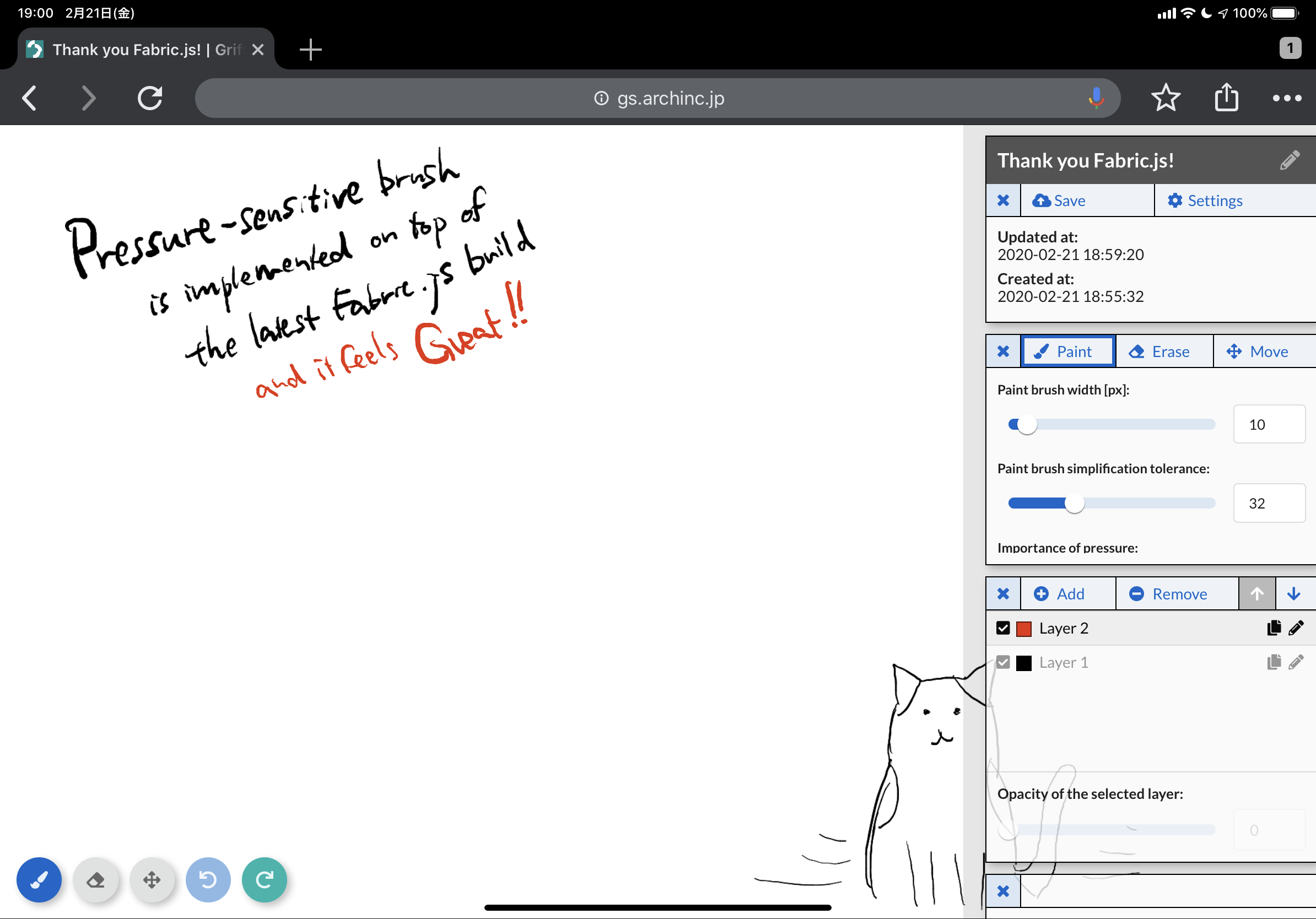
Since I contributed to #5587 and #5589, I have continued my effort to implement a pressure-sensitive brush, and it’s somehow working as intended. I’ve tested it on iPad (Safari and Chrome) and Surface Go (Edge). It’s not yet open-sourced, but you could get the idea below:
https://gs.archinc.jp/drawings/5e4fa91448c4290030d09661
arcatdmz
on 21 Feb 2020
@arcatdmz That's awesome!! Curious, how is it represented in vector terms, a series of separate smaller segments of different widths, or something else?
AndrewJDR
on 21 Feb 2020
@AndrewJDR Thanks! Your guess is right, one stroke consists of multiple separate segments. To make it look smooth, a path simplification algorithm is applied to the raw stroke data at the end of each stroke (onMouseUp).
arcatdmz
on 21 Feb 2020
@arcatdmz That's very cool, do you plan to contribute that back to the fabric repo or somewhere else on github?
AndrewJDR
on 22 Feb 2020
Hi @AndrewJDR , as i said before, if you want to contribute it, open a pr in early stage, so that we can start to look at code for integration before is done and maybe your time allotment for it is finished. Looks nice.
asturur
on 22 Feb 2020
@asturur oh this is not my work, it’s @arcatdmz code... so I was wondering if they plan to open it :)
AndrewJDR
on 22 Feb 2020
sorry i confused message order and nicknames
asturur
on 22 Feb 2020
Hi all, thanks for your positive comments. I do wish to open a PR but it would be in March since I'm a bit busy this week.
arcatdmz
on 23 Feb 2020
Oh, by the way, our tech stack is completely based on TypeScript so it wouldn't be straightforward to open a PR on this main repo.
Probably we're going to publish it as an independent npm package as well as a js file hosted on CDN services such as jsDelivr and unpkg.
arcatdmz
on 23 Feb 2020
that is fine by me! We could find a way to link that clearly in examples/readme.
asturur
on 23 Feb 2020
I've noticed v4 is being developed and its beta version has been already released. Regarding the pressure-sensitive brush library, let me make sure that it can be used with v4.
arcatdmz
on 6 Mar 2020
Nothing should have changed in that case, the new item i think it allows you to use pressure events on controls, although i have no idea how you can use them.
asturur
on 8 Mar 2020
I still need to work on documentations, but the basic features are working properly with v3.
arcatdmz
on 9 Mar 2020
@asturur @AndrewJDR I've completed the API document and other publication materials, I think.
- GitHub repository: https://github.com/arch-inc/fabricjs-psbrush/
- Demo site: https://arch-inc.github.io/fabricjs-psbrush/
- API document: https://arch-inc.github.io/fabricjs-psbrush/api/globals.html
@asturur Please let me know if there's anything I could do to include links to any of these in the Fabric.js official documents, as you've said so:
We could find a way to link that clearly in examples/readme.
arcatdmz
on 29 Mar 2020
@arcatdmz if you want to have a look at how i m building demo pages now:
https://raw.githubusercontent.com/fabricjs/fabricjs.com/gh-pages/posts/demos/_posts/2020-2-15-custom-control-render.md
and how it looks like:
http://fabricjs.com/custom-control-render
you can build a demo based on that.
As you see the embed prefill from codepen allow you to link external libraries easily and to have an editable demo.
You can write a demo page for fabricjs.com, a simple one.
We can also have in the tutorial section how to build a custom brush
asturur
on 29 Mar 2020
Hello, I am working on a drawing app similar to Chrome Canvas or the Google Keep Drawing Area. I want the free drawing brush width to be velocity sensitive (thus in a way simulating pressure) ie, when the mouse velocity increases, I want the brush stroke to get thicker. I stumbled on to this issue, and after some reading and research, I overrided the freedrawingBrush methods and broke down the path segments into smaller subsegments with width according to the speed.
But I'm having trouble regarding how to simplify or smooth out the different paths and their widths, so that it all looks like a single smooth curve.
@asturur @AndrewJDR @arcatdmz any suggestions or help?
 g-ravity
on 14 May 2020
g-ravity
on 14 May 2020
Well how are you breaking up the segents? are those linear now? or still cubic curves?
asturur
on 24 May 2020
I guess my code helps here. If you go with the "smaller sub-segments" approach, I would suggest the following:
- When the user is drawing a path, show raw non-simplified path and record relevant data (in your case, probably the timestamp of each
mousedownevent.) - When drawing finishes, simplify the path
To simplify the path, I rewrote a simplification library in TypeScript and extended it to take pressure values into consideration.
You can check the actual behavior in the demo site: https://arch-inc.github.io/fabricjs-psbrush/
arcatdmz
on 24 May 2020
btw I've finally managed to start working on the demo page for fabricjs-psbrush.
arcatdmz
on 24 May 2020
Related issues
 vleandersson
·
4Comments
vleandersson
·
4Comments
 semiadam
·
3Comments
semiadam
·
3Comments
 bevacqua
·
4Comments
bevacqua
·
4Comments
 medialwerk
·
5Comments
medialwerk
·
5Comments
 guettli
·
4Comments
guettli
·
4Comments
Most helpful comment
Since I contributed to #5587 and #5589, I have continued my effort to implement a pressure-sensitive brush, and it’s somehow working as intended. I’ve tested it on iPad (Safari and Chrome) and Surface Go (Edge). It’s not yet open-sourced, but you could get the idea below:
https://gs.archinc.jp/drawings/5e4fa91448c4290030d09661