Fabric.js: loadSVGFromURL ignores Groups <g>?
I'm loading in an external SVG file to parse out and display items on the canvas as they are selected (from other images or canvases).
In my SVG file I have all objects organized into various groups, which I need to retain for organizational reference in my code logic.
I'm finding out, though, that loadSVGFromURL appears to ignore groups alltogether, and only import the objects (i.e. paths, circles, etc.).
Or rather: it loads the groups as stand-alone objects, and doesn't preserve the hierarchy (that I can tell). Actually not true, it seems to ignore
Any ideas why this might be?
Here is an excerpt of my SVG file:
<svg width="1891px" height="1492px" viewBox="0 0 1891 1492" version="1.1" xmlns="http://www.w3.org/2000/svg" xmlns:xlink="http://www.w3.org/1999/xlink" xmlns:sketch="http://www.bohemiancoding.com/sketch/ns">
    <title>blazonry</title>
    <description>Created with Sketch (http://www.bohemiancoding.com/sketch)</description>
    <g id="Page-1" stroke="none" stroke-width="1" fill="none" fill-rule="evenodd" sketch:type="MSPage">
        <g id="Shields" sketch:type="MSLayerGroup" transform="translate(342.000000, 26.000000)" stroke="#000000">
            <path d="M1,0 L1,400 C0.999999169,799.99998 201,1205 601,1439.4375 C1001,1205 1201,800 1201,400 L1201,0 L1,0 Z M1,0" id="Heater" sketch:type="MSShapeGroup"></path>
            <path d="M1,0 L1,960.824531 C1.00000084,1439.4375 489.311066,1258.28207 600.483175,1439.4375 C708.904794,1258.28211 1201,1439.4375 1200.99997,960.824531 C1200.99996,960.824531 1201,0 1201,0 L1,0 Z M1,0" id="BevelledSmooth" sketch:type="MSShapeGroup"></path>
[...]
And here the code I'm using to fetch the information:
<!DOCTYPE html>
<html>
    <head>
        <title>Test</title>
        <script src="http://ajax.googleapis.com/ajax/libs/jquery/1.10.2/jquery.min.js"></script>
        <script src="scripts/fabric.min.js"></script>
        <script type="text/javascript">
            <!--
            var currentShield = -1;
            var target;
            var group = [];
            var loadedObjects

   $(function(){
            this.target = new fabric.Canvas('result');

        fabric.loadSVGFromURL("assets/blazonry.svg",function(objects,options) {

         loadedObjects = new fabric.Group(objects);

//      alert(options);

        target.add(loadedObjects);
        canvas.renderAll();

        },function(item, object) {
            if (item.getAttribute("id") == "Shields")
            {
                object.set('id',item.getAttribute('id'));
                this.group.push(item);
               }
        });


    }); // end $(function(){});

            function nextShield()
            {
                        target = new fabric.Canvas('result');

                this.currentShield++;
                var test = new fabric.Path(this.group[currentShield].getAttribute("d"))

        test.set({
                top: 250,
                left: 250,
                scaleY: .1,
                scaleX: .1
        });
                target.add(test);
                target.renderAll();
            }
            -->
        </script>
        <style>
            canvas
            {
                border: 1px solid black;
            }
        </style>
    </head>
    <body>
        <canvas id="result" width="500" height="500"></canvas>
        <input type="button" id="next" onclick="nextShield();" value="Next Shield" />
        <ul id="carousel" class="elastislide-list">
        </ul>
    </body>
</html>
Want to back this issue? Post a bounty on it! We accept bounties via Bountysource.
 mikebronner
All 47 comments
Related or same as #917 ?
mikebronner
on 23 Oct 2013
Yes, our parser ignores <g> elements BUT not before it reads all the attributes from it :) So we're using <g>'s for SVG's hierarchical styling but we don't actually create fabric.Group (or fabric.PathGroup) instances out of them. This is probably something that we _should_ be doing, and the reason we don't is because fabric.Group's were introduced later, after we already had working parser. I imagine that changing parser this way would be quite some work, but it could make things cleaner and improve rendering. I'll mark this as "possible feature".
 kangax
on 23 Oct 2013
kangax
on 23 Oct 2013
@kangas, groups is proving to be critical for many applications.
We found a way to properly group the SVG elements if you are interested in incorporating:
I took a close look at the parser and it does parse 'flat' which is where the problem lies.
- As you parse, when you see a < g > you simply create a group and add it to an object (say 'svgGroups') to find it later.
- Then when you parse and find an element where the parent that is a < g > just add the current object to it via addWithUpdate (by looking for this parent group in 'svgGroups')
- Only add the first object returned by fabric.loadSVGFromURL(..) to the canvas as the hierarchy is now built.
Our challenge now is to figure out the rendering algorithm as the child objects get misplaced given the original flat approach. Any hints @kangax ? Would be greatly appreciated.
[how do we send you the updated code]
 ramezrafla
on 4 Jun 2015
ramezrafla
on 4 Jun 2015
hi guys.
the rendering is misplaced because all the rendering of svg is different from the normal object rendering.
fabricjs does not support the transform matrix attribute in good way yet.
So even if you maintain the group and parent children relationship in the parser and you modify the parser so it creates fabric pathgroups for that, you cannot ungroup them from the main pathgroup yet because they would be unusable in an interactive environment.
anyway to propose some code clone this repository on github, commit the code to your cloned repository and then create a pull request.
 asturur
on 4 Jun 2015
asturur
on 4 Jun 2015
Thanks @asturur
Agreed, what I am trying to do now is mimic group creation direct from JS. When you do this
group = new fabric.Group([child])
The coordinates of 'child' are relative to the top-left of 'group'.
So in theory, we can mimic this behaviour by altering the coordinates of child and then adding to group.
This should result in minimal code changes. Does that make sense?
Another alternative is doing this outside of fabric. After the canvas has rendered, go through all the hierarchies and keep to group.
Thinking out loud ...
ramezrafla
on 4 Jun 2015
i think you should try with PathGroups.
they have a flag that in rendering is called notransform. but every object will probably have a transformMatrix properties that will give you headache.
first try would be make pathgroups of patgroups, parsing the attributes flatted to the objects and not on the pathgroup itself so that you can ungroup a bit.
now that you make me think of it, maybe creating a pathgroup of single object and then incapsulating them in other pathgroups to maintain original structure should work out of the box with current code.
asturur
on 4 Jun 2015
Thanks @asturur
So this seems to work:
    group1 = new fabric.PathGroup([rect]);
    group1.transformMatrix = [1,0,0,2,0,20];

    var group2 = new fabric.PathGroup([group1]);
    group2.transformMatrix = [2,0,0,1,20,0];

    canvas.add(group2);
The transformMatrix is respected (as it seems).
Now we need to build a post-renderer parser to get this hierarchy going right :)
ramezrafla
on 5 Jun 2015
But ... it doesn't catch mouse / touch events!
grrr ...
ramezrafla
on 5 Jun 2015
I give up, the rendering has major issues. My next idea is to use this as a parser and create objects with EaselJS on Canvas :) and maybe contribute it to the CreateJS library
Will keep this forum posted.
ramezrafla
on 5 Jun 2015
if i solve i ll keep you informed.
asturur
on 5 Jun 2015
Is there any update on this?
 bajalovic
on 21 Jul 2015
bajalovic
on 21 Jul 2015
This has revealed itself to be problematic for our project as well. We are working with SVG documents with absolute units and internal transforms in those unit systems (not pixels). The pattern of just extracting the elements from the documents renders #nojoy.
It's unclear if anyone is working on this. We can contribute if a basic solution can be described, we've not ventured under the hood of fabric thus far.
 eric-schleicher
on 24 Jul 2015
eric-schleicher
on 24 Jul 2015
is useless as of now to try to support groups if properties are squeezed down to the single elements.
our groups do not behaves as the svg groups.
for any of you the aim.is different whyle a complete solution is hard. fabric do not really support group of groups of groups as of now.
i m working on skewing
then general transformMatrix support
then group sub targeting
those things should be solved before we can think of supporting something like that.
i would be glad to receive a sample SVG from eric if possible
asturur
on 24 Jul 2015
Just checking in to see if there is any movement on this or even suggestion for a work around. I am building an application that involves customizing SVG files by toggling visibility of elements and group functionality is absolutely necessary for this use. I'd love to use Fabric as I have all my other functions working well but losing the ability to target groups has stopped development for now. Open to suggestions for a creative workaround, I have even considered trying to apply the group id as a class to the individual paths but not sure how to automate that on a complex SVG.
 amandakremser
on 13 Sep 2015
amandakremser
on 13 Sep 2015
You can try snap svg or Raphael. But I don't believe they work on canvas (Raphael likely doesn't as it supports older browsers)
On Sep 13, 2015, at 5:25 PM, Amanda Kremser [email protected] wrote:
Just checking in to see if there is any movement on this or even suggestion for a work around. I am building an application that involves customizing SVG files by toggling visibility of elements and group functionality is absolutely necessary for this use. I'd love to use Fabric as I have all my other functions working well but losing the ability to target groups has stopped development for now. Open to suggestions for a creative workaround, I have even considered trying to apply the group id as a class to the individual paths but not sure how to automate that on a complex SVG.
—
Reply to this email directly or view it on GitHub.
ramezrafla
on 14 Sep 2015
Thanks! I actually did explore snap.svg before switching to Fabric and it had some nice features but the real highlight of Fabric for me is the serializing functions as I need users to be able to save and reload images. Fabric really seems to be perfect for my use with this one exception. I'll keep working on a solution and post back if I come up with something. It's looking like I'll be writing a custom script to add attributes or classes to the paths based on what group they would have been in for now.
amandakremser
on 14 Sep 2015
Looks like my idea won't actually work since my SVG doc uses symbols and I see no way to add classes to use:href tags. Any other ideas are welcome. Just any way really to be able to reference which
amandakremser
on 14 Sep 2015
when you parse the svg, group id will descend to element id.
With reviver function in parseSVGDocument, you have chance to check elements and instances togheter.
At that moment you can swap "id" with a "class" attribute.
But on canvas, class property is not applied dinamically.
Anyway something is moving, just i do not have time to test it
asturur
on 14 Sep 2015
@amandakremser it sounds like you're hitting the same limits that we did. We ultimately had to rip fabric out and focused instead on producing the right SVG documents and then pushing them into the canvas. There are a number of way to produce images from DOM and the fidelity of SVG in DOM is quite amazing.
We were able to do this because our use-case didn't need post render user point/click interactivity (which was where fabric really provided value). Since doing that our documents have gotten much cleaner, behave predictably we can freely use classes and other construct against sub-trees of the document.
In the end fabric wasn't occluding any complexity and just didn't support the (not) so esoteric features of the SVG namespace like groups.
Not slamming fabric here, but if you aren't using the higher level functionality that fabric provide it might be worth considering working natively with SVG. it's really not that bad, and the precision and predictability that some with it is much greater than what fabric currently supports.
If you're interested i can point you to some resources that were really useful for us.
eric-schleicher
on 14 Sep 2015
Thank you @asturur, I have gotten the reviver function to pull out parent node IDs and I'm adding them to the paths as a custom attribute "groupID". Using this I am able to loop through and affect paths within a "group".
This does slow things down when adding my art to the canvas and it's a bit problematic for nested groups, but it get's me a few big step closer to the result I need. I'm looking into the possibility of actually adding each path to a fabric.Group based on groupID when it's loaded. If I get this working I'll put together a fiddle link and share in case it can help anyone else.
@eric-schleicher I hear you! Considering how robust Farbic is in many areas I assumed (oops!) that it would have the capability of recognizing groups like a few other libraries I tired previously. In my case the whole app revolves around users making changes to specific parts of the art once it's on the canvas as well as the saving and reloading so Fabric has been fantastic for all of that.
amandakremser
on 15 Sep 2015
Currentlu i wrote a function to change the generic transformation in angle,scale,translate,and skew.
Fabric support for skew is done and needs to be merged.
Then it will be possible to use normal group for svg. BUt still we have to test nested groups...
Consider that every big change brings backward incompatibilities ( i woul elimante pathgroups fro example )
consider that.you are working on some projets with fabricjs, while i have different job and just having fun with fabricjs.
Also i asked eric, and i ask you amanda if it is possible to have sample of your svgs to better understand the needs of your application and maybe found some limit case that will help develop a better solution.
There are so many strange features in svgs, and specs are so deep, that sometimes you need to support something that completely changes the game.
asturur
on 15 Sep 2015
@asturur just a quick note, I do really appreciate all the hard work you and the team put in to Fabric, and I hope it didn't sound like I expect a quick fix! I definitely understand having limited time for side projects & the complexity of the issue. I'm very impressed with Fabric overall and I hope to contribute what I can, probably in the area of tutorials/samples & community help.
Back on the topic of groups, I'm progressing with your advice of grabbing the parent node ID. This is perfect for one level groups, it only slows down/gets tricky if you go deeper than that. For instance I ran into trouble with keeping all of the actual paths at the same level in the hierarchy.
I attempted to put a sample together on CodePen or JS fiddle for you but I ran into the issue of loadSVGfromURL not working on those platforms because of cross domain issues, and parent node not working with load from string. (Unless that was just user error.)
The last part of my work around is putting paths automatically in fabric groups based on their parent node ID. I can put the working sample on Github for you when done if you think it might help. Just wondering if there is a simpler way than having to eliminate path groups etc.
The file itself in my case is nothing fancy (other than having many nested groups some symbol/xlink refs) and loads perfectly in kitchen sink.
amandakremser
on 15 Sep 2015
Running into this issue again on a project I'm working on. It seems everyone is addressing the issue of groups not being loaded a bit differently at this point. Is there a consensus on a viable work-around that could work for everyone? (I'm having trouble to get it to work at all.)
@kangax mentioned that the attributes on the group weren't actually discarded. Is there a way I can access them in the reviver method?
Thanks :) And happy new year to all!
Update:
I was able to get things working using the reviver method (this.generator is my fabric canvas instance):
        fabric.loadSVGFromString('...', this.prepCanvas, this.addObjects);

        prepCanvas: function (paths, options) {
            var object = fabric.util.groupSVGElements(paths, options);

            if (paths.length > 0) {
                object.customAttributes = _.first(paths).parentAttributes;
            }

            object.scaleToHeight(this.generator.height)
                .set({left: 0, top: 0})
                .setCoords();
            this.generator.add(object);
            this.generator.setActiveObject(object);
        },

        addObjects: function (item, object) {
            parent = item.parentNode;
            object.parentAttributes = {
                classification: parent.getAttribute('classification'),
                name: parent.getAttribute('name'),
                attitude: parent.getAttribute('attitude'),
                blazon: parent.getAttribute('blazon'),
                type: parent.getAttribute('type')
            };
            object.customAttributes = {
                layer: item.getAttribute('layer')
            };
        },
This is an old issue that can be helped a bit by fabric 2.0
For who is interested:
The svg parser now gives you back an array of elements and a mirrored array of svg nodes.
That means you can write a function that inspect svg nodes, find group relations and rebuilds it.
asturur
on 3 Sep 2017
@asturur Can you elaborate a little further what can now be done with fabric 2.0?
If I call
fabric.loadSVGFromString(
      `<svg>
        <g>
            <path d="M10 10"/>
        </g>
        <g>
            <path d="M20 20"/>
            <path d="M30 30"/>
        </g>
    </svg>`, (objects, options) => {
      console.log(objects)
    })
I still just see three objects, and I don't see a way to recover the original hierarchy. Is there a way I'm missing?
 sfentress
on 16 Jan 2018
sfentress
on 16 Jan 2018
So the full signature is now:
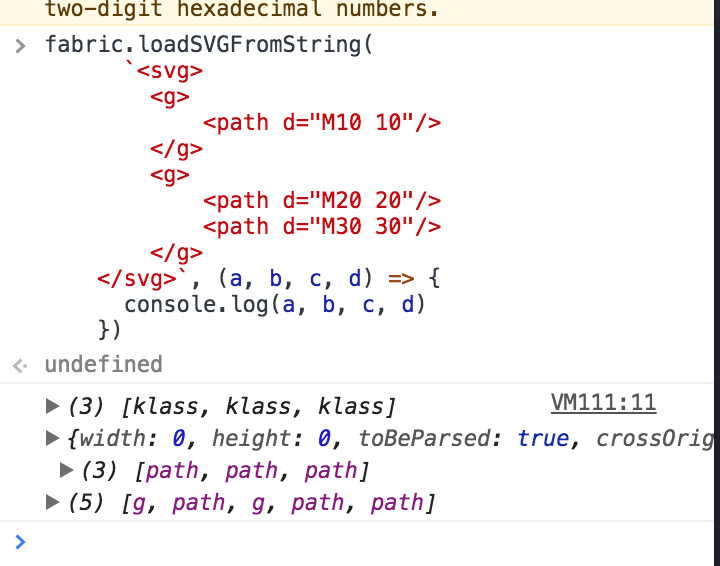
a is objects, c is the svg element corresponding to objects.
Starting from c, you can inspect parentNodes of each element and rebuild it.
I'm not saying is straight forward, i m saying is possible now, and before it wasn't at all.
asturur
on 16 Jan 2018
What if I say I had fixed this issue of fabric js ignores group with the help of pure JavaScript by investing around 2 months.
 kanchanvadhel
on 21 Dec 2018
kanchanvadhel
on 21 Dec 2018
Well you could talk of your solution or open a PR.
Actually you can recreate groups following the elements passed in the callback and comparing the parentElements in the SVG structure, but is tedious and requires a lot of code.
A new SVG parser, rewritten, would be better.
asturur
on 29 Dec 2018
@kanchanvadhel can you show how you resolved the problem?
 adamgamble
on 23 Apr 2019
adamgamble
on 23 Apr 2019
It is not free... How much will you pay me for that..
On Tue, Apr 23, 2019, 9:35 PM adamgamble notifications@github.com wrote:
@kanchanvadhel https://github.com/kanchanvadhel can you show how you
resolved the problem?—
You are receiving this because you were mentioned.
Reply to this email directly, view it on GitHub
https://github.com/fabricjs/fabric.js/issues/899#issuecomment-485868846,
or mute the thread
https://github.com/notifications/unsubscribe-auth/AK7IJE6HYNSYGLKNX2MQPRLPR4XVDANCNFSM4AIXQRQQ
.
kanchanvadhel
on 23 Apr 2019
@kanchanvadhel Can you explain the approach you took?
adamgamble
on 23 Apr 2019
No... Sorry
On Tue, Apr 23, 2019, 9:38 PM adamgamble notifications@github.com wrote:
@kanchanvadhel https://github.com/kanchanvadhel Can you explain the
approach you took?—
You are receiving this because you were mentioned.
Reply to this email directly, view it on GitHub
https://github.com/fabricjs/fabric.js/issues/899#issuecomment-485870025,
or mute the thread
https://github.com/notifications/unsubscribe-auth/AK7IJE5LEVF765IPES46VM3PR4YAZANCNFSM4AIXQRQQ
.
kanchanvadhel
on 23 Apr 2019
@adamgamble This is what I ended up doing, based on @asturur's hint on Jan 16 2018. It may not be useful for your use-case, but you may be able to tweak it to work. It simply adds the parent ids (and class names) to the object's metadata, so that I can run through the list of parents (and up through ancestors) to find out if an object is a child of another object, such as a group.
fabric.loadSVGFromString(imgDef, (objects, options, svgElements) => {
  addAncestorAndClassAttributes(objects, svgElements)

  // do stuff with the objects
});

/**
 * This function will get any class name of the object, and also look up through the parent
 * tree of the raw svg objects, and add to a new ancestors attribute on the fabric object all
 * the classes and ids of the parents.
 *
 * It will add this info to an `_myLib` attribute, to avoid possible namespace clashes with
 * future versions of fabricjs.
 *
 * obj = {
 *  id: "gate_part",
 *  ...
 *  _myLib: {
 *    class: ["inner_gate", "shiny"],
 *    ancestors: {
 *      ids: ["gate", "cell"],
 *      classes: ["gate_class", "glow", "cell_class"]
 *    }
 *  }
 * }
 */
addAncestorAndClassAttributes(fabricObjects, svgObjects) {
  for (let i = 0; i < fabricObjects.length; i++) {
    const obj = fabricObjects[i]
    if (!obj._myLib) obj._myLib = {}

    let svgObj = svgObjects[i]
    obj._myLib.class = svgObj.className.baseVal.split(" ")

    obj._myLib.ancestors = {
      ids: [],
      classes: []
    }

    while (svgObj = svgObj.parentElement) {
      if (svgObj.id) {
        obj._myLib.ancestors.ids.push(svgObj.id)
      }
      if (svgObj.className.baseVal) {
        obj._myLib.ancestors.classes.push(...svgObj.className.baseVal.split(" "))
      }
    }
  }
}
Let me know if that's useful.
@kanchanvadhel Have you made use of this free software, which others spent many months on?
sfentress
on 23 Apr 2019
I have do it with JavaScript and angular nothing else
On Tue, Apr 23, 2019, 9:56 PM Sam Fentress notifications@github.com wrote:
@adamgamble https://github.com/adamgamble This is what I ended up
doing, based on @asturur https://github.com/asturur's hint on Jan 16
- It may not be useful for your use-case, but you may be able to tweak
it to work:fabric.loadSVGFromString(imgDef, (objects, options, svgElements) => {
addAncestorAndClassAttributes(objects, svgElements)// do stuff with the objects
});/**
- This function will get any class name of the object, and also look up through the parent
- tree of the raw svg objects, and add to a new ancestors attribute on the fabric object all
- the classes and ids of the parents.
*- It will add this info to an
_myLibattribute, to avoid possible namespace clashes with- future versions of fabricjs.
*- obj = {
- id: "gate_part",
- ...
- _myLib: {
- class: ["inner_gate", "shiny"],
- ancestors: {
- ids: ["gate", "cell"],
- classes: ["gate_class", "glow", "cell_class"]
- }
- }
- }
*/
addAncestorAndClassAttributes(fabricObjects, svgObjects) {
for (let i = 0; i < fabricObjects.length; i++) {
const obj = fabricObjects[i]
if (!obj._myLib) obj._myLib = {}let svgObj = svgObjects[i] obj._myLib.class = svgObj.className.baseVal.split(" ") obj._myLib.ancestors = { ids: [], classes: [] } while (svgObj = svgObj.parentElement) { if (svgObj.id) { obj._myLib.ancestors.ids.push(svgObj.id) } if (svgObj.className.baseVal) { obj._myLib.ancestors.classes.push(...svgObj.className.baseVal.split(" ")) } }}
}Let me know if that's useful.
@kanchanvadhel https://github.com/kanchanvadhel Have you made use of
this free software, which others spent many months on?—
You are receiving this because you were mentioned.
Reply to this email directly, view it on GitHub
https://github.com/fabricjs/fabric.js/issues/899#issuecomment-485876307,
or mute the thread
https://github.com/notifications/unsubscribe-auth/AK7IJEY4LDSQNMWHPEQFWIDPR42CFANCNFSM4AIXQRQQ
.
kanchanvadhel
on 23 Apr 2019
@sfentress Thanks for posting your solution. Our main issue is with performance for svgs that have a large number of small grouped elements. After the SVG is imported we have performance issues on mouse over and such since there are so many elements to consider.
I'll let you know what we come up with.
adamgamble
on 23 Apr 2019
Hi, while i have to ask authorization to post my code for that, i can for sure say that if you look at the loadSVG callback you find both a parsed objectlist but also the respective nodes of the svg in another argument.

now to results[0] correspond elements[0].
element[0] is still attached to the original DOM of the SVG, so you can inspect the parent and parent of the parent and build a logic that finds the common group.
That is what we did.
asturur
on 27 Apr 2019
@kanchanvadhel the approach i solved this issue, pay me for that is not tolerated by me.
Is ok to say that you solved an issue and you cannot share your solution. Or is ok to say you are available for freelance work to solve that, leave your email to who seems interested and move the conversation privately please.
This is not a job postin bulletin, i have like 20 emails a day to check from this issue tracker and that takes lot of time. I'm happy to help users, but i m not happy to get pointless emails of things that are not helping users
asturur
on 27 Apr 2019
@asturur,
I found some solution for restoring SVG with groups and clip pathes setted on these groups.
I re-wrote the part of fabric's parser and it works well, but...
I can't open PR because this feature (nested groups in SVG) can't work with fabric's canvas transformation.
You can't get objects inside in nested groups, you can't transform it, because it depends to parent groups etc. You can only load SVG and this all!
I try to fix it too but this is very hard issue. I will be back to it some time.
If you want I will share my code as PR (after we release it in our product). We will release it on our cleverbrush project 30th of April. This fix will be able to load 99% of all SVG's with correct, because groups need to draw correct clip pathes if they have it.
 AlexSergey
on 27 Apr 2019
AlexSergey
on 27 Apr 2019
i have a solution but i do not like it.
As soon as i m done with custom controls and other stuff i want to work on, i ll rewrite the svg parser ground up with groups in mind.
asturur
on 27 Apr 2019
I also hit this limitation in one of my pet projects. However as far as I have some control over svg files (or demand from svg files supplier to comply with some requirements) I was able to solve this issue by allowing only one level of grouping. Then after svg is loaded I iterate elements and group elements because group id is propagated to children. As a result all elements that belong to some groups are grouped and can be manipulated as groups, all other elements are not grouped. Posting it here in hope it will help somebody.
    fabric.loadSVGFromURL('some.svg', function (objects, options) {

        var groupedObjects = {};

        for (var i = 0; i < objects.length; i++) {
            var el = objects[i];
            if (!el.id) continue;

            if (!groupedObjects[el.id]) {
                groupedObjects[el.id] = [];
            }

            groupedObjects[el.id].push(el);
            objects.splice(i, 1);
            i--;
        }

        var groups = Object.keys(groupedObjects).map(function (key) {
            return fabric.util.groupSVGElements(groupedObjects[key]);
        });

        canvas = new fabric.Canvas('c', { backgroundColor: '#fff' });

        canvas.add.apply(canvas, objects);
        canvas.add.apply(canvas, groups);

        canvas.renderAll();
    });
 timurka-xalien
on 19 May 2019
timurka-xalien
on 19 May 2019
Any Solution till now ??
 bhaskardas9475
on 4 Jul 2019
bhaskardas9475
on 4 Jul 2019
Any solution?
 SanjayRathod7
on 26 May 2020
SanjayRathod7
on 26 May 2020
Here is how I ended up solving it. I know it may not be the most efficient solution but It works for me 👍
```
var url = URL.createObjectURL(e.target.files[0]);
var paths = [];
fabric.loadSVGFromURL(url, function(objects, options) {
objects.forEach(function(elem) {
paths.push(elem);
});
let svg = new fabric.Group(paths);

svg.set({
  originX: "left",
  originY: "top",
  top: 0,
  left: 0
});
svg.scaleToWidth(150); //optional
svg.scaleToHeight(150); //optional
canvas.add(svg).renderAll();
});
```
 leosantacruz
on 18 Nov 2020
leosantacruz
on 18 Nov 2020
@leosantacruz Hi! i'm so glad to see that you have made progress on this. Could you please explain a bit of what is going on in your solution and to what extent that this solves the problem?
for me grouping is a make it or break it deal and i'd love to see it working here.
 visionm45
on 18 Nov 2020
visionm45
on 18 Nov 2020
Hi @visionm45! I know it's not the final solution for the problem.
Since fabric.js doesn't manage those <g> svg groups and it separates all the elements in individual objects, I've just used a forEach method to have an array of svg's elements and then I put it all together in a group. So I can handle it as a single object again.
I've tested it with some complex svg and It works fine for me. I hope It may be useful for someone else.
leosantacruz
on 18 Nov 2020
@leosantacruz
So this create a separate fabric group for each SVG
visionm45
on 18 Nov 2020
@visionm45 supose you want to import two SVG countries flags. In that case the final result will be two Groups. One Group per flag.
Then you'll be able to put some ID to each one.
leosantacruz
on 19 Nov 2020
Related issues
 rizwanullah
·
35Comments
rizwanullah
·
35Comments
 ollym
·
76Comments
asturur
·
43Comments
kangax
·
39Comments
asturur
·
41Comments
ollym
·
76Comments
asturur
·
43Comments
kangax
·
39Comments
asturur
·
41Comments
Most helpful comment
Any Solution till now ??