Fabric.js: [Feature] Allow Objects to only change width/height on user scaling
I'd like to see the possibility to set a flag on an object that tells it to change its width/height prop when the user drags the objects handles to scale it:
var rect = new fabric.Rect({
    top: 0,
    left: 0,
    width: 100,
    height: 100,
    scalingAffectsSizeProp: true
});
When scaling the rect it will keep its scaleX/scaleY prop at 1 and only adopt its width/height props instead. This will be helpful in certain cases as sometimes one don't want to deal with the scaling factors. Additionally it will help against scaling the strokeWidth, which is a common problem. The new flag may be set to false as default to avoid breaking dev code.
There already exist some possible workarounds but I would be glad to see a reliable solution inside fabric itself.
Please also take a look at:
- https://github.com/kangax/fabric.js/issues/2235
- https://github.com/kangax/fabric.js/issues/2012
- https://github.com/kangax/fabric.js/issues/2685
- https://github.com/kangax/fabric.js/issues/66
SO:
 Fidel90
All 15 comments
NO.
i explain you why:
width and height derive from shape/ object properties. changing width and height of a polygon will not change its points, in a path will not change its curves, in a rect will not change the rounded corners.
people do not want to see strokewidth to enlarge or deform, there is a simple fix for this i will put an hook in next release so people can trigger this effect.
 asturur
on 31 Aug 2016
asturur
on 31 Aug 2016
@asturur
I have checked fabric release notes, but I have not found the hook that could fix the strokeWidth deformation issue. Could you please let me know if the hook is already implemented somewhere in fabric source code?
 make2514
on 8 Mar 2017
make2514
on 8 Mar 2017
i still did not do it.
if you want to avoid stroke deformation in scaling search the renderStroke method of object class.
before calling ctx.stroke() write ctx.scale(1/this.scaleX, 1/this.scaleY) that should do the trick.
Since this is also possible in SVG, it will probably become an option.
asturur
on 8 Mar 2017
Thank you very much, asturur! Your fix works like a charm!
make2514
on 8 Mar 2017
@asturur
I have tested the trick and it works for single Objects. Is there also a solution for groups?
That would be great.
 swildau
on 21 Mar 2017
swildau
on 21 Mar 2017
is sam, just you have to get full object scaling. Please check in the docs for Object.getObjectScaling
asturur
on 21 Mar 2017
@asturur
I´m sorry, but I dont know what you mean with "get full object scaling". Could you give any further help, that would be very nice.
swildau
on 22 Mar 2017
i gave you name of method and link to docs. is all there really.
asturur
on 22 Mar 2017
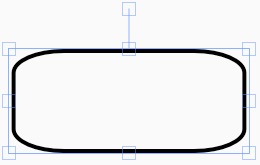
@asturur, thank you for the ctx.scale stroke fix. Is there a similar fix for rounded corners? I'm looking at _render of rect.class.js and not sure how to fix this:
Before scale X adjustment:

After scale X adjustment:
 semireg
on 17 Jul 2018
semireg
on 17 Jul 2018
that requires more complex logic. may be not that hard if you look at
rect._render
On Tue, 17 Jul 2018, 14:46 Caylan, notifications@github.com wrote:
@asturur https://github.com/asturur, thank you for the ctx.scale stroke
fix. Is there a similar fix for rounded corners? I'm looking at _render of
rect.class.js and not sure how to fix this:Before scale X adjustment:
[image: 2018-07-17 at 1 45 pm]
https://user-images.githubusercontent.com/1819762/42838934-b75cafba-89c7-11e8-93bf-87579f8750fc.jpgAfter scale X adjustment:
[image: 2018-07-17 at 1 46 pm]
https://user-images.githubusercontent.com/1819762/42838959-c88a1804-89c7-11e8-94f3-497e08f7d805.jpg—
You are receiving this because you were mentioned.
Reply to this email directly, view it on GitHub
https://github.com/fabricjs/fabric.js/issues/3218#issuecomment-405687420,
or mute the thread
https://github.com/notifications/unsubscribe-auth/ABI4QOdmuUwHbPBh2or0pXzuBG6HYI_3ks5uHjECgaJpZM4JxUm0
.
asturur
on 17 Jul 2018
After some experimentation, it turned out to be an easy fix.
      var rx = this.rx ? Math.min(this.rx / this.scaleX, this.width / 2) : 0,
          ry = this.ry ? Math.min(this.ry / this.scaleY, this.height / 2) : 0,
Still sucky today in 2020 with no clear simple solution
 h3rb
on 4 May 2020
h3rb
on 4 May 2020
Ahhh, object property:
strokeUniform: true
h3rb
on 4 May 2020
probably the answer is custom actions on controls on the v4 beta.
asturur
on 4 May 2020
I needed to change the actual width and height:
    var scaling = function (e) {
      var obj = e.target;
      if (obj.type !== 'rect') { return; }

      obj.set({
        height: obj.height * obj.scaleY,
        width: obj.width * obj.scaleX,
        scaleX: 1,
        scaleY: 1
      });
    };

  canvas.on('object:scaling', scaling);
 lpsBetty
on 24 Jul 2020
lpsBetty
on 24 Jul 2020
Related issues
 f987002856
·
3Comments
f987002856
·
3Comments
 semiadam
·
3Comments
semiadam
·
3Comments
 bhaskardas9475
·
4Comments
bhaskardas9475
·
4Comments
 urcoder
·
5Comments
urcoder
·
5Comments
 zhangzhzh
·
4Comments
zhangzhzh
·
4Comments
Most helpful comment
NO.
i explain you why:
width and height derive from shape/ object properties. changing width and height of a polygon will not change its points, in a path will not change its curves, in a rect will not change the rounded corners.
people do not want to see strokewidth to enlarge or deform, there is a simple fix for this i will put an hook in next release so people can trigger this effect.