Fable: dotnet SDK 2.0 preview 2 CLI is very slow or hangs
Description
dotnet SDK 2.0 preview 2 CLI is very slow
Repro code
dotnet new -I Fable.Template
dotnet new fable -n Test3
cd Test3
.\.paket\paket.exe restore #or mono .\.paket\paket.exe restore on Mac
yarn install
dotnet restore
Expected and actual results
Expecting that dotnet resotre begin restore
Actually its hangs for long long time (on MacOs and on Windows)
Related information
- Fable version (
dotnet fable --version): this command hangs also - Operating system: macOS Sierra 10.12.5 and Microsoft Windows [Version 10.0.15063]
 ed-ilyin
All 48 comments
@ed-ilyin Any indication this is a Fable issue? Does it restore other "dotnet new" projects ok?
 dsyme
on 3 Jul 2017
dsyme
on 3 Jul 2017
restore for new f# classlib project is very fast
ed-ilyin
on 3 Jul 2017
I am getting the same issue with the simple template, dotnet restore hangs with dotnet core 2 preview 2. At first I thought it was the wrong paket version because the bootstrapper wasn't commited, but the issue is still there with the latest version of paket.
 Kurren123
on 4 Jul 2017
Kurren123
on 4 Jul 2017
So this is Paket related then? Is it a known problem? Pinging @forki and @enricosada. I think there are many F# related issues fixed in the nightly dotnet SDK 2.0 but I don't know if there's anything about this.
BTW, @ed-ilyin you don't need to call .paket/paket.exe restore explicitly, dotnet restore is enough. But I guess this is not related to the problem.
 alfonsogarciacaro
on 4 Jul 2017
alfonsogarciacaro
on 4 Jul 2017
What does hang mean? Can you post the output that you see?
 forki
on 4 Jul 2017
forki
on 4 Jul 2017
yes, and also dotnet --info please
 enricosada
on 4 Jul 2017
enricosada
on 4 Jul 2017
Sure, there is the screenshot with dotnet --info and dotnet restore outputs.
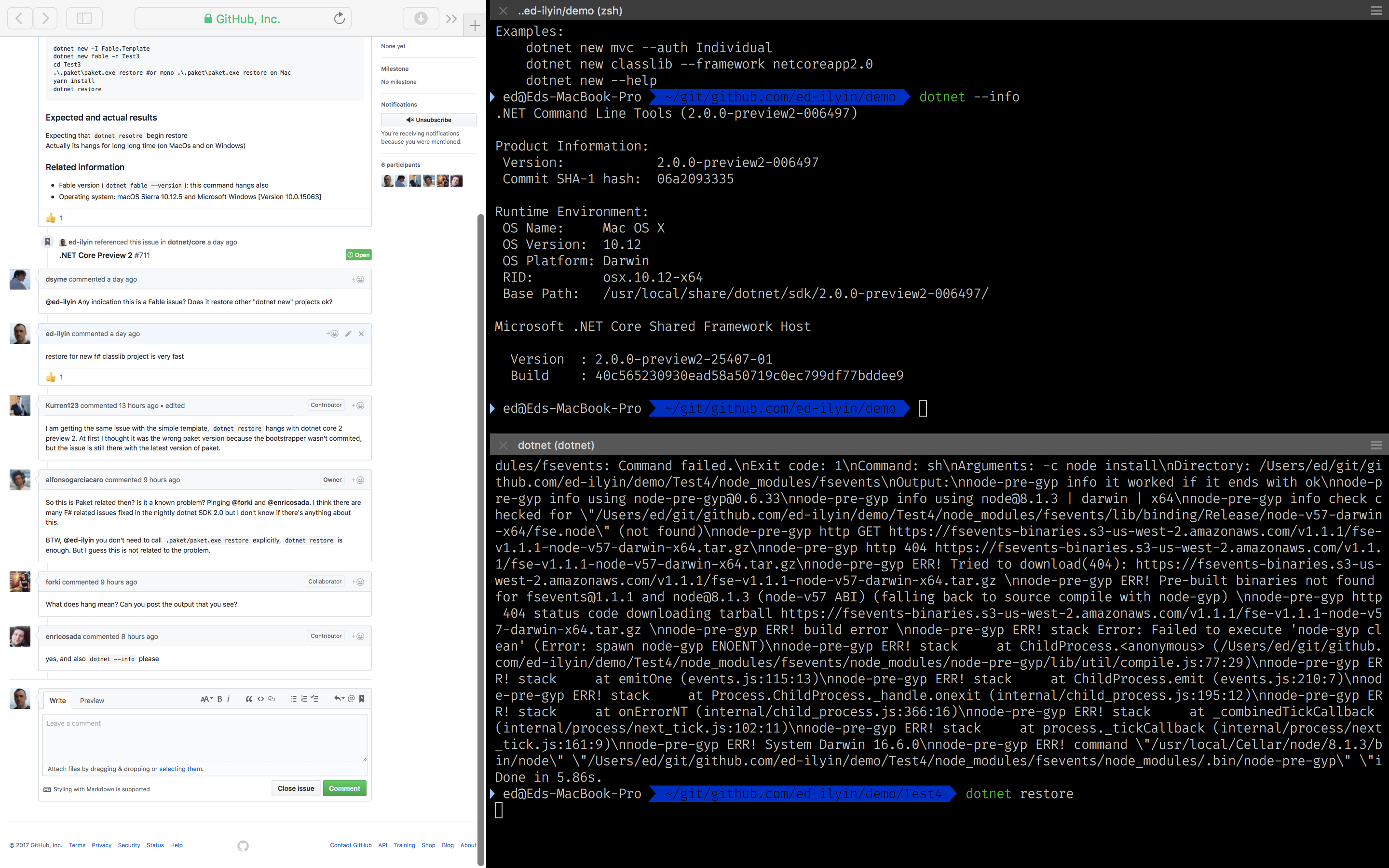
And screenshot of activity monitor:

Same in my Windows 10 virtual machine.
ed-ilyin
on 5 Jul 2017
So it doesn't give any output in dotnet restore?
Am 05.07.2017 7:38 vorm. schrieb "Ed Ilyin" notifications@github.com:
Sure, there is the screenshot with dotnet --info and dotnet restore
outputs.
[image: screen shot 2017-07-05 alle 08 32 50]
https://user-images.githubusercontent.com/5064271/27850396-03968f02-615d-11e7-9f8f-bbf68e065330.png
And screenshot of activity monitor:
[image: screen shot 2017-07-05 alle 08 35 43]
https://user-images.githubusercontent.com/5064271/27850398-06aa0c14-615d-11e7-9e5f-39ad8e1f2d1b.png
Same in my Windows 10 virtual machine.—
You are receiving this because you were mentioned.
Reply to this email directly, view it on GitHub
https://github.com/fable-compiler/Fable/issues/1042#issuecomment-313000889,
or mute the thread
https://github.com/notifications/unsubscribe-auth/AADgNOiU1A4lCiJYpkHIqSXXv7dNANFuks5sKyFhgaJpZM4OMj03
.
forki
on 5 Jul 2017
exactly, but after some 10 minutes or more it starts do it's job
ed-ilyin
on 5 Jul 2017
Can you please try to run "paket install" and retry to run dotnet restore after that?
forki
on 5 Jul 2017

ed-ilyin
on 5 Jul 2017
Ok. So it's doesn't fix it. Can you please zip everything up. And attach here?
forki
on 5 Jul 2017
ed-ilyin
on 5 Jul 2017
PS D:\temp\fable> dotnet --version
2.1.0-preview1-006576

can't repro
forki
on 5 Jul 2017
@enricosada @davkean do you know if something was wrong in dotnet SDK 2.0 preview 2 CLI?
forki
on 5 Jul 2017
nope, let me try locally too.
enricosada
on 5 Jul 2017
@rrelyea asks if you could please file the issue with repro against NuGet/Home
forki
on 7 Jul 2017
Can't understand what does this mean. Sorry, I'm noob.
ed-ilyin
on 7 Jul 2017
@alfonsogarciacaro @enricosada is this an instance of https://github.com/fable-elmish/templates/issues/17 ?
forki
on 7 Jul 2017
I have rolled back to preview1 - with preview1 all again is fast
ed-ilyin
on 7 Jul 2017
Going back to preview 1 won't help you for very long. :-)
What I'd like is a repro that I can run with preview 2.
I don't think I have fable templates installed.
Can you give me full repro steps?
 rrelyea
on 7 Jul 2017
rrelyea
on 7 Jul 2017
@rrelyea @forki
Here are my Repro Steps:
- dotnet new -i Fable.Template.Elmish.React
- dotnet new fable-elmish-react -n Repro1042
- cd Repro1042
- yarn or npm install
- dotnet restore <--- Takes > 10 minutes on my machine
- dotnet fable yarn-start <-- Also takes > 10 minutes on my machine
.NET Command Line Tools (2.0.0-preview2-006497)

Product Information:
 Version:            2.0.0-preview2-006497
 Commit SHA-1 hash:  06a2093335

Runtime Environment:
 OS Name:     Windows
 OS Version:  10.0.15063
 OS Platform: Windows
 RID:         win10-x64
 Base Path:   C:\Program Files\dotnet\sdk\2.0.0-preview2-006497\

Microsoft .NET Core Shared Framework Host

  Version  : 2.0.0-preview2-25407-01
  Build    : 40c565230930ead58a50719c0ec799df77bddee9
 mike-morr
on 8 Jul 2017
mike-morr
on 8 Jul 2017
Interesting Note if you run dotnet restore before running yarn it's fast. Once the node_modules folder gets populated, dotnet restore is slow. This seems connected to @dsyme's discovery about the number of files in the project folder.
mike-morr
on 8 Jul 2017
@rrelyea there is steps in the issue text:
Repro code
dotnet new -I Fable.Template
dotnet new fable -n Test3
cd Test3
yarn install
dotnet restore
@rrelyea so this is not only an issue for restore, but other dotnet commands as well.
forki
on 8 Jul 2017
Thanks for the confirmation @mike-morr! So it seems dotnet SDK 2 scans all subdirectories for .fsproj files instead only the current one as dotnet SDK 1 does, is that right? If that's the case I can think of two solutions:
- Add the project file to the command:
dotnet restore MyProject.fsproj - Move the project file to
srcfolder as discussed here: https://github.com/fable-elmish/templates/issues/17
I'm a bit reluctant about the second option because it's not that easy any more to run Fable commands from root, but I guess we'll have to start doing that anyway when VS supports the new .fsproj files and we have to add a solution file to the templates.
alfonsogarciacaro
on 8 Jul 2017
@alfonsogarciacaro we can be reluctant, but it's the only way out.
Am 08.07.2017 15:11 schrieb "Alfonso Garcia-Caro" <[email protected]
:
Thanks for the confirmation @mike-morr https://github.com/mike-morr! So
it seems dotnet SDK 2 scans all subdirectories for .fsproj files instead
only the current one as dotnet SDK 1 does, is that right? If that's the
case I can think of two solutions:
- Add the project file to the command: dotnet restore MyProject.fsproj
- Move the project file to src folder as discussed here:
fable-elmish/templates#17
https://github.com/fable-elmish/templates/issues/17I'm a bit reluctant about the second option because it's not that easy any
more to run Fable commands from root, but I guess we'll have to start doing
that anyway when VS supports the new .fsproj files and we have to add a
solution file to the templates.—
You are receiving this because you were mentioned.
Reply to this email directly, view it on GitHub
https://github.com/fable-compiler/Fable/issues/1042#issuecomment-313855119,
or mute the thread
https://github.com/notifications/unsubscribe-auth/AADgNMLHMWUoaeoYSu0Y9y3PR7l40-16ks5sL3_7gaJpZM4OMj03
.
forki
on 8 Jul 2017
@forki @alfonsogarciacaro Perhaps we should not support Preview 2. They are going to have to fix this for MVC projects which have node_modules folder. My understanding is that this issue repros with the out of the box MVC template as well.
Adding complexity to this project to workaround the issue that is hopefully temporary seems wrong.
mike-morr
on 8 Jul 2017
We can't rely on that fix. Nobody from dotnet team has acknowledge that it
is a bug /cc @davkean
Am 08.07.2017 8:12 nachm. schrieb "Mike Morrison" <[email protected]
:
@forki https://github.com/forki @alfonsogarciacaro
https://github.com/alfonsogarciacaro I think the correct course of action
is to not support preview 2. They are going to have to fix this for MVC
projects which have node_modules folder. My understanding is that this
issue repros with the out of the box MVC template as well.
—
You are receiving this because you were mentioned.
Reply to this email directly, view it on GitHub
https://github.com/fable-compiler/Fable/issues/1042#issuecomment-313872338,
or mute the thread
https://github.com/notifications/unsubscribe-auth/AADgNDUaQl8BW-hpHYWpBLSS9e-z6UUKks5sL8ajgaJpZM4OMj03
.
forki
on 8 Jul 2017
I agree with making it work out of the box for now because we can't predict how soon this will be fixed
Kurren123
on 9 Jul 2017
Folks, the easiest way to get traction on an issue is to file a bug against a Microsoft repo. I don't have enough context to understand where the bug is, but start with http://github.com/dotnet/cli.
 davkean
on 10 Jul 2017
davkean
on 10 Jul 2017
@davkean it's the same thing as https://github.com/dotnet/core/issues/724 but with different repros.
forki
on 10 Jul 2017
in the linked issues the root cause is analysed as gobbling going rogue in restore and build. Workaround: dotnet restore /p:EnableDefaultItems=false
forki
on 12 Jul 2017
I think that adding the following to a PropertyGroup in the project should work around the issue:
<DefaultItemExcludes>$(DefaultItemExcludes);**\node_modules\**;node_modules\**</DefaultItemExcludes>
 dsplaisted
on 17 Jul 2017
dsplaisted
on 17 Jul 2017
@dsplaisted are you going to fix that in the sdk?
forki
on 19 Jul 2017
@dsplaisted is still working on a fix, but yes the fix will be in the SDK.
davkean
on 19 Jul 2017
This should be fixed with this MSBuild PR: https://github.com/Microsoft/msbuild/pull/2326
The issue was that the automatic Link metadata feature in the .NET SDK used a pattern that caused an O(n^2) runtime (where n is the number of items) during MSBuild evaluation.
dsplaisted
on 20 Jul 2017
Thanks so much for resolving this! Hopefully it wasn't too painful of a fix
:)
On Jul 20, 2017 4:16 PM, "Daniel Plaisted" notifications@github.com wrote:
This should be fixed with this MSBuild PR: Microsoft/msbuild#2326
https://github.com/Microsoft/msbuild/pull/2326The issue was that the automatic Link metadata
https://github.com/dotnet/sdk/pull/1246 feature in the .NET SDK used a
pattern that caused an O(n^2) runtime (where n is the number of items)
during MSBuild evaluation.—
You are receiving this because you are subscribed to this thread.
Reply to this email directly, view it on GitHub
https://github.com/fable-compiler/Fable/issues/1042#issuecomment-316817507,
or mute the thread
https://github.com/notifications/unsubscribe-auth/AA3VvpbaU-Okpbh9Ksszxo9teJoDSfn7ks5sP7WDgaJpZM4OMj03
.
 StachuDotNet
on 21 Jul 2017
StachuDotNet
on 21 Jul 2017
I'm really sorry if this is the wrong place to talk about that, but I'm just looking around if the Fable .NET Core 2.0 preview 2 templates are correct . Because when I try dotnet fable after restore I always got:
     It was not possible to find any compatible framework version
         The specified framework 'Microsoft.NETCore.App', version '1.0.4' was not found.
           - Check application dependencies and target a framework version installed at:
               /
           - Alternatively, install the framework version '1.0.4'.
Installing SDK 1.0.4 solved this problem, but the problem is I have another problems with SDK 1.0.4 which was fixed into .NET Core 2... :( so basically I need to choose which bug i wants to suffer for now. And installing the both SDKs to choose the suffering on the fly setting the global.json file per project I have a third issue (which seems not be reported), so I did need to uninstall SDK 2.0 preview completely.
Anyway, there is some problem with the template for .NET Core SDK 2.0?
 ryukinix
on 6 Aug 2017
ryukinix
on 6 Aug 2017
/cc @enricosada
I ass you need to get rid of the fsharp sdk in the first line of the fsproj and from the deps and references file. Enrico is that correct?
forki
on 6 Aug 2017
HMMMM, good to know. I'll test it, thanks for the advice @forki. I'll reinstall the .NET Core SDK 2.0 to check.
ryukinix
on 6 Aug 2017
Yes with sdk 2 the f# bits went into the default sdk. No f# sdk needed
anymore
Am 06.08.2017 12:03 schrieb "Manoel Vilela" notifications@github.com:
HMMMM, good to know. I'll test that, thanks for the advice @forki
https://github.com/forki. I'll reinstall the .NET Core SDK 2.0 to check
that.
—
You are receiving this because you were mentioned.
Reply to this email directly, view it on GitHub
https://github.com/fable-compiler/Fable/issues/1042#issuecomment-320497326,
or mute the thread
https://github.com/notifications/unsubscribe-auth/AADgNPGIhUTG9-sOBrC4ogdOig3s2mSXks5sVY93gaJpZM4OMj03
.
forki
on 6 Aug 2017
I installed again the SDK 2.0 preview 2 build 006497. Unfortunately, on a new fresh template creation for Fable and after deleted all the references of Fsharp.NET.Sdk I'm still receiving the same error... :/
ryukinix
on 6 Aug 2017
@ryukinix I don't think it's about the FSharp.NET.Sdk because if I recall correctly, they wanted to make dotnet SDK 2.0 also compatible with projects using this package. According to the error message you need the netcore 1.0.4 runtime to run Fable. AFAIK, it's possible to install one SDK and several runtimes, though I'm not sure about the installation process. Can you try installing the dotnet SDK 2.0 and then installing [.0.4, but only the runtime.
BTW, I haven't tried it but in another issue (I forgot which) a user commented dotnet SDK 2.0 latest bits (which you can download from here) were working fine.
alfonsogarciacaro
on 6 Aug 2017
@alfonsogarciacaro this is funny. Your idea has a strong potential to fix this. But the way I fixed was weird. Actually, installing the attached runtime version in your comment (1.0.4) I got a new error:
❯ dotnet -d fable
Telemetry is: Enabled
projectfactory: MSBUILD_EXE_PATH = /opt/dotnet/sdk/2.0.0-preview2-006497/MSBuild.dll
projectfactory: MSBuild project path = /home/lerax/Desktop/frontend/src/frontend.fsproj
projecttoolscommandresolver: resolving commandspec from 1 Tool Libraries.
projecttoolscommandresolver: Attempting to resolve command spec from tool dotnet-fable
projecttoolscommandresolver: nuget packages root:
- /home/lerax/.nuget/packages/
projecttoolscommandresolver: found tool lockfile at : /home/lerax/.nuget/packages/.tools/dotnet-fable/1.1.17/netcoreapp2.0/project.assets.json
projecttoolscommandresolver: expect deps.json at: /home/lerax/.nuget/packages/.tools/dotnet-fable/1.1.17/netcoreapp2.0/dotnet-fable.deps.json
projecttoolscommandresolver: attempting to create commandspec
packagedcommandspecfactory: attempting to find command dotnet-fable in dotnet-fable
PackagedCommandSpecFactory: Looking for prefercliruntime file at `/home/lerax/.nuget/packages/dotnet-fable/1.1.17/lib/netcoreapp1.0/../../prefercliruntime`
PackagedCommandSpecFactory: Ignoring prefercliruntime file as the tool target framework (1.0.4) has a different major version than the current CLI runtime (2.0.0-preview2-25407-01)
Running /opt/dotnet/dotnet exec --depsfile /home/lerax/.nuget/packages/.tools/dotnet-fable/1.1.17/netcoreapp2.0/dotnet-fable.deps.json --additionalprobingpath /home/lerax/.nuget/packages /home/lerax/.nuget/packages/dotnet-fable/1.1.17/lib/netcoreapp1.0/dotnet-fable.dll
Process ID: 8948
Error: assembly specified in the dependencies manifest was not found -- package: 'System.Diagnostics.DiagnosticSource', version: '4.3.0', path: 'lib/netstandard1.3/System.Diagnostics.DiagnosticSource.dll'
But instead installing the runtime and just create a symbol link with
sudo ln -s /opt/dotnet/shared/1.1.2 /opt/dotnet/shared/1.0.4 worked. The reason worked? I don't have clue. I expected that installing the version of 1.0.4 (which is required on that output) would works...
Another thing: If I never had the the 1.0.4 runtime version before, why this doesn't happens with the SDK 1.0.4? This is weird.
If I running fable with runtime of .NET Core 1.1.2 and SDK 1.0.4 I don't have any problem (as I say before, I don't have problems with Fable but I have with the console app at example).
This is really funny.
ryukinix
on 6 Aug 2017
@ryukinix Yeah, still many moving pieces with netcore, hopefully most of them will be solved with the official release of dotnet SDK 2.0 🙏
About Fable working with dotnet SDK 1.0.4, that's because that SDK version comes bundled with runtimes 1.0.x and 1.1.x. You can see the runtimes installed in the shared folder where dotnet is installed (/opt/dotnet in your case). I don't know well the resolution rules for the netcore runtimes, but apparently it was fixed thanks to your symbol link.
Funny indeed 😄
alfonsogarciacaro
on 7 Aug 2017
I still know that this thread is not really related to the problem I described, but just for additional information, installing the runtime 1.0.4 not worked because that:
This change was correcting the "toLower" hack in the DependencyModel. On case-sensitive machines, the 2.0 SDK will be broken with shared frameworks v1.0.0-1.0.4. The bug is fixed in v1.0.5. See dotnet/core-setup#1559.
Obviously Linux is a "Case-sensitive machine" (btw, mostly anything that is not Windows)
So then, this was fixed in new versions and for this reason the symlink (weirdly) pointing to 1.1.2 works. But I still doesn't understand why dotnet try target the old version 1.0.4 only on SDK 2.0 with shared runtimes (I'm using the official SDK and runtime now and this bug persists if I use 1.0.4).
ryukinix
on 16 Aug 2017
This should be fixed with dotnet SDK 2 stable, please feel free to reopen if there're still problems.
alfonsogarciacaro
on 7 Sep 2017
Related issues
forki
·
3Comments
alfonsogarciacaro
·
3Comments
 et1975
·
3Comments
et1975
·
3Comments
 nozzlegear
·
3Comments
nozzlegear
·
3Comments
 SirUppyPancakes
·
3Comments
SirUppyPancakes
·
3Comments
Most helpful comment
in the linked issues the root cause is analysed as gobbling going rogue in restore and build. Workaround:
dotnet restore /p:EnableDefaultItems=false