Faas: Azure function invocation failing with a-sync callback
I implemented OpenFaas on Azure AKS.
I used https://github.com/openfaas/faas-netes as a source. All works fine.
Only the a-sync call-back functionality doesn't work.
Expected Behaviour
I added a X-Callback-Url to the header with an URL to an Azure Function.
I expect the Function to call the callback URL when the routine ends.
Current Behaviour
The Azure Function works.
The OpenFaas function returns a when called a-sync 202 Status, but doens'nt call the Azure Function (callback URL)
Possible Solution
I have looked at the documentation on https://github.com/openfaas/faas/blob/master/guide/asynchronous.md. The problem is that i don't have the yml files mentioned in the instruction.
Steps to Reproduce (for bugs)
- http://cenaks01.westeurope.cloudapp.azure.com:8080/async-function/timefunction (expects an number in the body)
- https://cencept-functions.azurewebsites.net/api/OpenFaasSMS?code=U1DZSiP0Ygcrh5anUgGdBQ705wz5LktE2AHtkaTqQCXGE80scnoHsw==&clientId=default&receiver=0612345678
- curl --header X-Callback-Url: https://cencept-functions.azurewebsites.net/api/OpenFaasSMS?code=U1DZSiP0Ygcrh5anUgGdBQ705wz5LktE2AHtkaTqQCXGE80scnoHsw==&clientId=default&receiver=0653373439 --data 1 http://cenaks01.westeurope.cloudapp.azure.com:8080/async-function/timefunction
Context
I want to have a callback for async calls to check the result status.
Your Environment
Kubernetes (FaaS-netes) on Azure AKS
Link to your project or a code example to reproduce issue:
Please also follow the troubleshooting guide and paste in any other diagnostic information you have:
 CentricStraaten
All 22 comments
Hi @CentricStraaten,
I cannot reproduce. After invoking the function with
$ curl --header X-Callback-Url: https://cencept-functions.azurewebsites.net/api/OpenFaasSMS?code=U1DZSiP0Ygcrh5anUgGdBQ705wz5LktE2AHtkaTqQCXGE80scnoHsw==&clientId=default&receiver=0653373439 --data 1 http://cenaks01.westeurope.cloudapp.azure.com:8080/async-function/timefunction
I got this output with response from the Azure function ({"Message":"The HTTP 'GET' method is not supported by the 'GenericJsonWebHookReceiver' WebHook receiver."})
[1] 35785
[2] 35786
-bash: --data: command not found
[2]+  Done                    clientId=default
iyovcheva-a01:faas iyovcheva$ {"Message":"The HTTP 'GET' method is not supported by the 'GenericJsonWebHookReceiver' WebHook receiver."}
[1]+  Done                    curl --header X-Callback-Url: https://cencept-functions.azurewebsites.net/api/OpenFaasSMS?code=U1DZSiP0Ygcrh5anUgGdBQ705wz5LktE2AHtkaTqQCXGE80scnoHsw==
iyovcheva-a01:faas iyovcheva$
Can you please share more details on how you reproduce, errors from the service logs, etc?
 ivanayov
on 13 Apr 2018
ivanayov
on 13 Apr 2018
Derek add label: support
ivanayov
on 13 Apr 2018
Derek edit title: Azure function invocation failing with a-sync callback
ivanayov
on 13 Apr 2018
Hi, you should use a POST for the Azure Function. It expects a payload with data. That is why the data attribute is in the curl command.
CentricStraaten
on 13 Apr 2018
I don't have service logs from the Azure Functions, the function is never called. I have included a Postman JSON which you can import into Postman. I use these request to test both functions.
CentricStraaten
on 13 Apr 2018
Below my Function Code
using Microsoft.ApplicationInsights;
using System;
using System.Timers;

namespace Function
{
    public class FunctionHandler
    {
        int _seconds = 0;

        TelemetryClient _telemetryClient = new TelemetryClient();

        /// <summary>
        /// http://cenaks01.westeurope.cloudapp.azure.com:8080/functions/timefunction
        /// </summary>
        /// <param name="input"></param>
        public void Handle(string seconds) {
            // Create Session Identifier
            Guid sessionId = Guid.NewGuid();

            // Track Event
            _telemetryClient.TrackEvent($"[{sessionId}] Start TimeFunction for {seconds} seconds.");

            // Determine Thread Sleep Seconds
            _seconds = Convert.ToInt32(seconds)*1000;

            System.Threading.Thread.Sleep(_seconds);

            // Track Event
            _telemetryClient.TrackEvent($"[{sessionId}] End TimeFunction after {seconds} seconds.");

            // Response
            Console.WriteLine("Seconds: " + seconds);
        }
    }
}
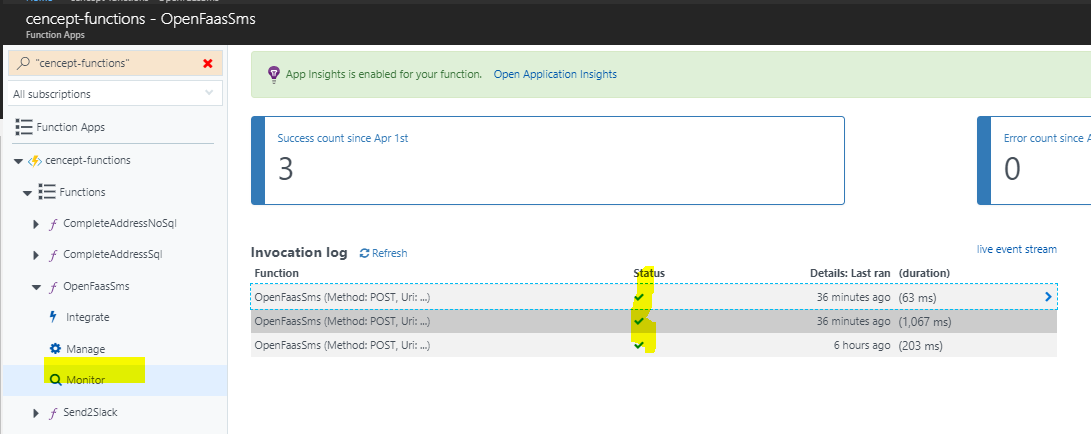
Below you can see the Azure Function log. It has only registered my Postman requests.
CentricStraaten
on 13 Apr 2018
I solved the issue. The Azure Function did not accept a get. I changed the Function and the callback works!
Sorry, thank you for your support._
CentricStraaten
on 13 Apr 2018
Derek close
ivanayov
on 13 Apr 2018
When using curl any parameters or headers should be quoted with "" i.e.
curl --header \
  "X-Callback-Url: https://cencept-functions.azurewebsites.net/api/OpenFaasSMS?code=U1DZSiP0Ygcrh5anUgGdBQ705wz5LktE2AHtkaTqQCXGE80scnoHsw==&clientId=default&receiver=0653373439" \
 --data "1" \
 http://cenaks01.westeurope.cloudapp.azure.com:8080/async-function/timefunction -i
I can't see any code which is doing a GET here.
- The curl statement from Ivana is a post due to
--data 1 - The x-callback-url is also going to invoke via a POST
The reason for seeing the error may have been because the curl was not quoted so bash interprets the text as other commands.
Just wanted to make you aware that you could use an OpenFaaS function for the call-back too.
 alexellis
on 17 Apr 2018
alexellis
on 17 Apr 2018
Why is the x-callback-url called multiple times (each 20 seconds as long as the function is executing)?
When i call the function (with call-back)
- 60 minutes, it executes 3 callbacks
- 119 minutes, 5 callbacks
- 120 minutes, 6 callbacks
etc..
I have implemented Application Insights and noticed that the function is "retried" every 20 seconds?
CentricStraaten
on 18 Apr 2018
I am aware that we could use an OpenFaas function for call-back. For now it is convenient to use the Azure Function because it is allready functional.
CentricStraaten
on 18 Apr 2018
What timeout did you configure for your asynchronous tasks? It sounds like you'll need to up the value. NATS Streaming is the system we use under the hood for asynchronous processing. It will retry work which doesn't complete in the deadline. I'd say this is what you're seeing.
http://docs.openfaas.com/deployment/troubleshooting/#timeouts-asynchronous-invocations
alexellis
on 18 Apr 2018
I configured timeout in the function yml file.
provider:
  name: faas
  gateway: http://cenaks01.westeurope.cloudapp.azure.com:8080

functions:
  timefunction:
    lang: csharp
    handler: ./timefunction
    image: bengkel/timefunction:4.9
    environment:
        read_timeout: 300s
        write_timeout: 300s
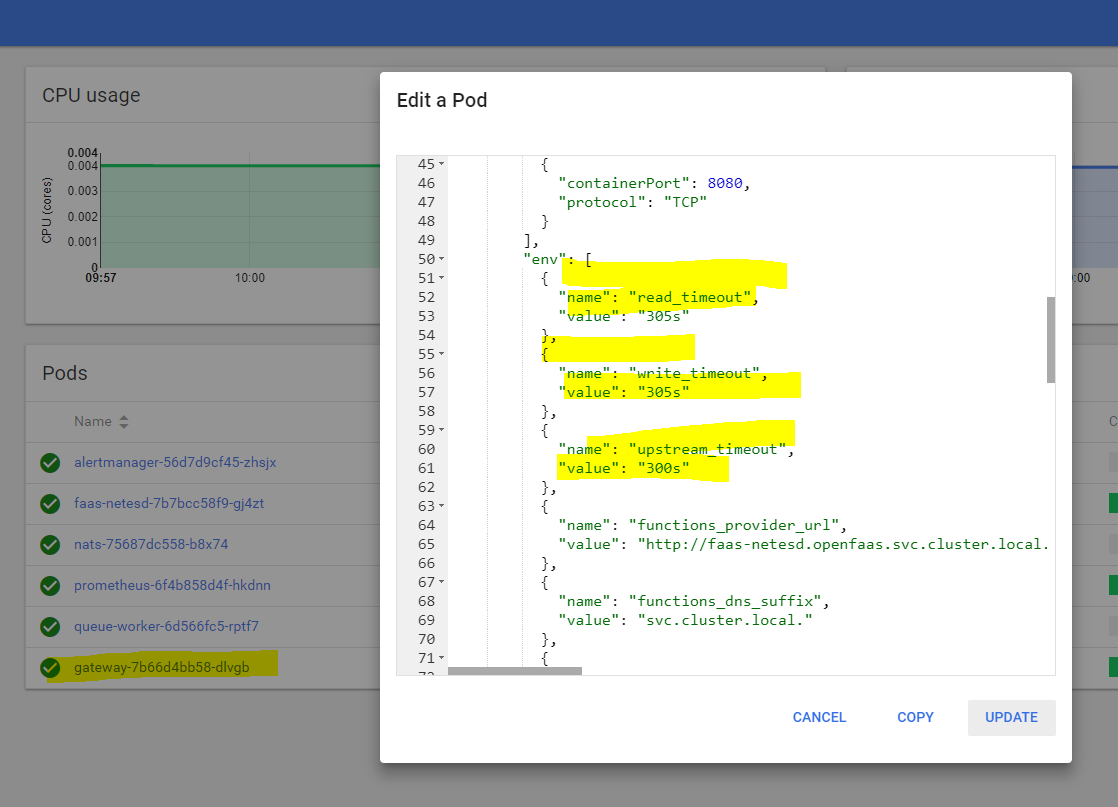
OpenFaas is running in Azure AKS. I also changed the gateway timeout.
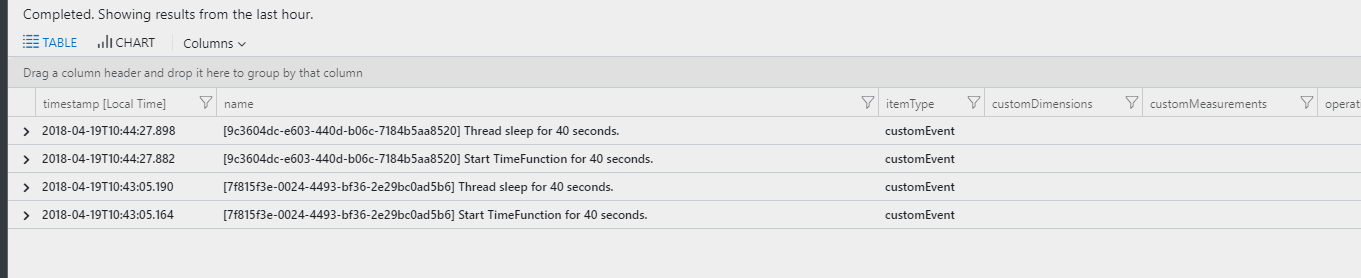
I Added Application Insighs to my function. It registers a Custom Event on the Start of the Function when i call it (a-)sync. It never registers end of the Function (see code below).
using Microsoft.ApplicationInsights;
using Microsoft.ApplicationInsights.Extensibility;
using System;

namespace Function
{
    public class FunctionHandler
    {
        int _seconds = 0;

        TelemetryClient _telemetryClient = new TelemetryClient();

        /// <summary>
        /// http://cenaks01.westeurope.cloudapp.azure.com:8080/functions/timefunction
        /// </summary>
        /// <param name="input"></param>
        public void Handle(string seconds) {
            if (string.IsNullOrEmpty(seconds)) seconds = "0";

            // Create Session Identifier
            Guid sessionId = Guid.NewGuid();

            TelemetryConfiguration.Active.InstrumentationKey = "{my-instrumentation-key}";

            // Track Event
            _telemetryClient.TrackEvent($"[{sessionId}] Start TimeFunction for {seconds} seconds.");

            // Determine Thread Sleep Seconds
            try
            {
                _seconds = Convert.ToInt32(seconds) * 1000;

                // Track Event
                _telemetryClient.TrackEvent($"[{sessionId}] Thread sleep for {seconds} seconds.");

                System.Threading.Thread.Sleep(_seconds);
            }
            catch (Exception exception) {
                 // Track Event
                _telemetryClient.TrackEvent($"[{sessionId}] {exception.Message}.");
            }

            // Track Event
            _telemetryClient.TrackEvent($"[{sessionId}] End TimeFunction after {seconds} seconds.");

            // Response
            Console.WriteLine("Seconds: " + seconds);
        }
    }
}
That's a step in the right direction but you need to read the section I linked you to and update the queue worker's setting.
Here's the link again:
http://docs.openfaas.com/deployment/troubleshooting/#timeouts-asynchronous-invocations
alexellis
on 19 Apr 2018
I also updated the queue worker's setting

- A synchronous call is still responding with an 502 gateway error.
- The a-sync call-back is now only executed once
- The a-sync function result is not OK. Application Insights doesn't register the final result, which states that the function did not execute properly as you can see in my previous code example it doesn't report the function end.
CentricStraaten
on 19 Apr 2018
Try reproducing the issue in an isolated environment with a sleep function or similar.
alexellis
on 24 Apr 2018
What do you mean with an isolated environment? This is a POC environment which is only used by me.
CentricStraaten
on 25 Apr 2018
I think I fixed it. I also had to change te env variables in the faas-netesd?
CentricStraaten
on 25 Apr 2018
@BurtonR can you offer any insights for @CentricStraaten ?
alexellis
on 25 Apr 2018
Hi @CentricStraaten! Were you able to resolve your issue? Could you share what you did, or when you realized what the problem was?
I'd recommend starting up a Play With Docker session (https://labs.play-with-docker.com/) and running the deployment one liner to get started in a fresh, clean environment. When you start a session, just follow the steps in the Swarm Deployment Guide. This way you can be sure OpenFaaS and your functions work as expected before getting into more complex things.
If you need to test on Kubernetes you could try a local Kubernetes deployment with MiniKube. Just to make sure that there isn't some other process/app/networking issue causing your troubles
 burtonr
on 25 Apr 2018
burtonr
on 25 Apr 2018
I added Application Insights to my function. In my function I added custom events to check if the could would run and finish after called a-sync. I used Postman to call my function on the async-function URL. I noticed that the function was initiated, received a timeout when the function exceeded the execution time of 8 seconds, and noticed that the code (sleep for 20 seconds) did not finish properly.
To increase the maximum run-time and avoid time-out exceptions i had to set the environment variables read-timeout and write_timeout in different containers.
In the Azure AKS Kubernetes management portal I changed (or added) the variables in the yaml for following deployments (containers):
- my function
- gateway (see previous post)
- faas-netesd
In my case i raised the maximum time on the platform to 5 min, 300 seconds, and use different values per function. I tested long running functions successfully.
For the callback i added the X-Callback-Url variable in the header of the request. I noticed that the callback was called every 20 seconds.
In the queue-worker yaml I change ack_wait and ack_timeout from 20s to 300s also.
After this change the callback is only initiated once.
CentricStraaten
on 26 Apr 2018
Related issues
 ndarilek
·
4Comments
ndarilek
·
4Comments
 jvice152
·
7Comments
alexellis
·
6Comments
jvice152
·
7Comments
alexellis
·
6Comments
 rorpage
·
7Comments
rorpage
·
7Comments
 maxbry
·
7Comments
maxbry
·
7Comments
Most helpful comment
I solved the issue. The Azure Function did not accept a get. I changed the Function and the callback works!
Sorry, thank you for your support._