Faas: Docker Compose v3.3 Not Yet Supported on the Docker Playground
The Docker Compose version 3.3 specified in the docker-compose.yml, is not yet supported on the Docker Playground.
Expected Behaviour
I expect the stack to correctly start on the Docker Playground when clicking on  button on the README.
Current Behaviour
The following error is returned while starting the stack on the Docker Playground:
WARNING: The https_proxy variable is not set. Defaulting to a blank string.
ERROR: Version in "/var/run/pwd/uploads/docker-compose.yml" is unsupported. You might be seeing this error because you're using the wrong Compose file version.Either specify a supported version ("2.0", "2.1", "3.0", "3.1", "3.2") and place your service definitions under the `services` key, or omit the `version` key and place your service definitions at the root of the file to use version 1.
For more on the Compose file format versions, see https://docs.docker.com/compose/compose-file/
Possible Solution
Provide a version of the docker-compose.yml to be used on the Docker Playground
Steps to Reproduce (for bugs)
- Click on the button on the README
Context
N/A
Your Environment
N/A
 VincenzoFerme
All 15 comments
Can you raise this with the PWD website? https://github.com/play-with-docker/play-with-docker/issues
Seems like they are running a "very old" version of Docker. cc/ @marcosnils
 alexellis
on 28 Oct 2017
alexellis
on 28 Oct 2017
@VincenzoFerme we'll temporarily roll-back to support PWD. This is unfortunate because we want to take advantage of newer Swarm features for a better user experience. It should allow you to use the "automatic button" though.
alexellis
on 28 Oct 2017
We're planning to update PWD this week to https and the latest compose version. I'll let you know when it's done so you can give it a try.
 marcosnils
on 29 Oct 2017
marcosnils
on 29 Oct 2017
Thanks @marcosnils - is the login page issue fixed now too that was preventing us from using the button?
alexellis
on 3 Nov 2017
@alexellis yes, that is fixed. The only issue missing is that when using the button sometimes the exposed ports don't appear at the top. We're investigating why that happens. Compose has been also updated to 1.16 which supports the 3.3 format.
marcosnils
on 3 Nov 2017
I just tried to start PWD with the current version of the docker-compose.yml and I get:
WARNING: The https_proxy variable is not set. Defaulting to a blank string.
ERROR: Service 'gateway' depends on service 'nats' which is undefined.
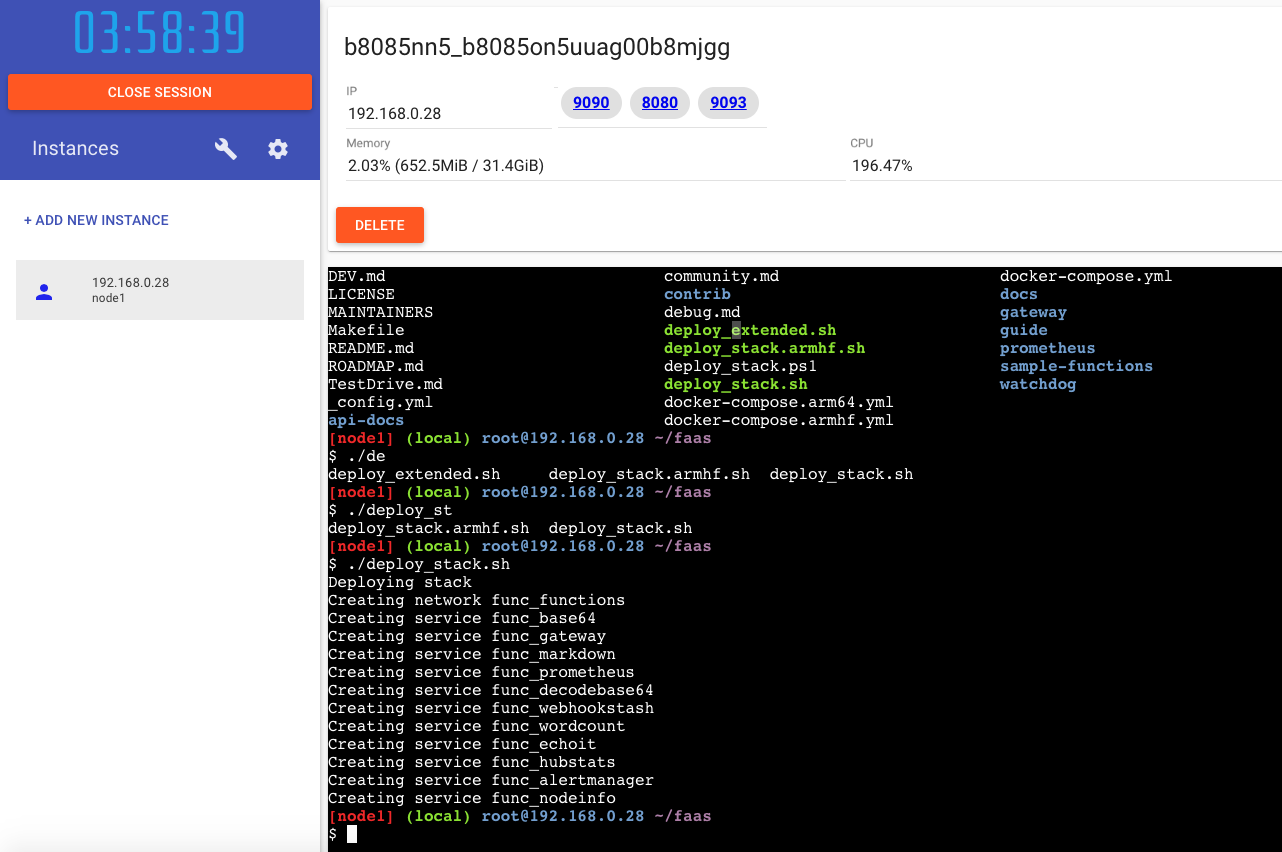
I got this.. what are we doing differently?
alexellis
on 6 Nov 2017
@VincenzoFerme @marcosnils reports above that PWD is not ready for use with the "1-click buttons" which is why we took it off the homepage. You can do what I did above and just paste in the 1-liner from the TestDrive.
alexellis
on 6 Nov 2017
@VincenzoFerme @alexellis I believe this should be fixed. Please give it a try and let me know if something's not working for you.
marcosnils
on 13 Nov 2017
Now it starts all the services correctly. You just have a warning:
Some services (alertmanager, base64, decodebase64, echoit, gateway, hubstats, markdown, nodeinfo, prometheus, webhookstash, wordcount) use the 'deploy' key, which will be ignored. Compose does not support 'deploy' configuration - use `docker stack deploy` to deploy to a swarm.
This is probably to do with the way PWD works with stacks. We are not advising anyone to use compose.
We have an open issue to removes the old depends on tags. If you would like to raise a PR I can merge it.
There's no concept of a docker-stack.yml file and we are targeting stacks not compose.
alexellis
on 14 Nov 2017
PWD doesn't use compose to deploy. But it first does docker-compose pull so you can see the images being downloaded (as you don't see it with stack deploy) and that's were you get the warning.
After that it just does a regular docker stack deploy. You can verify this by running docker stack ls after everything finishes.
marcosnils
on 14 Nov 2017
@alexellis you are right, my mistake about the docker-stack.yml file, sorry :). @marcosnils is right, I experienced exaclty what he is describing in https://github.com/openfaas/faas/issues/353#issuecomment-344364207. Locally I can replicate the same behaviour by first issuing docker-compose pull and then docker stack deploy -c docker-compose.yml faas where the docker-compose.yml file is https://github.com/openfaas/faas/blob/master/docker-compose.yml.
VincenzoFerme
on 15 Nov 2017
Can we add the button back yet @VincenzoFerme ?
alexellis
on 30 Nov 2017
I think we can add it back, to me it is working again.
VincenzoFerme
on 1 Dec 2017
Related issues
 jvice152
·
7Comments
jvice152
·
7Comments
 VenkateshSrini
·
7Comments
VenkateshSrini
·
7Comments
 ndarilek
·
4Comments
alexellis
·
6Comments
alexellis
·
5Comments
ndarilek
·
4Comments
alexellis
·
6Comments
alexellis
·
5Comments
Most helpful comment
We're planning to update PWD this week to https and the latest compose version. I'll let you know when it's done so you can give it a try.