External-dns: DigitalOcean creates entries with host in them twice
tldr: Ingress resource with annotation of external-dns.alpha.kubernetes.io/hostname: k8s.noahh.io created an A record with the hostname of k8s.noahh.io.noahh.io in DigitalOcean DNS.
The Context
I am using external-dns with DigitalOcean. I run the external-dns pod configured to watch ingress resources.
I have a deployment which runs my personal website. Which I have manually been creating DNS entries for. I deleted any manually created entries before deploying external-dns.
It has a pretty typical structure. With a service of type LoadBalancer. And an ingress with the external-dns.alpha.kubernetes.io/hostname annotation.
The Unexpected Behavior
When I deploy my personal website's ingress resource with external-dns.alpha.kubernetes.io/hostname: k8s.noahh.io external-dns will create an A record with the hostname k8s.noahh.io.noahh.io. Which points towards my website ingress resource.
As you can see in the DigitalOcean dashboard:
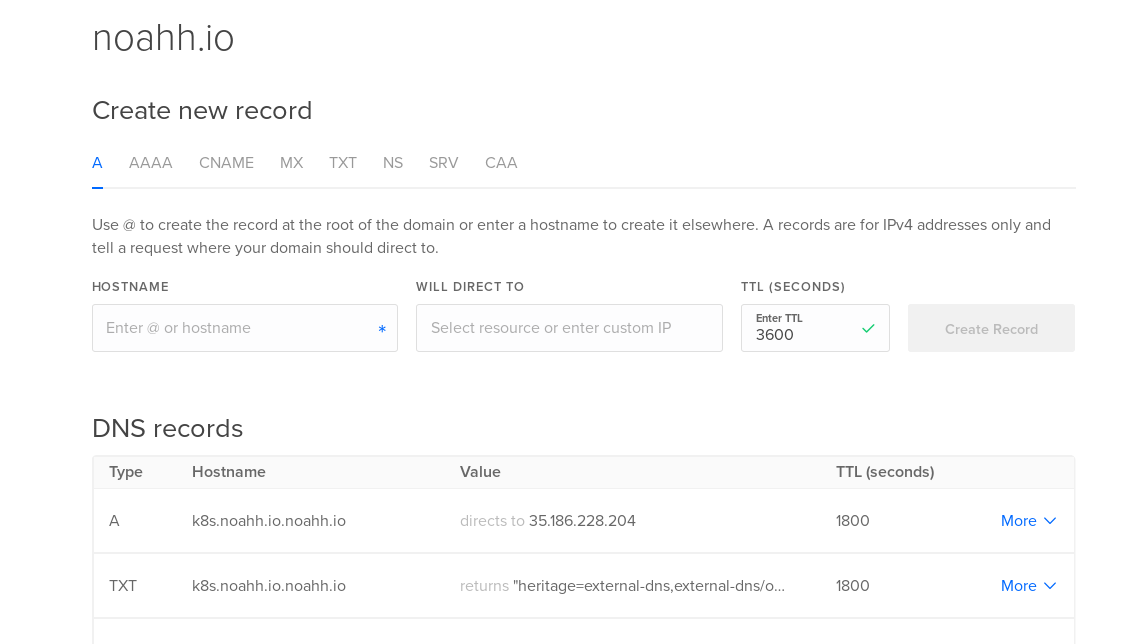
The IP listed in the screenshot is the IP of my website ingress resource at the time.
I also verified that this is not an oddity of the DigitalOcean DNS UI with dig:
$ dig +short k8s.noahh.io
$ dig +short k8s.noahh.io.noahh.io
35.186.228.204
As we can see, the subdomain is k8s.noahh.io and the host is noahh.io. Resulting in a hostname of k8s.noahh.io.noahh.io.
What I Have Tried
Setting the annotation to just the subdomain
The issue still occurs when I deploy the same ingress resource with the annotation external-dns.alpha.kubernetes.io/hostname: k8s.
Reducing specificity in the ingress spec
I tried removing any hosts from the spec.rules section of the ingress resource. Because I suspected that external-dns might be reading hostnames off of the spec.rules.$.host parameter. And getting confused somehow.
However the issue still occurred.
Adding a peroid onto the end of the annotation value
I tried deploying an ingress resource with the annotion external-dns.alpha.kubernetes.io/hostname: k8s.noahh.io..
The difference being the additional peroid following the tld. The issue still ocurred.
Guesses
I specify a list of full hostnames (subdomain and tld) in order to use kube-lego. Maybe this is interfering with external-dns? Although I have used kube-lego and external-dns together before (using GCP DNS instead of DigitalOcean) so I don't see why this would happen.
I am almost convinced that this is an issue with my setup. However I have checked it so many times that I feel that there is a slight possibility that this might be a bug with the DigitalOcean external-dns controller. As I have previously only worked with the GCP external-dns controller.
Files
External DNS Deployment
Website Service file
Website Ingress file (contains external-dns annotation)
 Noah-Huppert
All 8 comments
I was able to create a sub zone hosted on GCP Cloud DNS at k8s.noahh.io. I then added the GCP Cloud DNS name servers to the DigitslOcean DNS under k8s.noahh.io.
External-dns successfully created entries in the GCP Cloud DNS k8s.noahh.io zone (Ex: www.k8s.noahh.io).
I then made a couple CNAME records in my root zone hosted on DigitalOcean DNS pointing towards the entries in the GCP Cloud DNS zone (CNAME www -> www.k8s.noahh.io)
So I was able to work around the issue in a slightly roundabout way. But I think this confirms that the DigitalOcean controller has a bug of some sort.
Noah-Huppert
on 6 Feb 2018
@Noah-Huppert since it is merged into master, could you verify if the issue still occurs?
Otherwise I will close the issue and thanks again for creating this issue.
 njuettner
on 22 Feb 2018
njuettner
on 22 Feb 2018
To test the new code, do I just have to relaunch my External DNS container? Are there any special steps I need to take to run the new code?
Noah-Huppert
on 22 Feb 2018
You could get the latest image via docker pull registry.opensource.zalan.do/teapot/external-dns
njuettner
on 22 Feb 2018
Latest tag would be v0.5.0-alpha.1
njuettner
on 22 Feb 2018
Ok. I will try switching my cluster back over to DigitalOcean DNS and see what happens.
Noah-Huppert
on 22 Feb 2018
$ dig +short www.noahh.io
35.201.93.41
$ dig +short www.noahhuppert.com
35.201.93.41
Success. Thank you!
Noah-Huppert
on 3 Mar 2018
@Noah-Huppert thanks for reporting and testing it.
@njuettner thanks for the fix.
😄
 linki
on 5 Mar 2018
linki
on 5 Mar 2018
Related issues
 estahn
·
4Comments
estahn
·
4Comments
 placydo
·
5Comments
placydo
·
5Comments
 naveeng68
·
4Comments
naveeng68
·
4Comments
 jchv
·
3Comments
jchv
·
3Comments
 nyetwurk
·
4Comments
nyetwurk
·
4Comments
Most helpful comment
Latest tag would be v0.5.0-alpha.1