Extensions: Logs include control characters (in place of coloring) in Visual Studio output window when using Docker
Repro Steps
- Install Docker for Windows Beta and Docker Tools for Visual Studio
- New ASP.NET Core Application
- Add -> Docker Support
- Debug -> Start Without Debugging
Issue
Logs in output window include garbage characters in place of coloring:
DockerTask.ps1 -WaitForUrl -Machine ''
Hosting environment: Production
Content root path: /app
Now listening on: http://*:80
Application started. Press Ctrl+C to shut down.
[0m[32minfo[39m[0m[0m[32m: Microsoft.AspNetCore.Hosting.Internal.WebHost[1][39m[0m
Request starting HTTP/1.1 GET http://docker/
CC: @glennc
 mikeharder
All 18 comments
Not sure what's the proper way to fix this would be. Perhaps we can detect we're outputting to VS window and disable colors?
 muratg
on 19 May 2016
muratg
on 19 May 2016
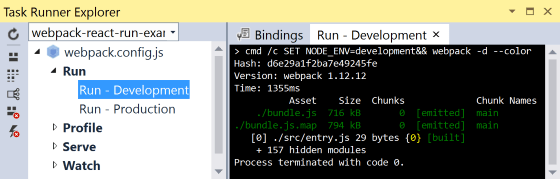
@muratg Wouldn't it be better if VS would interpret the codes and display color output?
The WebPack Task Runner extension by @madskristensen, for example, supports color output in a VS pane:
 nil4
on 19 May 2016
nil4
on 19 May 2016
@nil4 Good point!
@BillHiebert Do you know if that's something we could do? AFAIK, npm console output has the same issue.
muratg
on 19 May 2016
The output window does not support colors today, nor does it recognize and strip the control characters from the text. There are some extensions you can install which do add colors but I don't know if they handle the control sequences.
Failing that, Docker tooling needs to strip the characters from the strings before sending them on to the output window.
 BillHiebert
on 19 May 2016
BillHiebert
on 19 May 2016
@SteveLasker Are the tools guys thinking about this already or were you expecting something from logging?
 glennc
on 19 May 2016
glennc
on 19 May 2016
If possible, I think we should fix this at the Logging level, so any downstream consumer is fixed. I know some tools detect whether output is going to a console or redirected (to a file or another process), and change their output format accordingly.
mikeharder
on 19 May 2016
It can be done from .NET via the Console.IsOutputRedirected property.
mikeharder
on 19 May 2016
I ran a simple test and redirected the output to a file, and the file didn't contain any control characters:
``` C#
var factory = new LoggerFactory();
factory.AddConsole();
var logger = factory.CreateLogger
logger.LogInformation("information");
dotnet restore
dotnet build
dotnet binDebugnetcoreapp1.0ConsoleApp1.dll > out.txt
```
So maybe Logging is already doing the right thing, and this does need to be fixed downstream. I will send mail to the Docker Tools for VS team.
mikeharder
on 20 May 2016
Putting this in 1.0.1 milestone for further investigation post RTM.
muratg
on 26 May 2016
The issue is most likely in Docker Tools for VS, rather than Logging. They have filed an issue on their end and will fix it when they are able.
mikeharder
on 26 May 2016
We're using this with Kestrel on mono inside docker. We're logging to the console and then we're using docker's syslog driver to forward the logs. As a result we get the string polluted by control characters.
Maybe the simplest solution would be to include an option to disable colors altogether?
 mrgleba
on 22 Jun 2016
mrgleba
on 22 Jun 2016
@mikeharder what's the current recommendation for this one?
cc @davidfowl
muratg
on 12 Jul 2016
@muratg: We should really look at end-to-end scenarios to see how they can be improved. For the scenario mentioned above:
We're logging to the console and then we're using docker's syslog driver to forward the logs. As a result we get the string polluted by control characters.
One option might be logging to a file instead of the console. I've verified that control characters are not present when logging to a file.
Another option might be for docker's driver to remove control characters. I think any process which writes colors to the console would have the same issue in Docker.
Finally, we could add an option in Logging to disable colors, but this has a few drawbacks. First, the app author may not know when or whether to disable colors. It depends on the context the app is being used. Second, other tools like the CLI would also need to add options to disable colors.
mikeharder
on 12 Jul 2016
I'm not sure how you were even getting control characters on Windows since we don't write them unless you are on Unix. Unless our IsWindows check isn't working properly on Docker for Windows...
 BrennanConroy
on 28 Jul 2016
BrennanConroy
on 28 Jul 2016
After some investigation we can't easily detect if the output is being redirected, see https://github.com/dotnet/corefx/issues/10428
BrennanConroy
on 29 Jul 2016
What is the status of this? We are using docker containers on AWS, and get the control characters in our logs. Makes it rather difficult to read.
If it is difficult to auto detect, could we get an Environment variable or some other way to just turn off colorizing?
 neybar
on 20 Nov 2017
neybar
on 20 Nov 2017
As a workaround, it's possible to use the ConsoleLogger.DisableColors option added in 2.1: https://github.com/aspnet/Logging/pull/772
mikeharder
on 31 Jul 2018
If you are using WebHostBuilder.CreateDefault setting ASPNETCORE_LOGGING__CONSOLE__DISABLECOLORS environment variable to true would disable colors too.
 pakrym
on 16 Nov 2018
pakrym
on 16 Nov 2018
Related issues
 JunTaoLuo
·
4Comments
JunTaoLuo
·
4Comments
 shirhatti
·
6Comments
shirhatti
·
6Comments
 vsfeedback
·
6Comments
vsfeedback
·
6Comments
 davidfowl
·
5Comments
davidfowl
·
5Comments
 grahamehorner
·
3Comments
grahamehorner
·
3Comments
Most helpful comment
What is the status of this? We are using docker containers on AWS, and get the control characters in our logs. Makes it rather difficult to read.
If it is difficult to auto detect, could we get an Environment variable or some other way to just turn off colorizing?