Express: Why express session is very slow?
Environment
vm - centos7(4cpu, 8Gb memory, gigabit NAT)
I tested in the Express version 3 and 4.
set as follows..
package.json
{
  "name": "apiauth",
  "version": "1.0.0",
  "description": "",
  "main": "index.js",
  "scripts": {
    "test": "echo \"Error: no test specified\" && exit 1"
  },
  "author": "",
  "license": "ISC",
  "dependencies": {
    "express": "4.13.3",
    "body-parser": "~1.13.3",
    "connect-redis": "~2.4.1",
    "cookie-parser": "~1.3.5",
    "cookie-session": "~1.2.0",
    "express-session": "~1.11.3",
    "redis-connection-pool": "1.1.0"
  }
}
A. no session api.js
var express = require('express');
var http = require('http');
var app = express();
var server = http.createServer(app);
var session = require('express-session');
var cookieParser = require('cookie-parser');
var bodyParser = require('body-parser');
app.use(cookieParser());
app.use(bodyParser.json());
app.use(bodyParser.urlencoded({ extended: true }));

app.get('/test.json', function (req, res) {
    data = {a:[1,2,3,4,5,67,7,8,9,0,10]};
    res.send(data);
});

server.listen(8182, function() {
    console.log('Express server listening on port ' + server.address().port);
});
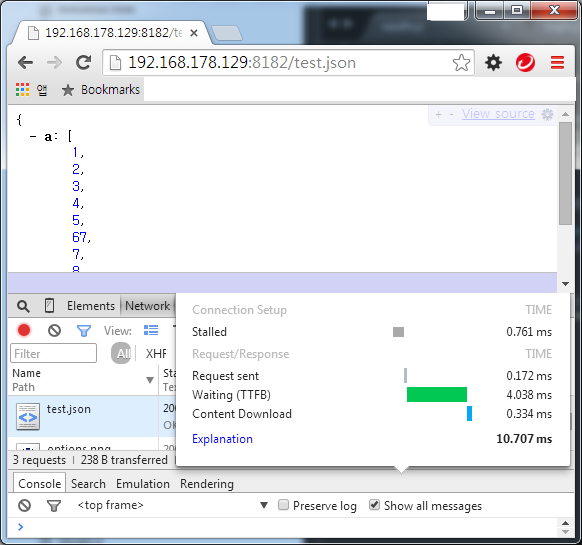
B. session api.js
var express = require('express');
var http = require('http');
var app = express();
var server = http.createServer(app);
var session = require('express-session');
var cookieParser = require('cookie-parser');
var bodyParser = require('body-parser');
app.use(cookieParser());
app.use(session({
    key: 'sid',
    secret: "test.kr",
    resave: false,
    saveUninitialized: true,
    cookie: {secure: false, maxAge: 60000, domain: '.test.kr'}
}));
app.use(bodyParser.json());
app.use(bodyParser.urlencoded({ extended: true }));

app.get('/test.json', function (req, res) {
    data = {a:[1,2,3,4,5,67,7,8,9,0,10]};
    res.send(data);
});

server.listen(8182, function() {
    console.log('Express server listening on port ' + server.address().port);
});
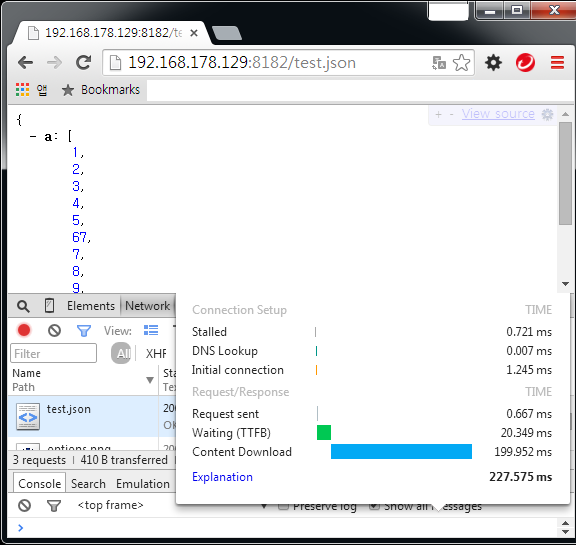
Content download speed is extremely slow. Despite of the local environment.
How can I speed up?
 yahao87
All 27 comments
Most API calls should be stateless, and changing the order of your session initialization will speed up your stateless API calls:
// ...other app stuff...
// swap order of:
app.get('/test.json', function (req, res) {
data = {a:[1,2,3,4,5,67,7,8,9,0,10]};
res.send(data);
});
// having this below your api will mean that your API requests will be handled before this is added to the request...
app.use(session({
key: 'sid',
secret: "test.kr",
resave: false,
saveUninitialized: true,
cookie: {secure: false, maxAge: 60000, domain: '.test.kr'}
}));
server.listen(8182, function() {
console.log('Express server listening on port ' + server.address().port);
});
 dhigginbotham
on 7 Aug 2015
dhigginbotham
on 7 Aug 2015
First, I'm sorry I can not write English well, so I can not explain in detail.
Then, most of the login process is applied to a very slow download time(min 200ms).
Is called the normal operation?
download time over 200ms per login session?
additionally, not surprisingly worse when the local is not.
Is Express session originally very slow?
Should I use another language for the session?
yahao87
on 7 Aug 2015
I've never used express-session in much detail because it doesn't really have the ability to scale in production environments -- I'm assuming that they didn't optimize for speed when its meant solely as a debugging session store (could be wrong, but idk there)
Yes, there are other alternatives click here.
dhigginbotham
on 7 Aug 2015
I am already being used to redis-session and passport-google on a live server.
But it's too slow.
passport is fast.
So the test is done in the above code.
Redis session even slow, local storage as well.

Network is Gigabit Network.
And content size is smaller than 1kbyte.
yahao87
on 7 Aug 2015
please move this issue over to the https://github.com/expressjs/session repo.
 gabeio
on 7 Aug 2015
gabeio
on 7 Aug 2015
I've never used express-session in much detail because it doesn't really have the ability to scale in production environments -- I'm assuming that they didn't optimize for speed when its meant solely as a debugging session store (could be wrong, but idk there)
@dhigginbotham express-session when connected to a database has the ability to scale just as much as express does (express-session when not connected to anything, therefore using memory, is intended for development only)
gabeio
on 7 Aug 2015
@yahao87 looking at that chrome debug screen it seems somewhere you have a connection delay or maybe a database delay because express and thusly express-session handled the request in under 37ms where ever you are reading your data from (database / hdd?), or over (your / server internet?), is the issue which took 240ms...
gabeio
on 7 Aug 2015
@gabeio
This problem occurs at any time, anywhere.
It was tested in a ssd, it is what happened in one computer.
And it appears the same on another computer.
it's nothing to do with local.
Make a test into the code listed above in your vm.
And to test the local chrome browser.(not 127.0.0.1 but VM's NAT IP)
Do you think this is another problem in this environment?
It will be able to get the same results. always.
I tested in three PC.
There is a complete code above.
You can test. In less than a minute.
Compare it to A and B.
Content download time is tcp problems.
This happened to the handshake abnormally terminated at express-session?
yahao87
on 8 Aug 2015
@yahao87 I ran the code above and got this result from chrome:

I am on os x using iojs v2.5.0 [email protected] & [email protected] (example b)
gabeio
on 8 Aug 2015
The extra 200ms you are seeing is the write to Redis for your session. The express-session module will hold the last byte of the response until after the store writes the session, which is why it elongated your content download time.
Not all session modules on npm do this, while some will not send the response at all until after the Redis write is complete and others don't write to Redis until the response is sent.
You can easily use Node.js debugging tools to determine exactly where all the time is used, which will provide you the exact information you are seeking. Just viewing from Chrome doesn't show what is happening inside the Node.js process.
 dougwilson
on 8 Aug 2015
dougwilson
on 8 Aug 2015
@dougwilson
Do you read me?
The above code did not use the redis.
yahao87
on 8 Aug 2015
@gabeio
Do you read me?
I wrote that (not 127.0.0.1 but VM's NAT IP).
Your test is wrong.
yahao87
on 8 Aug 2015
Right, but you spoke of Redis and I assumed you accidentally didn't include it. I ran both your code examples and they both executed in 10ms for me, no difference. @gabeio also posted a screenshot.
Since I cannot reproduce with the provide code, all I can suggest is you used Node.js debugging tools to find out exactly what is taking the time inside the Node.js process.
dougwilson
on 8 Aug 2015
Local host and network test test differs distinctly.
In particular, the contents download time.
yahao87
on 8 Aug 2015
I did the test between two different physical machines on my network and got 12ms for both examples you posted.
The difference you can see if you use Wireshark:
The first example is only 1 TCP packet while the second is 2 TCP packets because express-session splits the response. Depending on your TCP stack, it is likely the Nagle algorithm is adding the 200ms delay in your tests.
dougwilson
on 8 Aug 2015
P.S. to disable Nagle in Node.js, add the following as your first middleware:
app.use(function(req,res,next){
  req.connection.setNoDelay(true);
  next();
});
@dougwilson
wow~!
This problem disappeared.
setNoDelay !
I knew that the only nginx.
I did not know that.
thank you thank you thank you~! T_T
yahao87
on 8 Aug 2015
It's no problem at all :) I knew we'd get there eventually. I didn't think of it either until after I just kept typing and after we iterated, we got there :) I'm glad to hear that the Nagle was your case.
dougwilson
on 8 Aug 2015
@dougwilson
Then, I have a question.
Why not turn off the nagle algorithm by default in the express-session?
yahao87
on 8 Aug 2015
Turning it off can have negative effects and it's a connection-level option, which affects many requests.
You can see the effects with express-session, but you can get the same effects without it, all you need to do is send more than one TCP packet. The only reason you see the difference for your test is because you are sending such a tiny payload it typically fits in just one packet; sending something that takes two or more packets would not have any noticeable difference when using express-session.
The short answer is no, express-session will not make dangerous changes to your TCP stack.
dougwilson
on 8 Aug 2015
But yea, most importantly the issue is just how your TCP stack deals with the HTTP request being contained in more than one packet. If you wanted to see the packet split, use your example without express-session and keep making the JSON bigger and you'll see a sudden jump in download time when you reach the TCP packets size threshold on your stack (you'll see a response that takes 15ms jump to 200+ms just by adding a single byte that causes a packet split.
dougwilson
on 8 Aug 2015
Also, I think Nagle may even be disabled by default on recent versions of Node.js. What version are you using?
dougwilson
on 8 Aug 2015
Nevermind, even on the most recent version Nagle is on by default.
dougwilson
on 8 Aug 2015
I use node v0.12.0.
So, I tested after upgrade.
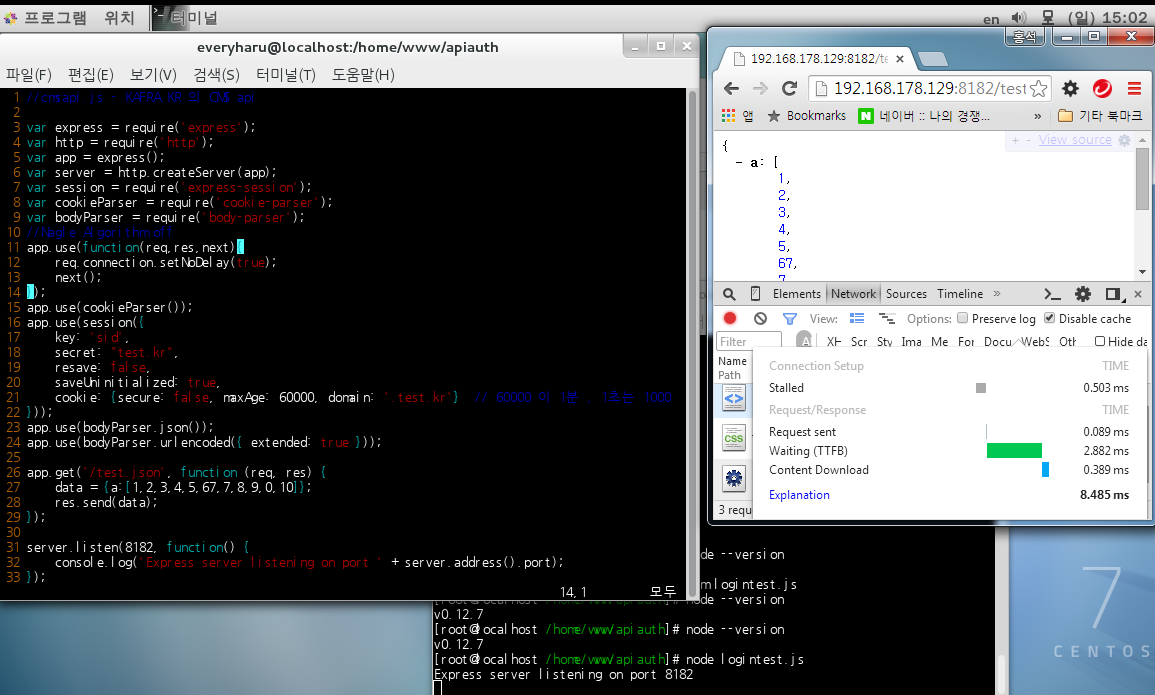


Express session is not default.
... :S
yahao87
on 9 Aug 2015
Correct, even on the most recent version Nagle is on by default. You need to disable it yourself after reading about it, what it does, and what it means to have it off
dougwilson
on 9 Aug 2015
I am confused.
setNoDelay(true) == Nagle off
setNoDelay(false) == Nagle on
To quote nodejs document,
"noDelay defaults to true."
Doesn't that mean nagle is off by default?
yahao87
on 9 Aug 2015
To quote nodejs document,
"noDelay defaults to true."Doesn't that mean nagle is off by default?
That's what I thought at first, but no, their documentation is just very confusing. What that is actually saying is that .noDelay() is the same as .noDelay(true) because the first argument to the .noDelay method is true by default if you don't provide it; it has nothing to do with the initial state of the socket.
Please feel free to continue this discussion over on Node.js's issue tracker, as I can only state the facts: Nagle is on by default and you can turn it off using socket.noDelay().
dougwilson
on 9 Aug 2015
Related issues
 despairblue
·
3Comments
despairblue
·
3Comments
 AndrewEQ
·
4Comments
AndrewEQ
·
4Comments
 ER-GAIBI
·
3Comments
ER-GAIBI
·
3Comments
 zackarychapple
·
3Comments
zackarychapple
·
3Comments
 Sunriselegacy
·
3Comments
Sunriselegacy
·
3Comments
Most helpful comment
P.S. to disable Nagle in Node.js, add the following as your first middleware: