Hi,
I have a long running operation triggered with a GET request, that migrates some data from SQL Server to Postgres. I takes about 4-5 minutes. At some point about middle of it, the same request is fired again, before the first one is finished. It's not a browser issue, both Chrome and Firefox behave exactly the same, and Fiddler doesn't list a second request. This is the route :
router.get('/mig', function (req, res) {
    console.log("MIGRATION REQUESTED");
    mig.run().then(function () {
        res.send("Done");
    }).catch(function (cause) {
        res.send("Failed for " + cause.message);
    });
});
Also there is a global middleware, registered as first middleware, just logs requests to the console. This is also fired twice.
app.use(function (req, res, next) {
    console.log("NEW REQUEST " + req.url);
   ...
And HTTP log records. What's also strange is, the first one seems not responded whereas second one responded with 200 code.
{"level":"info","message":"127.0.0.1 - - [Fri, 23 Jan 2015 08:50:50 GMT] \"GET /admin/mig HTTP/1.1\" - - \"http://localhost/admin/data\" \"Mozilla/5.0 (Windows NT 6.1; WOW64) AppleWebKit/537.36 (KHTML, like Gecko) Chrome/39.0.2171.99 Safari/537.36\" -\n","timestamp":"2015-01-23T08:50:50.921Z"}
{"level":"info","message":"127.0.0.1 - - [Fri, 23 Jan 2015 08:51:33 GMT] \"GET /admin/mig HTTP/1.1\" 200 - \"http://localhost/admin/data\" \"Mozilla/5.0 (Windows NT 6.1; WOW64) AppleWebKit/537.36 (KHTML, like Gecko) Chrome/39.0.2171.99 Safari/537.36\" 41890.017\n","timestamp":"2015-01-23T08:51:33.817Z"}
 mehmetavsar
All 9 comments
solved this with setting request timeout to 10 minutes before long-running task.
req.connection.timeout(60*10*1000)
It seems that it's something about Node. In redundant request, stack trace goes by Node's timer.js but Express is not utilizing it.
It sounds like an stack overflow question, but at first I've thought it's a bug in Express.
mehmetavsar
on 23 Jan 2015
Yes, I've experienced this plenty of times. It is, in fact, your browser making a second request (i.e. retrying the failed request). Node.js has a default timeout on all incoming requests, and if you don't change the timeout (as you did in your update), then Node.js will kill the TCP connection if you don't respond to the client in that amount of time. Most web browsers will see this sudden TCP connection termination as a failure and retry the request (sadly, even if it's a POST :( ).
Try using Chrome's network tab instead of Fiddler and you should see the second request (make sure Fiddler is completely disabled).
 dougwilson
on 1 Feb 2015
dougwilson
on 1 Feb 2015
I was going crazy with this duplicate request until I found this post. What I've noticed is that if express redirects the browser then the browser will send a repeated request (in my experience it was after 5 seconds) if the redirection has not completed.
Example demonstrating issue:
app.get('/path1', function( req, res ) {
    console.log('path1');
    res.redirect('/path2');
});

app.get('/path2', function( req, res ) {
    console.log('path2');
    setTimeout( function() {
        console.log('done');
        res.send('done');
    }, 10000 );
});
With above, then I would see the following output in my console:
path1
path2
path2 <<< after 5 seconds
done
By adding timeout to the redirection's request then I was able to avoid the duplicate request:
app.get('/path1', function( req, res ) {
    console.log('path1');
    res.redirect('/path2');
});

app.get('/path2', function( req, res ) {
    req.connection.setTimeout( 1000 * 60 * 10 ); // ten minutes
    console.log('path2');
    setTimeout( function() {
        console.log('done');
        res.send('done');
    }, 10000 );
});
With modified code then I would see the following output in my console:
path1
path2
done
 douglascayers
on 7 Jun 2017
douglascayers
on 7 Jun 2017
In our case the duplicate request was writing hundred of documents in one post in MongoDB. The
req.connection.setTimeout( 1000 * 60 * 10 ); // ten minutes was the solution.
Thanks
 mgcristobal
on 11 Jul 2017
mgcristobal
on 11 Jul 2017
Just to link a related information for the sake of completeness. HTTP clients (browsers etc.) are expected to retry a request if the client sees the connection close before receiving any status from the server. This is as specified in the HTTP RFC:
If an HTTP/1.1 client sends a request which includes a request body,
but which does not include an Expect request-header field with the
"100-continue" expectation, and if the client is not directly connected
to an HTTP/1.1 origin server, and if the client sees the connection
close before receiving any status from the server, the client SHOULD retry the request. ....
The connections (sockets) automatically get closed after a preset timeout by node. So, the retries are seen as duplicate requests.
 sivaraam
on 17 Apr 2018
sivaraam
on 17 Apr 2018
Further, I think it would be enough to set the timeout using a one-off server.setTimeout() as shown in this SO answer.
sivaraam
on 17 Apr 2018
Do you have a way to differentiate between the original request and the duplicate one?
 pradyumnad
on 7 Oct 2019
pradyumnad
on 7 Oct 2019
Hi @pradyumnad its been a long time now but this may help someone who lands on this in the future: https://blogs.oracle.com/ravello/beware-http-requests-automatic-retries
 nvinayvarma189
on 24 Apr 2020
nvinayvarma189
on 24 Apr 2020
Do you have a way to differentiate between the original request and the duplicate one?
I had this issue, the above mentioned setTimeout worked for me (but need to do more testing to confirm).
I did a diff between 2 request objects. I use node js, express js and a react js frontend. Chrome never showed the duplicate request in network tab, but the express.js route received the post request.
This was the main difference I found in request object. I printed both request objects like this
app.post('/post', (req, res) => {
  console.log(req);
....
(Duplicate request on left, Original request on right)
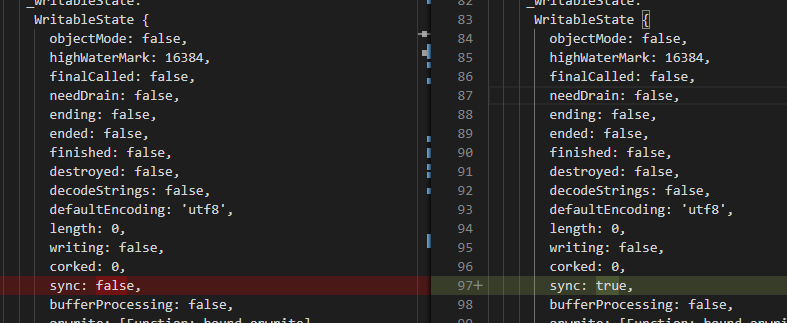
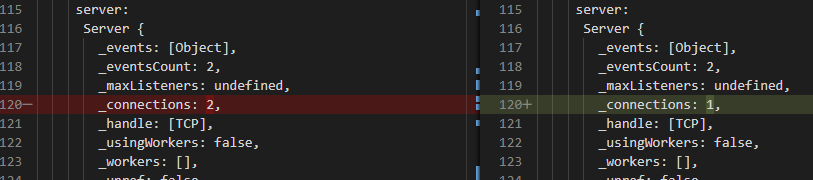
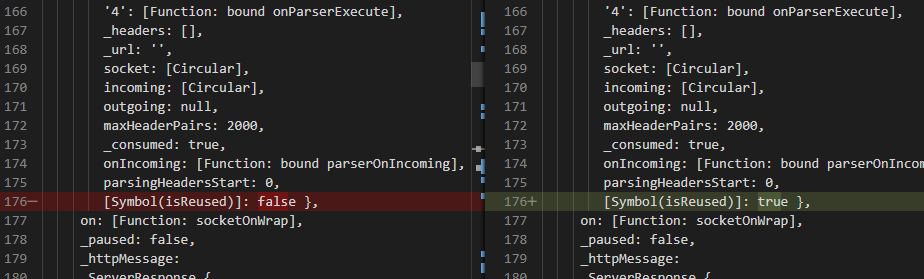
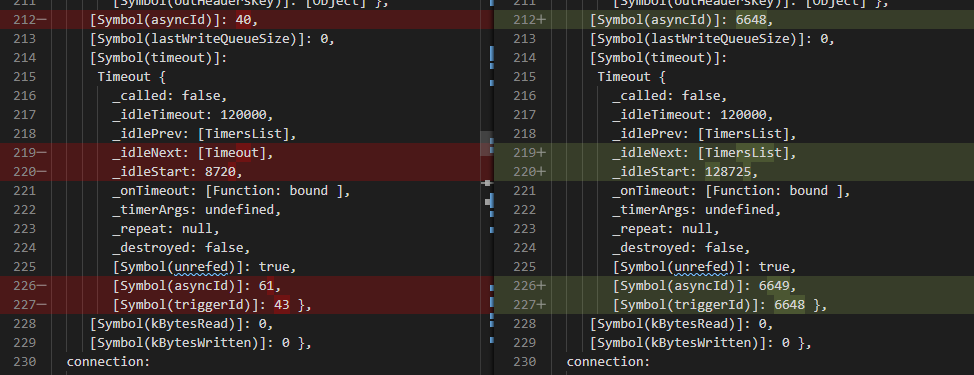
The relevant difference is the sync and isReused flag. I am not sure how to check these or is this the correct pointer to find a duplicate request.
 kiranvj
on 27 Jun 2020
kiranvj
on 27 Jun 2020
Related issues
 jefflage
·
4Comments
jefflage
·
4Comments
 ER-GAIBI
·
3Comments
ER-GAIBI
·
3Comments
 extensionsapp
·
3Comments
extensionsapp
·
3Comments
 gaurav5430
·
3Comments
gaurav5430
·
3Comments
 wxs77577
·
3Comments
wxs77577
·
3Comments
Most helpful comment
I was going crazy with this duplicate request until I found this post. What I've noticed is that if express redirects the browser then the browser will send a repeated request (in my experience it was after 5 seconds) if the redirection has not completed.
Example demonstrating issue:
With above, then I would see the following output in my console:
path1
path2
path2 <<< after 5 seconds
done
By adding timeout to the redirection's request then I was able to avoid the duplicate request:
With modified code then I would see the following output in my console:
path1
path2
done