Express-graphql: Request fails when using application/graphql with body parser
When sending a Content-Type : application/graphql with a query string the request fails.
If using body parser json or url encoded it says that i don't have a query string.
if used with text type application/graphql it gets stuck on parseBody.js in the line 119.
 ghost
ghost
All 11 comments
+1 I'm experiencing exactly the same issue as @AJ1310 describes
 philostler
on 12 Sep 2015
philostler
on 12 Sep 2015
This is now fixed and will go out with the next release.
 leebyron
on 30 Sep 2015
leebyron
on 30 Sep 2015
Are you sure this has been fixed? I'm running express-graphql 0.4.13 with body-parser 1.15.0 and doing a POST with headers set to Content-Type: application/graphql I get
{
"errors": [
{
"message": "Must provide query string."
}
]
}
 joanrodriguez
on 5 Apr 2016
joanrodriguez
on 5 Apr 2016
I solved my problem doing the following:
// configure app to use bodyParser()
// this will let us get the data from a POST
// exclusing the route to graphql
app.use(/\/((?!graphql).)*/, bodyParser.urlencoded({ extended: true }));
app.use(/\/((?!graphql).)*/, bodyParser.json());
Yes this is fixed. However if you're also using body-parser, you must still ensure the output of body-parser is compatible with the express-graphql plugin.
The recommended use is still to use the express-graphql middleware _before_ using any kind of body parser middleware you may be using for other routes.
leebyron
on 5 Apr 2016
I am experiencing the same issue using :
"body-parser": "^1.17.2",
"express": "^4.15.3",
"express-graphql": "^0.6.
My server:
const schema = require('./schema');
const express = require('express');
const graphqlHTTP = require('express-graphql');
const cors = require('cors')
const bodyParser = require('body-parser');


const app = express();
app.use(cors());
app.use(bodyParser.urlencoded({ extended: true }));
app.use(bodyParser.json());

app.use('/graphql', graphqlHTTP(req => {
  return ({
  schema,
  pretty: true,
  })
}));

const server = app.listen(9000, err => {
  if (err) { return err; }
  console.log(`GraphQL server running on http://localhost:${9000}/graphql`);
});
Request:
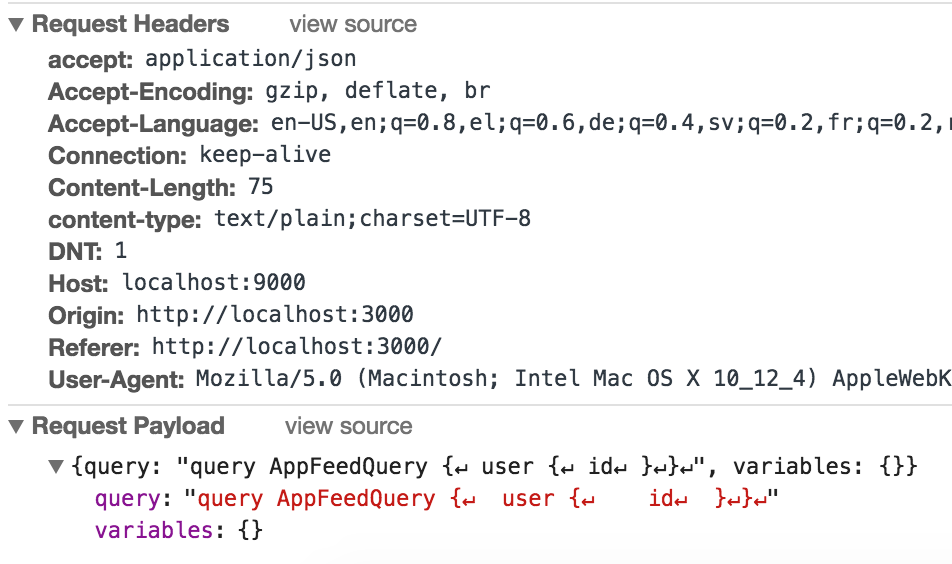
Any help?
 AvraamMavridis
on 6 Aug 2017
AvraamMavridis
on 6 Aug 2017
@AvraamMavridis you got this to work? I got a similar issue
Btw, you're using content-type: text/plain it has to be application/json
 SyedAman
on 16 Aug 2017
AvraamMavridis
on 16 Aug 2017
SyedAman
on 16 Aug 2017
AvraamMavridis
on 16 Aug 2017
@AvraamMavridis @ghost try adding
app.use(bodyParser.text({ type: 'application/graphql' }));
fixed it for me
 dh94
on 11 Sep 2017
dh94
on 11 Sep 2017
@dh94 can you confirm that this need to be called after bodyParser.json() ? I had some issues with Apollo Server 2 in a Meteor app and writing
app.use(bodyParser.json())
app.use(bodyParser.text({ type: 'application/graphql' }));
seemed to fix it.
Edit: it was not sufficient, see body-parser-graphql package which works fine now
 eric-burel
on 9 Jan 2019
eric-burel
on 9 Jan 2019
https://www.npmjs.com/package/body-parser-graphql
fixed it for me
 kuminra
on 4 Mar 2019
kuminra
on 4 Mar 2019
Related issues
 violet-day
·
3Comments
violet-day
·
3Comments
 stevvvn
·
3Comments
stevvvn
·
3Comments
 jamesmoriarty
·
4Comments
jamesmoriarty
·
4Comments
 arealmaas
·
4Comments
arealmaas
·
4Comments
 KieronWiltshire
·
3Comments
KieronWiltshire
·
3Comments
Most helpful comment
I solved my problem doing the following: