Exoplayer: How to show subtitle without url on Exoplayer
Hello, everyone.
How to show subtitle without url on Exoplayer.
I am trying to show subtitle in Exoplayer but I have no subtitle url.
My word means that I want to show subtitle with a url of only video file, not subtitle file.
I can see subtitles without subtitle file(.srt, .ass ...) on VLC media player.
I think that this video file contains subtitles info itself.
In this case, how to show subtitle on Exoplayer.
Thanks and best regards.
 msilucifer
All 8 comments
If the video & subtitles are in a container that ExoPlayer recognises, then the subtitle track should be extracted and be available to the TrackSelector.
In the demo app, this shows up in the UI under the 'SELECT TRACKS' at the top of the video playback screen (then the 'TEXT' tab).
If you don't see the subtitle track here when you play your content in the demo app , please share the media you're using so we can reproduce and investigate. If you're unable to share it publicly, please send it to dev.[email protected] with subject "Issue #7677". Please also update this issue to indicate you’ve done this.
 icbaker
on 27 Jul 2020
icbaker
on 27 Jul 2020
Thanks for your response, @icbaker
I can see the 'TEXT' tab and also I can choose 'AUTO' item.
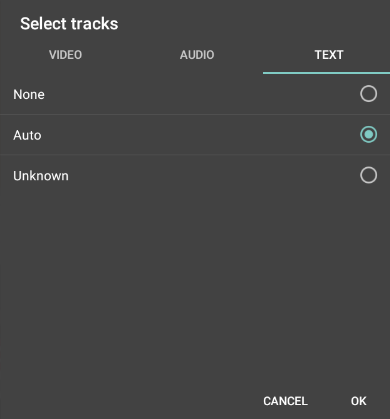
But I can't see the subtitles in the video.
I sent the video url to "dev.[email protected]".
Please test it and I really appreciate if you solve this problem.
Best wishes.
msilucifer
on 27 Jul 2020
Thanks for the media link - the subtitles in your stream look like 'EBU Teletext', which isn't currently supported by ExoPlayer. There's a feature request here: https://github.com/google/ExoPlayer/issues/5491
icbaker
on 29 Jul 2020
Thanks, @icbaker
I can't find the solution in this issue #5491
So Can't I show the subtitles without url?
Best wishes.
msilucifer
on 29 Jul 2020
ExoPlayer supports many formats of subtitles embedded in video containers ("without the url") - but we don't currently support DVB Teletext subtitles, which is what your media has.
So in general you can show subtitles "without the url" if they're in a format that ExoPlayer supports (e.g. CEA-608 inside TS files, TTML inside MP4 files, SSA or SubRip inside Matroska files). But you can't show teletext subtitles, because we can't currently decode them.
icbaker
on 29 Jul 2020
Thank you for your clear answer.
msilucifer
on 29 Jul 2020
Could you share the media that be able to show the subtitles without the url?
It would be very helpful to me if you do that.
msilucifer
on 30 Jul 2020
There's now an example of an MP4 file with embedded tx3g subtitles in the demo app if you build it from the dev-v2 branch. You can also find the sample here: https://storage.googleapis.com/exoplayer-test-media-1/mp4/dizzy-with-tx3g.mp4
icbaker
on 3 Aug 2020
Related issues
 orcunkobal
·
3Comments
orcunkobal
·
3Comments
 stari4ek
·
3Comments
stari4ek
·
3Comments
 R00We
·
3Comments
R00We
·
3Comments
 schyau
·
3Comments
schyau
·
3Comments
 AndrewJack
·
3Comments
AndrewJack
·
3Comments
Most helpful comment
ExoPlayer supports many formats of subtitles embedded in video containers ("without the url") - but we don't currently support DVB Teletext subtitles, which is what your media has.
So in general you can show subtitles "without the url" if they're in a format that ExoPlayer supports (e.g. CEA-608 inside TS files, TTML inside MP4 files, SSA or SubRip inside Matroska files). But you can't show teletext subtitles, because we can't currently decode them.