Exoplayer: PlayerNotificationManager not updating on fast consecutive actions
[REQUIRED] Issue description
I'm using ExoPlayer to play some HLS tracks. When i'm doing couple of fast actions (like tap 3-4 times Next button) by mediaController or in notification - the content i return in PlayerNotificationManager.MediaDescriptionAdapter doesn't get displayed. Notification displays one track previous to the one that is actually playing. So Changing playback this way properly updates the player state, but doesn't seem to update the notification properly. I can't seem to make some 100% repro, but it does this consistently when i smash next/previous button quite fast.
[REQUIRED] Reproduction steps
This is my MediaDescriptionAdapter:
internal class MediaDescriptionAdapter(
    private val context: Context,
    private val sessionPendingIntent: PendingIntent?
) : PlayerNotificationManager.MediaDescriptionAdapter {

    private var currentBitmap: Bitmap? = null

    override fun createCurrentContentIntent(player: Player?): PendingIntent? = sessionPendingIntent

    override fun getCurrentContentText(player: Player?): String? = player?.let {
        val mediaDescription = it.currentTag as MediaDescriptionCompat? ?: return ""
        mediaDescription.subtitle.toString()
    }

    override fun getCurrentContentTitle(player: Player?): String {
        player?.let {
            val mediaDescription = it.currentTag as MediaDescriptionCompat? ?: return ""
            Timber.d("getCurrentContentTitle with ${mediaDescription.title.toString()}")
            return mediaDescription.title.toString()
        }
        return ""
    }

    override fun getCurrentLargeIcon(
        player: Player?,
        callback: PlayerNotificationManager.BitmapCallback?
    ): Bitmap? {
        val mediaDescription = player?.currentTag as MediaDescriptionCompat?
        val uri = mediaDescription?.iconUri ?: return null
        Glide
            .with(context)
            .asBitmap()
            .load(uri)
            .into(object : CustomTarget<Bitmap>() {
                override fun onLoadCleared(placeholder: Drawable?) {
                    // Nothing to do here
                }

                override fun onResourceReady(resource: Bitmap, transition: Transition<in Bitmap>?) {
                    callback?.onBitmap(resource)
                    currentBitmap = resource
                }
            })
        return currentBitmap
    }
}
As you can see i log the result of getCurrentContentTitle. I can confirm that this method gets called properly and i do return correct metadata for currently playing track. So it seems like notification don't get some kind of update event properly.
Can you think of any reason this could be happening?
My first idea was that Glide callback could brake something, but when i return null on every getCurrentLargeIcon the problem still occurs.
EDIT: i think i have some repro. When i change the track, wait for the time it takes to load hls and click next and the exact time - notification doesn't get refreshed but track is changed
EDIT2: Sometimes metadata is updated properly, but notification background isn't set when callingcallback.onBitmap().
[REQUIRED] Link to test content
This bug seems to be unrelated to any particular content
[REQUIRED] Version of ExoPlayer being used
2.10.7
[REQUIRED] Device(s) and version(s) of Android being used
Multiple emulators, from android 6 to 10, OnePlus 7 with Android 10
 jakoss
All 13 comments
On further investigation i found out that all methods in MediaDescriptionAdapter are getting called 3 times. This seems to mess with glide. But i don't know if it's relevant to the issue
jakoss
on 15 Nov 2019
Thanks. I'l investigate whether I can repro this. I'll also check whether there are ways to reduce the number of calls on the description adapter some more.
In any case I'd recommend to not call Glide each time but have a cache for the bitmaps so that you can reuse it once you downloaded and scaled them. Please also see the java doc of the method for more details:
Because the adapter may be called multiple times for the same media item, the bitmap should be cached by the app and whenever possible be returned synchronously at subsequent calls for the same media item.
Thinking a bit more about that case, it might even be a good thing to check whether Glide is already working for a given bitmap. If the method is called multiple times very quickly, Glide might still be downloading and scaling when the next call arrives.In this case we don't want to start it another time doing the same thing. So the best way is probably to have a placeholder which you can return immediately. Then place that placeholder in the cache, and send Glide do it's work. If now the next call arrives it takes the placeholder from the cache. When Glides is done, you can replace the placeholder in the cache and call the callback.
I still want to look how we can ease that situation on the manager side. Thanks for your detailed report.
 marcbaechinger
on 15 Nov 2019
marcbaechinger
on 15 Nov 2019
Thanks in advance for investigation.
I solved the glide multiple requests using coroutines and it does work fine
override fun getCurrentLargeIcon(
        player: Player?,
        callback: PlayerNotificationManager.BitmapCallback?
    ): Bitmap? {
        val mediaDescription = player?.currentTag as MediaDescriptionCompat?
        val uri = mediaDescription?.iconUri ?: return null
        val cachedBitmap = bitmapCache[uri]
        if (cachedBitmap != null) return cachedBitmap

        // check if request for uri exists and then wait for it (or create one)
        scope.launch {
            val deferredJob = downloadLock.withLock {
                val job = downloadCache[uri]
                if (job != null) {
                    job
                } else {
                    val newJob = getCoverAsDeferredAsync(uri)
                    downloadCache.put(uri, newJob)
                    newJob
                }
            }

            val bitmap = deferredJob.await()
            callback?.onBitmap(bitmap)
            previousBitmap = bitmap
        }
        return previousBitmap
    }

    private suspend fun getCoverAsDeferredAsync(uri: Uri): Deferred<Bitmap> = coroutineScope {
        async { getCover(uri) }
    }

    private suspend fun getCover(uri: Uri): Bitmap {
        return suspendCoroutine { continuation ->
            Glide
                .with(context)
                .asBitmap()
                .load(uri)
                .into(object : CustomTarget<Bitmap>() {
                    override fun onLoadCleared(placeholder: Drawable?) {
                        // Nothing to do here
                    }

                    override fun onResourceReady(
                        resource: Bitmap,
                        transition: Transition<in Bitmap>?
                    ) {
                        continuation.resume(resource)
                        bitmapCache.put(uri, resource)
                    }
                })
        }
    }
This way i create a Deferred job for every unique request that i pass to glide. Any consecutive requests are just waiting for that job to finish (by await())
jakoss
on 15 Nov 2019
Did this resolve the problem above or do you still manage to make the notification not update correctly?
marcbaechinger
on 15 Nov 2019
No, notification still have update issues. Sometimes meta will get updated, but bitmap won't (even if i call callback with proper bitmap)
jakoss
on 15 Nov 2019
It's possible the notification updates are being rate limited. I ran into similar issues myself -- when I spam updates, they stop being applied and I see this in the logs:
E/NotificationService: Package enqueue rate is 6.4452186. Shedding <some metadata about your app here>
 BrendanParks
on 25 Nov 2019
BrendanParks
on 25 Nov 2019
I checked logcat and i don't see any logs about notifications. Also - when i do exactly the same in spotify - notification is perfectly synchronized with player (proving that it can be done)
jakoss
on 25 Nov 2019
It could very well be a red herring/separate issue, but I can effectively replicate on the latest Spotify version by relentlessly spamming the next button on the notification:
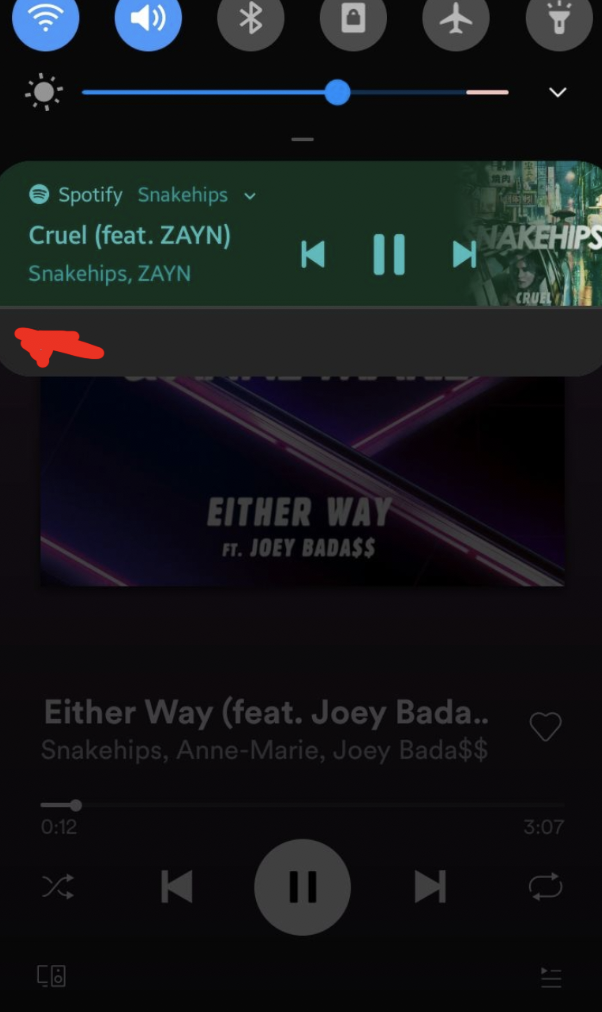
And I got quite a few of these in the logs after:
E/NotificationService: Package enqueue rate is 5.7212663. Shedding <notification info>. package=com.spotify.music
I remember doing this in the past too, so maybe they've made it a bit harder by slowing down/queuing up the notification updates to get around the rate limiting.
Device is Galaxy S10+ running Android P (the samsung fork :) ), and spotify 8.5.33.831.
BrendanParks
on 26 Nov 2019
@marcbaechinger were you able to replicate this? Maybe ExoPlayer should have some rate limiting
jakoss
on 26 Nov 2019
I was able to reproduce this with Google Play Music, Spotify and the ExoPlayer demo app using the PlayerNotificationManager:
2019-12-02 17:34:21.814 1061-3016/system_process E/NotificationService: Package enqueue rate is 5.5803037. Shedding 0|com.spotify.music|2131430002|null|10235. package=com.spotify.music
2019-12-02 17:35:14.937 1061-2130/system_process E/NotificationService: Package enqueue rate is 5.2860003. Shedding 0|com.google.android.music|1|null|10143. package=com.google.android.music
2019-12-02 17:37:30.132 1061-1735/system_process E/NotificationService: Package enqueue rate is 5.4202433. Shedding 0|com.google.android.exoplayer2.demo|10|null|10218. package=com.google.android.exoplayer2.demo
For the case when I just hit the play/pause button repeatedly the notification is updated once for each status update (in this case playWhenReady true/false). When hitting very quickly I can still go over the enqueue rate threshold which causes the notification to be out of sync.
So reducing the notification updates alone will make it harder for users to produce this (needs hitting faster), but it is still possible. I'm looking into providing a fix for this.
A second approach might be to somehow throttle updates of the notifications. I'm not sure what is the best way of doing this as I actually don't want to significantly increase the lag between the command arriving and the update of the notification.
I'll update this thread when we push something to the dev-v2 branch.
marcbaechinger
on 2 Dec 2019
Reducing the notification updates alone will make it harder for users to produce this
This has now been done in Marc's change ref'd above. @marcbaechinger - Should we either close this or reclassify it as a platform bug at this point?
 ojw28
on 6 Dec 2019
ojw28
on 6 Dec 2019
I think this might be ommited in release notes for 2.11.0
jakoss
on 12 Dec 2019
[Internal bug ref: b/145521438]
ojw28
on 19 Dec 2019
Related issues
 schyau
·
3Comments
schyau
·
3Comments
 KenendZ
·
3Comments
KenendZ
·
3Comments
 Ufosek
·
3Comments
Ufosek
·
3Comments
 AndrewJack
·
3Comments
AndrewJack
·
3Comments
 noamtamim
·
3Comments
noamtamim
·
3Comments