Exoplayer: Overflow of playerView in Viewpager
Content description
I have an activity set up with a Viewpager.
The Viewpager uses an adapter that creates Views( not fragments ).
Some of these views contain a PlayerView.
It all works perfectly fine unless I set the resizeMode to ZOOM.
When the resizeMode
is set to ZOOM, the playerView overflows onto the next / previous item in the Viewpager.
I have tried forcing the width to a set value, tried to force clipping to the parent, but to no avail.
I have tried setting the resize mode from both the xml directly and the view in code.
I have also tried playing with the player's videoScalingMode to C.VIDEO_SCALING_MODE_SCALE_TO_FIT_WITH_CROPPING but the issue is always there.
Here is a gif showing the issue. Here the Viewpager starts with a video that doesn't have ZOOM enabled, but the previous item in the Viewpager has ZOOM and is seen overflowing into the current item.
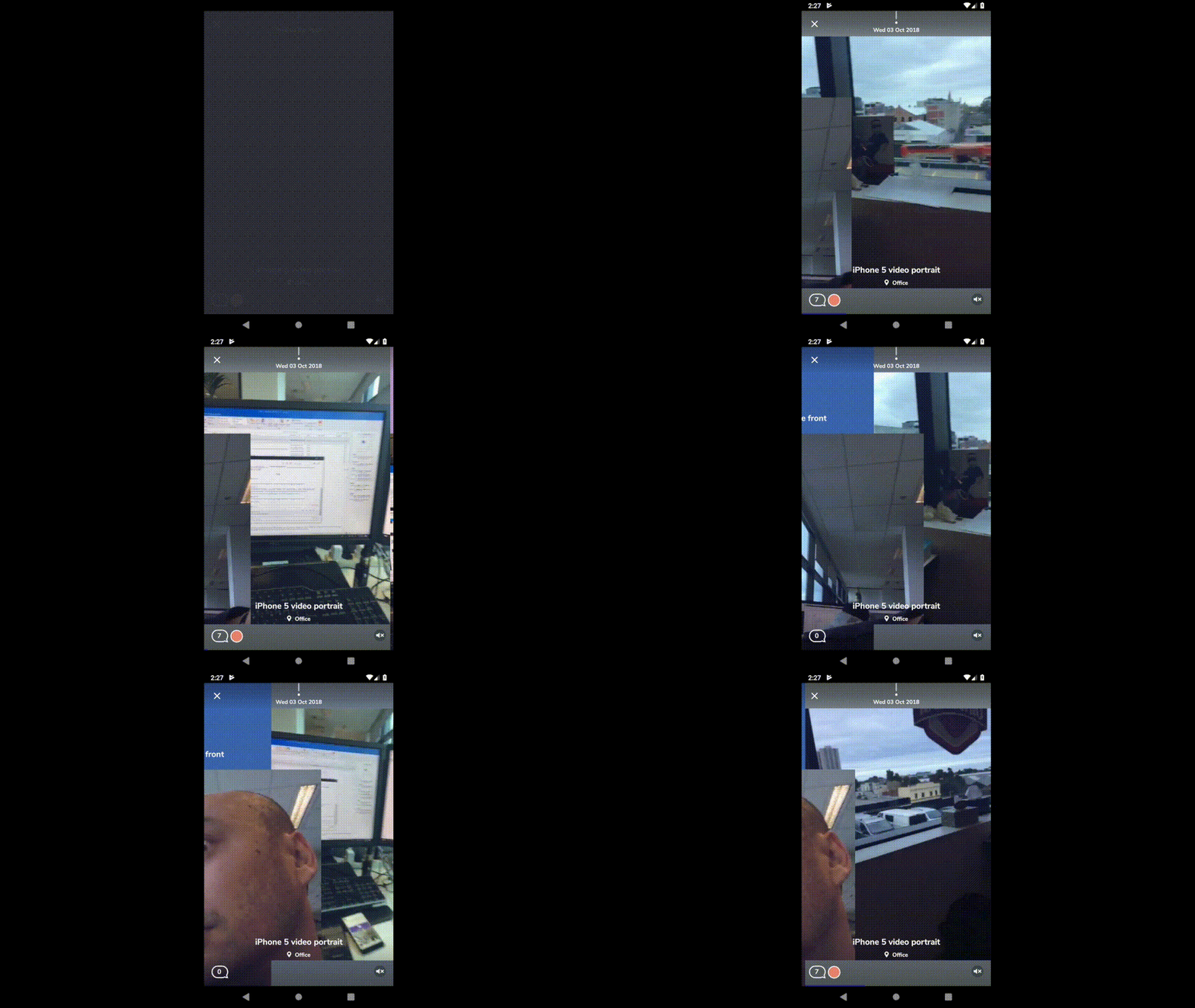
Link to test content
The videos are basic videos shot from iphones
Version of ExoPlayer being used
Using Exoplayer-core and -ui v2.9.6
Device(s) and version(s) of Android being used
Tested on various phones, all reproduce errors. Min SDK is set to 22.
 EscapeArtist
All 11 comments
This issue does not seem to follow the issue template. Make sure you provide all the required information.
 google-oss-bot
on 2 Apr 2019
google-oss-bot
on 2 Apr 2019
I tried to reproduce this by setting app:resize_mode="zoom" on a player view but the contents were clipped as expected. This Stack Overflow question covers the opposite problem so I wonder if it provides any clues to what's going on. If you think this is an ExoPlayer issue after investigating please provide a link to a minimal project that reproduces the issue and we can take a look.
 andrewlewis
on 7 Apr 2019
andrewlewis
on 7 Apr 2019
the Viewpager is filled with other views like images, and even some exploayer not set to zoom, as you can see in the gif above.
All these things are clipped as expected. The only issue is when there's an exoplayer AND it is set to zoom.
That stackoverflow example assumes that by default everything is clipped properly, which agian is the case, even with the exoplayer NOT set in zoom.
It's the zoom setting that starts messing with the overflow.
EscapeArtist
on 9 Apr 2019
Please could you share a minimal demo project we can use to reproduce this? Thanks.
andrewlewis
on 9 Apr 2019
I have managed to reproduce the error pretty easily with a simple project.
The error happens when there is already an exoplayer in the current viewpager. The ZOOMed played from the next screen will then overflow and mix up with the surfaceview of the currently visible player.
Here is a zip file of a simple project where the error occurs.
EscapeArtist
on 9 Apr 2019
You can use videoScalingMode = C.VIDEO_SCALING_MODE_SCALE_TO_FIT_WITH_CROPPING and resizeMode = AspectRatioFrameLayout.RESIZE_MODE_FILL.
Unfortunately there is also an issue with that solution when swiping, the aspect ratio gets changed like it is ignoring the scaling mode.
 stephenBC
on 17 Apr 2019
stephenBC
on 17 Apr 2019
I managed to fix this by adding this:
    <com.google.android.exoplayer2.ui.PlayerView
        app:resize_mode="zoom"
        app:surface_type="texture_view"
        ...
     />
 malwinder-s
on 9 May 2019
malwinder-s
on 9 May 2019
@malwinder-s looks like that fixes it, thanks!
stephenBC
on 13 May 2019
Seems to do the trick for me too, thanks.
EscapeArtist
on 15 May 2019
Thanks for the information. Closing as using TextureView instead of SurfaceView seems to work. See also Choosing a surface type.
andrewlewis
on 19 Jun 2019
app:surface_type="texture_view" this worked for me for black screen issue thanks a lot
 vindhyapratap
on 19 Jun 2019
vindhyapratap
on 19 Jun 2019
Related issues
 0x410c
·
3Comments
0x410c
·
3Comments
 stari4ek
·
3Comments
stari4ek
·
3Comments
 noamtamim
·
3Comments
noamtamim
·
3Comments
 orcunkobal
·
3Comments
orcunkobal
·
3Comments
 Tramnguyen108
·
3Comments
Tramnguyen108
·
3Comments
Most helpful comment
I managed to fix this by adding this: