Exist: The configuration connection existdb 4.x(tested on 4.6.1) dont work
What is the problem
The configuration connection existdb 4.x(tested on 4.6.1) dont work on Oxigen XML Developer
What did you expect
Connect with existdb through xmlrpc on Oxigen XML Developer
Describe how to reproduce or add a test
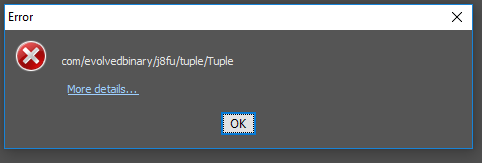
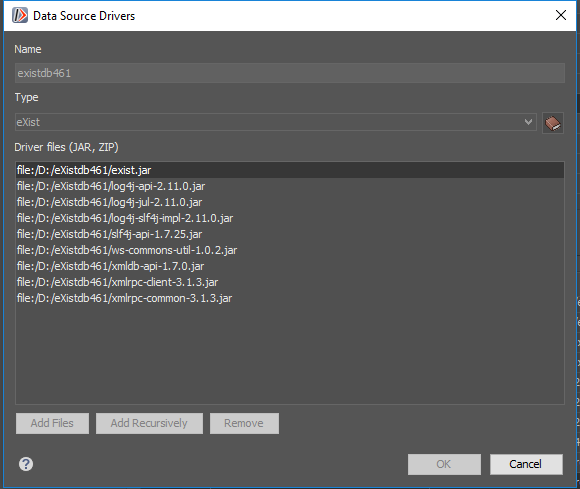
three screenshots showing the connection drivers and the error:

Context information
oxygen: 21.0 build 2019022207
windows: 10 64 bit
eXist-db: 4.6.1
java: jdk1.8.0_192
 rpompaideasoft
All 12 comments
I can't reproduce on macOS, i created a new connection with 4.6.1 and after restarting oxygen it is wai.
@rpompaideasoft any more steps that can help us reproduce this?
 duncdrum
on 6 Mar 2019
duncdrum
on 6 Mar 2019
Steps:
1- Locate the drivers (*. Jar) described here for existdb 4.x.
2- Create the connection in Oxygen with the driver folder specified above.
3- Try it!!
rpompaideasoft
on 6 Mar 2019
According to the image with jar files, a few files are missing. A bit similar as reported in #2311 :
pkg-java-1.1.jar - not needed I think
j8fu-1.21.jar ** missing
bcprov-jdk15on-1.60.jar * missing, not sure if needed
xmldb-api-1.7.0.jar - present
@raducoravu please could you update the documentation? Let's have a telco which jars are really needed
https://www.oxygenxml.com/doc/versions/20.1/ug-editor/topics/configure-exist-datasource.html
@rpompaideasoft I recommend to use the auto download function of oxygen. then all required jar files are downloaded.
 dizzzz
on 6 Mar 2019
dizzzz
on 6 Mar 2019
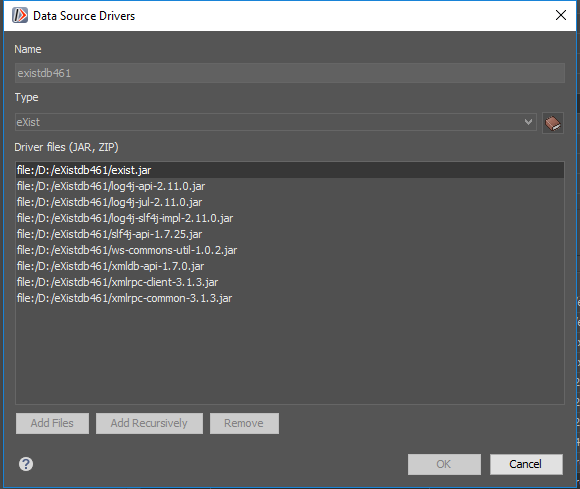
According to the image with jar files, a few files are missing.
Are nine jar files described here
And nine files on picture
rpompaideasoft
on 6 Mar 2019
@rpompaideasoft Sounds like the list of jars on oXygen's documentation may need to be updated, but AFAIK, the far more easier/popular/common/recommended method is to use the "Create eXist-db XML connection" wizard, which was mentioned at the top of the page whose link you posted. The direct link to the documentation for this wizard is: https://www.oxygenxml.com/doc/versions/20.1/ug-developer/topics/how-to-exist.html. Is there any particular reason you didn't use this method? It asks eXist to supply the jars, so there's no way to accidentally miss one.
 joewiz
on 6 Mar 2019
joewiz
on 6 Mar 2019
According to the image with jar files, a few files are missing. A bit similar as reported in #2311 :
pkg-java-1.1.jar - not needed I think
j8fu-1.21.jar ** missing
bcprov-jdk15on-1.60.jar * missing, not sure if needed
xmldb-api-1.7.0.jar - present@raducoravu please could you update the documentation? Let's have a telco which jars are really needed
https://www.oxygenxml.com/doc/versions/20.1/ug-editor/topics/configure-exist-datasource.html@rpompaideasoft I recommend to use the auto download function of oxygen. then all required jar files are downloaded.
Following @dizzzz (above instructions):
1-Error:

2- drivers autoloaded:

rpompaideasoft
on 6 Mar 2019
@rpompaideasoft Sounds like the list of jars on oXygen's documentation may need to be updated, but AFAIK, the far more easier/popular/common/recommended method is to use the "Create eXist-db XML connection" wizard, which was mentioned at the top of the page whose link you posted. The direct link to the documentation for this wizard is: https://www.oxygenxml.com/doc/versions/20.1/ug-developer/topics/how-to-exist.html. Is there any particular reason you didn't use this method? It asks eXist to supply the jars, so there's no way to accidentally miss one.
answered here
rpompaideasoft
on 6 Mar 2019
I will take a look at our documentation and update it.
Oxygen's "Create eXist-db XML connection" downloads and uses all JAR libraries specified in the Exist JNLP. There were problems with in the past with the JNLP not properly referring all JAR libraries and @adamretter has fixed them here: https://github.com/eXist-db/exist/pull/2411
I tested using the "Create eXist-DB connection" wizard in Oxygen to connect to an Exist 4.6.1 server and it worked for me. If this does not work for you, after you click the ""Create eXist-DB connection"" link there is a "Libraries" path, just make sure that it points to an empty folder where to other JAR libraries are located, otherwise Oxygen may load older JAR libraries from previous configured connections.
If expanding the Exist connection in the Data source Explorer still does not work, please restart Oxygen and try again to expand the Exist connection.
 raducoravu
on 7 Mar 2019
raducoravu
on 7 Mar 2019
@rpompaideasoft Is this working for you now? If so can we close the issue?
 adamretter
on 9 Mar 2019
adamretter
on 9 Mar 2019
The drivers 4.6.1 do not work yet. I'm using the existdb 2.2 drivers, but I do not know if it will be a long term problem
rpompaideasoft
on 11 Mar 2019
I don't expect the 2.2 drivers to work with the 4.x series ; There were quite some API changes under the hood
dizzzz
on 12 Mar 2019
I don't expect the 2.2 drivers to work with the 4.x series ; There were quite some API changes under the hood
it works for me while I correct the drivers 4.x.
rpompaideasoft
on 15 Mar 2019
Related issues
 Bpolitycki
·
4Comments
Bpolitycki
·
4Comments
 ahenket
·
4Comments
adamretter
·
6Comments
ahenket
·
4Comments
adamretter
·
6Comments
 lguariento
·
5Comments
lguariento
·
5Comments
 merenyics
·
3Comments
merenyics
·
3Comments
Most helpful comment
I will take a look at our documentation and update it.
Oxygen's "Create eXist-db XML connection" downloads and uses all JAR libraries specified in the Exist JNLP. There were problems with in the past with the JNLP not properly referring all JAR libraries and @adamretter has fixed them here: https://github.com/eXist-db/exist/pull/2411
I tested using the "Create eXist-DB connection" wizard in Oxygen to connect to an Exist 4.6.1 server and it worked for me. If this does not work for you, after you click the ""Create eXist-DB connection"" link there is a "Libraries" path, just make sure that it points to an empty folder where to other JAR libraries are located, otherwise Oxygen may load older JAR libraries from previous configured connections.
If expanding the Exist connection in the Data source Explorer still does not work, please restart Oxygen and try again to expand the Exist connection.