Excalidraw: Proposal: Selection like AutoCAD
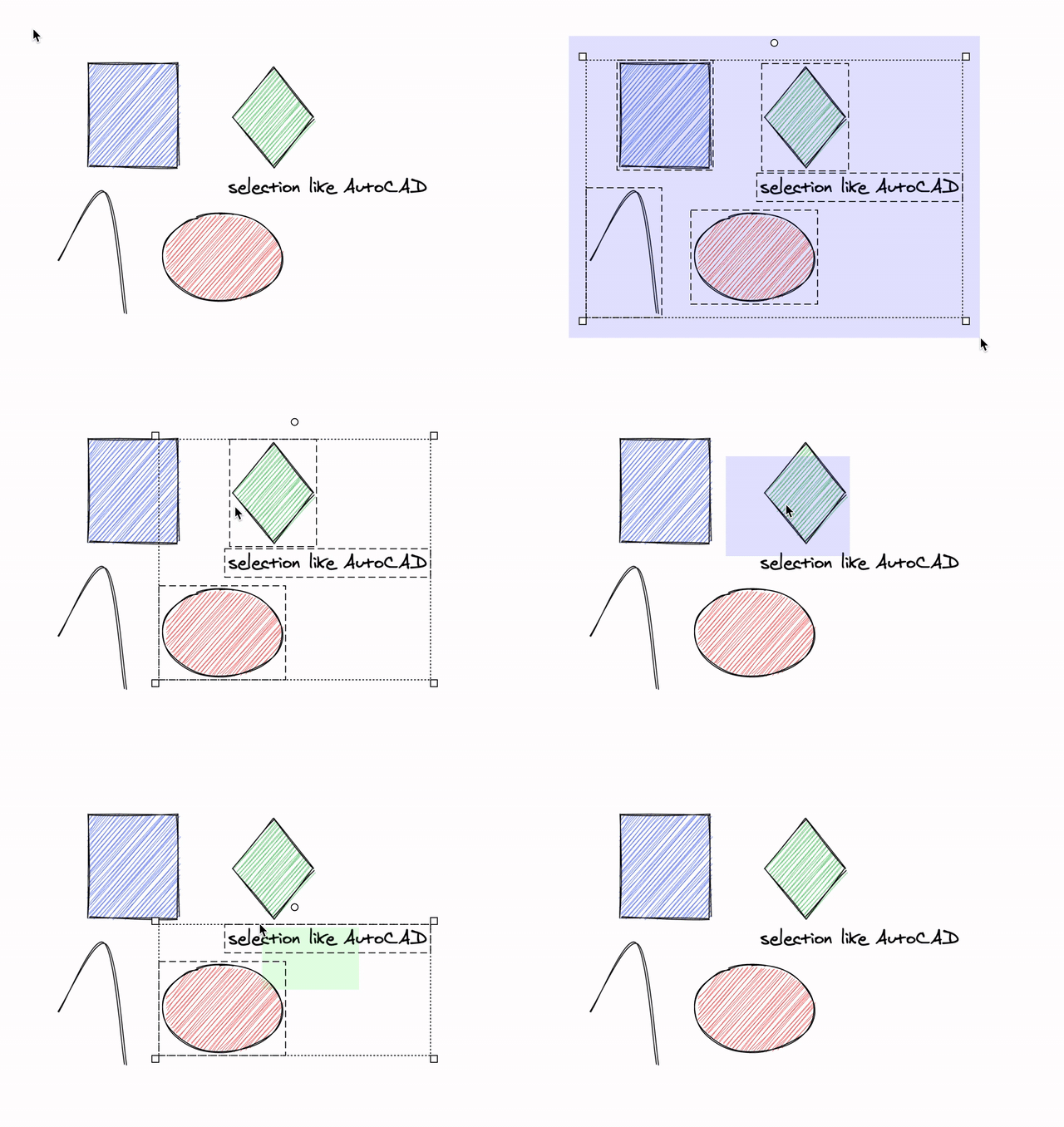
sometimes it's a little bit difficult to select an element because the selection window does not completely cover its bounding box. The way the selection windows it created can change the selection behavior:
- Draw a window from left to right. All objects completely inside the window frame will be selected. (current behavior)
- Draw a window from right to left. All objects completely or partly inside the window frame, will be selected. (additional behavior)
Window-selection / crossing-selection of AutoCAD explained here:
https://www.cadtobim.com/object-selection.html
 ReneCode
❤1
All 3 comments
Surprisingly, this was requested once already: https://github.com/excalidraw/excalidraw/issues/692
 dwelle
on 11 Nov 2020
dwelle
on 11 Nov 2020
😄1
While we're likely not implement the AutoCAD right-click behavior, we might investigate switching the behavior (but no promises).
I'm gonna close this one in favor of https://github.com/excalidraw/excalidraw/issues/2377
dwelle
on 11 Nov 2020
TBH I think the AutoCAD approach is the best from both worlds.. :) (I used to AutoCAD in the past)
 lipis
on 12 Nov 2020
lipis
on 12 Nov 2020
👍2
Was this page helpful?
0 / 5 - 0 ratings
Related issues
dwelle
·
3Comments
 vjeux
·
3Comments
vjeux
·
3Comments
vjeux
·
3Comments
dwelle
·
3Comments
vjeux
·
3Comments
vjeux
·
3Comments
vjeux
·
3Comments
dwelle
·
3Comments
Most helpful comment
TBH I think the AutoCAD approach is the best from both worlds.. :) (I used to AutoCAD in the past)