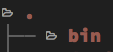
The new --icons option is great, but one thing that's bothering me is the spacing for pretty much any file name that doesn't start with a small character (folders/files that start with dots actually look pretty fine).
Example:

Maybe it's just me, but the icons are just a bit too close to the first character of the directory name, and it just makes things feel cramped. Any chance that this spacing could be manually adjusted perhaps?
 macintacos
All 10 comments
I suppose it depends on the font used.
I use Nerd font patched 'Sauce Code Pro' and it already has plenty of spacing.
Probably best as a configuration option --icons-spacing to specify 'pt' as a number?
 windware-ono
on 22 Jul 2019
windware-ono
on 22 Jul 2019
Yeah I’m not a fan of the smaller icons; I tried out those and some of them were illegible to me until I made the font point size comically large which was just not good for general use.
The option to space these out from the text would be good enough for me. Even if it’s just a literal “space” character (or maybe a character of my choice?) I’d be happy with that!
macintacos
on 22 Jul 2019
There already is a literal space character between the icon and the filename. The problem is the icon is drawing effectively double-wide while occupying a single column.
For comparison, using a patched Menlo font in macOS Terminal.app:
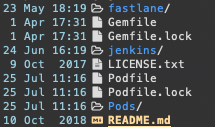
It looks to me as though the icons in my screenshot are still basically double-wide, except Terminal.app is centering the icon on the column instead of left-aligning it. This means it overlaps half of the preceding space and half of the the succeeding space, and ends up looking decent.
And when looking at the Grid output, it's clear that adding an extra space after the icon would look really bad, as it would make the icon appear to be its own grid entry instead of associated with the file:

 lilyball
on 25 Jul 2019
lilyball
on 25 Jul 2019
Which is to say, I have no objection to an --icons-spacing flag (though maybe it should just be a boolean flag --extra-icon-spacing instead of taking an argument?), but it should not be the default behavior.
lilyball
on 25 Jul 2019
Ah; to be honest, I think the centering would work better for me instead of adjusting the spacing. Could you link to the patched font that you use?
If this issue is unique to iTerm, then that sucks; I won’t be switching back to Terminal.app for a good long time.
macintacos
on 26 Jul 2019
NerdFonts doesn't have a download for Menlo directly, so I have to assume I patched this myself (I've been using it for years so I don't remember), but as the base font is owned by Apple I don't have the rights to distribute it. You should be able to run their Font Patcher Script on the copy of Menlo found on your system.
That said, I would encourage you to try this in Terminal.app, because I'm guessing the centering is special Terminal.app behavior when it encounters a character too wide for the column, because if it was font behavior then I would expect it to occur on all patched fonts, not just Menlo.
lilyball
on 26 Jul 2019
FWIW, I just tried the Terminal.app and am seeing the same spacing compared to iTerm; there is no centering going on, as far as I can tell.
macintacos
on 29 Jul 2019
Speaking of the Nerds Fonts :
- "_[font family] Nerd Font Complete_" will have non-Monospaced ( variable-width ) icons
- "_[font family] Nerd Font Complete Mono_" will have Monospaced ( fixed-width ) icons
Of course Monospaced icons will be "smaller" since they will share the same width as the letters.
For the record, powerlevel10k takes care of this problem during its configuration via this question :
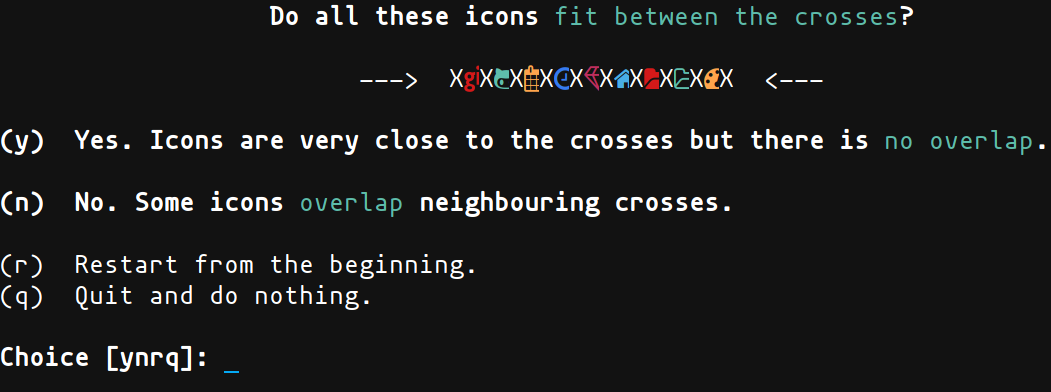
If you say no here, 1 space will be added after each icons.
I look forward to this new flag :) (--extra-icon-spacing)
 Sherulez
on 21 Feb 2020
Sherulez
on 21 Feb 2020
I solved this by just setting these in iTerm, since you can specify non-ASCII characters differently from ASCII ones:
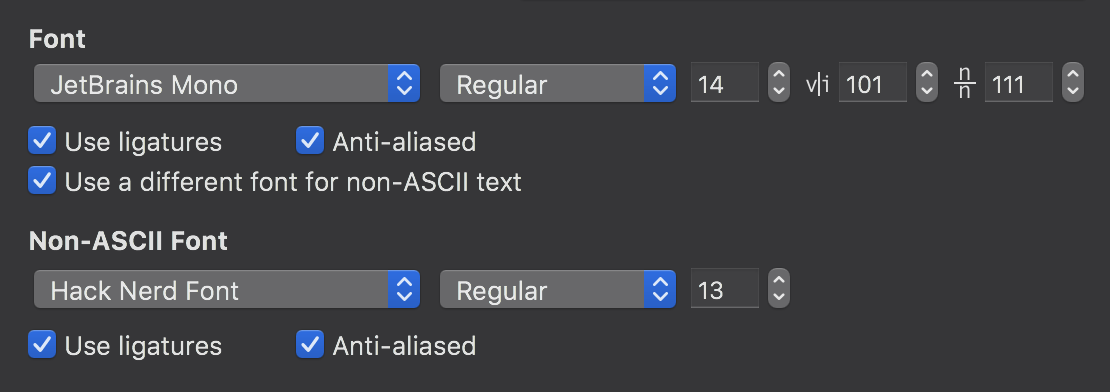
Hopefully this helps those that use iTerm 🙂
macintacos
on 22 Feb 2020
While testing icons with various fonts, I encountered both those that needed one space and those that needed two spaces. The aforementioned enviroment variable, EXA_ICON_SPACING, will do that (as of next release). See exa v0.9.0 compared to the current development version, with 1 space, and with 2 spaces:
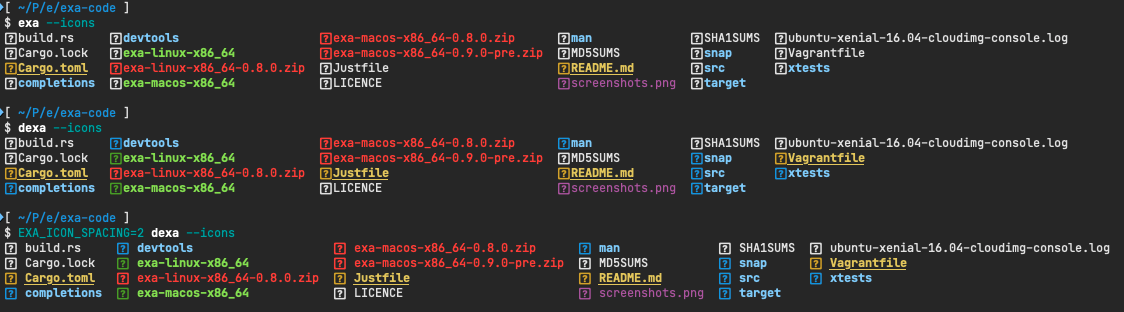
(ignore the fact that all icons are question marks)
It's an environment variable because it's not something that will usually change between exa invocations. It's more of a global setting.
 ogham
on 24 Oct 2020
ogham
on 24 Oct 2020
Related issues
 CosmicToast
·
4Comments
CosmicToast
·
4Comments
 mrusme
·
3Comments
mrusme
·
3Comments
 theduke
·
3Comments
theduke
·
3Comments
 jmks
·
3Comments
jmks
·
3Comments
 lilianmoraru
·
5Comments
lilianmoraru
·
5Comments
Most helpful comment
I solved this by just setting these in iTerm, since you can specify non-ASCII characters differently from ASCII ones:
Hopefully this helps those that use iTerm 🙂