Evalai: Add feature for filtering the submissions
Current Scenario
If there are a large number of submissions in a challenge and a challenge host wants to view all the submissions for a participant team then they have to scroll through all the submissions.
Expected
The challenge host should be able to filter the submissions by participant team name in View All Submissions Tab.
Deliverables
- [ ] Add the required API's.
- [ ] Add the required frontend UI.
Please feel free to discuss the approach before start coding.
 RishabhJain2018
All 19 comments
@RishabhJain2018 Can I work on this issue?
 Sanji515
on 20 Feb 2019
Sanji515
on 20 Feb 2019
Can I take this, as I am done with my previous issue?
 anuj-rathore
on 20 Feb 2019
anuj-rathore
on 20 Feb 2019
@anuj-rathore You can take #2142 issue.
Sanji515
on 20 Feb 2019
Wait, wait. I'm here to help :)
Since @Sanji515 you commented first, you can take this one. @anuj-rathore Please take the issue #2142 or you can wait I'm opening some more issues.
RishabhJain2018
on 20 Feb 2019
@RishabhJain2018 Could you please take a look at the proposal I've sent ?
 yashdusing
on 20 Feb 2019
yashdusing
on 20 Feb 2019
Yeah, I've it in my todo's. I'll get to it soon.
RishabhJain2018
on 20 Feb 2019
@RishabhJain2018 For frontend should I add another dropdown similar to phase list populated with the list of the participating team for filtering?
Sanji515
on 21 Feb 2019
Hmm..I am thinking of having a Filter Submissions button near the Download button under View All Submissions Tab which will appear when the host will select a phase. Upon clicking that button a modal comes up saying
Filter submissions by using participant team with a list of participant teams having input as a checkbox and of course scrollable, out of which the host selects one or multiple participant teams` and the submissions by those team will appear in the results.
@deshraj Thoughts on this?
RishabhJain2018
on 21 Feb 2019
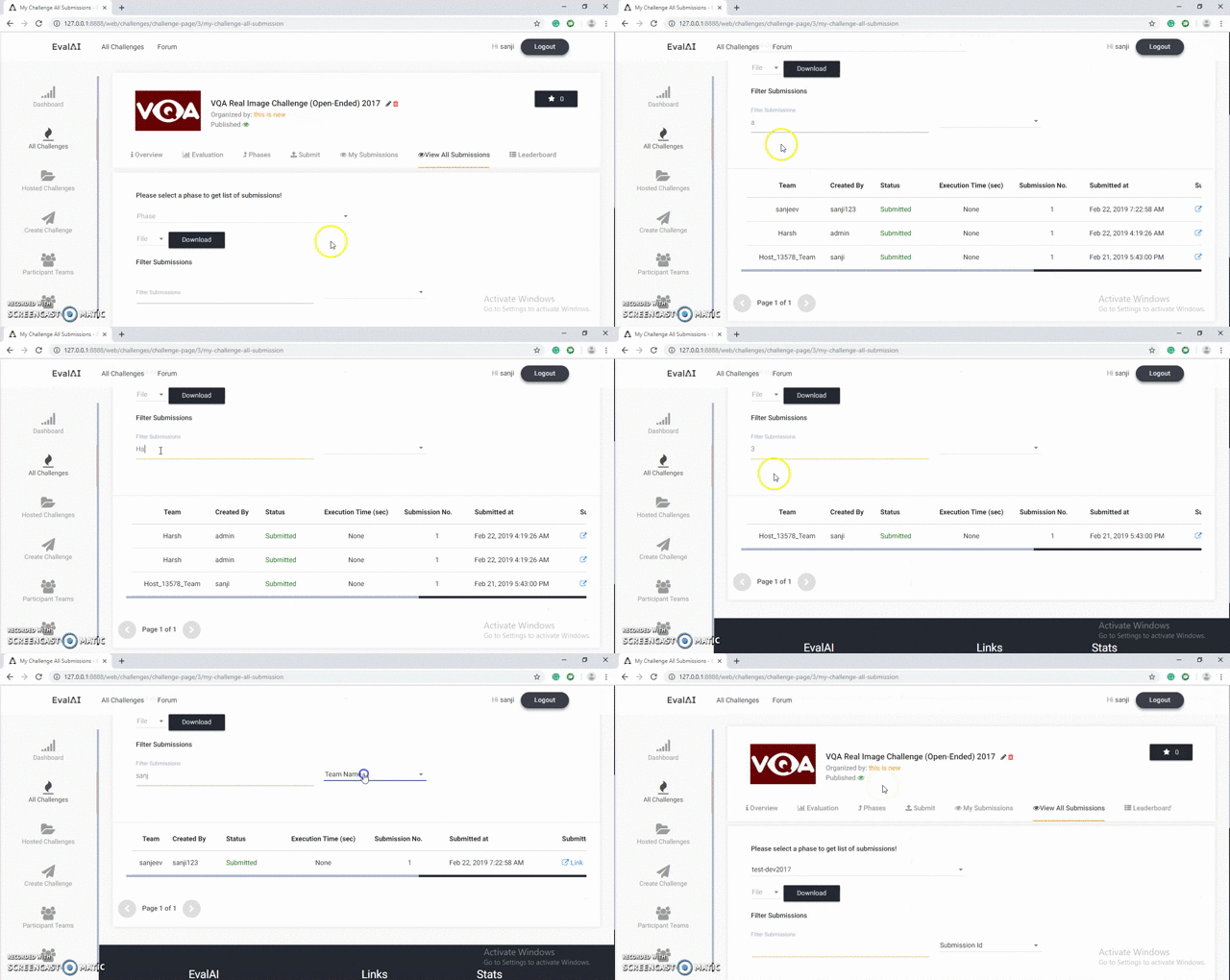
After having an offline discussion with @RishabhJain2018, we have converged on trying to get a search based filtering implemented instead of filtering through a modal. This will be a much simpler approach and provides a better user experience.
So basically the flow will be something like this:
- Select phase to see all submissions
- Enter submission id or team name in a search box to filter the submissions
- Show filtered submissions
See the following demo to get a sense of what we are looking for: http://plnkr.co/edit/XklvXtc1AZpndjLvXrh8?p=preview
 deshraj
on 21 Feb 2019
deshraj
on 21 Feb 2019
So we are going to give two option for filtering one with submission ID and another with team name and the user can select among these two options, by which method he wants to search like in the demo dropdown is given for Designation, name and company name.
am I right? @RishabhJain2018 @deshraj
Sanji515
on 21 Feb 2019
yeah
RishabhJain2018
on 21 Feb 2019
@RishabhJain2018 @deshraj Please have a look to screencast.
Sanji515
on 22 Feb 2019
@Sanji515 Could I ask which tool did you use to make this amazing gif? Many thanks!
 Helinia
on 22 Feb 2019
Helinia
on 22 Feb 2019
@Helinia Screencast-O-Matic :)
oh, I forgot this doesn't give you a gif, you will need to convert from video to Gif.
Sanji515
on 22 Feb 2019
@RishabhJain2018 @deshraj Please have a look to screencast.
@RishabhJain2018 @deshraj Please look into it.
Sanji515
on 22 Feb 2019
@Sanji515 this looks good in general. We might have more comments when we try it on our local machine. There might be some UI alignment we would want to do. Can you please open a PR for this?
deshraj
on 22 Feb 2019
@deshraj @RishabhJain2018 sure!
Sanji515
on 22 Feb 2019
This issue has been automatically marked as stale because it has not had recent activity. It will be closed if no further activity occurs. Thank you for your contributions.
![stale[bot] picture](https://avatars.githubusercontent.com/in/1724?v=4&s=40) stale[bot]
on 8 Jun 2019
stale[bot]
on 8 Jun 2019
This issue has been automatically closed as there is no further activity. Thank you for your contributions.
stale[bot]
on 15 Jun 2019
Related issues
 aka-jain
·
6Comments
aka-jain
·
6Comments
 dhruvbatra
·
4Comments
dhruvbatra
·
4Comments
 HargovindArora
·
4Comments
RishabhJain2018
·
5Comments
HargovindArora
·
4Comments
RishabhJain2018
·
5Comments
 Ayukha
·
5Comments
Ayukha
·
5Comments
Most helpful comment
After having an offline discussion with @RishabhJain2018, we have converged on trying to get a search based filtering implemented instead of filtering through a modal. This will be a much simpler approach and provides a better user experience.
So basically the flow will be something like this:
See the following demo to get a sense of what we are looking for: http://plnkr.co/edit/XklvXtc1AZpndjLvXrh8?p=preview