Hello! I use Eureka (4.0.1). I use the default SwitchRow and when the state changes, the UI breaks in other cells. Please see the videos. I tried two options, in one section and done also in a separate section.
class PeopleAnimationSettingsViewController: FormViewController {

    weak var delegate: PeopleAnimationSettingsViewControllerDelegate?

    // MARK: - Data

    var animatorModel: AnimatorModel!

    // MARK: - Row type

    private enum SliderRowType: String {
        case duration, animationInterval, customOffset
    }

    private enum SwitchRowType {
        case customOffset

        var tag: String {
            switch self {
            case .customOffset:
                return "SwitchRowType.customOffset"
            }
        }

        var title: String {
            switch self {
            case .customOffset:
                return "Custom offset"
            }
        }
    }

    // MARK: - Lifecycle

    override func viewDidLoad() {
        super.viewDidLoad()
        setupSettings()
        // UI
        addNavButtons()
        guard animatorModel != nil else  { return }
        setupForm()
    }

    private func setupSettings() {
        definesPresentationContext = true
    }

}

// MARK: - Navigation Bar

extension PeopleAnimationSettingsViewController {

    private func addNavButtons() {
        navigationItem.leftBarButtonItem = UIBarButtonItem(barButtonSystemItem: .cancel, target: self, action: #selector(dismissAction))
        navigationItem.rightBarButtonItem = UIBarButtonItem(title: "Apply", style: .done, target: self, action: #selector(applyNewSettings))
    }

}

// MARK: - Form

extension PeopleAnimationSettingsViewController {

    private func setupForm() {
        form
            +++ Section()
            <<< directionRow()
            <<< sliderRow(.duration)
            <<< sliderRow(.animationInterval)
            +++ Section() {
                $0.tag = "custom"
            }
            <<< switchRow(.customOffset)
            <<< sliderRow(.customOffset)
    }

}

// MARK: - Rows

extension PeopleAnimationSettingsViewController {

    private func directionRow() -> ActionSheetRow<String> {
        let row = ActionSheetRow<String>() {
            $0.tag = "DirectionRow"
            $0.title = "Direction"
            $0.selectorTitle = "Direction"
            $0.value = AnimatorManager.title(animatorModel.direction.rawValue)
            $0.options = ["Top", "Bottom", "Left", "Right"]
        }
        return row
    }

    private func getDirectionRow() -> ActionSheetRow<String>? {
        let row = form.rowBy(tag: "DirectionRow") as? ActionSheetRow<String>
        return row
    }

    private func sliderRow(_ type: SliderRowType) -> SliderRow {
        let row = SliderRow() { [weak self] in
            $0.tag = type.rawValue
            $0.title = type.rawValue

            switch type {
            case .customOffset:
                $0.minimumValue = 0
                $0.maximumValue = 1000
            default:
                $0.minimumValue = 0
                $0.maximumValue = 1
            }

            guard let animatorModel = self?.animatorModel else { return }

            switch type {
            case .animationInterval:
                $0.value = Float(animatorModel.animationInterval)
            case .duration:
                $0.value = Float(animatorModel.duration)
            case .customOffset:
                $0.value = 0
            }


            // hiden
            switch type {
            case .customOffset:
                let tag = SwitchRowType.customOffset.tag
                $0.hidden = Condition.function([tag], { form in
                    return !((form.rowBy(tag: tag) as? SwitchRow)?.value ?? false)
                })
            default:
                break
            }
        }
        return row
    }

    private func getSliderRow(_ type: SliderRowType) -> SliderRow? {
        let tag = type.rawValue
        let row = form.rowBy(tag: tag) as? SliderRow
        return row
    }

    private func switchRow(_ type: SwitchRowType) -> SwitchRow {
        let row = SwitchRow() {
            $0.tag = type.tag
            $0.title = type.title
        }
        return row
    }

}

// MARK: - New Model

extension PeopleAnimationSettingsViewController {

    @objc private func applyNewSettings() {
        guard let directionRow = getDirectionRow() else { return }
        guard let animationIntervalRow = getSliderRow(.animationInterval) else { return }
        guard let durationRow = getSliderRow(.duration) else { return }
        // values
        guard let directionRowValue = directionRow.value else { return }
        guard let animationIntervalRowValue = animationIntervalRow.value else { return }
        guard let durationRowValue = durationRow.value else { return }

        let direction = AnimatorManager.direction(directionRowValue)
        let animationInterval = TimeInterval(animationIntervalRowValue)
        let duration = TimeInterval(durationRowValue)

        animatorModel.animationInterval = animationInterval
        animatorModel.duration = duration
        animatorModel.direction = direction
        delegate?.doneAction(animatorModel)
        dismissAction()
    }

}

// MARK: - Navigation

extension PeopleAnimationSettingsViewController {

    @objc private func dismissAction() {
        dismiss(animated: true, completion: nil)
    }

}
https://monosnap.com/file/kdNejmC2vMFZ206xdGOYefJpfhsDRb
https://monosnap.com/file/29WSsSppxa3kbWpmlEDd8xZwHULFpo
 alexanderkhitev
All 12 comments
I am having very similar experience on iOS 11.x.
This one haven't been tried, but does it work under iOS 10.x as expected?
 AdamStreet
on 28 Nov 2017
AdamStreet
on 28 Nov 2017
@AdamStreet Yes on iOS 10 in our main application there were no such problems. I also fixed the bugs, after returning to the FormViewController, the lower cells have not the correct behavior, maybe I'll post another video later.
alexanderkhitev
on 28 Nov 2017
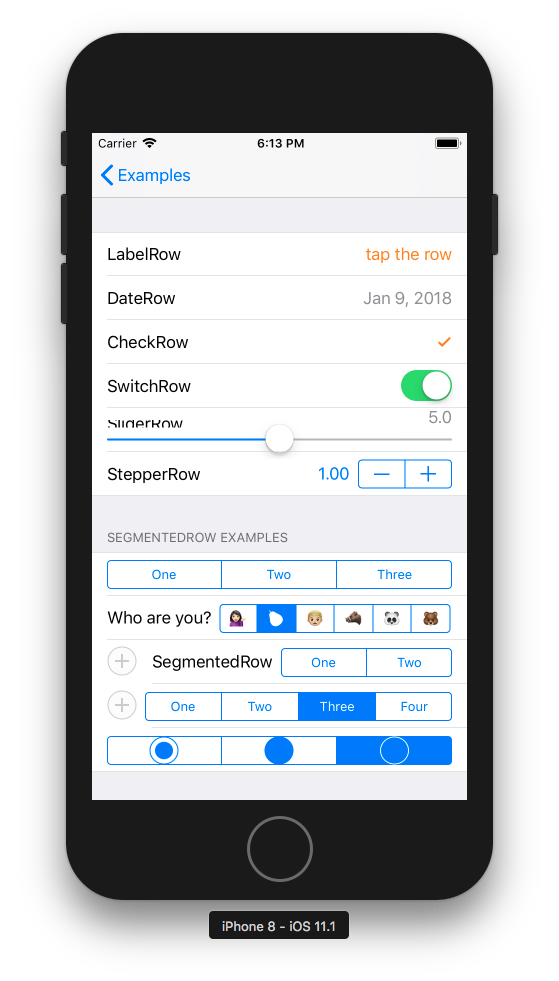
This is also happening on the Example provided in Eureka:
We'll work on this.
 m-revetria
on 9 Jan 2018
m-revetria
on 9 Jan 2018
related pull request #1296 cc/ @m-revetria
 mtnbarreto
on 9 Jan 2018
mtnbarreto
on 9 Jan 2018
@alexanderkhitev can you try setting UITableViewAutomaticDimension to your form's UITableView.rowHeight?
UITableViewAutomaticDimension should be the default value for UITableView.rowHeight on iOS 11, but I had to set it programmatically in UIViewController.viewDidLoad in order to make it work.
m-revetria
on 10 Jan 2018
Any update for SliderRow's UI Bug?
 lukeleleh
on 12 Jan 2018
lukeleleh
on 12 Jan 2018
@m-revetria Yes, I'll try when I have time and write about it.
alexanderkhitev
on 12 Jan 2018
@m-revetria I've added tableView.rowHeight = UITableViewAutomaticDimension in viewDidLoad, but the slider position still changes if another value in the form changes. I'm not seeing any difference.
 cerupcat
on 15 Jan 2018
cerupcat
on 15 Jan 2018
Not the best solution, but for now, this is working for me - Reloading the tableView on changes.
 override func viewWillAppear(_ animated: Bool) {
        super.viewWillAppear(animated)
        tableView.reloadData()
    }

    override func sectionsHaveBeenAdded(_ sections: [Section], at indexes: IndexSet) {
        super.sectionsHaveBeenAdded(sections, at: indexes)
        tableView.reloadData()
    }

    override func sectionsHaveBeenRemoved(_ sections: [Section], at indexes: IndexSet) {
        super.sectionsHaveBeenRemoved(sections, at: indexes)
        tableView.reloadData()
    }
Is this still happening after #1296 ?
 mats-claassen
on 29 Mar 2018
mats-claassen
on 29 Mar 2018
@mats-claassen Sorry, I have not tested it yet.
alexanderkhitev
on 30 Mar 2018
This was already fixed, now SliderRow title, slider and value text is shown in the same line.
mtnbarreto
on 17 May 2018
Related issues
 mkoppanen
·
15Comments
mkoppanen
·
15Comments
 geoffmacd
·
16Comments
geoffmacd
·
16Comments
 YSDC
·
25Comments
YSDC
·
25Comments
 murraycollingwood
·
16Comments
murraycollingwood
·
16Comments
 geoherna
·
14Comments
geoherna
·
14Comments
Most helpful comment
This is also happening on the Example provided in Eureka:

We'll work on this.