Eureka: Xcode 9 GM | Build Failing *NEED FAST SUPPORT*
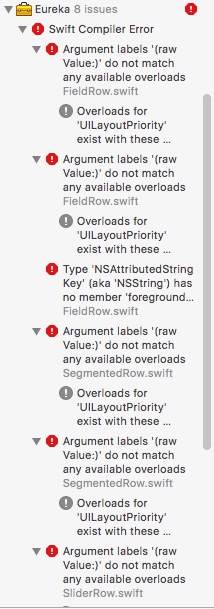
I need Eureka working because I have a very critical bug that needs to be fixed and uploaded to the App Store as an update. I also did not know that updating to Xcode 9 would break anything because I am using the Xcode 9 branch.
 mattfrias
All 13 comments
I've been struggling for two days with the xcode9 upgrade. My suggestion, if you are able, is to revert to xcode 8.3.3 using xcode-select to fix your bug. Then, keep a separate copy of your code forked for xcode 8 while you get everything working /w xcode 9
Some gotchas:
- make sure you launch xcode 8. xcode-select only changes the compiler for command line tools
- don't put any spaces in the path "/Application/Xcode8.app/Contents/Developer/" 😜
- if you use carthage, nuke the derived data directory between builds:
rm -rf ~/Library/Caches/org.carthage.CarthageKit/DerivedData/. CocoaPods may have something similar - clean the project AND the build folder (hold down option when you click the Product menu)
 eliburke
on 19 Sep 2017
eliburke
on 19 Sep 2017
@eliburke I tried to downgrade back to 8.3.3 but I can't so I'm really depending on the repo owner to fix it quickly so I can get this update out. But thank you for the help.
mattfrias
on 19 Sep 2017
Duplicate Issue of #1220
 Laptopmini
on 19 Sep 2017
Laptopmini
on 19 Sep 2017
Yes, I know but that issue does not have a solution. Hence why I have made a duplicate issue.
mattfrias
on 19 Sep 2017
How does that seem like a valid reason to you? Should you flood the issue section with duplicate threads until you get your answer by that logic?
You could've at least bothered to participate in it or voice your opinion.
Laptopmini
on 19 Sep 2017
@mattfrias Joined github on 27 September 2016 and @Laptopmini on 4 Mai 2014, who is ignorant github users 🤦♂️ .
 RSickenberg
on 20 Sep 2017
RSickenberg
on 20 Sep 2017
I didn't use any of the Xcode 9 Beta or GM. Was on Xcode 8.3.3 with Swift 3.2 until this morning. Got official Xcode 9 release from App Store, and subsequent Eureka build errors. Here's how I got Eureka to compile and seems to run fine for me this morning.
Podfile:
pod 'Eureka', :git => 'https://github.com/xmartlabs/Eureka.git', :branch => 'feature/Xcode9-Swift4'
- In Xcode 9, tap the 'Pods' project in the Project Navigator.
- Tap 'Eureka' in the 'Targets'
- Build Settings
- Search for 'Swift Lang'
- Change 'Swift Language Version' to 'Swift 4.0' (Everything else in my world is set up for Swift 3.2...)
- I nuked the contents of the DerivedData folder just to be sure. Not sure if this helps, but it can't hurt!
- Clean
- Build
- Joy!
Side note:
I noticed after I did another pod update, that the Eureka Swift Language Version reverts back to 3.2 and you'll get build errors again. Might be some other magic I'm missing in the Podfile? However, a quick tweak to Swift 4.0 and things build again.
 davros1970
on 20 Sep 2017
davros1970
on 20 Sep 2017
@davros1970 steps worked for me.
 edasque
on 20 Sep 2017
edasque
on 20 Sep 2017
try the following in your podfile:
post_install do |installer|
        installer.pods_project.targets.each do |target|

            if  target.name == "Eureka"
                target.build_configurations.each do |config|
                    config.build_settings['SWIFT_VERSION'] = '4.0'
                end
            end
        end
    end
 barteljan
on 21 Sep 2017
barteljan
on 21 Sep 2017
@barteljan Thank you that worked. 😄👍
Finally, someone actually helpful.
mattfrias
on 21 Sep 2017
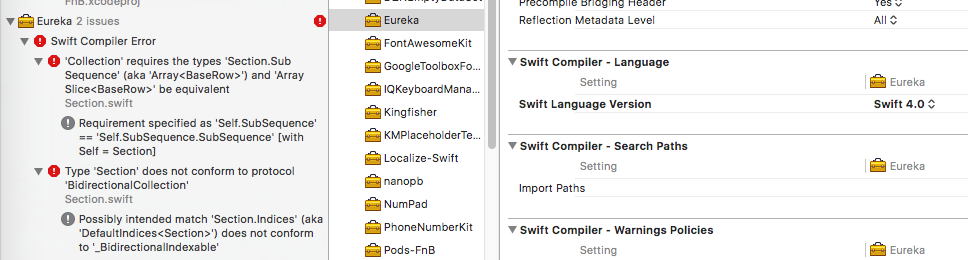
@barteljan Not working for me
 tuantmdev
on 26 Sep 2017
tuantmdev
on 26 Sep 2017
@tuantmdev Which eureka branch are you using ?
barteljan
on 26 Sep 2017
@barteljan Thanks, it works for me now after using master branch
tuantmdev
on 27 Sep 2017
Related issues
 Isuru-Nanayakkara
·
3Comments
Isuru-Nanayakkara
·
3Comments
 jaylyerly
·
3Comments
jaylyerly
·
3Comments
 iBearKh
·
3Comments
iBearKh
·
3Comments
 fpena
·
3Comments
fpena
·
3Comments
 smileatom
·
3Comments
smileatom
·
3Comments
Most helpful comment
I didn't use any of the Xcode 9 Beta or GM. Was on Xcode 8.3.3 with Swift 3.2 until this morning. Got official Xcode 9 release from App Store, and subsequent Eureka build errors. Here's how I got Eureka to compile and seems to run fine for me this morning.
Podfile:
pod 'Eureka', :git => 'https://github.com/xmartlabs/Eureka.git', :branch => 'feature/Xcode9-Swift4'
Side note:
I noticed after I did another pod update, that the Eureka Swift Language Version reverts back to 3.2 and you'll get build errors again. Might be some other magic I'm missing in the Podfile? However, a quick tweak to Swift 4.0 and things build again.