Eureka: Email error: "Unexpected CFBundleExecutable Key"
Hi, I'm getting an error with the Info.plist when uploading my iOS app to App Store. The error comes via email right after the upload to App Store finishes.
The deployment target of the app is iOS 10.0 and I'm using the latest version of the SDK -> 3.0.0.
This is the error:
Unexpected CFBundleExecutable Key - The bundle at '/Payload/APP_NAME.app/Target Support Files/Eureka/Info.plist' does not contain a bundle executable. If this bundle intentionally does not contain an executable, consider removing the CFBundleExecutable key from its Info.plist and using a CFBundlePackageType of BNDL. If this bundle is part of a third-party framework, consider contacting the developer of the framework for an update to address this issue.
If I do what is described in the error and erase the CFBundleExecutable Key, the app doesn't run in Xcode, and that's the only solution I have found in forums. I have also tried only changing the CFBundlePackageType to BNDL and setting Enable Bitcode to NO in my Project Settings, but it doesn't work.
I use CocoaPods to manage the library.
Any thoughts on what it can be?
 mafer-bc
All 7 comments
Hi @mafer-bc that's weird. The framework's plist file is generated by cocoapods when you install it. If you check in the rest of pods that you are using, all of them have a pretty similar plist file. We even have released some apps a few days ago using Eureka without any issue.
Can you check if your target's plist file is included in the "Copy Bundle Resources" build phase? It shouldn't be added, that might produce some issue while uploading to the App Store, ref: https://stackoverflow.com/a/39615474/1070393
 m-revetria
on 21 Jun 2017
m-revetria
on 21 Jun 2017
Hi! I had already checked that, and the plist file wasn't there.
I only have the localized plist, but it is a .strings file and the GoogleService-Info.plist, which is needed to use Google Services:
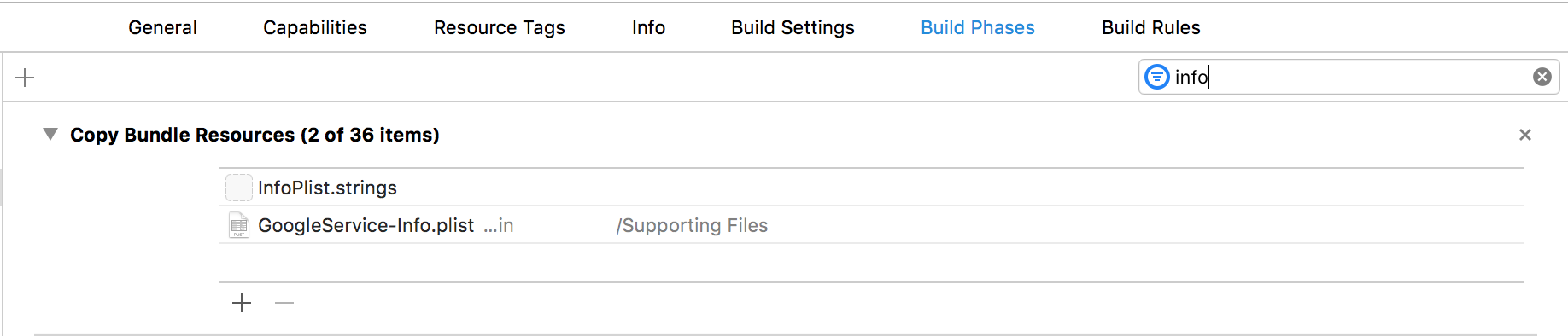
The other files are fonts or other localized files.
I noticed that the folder called "Target Support Files" that CocoaPods generates is in the "Copy Bundle Resources", I don't know if this is expected or needed?
mafer-bc
on 21 Jun 2017
I checked out some of my projects and I didn't see that folder being included in neither of them. This folder includes the Info.plist files for all the installed pods, so it can be the cause of your issue.
Can you try by removing it from the "Copy Bundle Resources" build phase?
m-revetria
on 22 Jun 2017
Sure!
I'm building the archive right now 😀
mafer-bc
on 22 Jun 2017
That worked! Thanks, I was struggling with this for a while!
mafer-bc
on 22 Jun 2017
Ok cool, I don't have idea how you ended up with that folder included in the "Copy Bundle Resources" phase.
m-revetria
on 22 Jun 2017
I'm having this issue. Do i remove the info plist from my project target - build phases - copy bundle resources? I just localized my info.plist file also.
 thankmelater23
on 12 Dec 2019
thankmelater23
on 12 Dec 2019
Related issues
 AAverin
·
14Comments
AAverin
·
14Comments
 arakweker
·
44Comments
arakweker
·
44Comments
 mkoppanen
·
15Comments
mkoppanen
·
15Comments
 chiliec
·
15Comments
chiliec
·
15Comments
 geoherna
·
14Comments
geoherna
·
14Comments