Eureka: Dynamically add rows but initially hidden
Hi I'm wondering whether its possible to add rows but initially hidden after the viewcontroller already appeared.
Right now I have a section and 1 switch row with default value of false. Both initialized on viewDidLoad.
afterwards, I made a network call and retrieve some datas, I use those datas to add rows below the switch row, with the hidden condition depending on the value of the switch row.
http://www.giphy.com/gifs/3oKIPkwbGH6BXBJk7S
I tried to put $0.hidden = Condition(booleanLiteral:true) when adding the dynamic rows.
but it always shows a glimpse of when added and then it went hidden
Eureka 3.0.0
Xcode 8.3.2
iOS 10.12.5
 tsanjoto
All 10 comments
Hi @tsanjoto, you have to set the hidden property in the row constructor's callback to achieve that behavior. Can you share your code?
I tried the current version in master and that is working. Take a look to the sample code posted below:
override func viewDidAppear(_ animated: Bool) {
super.viewDidAppear(animated)
DispatchQueue.main.asyncAfter(deadline: .now() + 5) { [unowned self] in
(0..<20).forEach { ind in
self.form.last! <<< ButtonRow("some_tag_\(ind)") { row in
row.title = "A NEW HIDDEN ROW: \(ind)"
row.hidden = Condition(booleanLiteral: true)
}
}
debugPrint("20 new rows were added to the form")
debugPrint("Total number of rows: \(self.form.allRows.count)")
}
DispatchQueue.main.asyncAfter(deadline: .now() + 10) { [unowned self] in
self.form.allRows.forEach { $0.hidden = false; $0.evaluateHidden() }
}
}
Previous code is producing the next behavior in one of the examples provided in the repo:
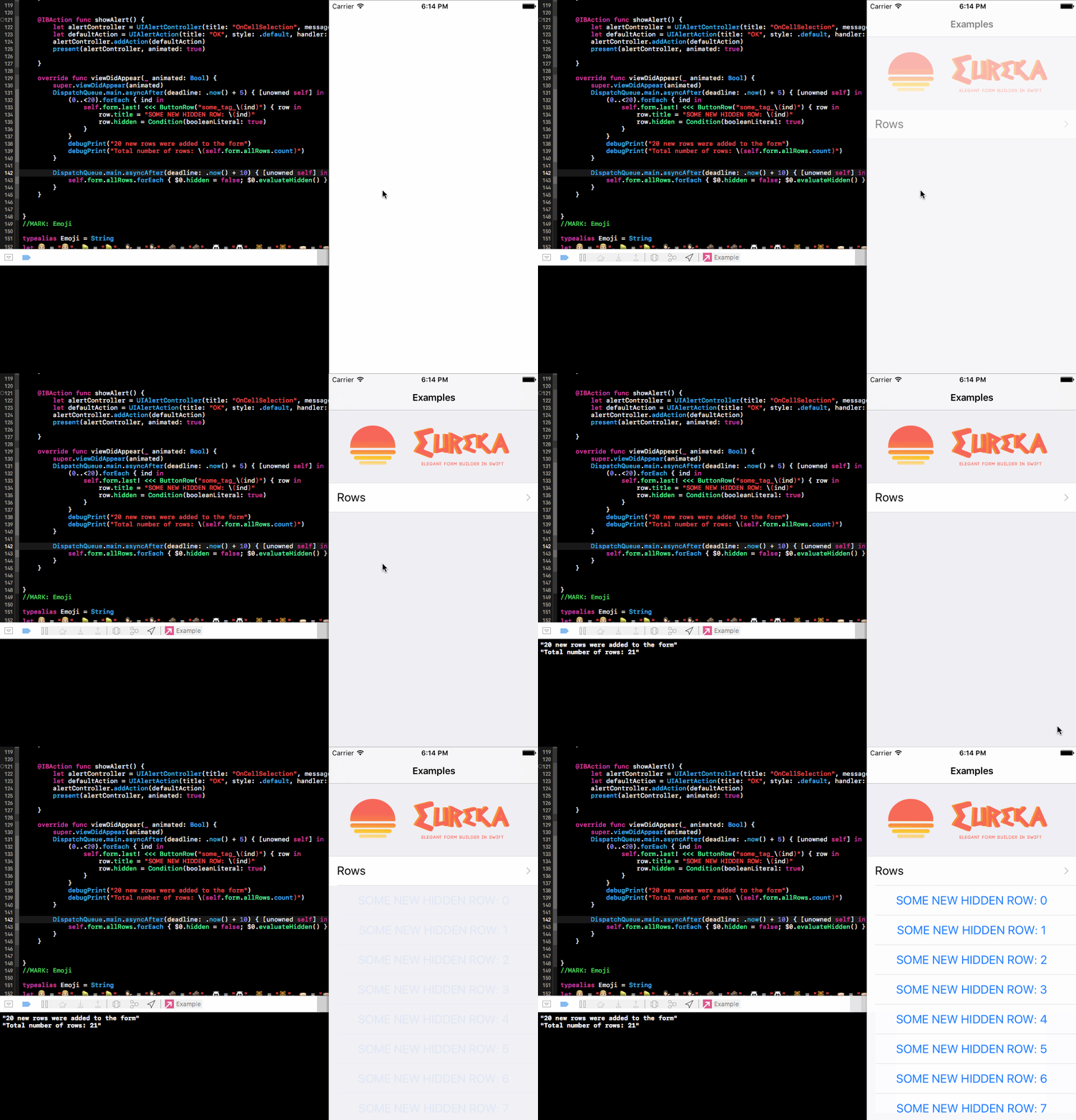
 m-revetria
on 28 Jun 2017
m-revetria
on 28 Jun 2017
Hi m-revetria,
I am able to replicate this on a single page project.
You need to get alamofire though.
It seems that the DispatchQueue.asyncAfter is not a good replication of a network call.
I attempted to going in background thread and resurface into main ui thread, that works fine.
After I replace it on Alamofire it behaves this way
https://giphy.com/gifs/xUOrwjGTMCkWioSomY/fullscreen
//
// ViewController.swift
// Eureka Bug
//
// Created by Thompson Sanjoto on 2017-06-28.
// Copyright © 2017 Thompson Sanjoto. All rights reserved.
//
import UIKit
import Eureka
import Alamofire
class ViewController: FormViewController {
static var dynamicSection = "Dynamic Section"
static var dynamicSectionToggle = "Dynamic Section Toggle"
static var dynamicSectionLoading = "Dynamic Section Loading"
var loadingTimer:Timer? = nil
var loadingDots:Int = 0
let dynamicSectionToggleCondition = Condition.function([ViewController.dynamicSectionToggle], { form in
return !((form.rowBy(tag: ViewController.dynamicSectionToggle) as? SwitchRow)?.value ?? false)
})
override func viewDidLoad() {
super.viewDidLoad()
// Do any additional setup after loading the view, typically from a nib.
self.setupForm()
//attempting to simulate network thread
let url = "http://www.google.com"
Alamofire.request(url).responseJSON { response in
print("cameback from google")
DispatchQueue.main.async {
print("This is run on the main queue, after the previous code in outer block")
self.loadingTimer?.invalidate()
let dynSection = self.form.sectionBy(tag: ViewController.dynamicSection)!
let loadingRow = self.form.rowBy(tag: ViewController.dynamicSectionLoading)!
//self.setupDynamicRegistrationForm(dynSection: dynSection, hiddenCondition: self.dynamicSectionToggleCondition)
let randomNumberOfRows:UInt32 = 15
for index in 0...randomNumberOfRows
{
dynSection <<< ButtonRow("\(index)\(index)\(index)\(index)\(index)")
{
$0.title = $0.tag
$0.hidden = self.dynamicSectionToggleCondition
}
}
loadingRow.hidden = Condition(booleanLiteral: true);
loadingRow.evaluateHidden()
debugPrint("Total number of rows: \(self.form.allRows.count)")
}
}
//do loading timer
loadingTimer = Timer.scheduledTimer(timeInterval: 0.25, target: self, selector: #selector(ViewController.updateLoadingText), userInfo: nil, repeats: true)
}
override func didReceiveMemoryWarning() {
super.didReceiveMemoryWarning()
// Dispose of any resources that can be recreated.
}
func setupForm()
{
self.navigationController?.navigationBar.topItem?.title = "Eureka Bug"
self.form = Form()
form +++ Section(ViewController.dynamicSection)
{
$0.header = nil
$0.tag = ViewController.dynamicSection
}
<<< SwitchRow(ViewController.dynamicSectionToggle)
{
$0.title = $0.tag
$0.value = false//TODO: TOGGLE THIS, if true it works fine
}
<<< LabelRow (ViewController.dynamicSectionLoading)
{
$0.title = "Loading"
$0.hidden = dynamicSectionToggleCondition
$0.cellStyle = .default
}
.cellUpdate{ (cell, row) in
cell.textLabel?.textAlignment = .center
}
}
func updateLoadingText()
{
var loadingTxt = "Loading"
loadingDots = (loadingDots + 1)%3
for _ in 0...loadingDots
{
loadingTxt.append(".")
}
debugPrint(loadingTxt)
if let loadingRow = form.rowBy(tag: ViewController.dynamicSectionLoading) as? LabelRow
{
loadingRow.title = loadingTxt
loadingRow.updateCell()
}
}
}
on
dynSection <<< ButtonRow("\(index)\(index)\(index)\(index)\(index)")
{
$0.title = $0.tag
$0.hidden = self.dynamicSectionToggleCondition
}
changing the $0.hidden = Condition(booleanLiteral: true)
makes no difference
tsanjoto
on 29 Jun 2017
any news on this? is it reproducible on your end?
tsanjoto
on 13 Jul 2017
Hi @tsanjoto thanks for the example code. I'll take a look to it and come back to you shortly.
m-revetria
on 18 Jul 2017
Hi @tsanjoto, thanks for the example code I was able to reproduce it on my end.
I noticed that with the debugger attached this is reproducible almost all the time in a real device but not always. If the debugger is not attached I never saw the issue. Adding the rows in an async block makes it not so common to see but I reproduced it some times by increasing the number of inserted rows. So seems to be related to a performance overload.
I think that the best option now is hiding the entire section instead of each row, specially if you are adding many of them. Take a look to the code bellow (I took your example and simplified a bit to keep just the most relevant code):
import Alamofire
import Eureka
import UIKit

class ViewController: FormViewController {

    static var dynamicSection = "section"
    static var dynamicSectionToggle = "section_toggle"

    override func viewDidLoad() {
        super.viewDidLoad()

        setupForm()

        let url = "http://www.google.com"
        Alamofire.request(url).responseJSON { [unowned self] response in
            let dynSection = self.form.sectionBy(tag: ViewController.dynamicSection)!
            let randomNumberOfRows: UInt32 = 30
            for index in 0...randomNumberOfRows {
                dynSection <<< ButtonRow("\(index)\(index)\(index)\(index)\(index)") {
                    $0.title = $0.tag
                }
            }
        }
    }

    func setupForm() {
        self.navigationController?.navigationBar.topItem?.title = "Eureka Bug"
        self.form = Form()

        form +++ Section() {
                $0.header = nil
            }
            <<< SwitchRow(ViewController.dynamicSectionToggle) {
                $0.title = "Dynamic Section Toogle"
                $0.value =  false
            }
        form +++ Section() {
                $0.header = nil
                $0.tag = ViewController.dynamicSection
                $0.hidden = Condition(stringLiteral: "$\(ViewController.dynamicSectionToggle) == false")
            }
    }

}
Thanks for the solve, is it possible to have 0 divider between 2 sections?
tsanjoto
on 23 Jul 2017
Hi @tsanjoto, maybe you can either use a tableView initialized with UITableViewStyle.grouped or make the involved sections have a dummy header and footer with height 0.1 (0 doesn't work). In either case you might need some design work to make it looks great.
m-revetria
on 25 Jul 2017
Hi, I have a similar issue where I can't dynamically show/hide the row on UIbutton click. Here's the complete source code and project to reproduce (https://github.com/cuongta/testEurekaHideShow).
Basically I have a UIButton on the Storyboard to toggle the shouldHide state and reload the table. The cellUpdate and the print statements do get called but nothing happens. Please help.
```swift
class ViewController: FormViewController {
var shouldHide: Bool = false

override func viewDidLoad() {
    super.viewDidLoad()

    form
    +++ Section("main")
    <<< ButtonRow () { (row: ButtonRow) -> Void in
        row.tag = "sampleRow"
        if self.shouldHide {
            print("hide exampleRow")
            row.hidden = true
        } else {
            print("show exampleRow")
            row.hidden = false
        }
    }
    .cellSetup ({ [unowned self] (cell, row) in
        row.title = "Title Example"
        row.cell.tintColor = .red
    })
    .cellUpdate({ [unowned self] (cell, row) in
        if self.shouldHide {
            print("cellUpdate: hide exampleRow \(self.shouldHide)")
            row.hidden = true
        } else {
            print("cellUpdate: show exampleRow \(self.shouldHide)")
            row.hidden = false
        }
    })
    .onCellSelection({ (cell, row) in
        print("It's Me!")
    })
}

@IBAction func toggleMe(sender: UIButton){
    self.shouldHide = !self.shouldHide
    self.tableView.reloadData()
}
}`
 cuongta
on 22 Aug 2017
cuongta
on 22 Aug 2017
@tsanjoto Closing as solved.
@cuongta You should call row.evaluateHidden() to force an evaluation after changing the hidden variable
 mats-claassen
on 29 Mar 2018
mats-claassen
on 29 Mar 2018
Related issues
 YSDC
·
25Comments
YSDC
·
25Comments
 MatrixSenpai
·
47Comments
MatrixSenpai
·
47Comments
 moonvader
·
29Comments
moonvader
·
29Comments
 AAverin
·
14Comments
AAverin
·
14Comments
 nikkau
·
15Comments
nikkau
·
15Comments
Most helpful comment
Hi @tsanjoto, thanks for the example code I was able to reproduce it on my end.
I noticed that with the debugger attached this is reproducible almost all the time in a real device but not always. If the debugger is not attached I never saw the issue. Adding the rows in an
asyncblock makes it not so common to see but I reproduced it some times by increasing the number of inserted rows. So seems to be related to a performance overload.I think that the best option now is hiding the entire section instead of each row, specially if you are adding many of them. Take a look to the code bellow (I took your example and simplified a bit to keep just the most relevant code):