Eui: DatePicker: Error when setting "locale" prop
Hi,
I'm currently working on an app that uses DatePickers. When I set the "locale" prop to anything else than "en-GB" or "en-US" (such as "ko", as described in the doc), an error appears.
TypeError: locale is null (http://localhost:5603/ybz/built_assets/dlls/vendors.bundle.dll.js line 7494 > eval:981)
My code is as follows, nothing fancy:
<EuiDatePickerRange
          className="datePicker"
          startDateControl={
            <EuiDatePicker
              selected={this.state.startDate}
              onChange={this.handleChangeStart}
              startDate={this.state.startDate}
              endDate={this.state.endDate}
              openToDate={this.state.startDate}
              isInvalid={this.state.startDate > this.state.endDate}
              dateFormat="DD/MM/YYYY HH:mm"
              timeFormat="HH:mm"
              aria-label="Début"
              locale="ko"
              showTimeSelect
            />
          }
          endDateControl={
            <EuiDatePicker
              selected={this.state.endDate}
              onChange={this.handleChangeEnd}
              startDate={this.state.startDate}
              endDate={this.state.endDate}
              isInvalid={this.state.startDate > this.state.endDate}
              dateFormat="DD/MM/YYYY HH:mm"
              timeFormat="HH:mm"
              aria-label="Fin"
              showTimeSelect
            />
          }
/>
I'm using the 6.10.8 version.
Am I missing something? Should I import something in particular?
Cheers
 Yadasko
All 14 comments
Interesting, I started an empty project with create-react-app and couldn't use the ko locale. Moment tries to dynamically require a locale definition when it is used:
      try {
        oldLocale = globalLocale._abbr;
        var aliasedRequire = require;
        aliasedRequire('./locale/' + name);
        getSetGlobalLocale(oldLocale);
      } catch (e) {}
and something in EUI's webpack config allows this to work in the docs, but it fails in my create-react-app test and I'm guessing it's the same problem you're experiencing. A work around is to specifically import the translation you need.
import 'moment/locale/ko';
Also, within Kibana we are working to allow EuiDatePicker's locale to inherit from the user's chosen locale data, see #2368
 chandlerprall
on 26 Sep 2019
chandlerprall
on 26 Sep 2019
Hi,
Thanks for looking into my problem! Strangely enough, importing directly the translation file did not work. It seems the locale file can't figure out how to access to "moment" when imported directly :
;(function (global, factory) {
   typeof exports === 'object' && typeof module !== 'undefined'
       && typeof require === 'function' ? factory(require('../../moment')) :
   typeof define === 'function' && define.amd ? define(['moment'], factory) :
   factory(global.moment)
}(this, (function (moment) { 'use strict';
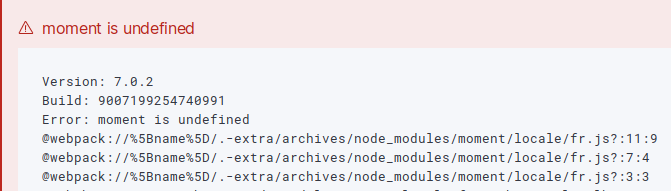
Did it work in your create-react-app test?
Yadasko
on 27 Sep 2019
Hmm, the direct import did work in my create-react-app test. How are you building & running your code?
chandlerprall
on 27 Sep 2019
Since I'm creating a Kibana plugin, I'm using the plugin helpers to build and run the plugin locally.
Yadasko
on 27 Sep 2019
Thanks! I'll dig into what's going on in that process.
chandlerprall
on 27 Sep 2019
Quick status update - we have a couple large projects that are in the finishing stages and are taking most of our development focus; either myself or @thompsongl will look into this issue further when one of those projects winds down.
chandlerprall
on 2 Oct 2019
No problem at all, this is not an issue that blocks us in our developments. Thank you for your time.
Yadasko
on 2 Oct 2019
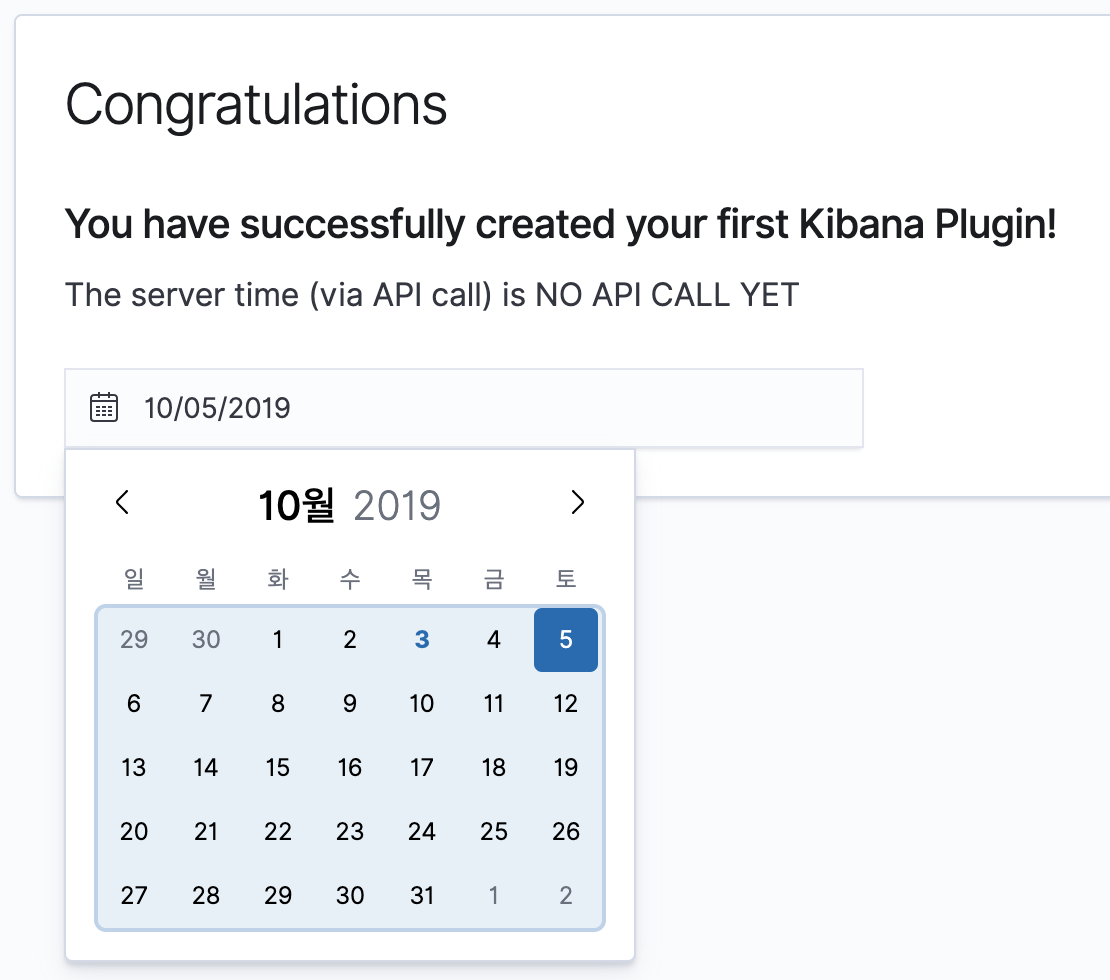
Had some time to look into this.
I created a new Kibana plugin via the plugin generator script, kept all of the boilerplate, and added a minimal EuiDatePicker:
<EuiDatePicker
  selected={this.state.date}
  onChange={this.updateDate}
  locale="ko"
/>
and everything seems as expected:
 thompsongl
on 3 Oct 2019
thompsongl
on 3 Oct 2019
Hmm that's strange! I'll try to do the same or remove as much stuff as I can to try to narrow the issue down tomorrow. I'll keep you updated! (I live in Europe, we're a little offbeat timewise 😄)
Yadasko
on 3 Oct 2019
Of course, I was using Kibana master (which has [email protected]) when I tried that. I can try again with the version you're using. You said you're using [email protected], which means you're on [email protected] or [email protected]? Is that right?
thompsongl
on 3 Oct 2019
Of course, I was using Kibana
masterwhen I tried that. I can try again with the version you're using. You said you're using [email protected], which means you're on [email protected] or [email protected]? Is that right?
Yes, we are using [email protected] for now. It might explain why you weren't able to reproduce.
We will (very) soon upgrade to [email protected], so if this is fixed in the new EUI version, it may not be worth investigating further?
I will still try to narrow it down tomorrow and see if upgrading fixes the issue. Once again, it is not a blocking one ☺️.
Yadasko
on 3 Oct 2019
So, I've deleted any non-related code and simplified the datePicker to the minimum.
import React, { Fragment } from "react";
import {
  EuiDatePicker,
} from "@elastic/eui";

import moment from 'moment';

export class ArchivesPage extends React.Component {
  constructor(props) {
    super(props);

    this.state = {
      date: moment()
    };
  }

  handleChangeEnd(date) {
    this.setState({
      endDate: date});
  }

  render() {
    return (
      <EuiDatePicker
        selected={this.state.date}
        onChange={this.handleChangeStart}
        locale="ko"
      />
    );
  }
}
I still get the same error when I click on the datePicker.
I tried creating a new plugin via the plugin-helper, just as you did, but still got the error.
I upgraded to [email protected] and strangely enough, the same errors appeared. So clearly something is wrong on my side.
Just to make sure I don't mess something up, here's what I did:
- Use the plugin generator from kibana/scripts to create a new plugin
yarn add --dev link:../../kibana/packages/kbn-plugin-helpersfrom the new plugin folderyarn kbn bootstrapyarn start
(I also tried to build the plugin and install it directly on a working ELK platform, without success.)
Here's the archive, if that can help you.
Yadasko
on 4 Oct 2019
Thanks for the extra testing and info, @Yadasko
I started over with 7.2 and can confirm that the problem does exist for me there. Which means that it was resolved sometime between 7.2 and 7.4, but at this point I don't know if EUI or Kibana fixed the problem (mostly because the problem is still undiagnosed 😄).
thompsongl
on 7 Oct 2019
Since it seems to have been resolved in the latests releases (Kibana or Eui), I'll close the issue.
Thank you for your time. 😄
Yadasko
on 16 Oct 2019
Related issues
 formgeist
·
3Comments
formgeist
·
3Comments
 igoristic
·
4Comments
igoristic
·
4Comments
 peteharverson
·
4Comments
peteharverson
·
4Comments
 muhammadtalhas
·
3Comments
muhammadtalhas
·
3Comments
 jen-huang
·
4Comments
jen-huang
·
4Comments