I'm creating a MVP of an application using this lib and decided to start with login form because it would be the easiest way to present the solution to the market I'm investing on.
When I run it in my computer's simulator, it just takes a couple seconds to finish the operation and going to the next page.
However, when I try it in the mobile device, it runs insanely slow, like progressing around 30% per minute.
Could it be related to the ARM processors capacity to do this kind of heavy calculation? I seen that the code for using this method to generate the key is mostly based on lots of math operations...
 fmsouza
All 44 comments
This is intentional. I'm surprised it is that much slower, but there is not much you can do about that. The reason to make it slow is so that a person who know their username + password simple waits 1 unit of time, but an attacker to guess 1,000,000 passwords would require 1,000,000 units of time. We make the unit of time long so that an attacker is financially incentivized not to attack.
We actually have a better solution to brain wallets we built at the ETHWaterloo hackathon, which we will be expanding upon and making available as a service.
In the case of a mobile device, I recommend the following; compute the key once from the username and password and store it encrypted in the Secure Enclave (or whatever TEE your device has), or possibly re-encrypt it with a lower difficulty key. Also, we've found users are less upset about waiting if a progress bar with "encrypting..." is shown; people don't mind waiting as much if it is for a good reason. Also, note that all the encrypting/decrypting/brainwallet functions allow a callback to be passed in to get frequent callbacks as to the progress. :)
 ricmoo
on 27 Oct 2017
ricmoo
on 27 Oct 2017
@ricmoo Can it be possible to get wallet instance from address ?
 padelagani
on 28 Oct 2017
padelagani
on 28 Oct 2017
No. There is no way to get a private key from an address, and there is no (overly) meaningful operations a wallet can do with only an address...
Why? What were you thinking of doing with a non-signing Wallet?
ricmoo
on 28 Oct 2017
Suppose, I have address of 2 users who want to transact, so I am having a to address and a from address so I do need to have private key of from user to get wallet instance then I can initiate a transaction.
So having wallet instance from user's address would be helpful.
padelagani
on 28 Oct 2017
"There is no way to get a private key from an address"
I am not asking for private key I want to have user wallet instance from user address
padelagani
on 28 Oct 2017
Why do you need a Wallet instance though? With only an address, the only Wallet operation that would work are:
- getBalance
- getTeansactionCount
Which both work against a provider with an address already.
Sorry, I think I’m misunderstanding the use case.
ricmoo
on 28 Oct 2017
var privateKey = "0x0123456789012345678901234567890123456789012345678901234567890123";
var wallet = new Wallet(privateKey);
console.log('Address: ' + wallet.address);
// "Address: 0x14791697260E4c9A71f18484C9f997B308e59325".
var transaction = {
nonce: 0,
gasLimit: 21000,
gasPrice: utils.bigNumberify("20000000000"),
to: "0x88a5C2d9919e46F883EB62F7b8Dd9d0CC45bc290",
value: utils.parseEther("1.0"),
data: "0x",
// This ensures the transaction cannot be replayed on different networks
chainId: providers.Provider.chainId.homestead
};
var signedTransaction = wallet.sign(transaction);
console.log(signedTransaction);
// "0xf86c808504a817c8008252089488a5c2d9919e46f883eb62f7b8dd9d0cc45bc2" +
// "90880de0b6b3a7640000801ca0d7b10eee694f7fd9acaa0baf51e91da5c3d324" +
// "f67ad827fbe4410a32967cbc32a06ffb0b4ac0855f146ff82bef010f6f2729b4" +
// "24c57b3be967e2074220fca13e79"
// This can now be sent to the Ethereum network
provider.sendTransaction(signedTransaction).then(function(hash) {
console.log('Hash: ' + hash);
// Hash:
});
For initiating a transaction according to this example I should have privateKey for a user (to which a address is linked of from user)
padelagani
on 28 Oct 2017
Correct. The above example sends funds from the private key 0x0123456789012345678901234567890123456789012345678901234567890123 to the address 0x88a5C2d9919e46F883EB62F7b8Dd9d0CC45bc290.
The address of the private key is 0x14791697260E4c9A71f18484C9f997B308e59325. But it isn't just linked, the address is computed from the private key.
To send funds, you must have the private key of the sender. You cannot have a wallet with only an address.
ricmoo
on 28 Oct 2017
@ricmoo I'm testing it again looking with more attention to the progress updates, and it taken more than 7 minutes to go from 0-100%. Also, the progress update function calls seems to be synchronous, as I'm attempting to show the new value at the screen, but the re-render phase never happens during this process, as the process is always occupied with the main calculation and never calls "the next tick". So I cannot show some kind of message like Encrypting your data, please wait... 36%.
I totally understand the intention you had in this implementation, but this method is completely unusable in a mobile device. And probably this behaviour may be the same if running inside a browser on a mobile device.
fmsouza
on 29 Oct 2017
That is a pretty insane wait time and it should not be able to be synchronous. The library injects an detected optimal setImmediate into the global namespace to increase performance. Do you have something else being injected that could be affecting the setImmedate in your JavaScript environment? What environment is it running in? Things like React hijack weird things...
For your MVP, the better option may be a 12 work mnemonic phrase anyways. Brain Wallets should not be considered secure (until our new solution is ready)...
ricmoo
on 30 Oct 2017
Also, is decryption and encryption slow? They both use the same memory-hard pbkdf...
ricmoo
on 30 Oct 2017
@ricmoo Actually I didn't. I wasn't injecting anything in the middle of the process at this point. My whole flow was much like a default React + Redux action trigger. I've triggered an action, and this action was intended to call some callback I sent with the action payload, much like in the following examples:
Component:
onPressSubmit({ username, password }) {
this.props.loadWallet(username, password, (progress) => this.setState({ progress }));
}
Action:
export const loadWallet = (username, password, cb) => (dispatch) =>
Wallet.fromBrainWallet(username, password, cb).then(wallet => {
dispatch({ type: LOAD_WALLET, payload: wallet });
});
But as it was that slow, I changed my approach by using the HDNode exported API to create a seed and then use it to open a wallet:
const combination = /* some combination, hash or something between username and password */;
const seed = utils.toUtf8Bytes(combination);
const node = HDNode.fromSeed(seed);
const wallet = new Wallet(node.privateKey);
It is working well for now. I now this may not be the most secure alternative, but as this MVP won't be used publicly yet, it is not a problem right now.
fmsouza
on 30 Oct 2017
For comparison, can you run this in your standard web browser on the same phone?
http://ricmoo.github.io/scrypt-js/
Use 18 as the Nlog2, but otherwise, leave all other values as their default.
Also, let me know if the progress bar doesn't update.
ricmoo
on 30 Oct 2017
The progress bar worked as expected.
For comparison, on my main computer (Macbook mid-2012, core i5 8GB RAM) the process took 5.459s to finish.
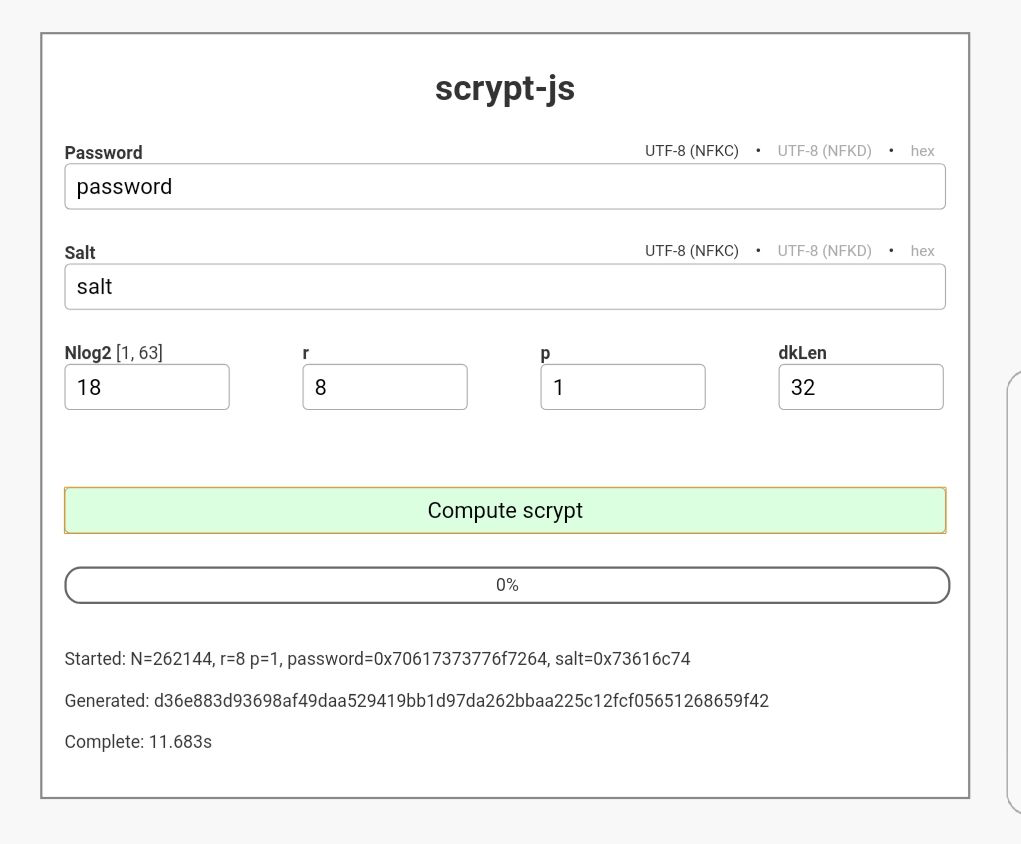
fmsouza
on 30 Oct 2017
Yeah. On my MacBook, it takes about 5.4s and on my iPhone, around 4.5s... My phone is officially faster than my computer...
That is the same code and scrypt parameters that are used in ethers.js for brain wallets, encrypting and decrypting. So, it seems like the React + Redux environment is doing something bizarre. I have never used that environment. Does it maybe hijack the postMessage API?
Just a suggestion, but before you call the brain wallet generation, try:
window.setImmediate = undefined;
One other thing we can do, in the node_modules/setimmediate/setImmediate.js, try adding some debug info to see which form of setImmediate it is using? It's a bit complicated. But that is likely where your time is being used up; setImmediate trying to use a method that React is messing with.
ricmoo
on 30 Oct 2017
@ricmoo I've tried your first suggestion, but when I set the setImmediate function to undefined it collapses the whole application.

I'll try to do the debugging later, and will update this thread when I have some more information about it.
fmsouza
on 7 Nov 2017
I just tried to flag each function in the setimmediate module, but it didn't made any difference to the app, probably related to some step in the code compilation process. I'll try later to run it on a CLI application on my phone and see what happens.
fmsouza
on 7 Nov 2017
You can try to circumvent the entire optimization:
window.setImmedate = window.setTimeout;
That should be the slowest implementation, but may be better than the using postMessage if react is hijacking it in some way.
ricmoo
on 7 Nov 2017
I'll try it and let you know.
Also, I just tried to run it on my phone and it worked flawlessly. Just wrote a script with it's single purpose to open a wallet using Wallet.fromBrainWallet(user, pass) and runned in Termux app and it executed quite fast! just a couple seconds and it finished. So this problem is actually very related to ReactNative itself, apparently...
fmsouza
on 7 Nov 2017
Tried all these hacks on the RN application and none seem to have changed anything. It still running very slow.
Edit: I've changed the title as I've seen in these tests that the problem is not related to the mobile device itself, but to the ReactNative platform.
fmsouza
on 7 Nov 2017
As this problem seems to be with React, I am going to close it. If you feel it should remain open, please re-open it.
Thanks!
ricmoo
on 23 Nov 2017
Same problem with the Wallet.encrypt.
It take 2~3s on my MacBook but take 5 minutes on My android phone.
 zhaozhiming
on 27 Mar 2018
zhaozhiming
on 27 Mar 2018
What environment on your android phone are you using? Try it in the Android web browser, to see how that compares?
ricmoo
on 27 Mar 2018
I use Expo to develop React Native App. Debug on my Android 7.0 phone.
OK, I will try it in my Android web browser and show the result later.
zhaozhiming
on 28 Mar 2018
@zhaozhiming as it was discussed above, it looks like this problem is on the ReactNative engine, not on the ethers.js lib.
fmsouza
on 28 Mar 2018
Should we submit a issue to ReactNative? Or is there already have a issue about it?
I think link that issue to here will help other people with this problem.
zhaozhiming
on 28 Mar 2018
@zhaozhiming Yes, I think it's a good idea. The problem is that [I don't know you, but] I don't know exactly what on ReactNative is causing all this slowness. If we just throw this problem at them with no direction it would be much harder to figure out how to resolve this issue.
But one workaround that worked for me was use a combination of the username + password as entropy to generate the private key. Like this function:
function generateKeyFromSeed (value) {
const seed = utils.toUtf8Bytes(value);
const node = HDNode.fromSeed(seed);
return node.privateKey;
}
generateKeyFromSeed('[email protected]:password1234'); // -> { privateKey: '0x1F3AB...', ... }
@fmsouza This method is great!
But I want to export the wallet keystore to let user backup, so I need to use the Wallet.encrypt to generate wallet keystore.
I think your ethereum wallet maybe want to have this feature too.
zhaozhiming
on 29 Mar 2018
Please keep in mind that this method (a simple hash) is much easier to brute-force attack. The advantage of using secret storage (i.e. encrypt) is that it uses the scrypt pbkdf, which is memory hard, making it hard to brute force, even on specialized hardware.
Using a simple hash should not be considered secure, and you should make sure there are additional layers of security (e.g. Secure Enclave) used in conjunction with such a simple way to break the password. At the very least, you should include a much larger salt, which is kept offline with the users credentials.
ricmoo
on 29 Mar 2018
@zhaozhiming hello, met the same problem (fast on PC or android browser BUT slow on android react-native ). did you find any solution?
 sosospicy
on 12 Jun 2018
sosospicy
on 12 Jun 2018
@sosospicy Not yet. Maybe you can try to use a background task to do it.
zhaozhiming
on 13 Jun 2018
A background task likely won't help. The scrypt Password-Based Key Derivation unction is intentionally very expensive and meant to be memory-hard.
If you need to operate on very limited devices, you will likely need to find another way to generate a private key, or create a stub to do it in native code, and use JavaScript callbacks to compute it outside the reactnative part.
ricmoo
on 13 Jun 2018
@ricmoo Thanks for reminding. It's a good way.
zhaozhiming
on 13 Jun 2018
@ricmoo @zhaozhiming thanks! I tried background task and the situation is as ricmoo said.
I'm trying to modify ethers.js module work with react-native-scrypt (testing that sample in component directly right now), unfortunately not work yet.
for the record, It works with react-native-scrypt. It spends about 5 seconds to finish the scrypt part on my android phone.
sosospicy
on 13 Jun 2018
@sosospicy how did you fix this problem? pls give some sample code or patch it. thanks
 oblank
on 16 Aug 2018
oblank
on 16 Aug 2018
@oblank I forked the main repo to my ethers.js and add two methods:
RNfromEncyptedWallet: const wallet = await ethers.Wallet.RNfromEncryptedWallet(
Keystore,
walletPwd,
);
RNdecrypt : const keystore = await wallet.RNencrypt(walletPwd);
@ricmoo I don't know if it's ok (and how) to contribute my work. If you think it's necessary please let me know.
sosospicy
on 16 Aug 2018
@sosospicy I tested your forked repo, it works fine in RN env, thanks again
oblank
on 16 Aug 2018
@oblank Glad to hear that!
sosospicy
on 16 Aug 2018
So, looking at the changes, it looks like it would be enough to allow you to swap in another implementation of scrypt? You could use the RNScrypt and use the following to make the API compatible:
// Instead of:
// var scrypt = require('scrypt');

// Use:
var RNscrypt = require('react-native-scrypt');
function scrypt (password, salt, dkLen, n, r, p) {
    setTimeout(function() {
        return RNScrypt(password, salt, n. r, p, dkLen);
    }, 0);
}
I am planning to update my scrypt library to be Promise compatible. So, once I have made it use promises instead, I will allow some way to hook in your own implementation of scrypt, along with other cryptographic primitives, since that is something people seem to want too.
ricmoo
on 16 Aug 2018
@oblank u're definitely right! Wait for your great work!
sosospicy
on 16 Aug 2018
RNfromEncyptedWallet:const wallet = await ethers.Wallet.RNfromEncryptedWallet( Keystore, walletPwd, );
RNdecrypt:const keystore = await wallet.RNencrypt(walletPwd);
How can these two methods be used?
 codeparkman
on 10 Oct 2019
codeparkman
on 10 Oct 2019
@sosospicy
codeparkman
on 10 Oct 2019
It's been 2 years since this issue was opened and one year since a solution was proposed. Is there any update on this?
Edit: I feel v5 is still forcing the use of scrypt-js.
 elivinsky
on 17 Dec 2019
elivinsky
on 17 Dec 2019
@codeparkman
Oh! Sorry i didn't read your message in time. Have you solved that?
sosospicy
on 26 Dec 2019
Related issues
 GFJHogue
·
3Comments
GFJHogue
·
3Comments
 moshebeeri
·
3Comments
moshebeeri
·
3Comments
 bbarton
·
3Comments
bbarton
·
3Comments
 pcowgill
·
3Comments
pcowgill
·
3Comments
 naddison36
·
3Comments
naddison36
·
3Comments
Most helpful comment
So, looking at the changes, it looks like it would be enough to allow you to swap in another implementation of scrypt? You could use the RNScrypt and use the following to make the API compatible:
I am planning to update my scrypt library to be Promise compatible. So, once I have made it use promises instead, I will allow some way to hook in your own implementation of scrypt, along with other cryptographic primitives, since that is something people seem to want too.