Etcher: The writer process ended unexpectedly
- Etcher version: 1.5.109
- Operating system and architecture:
Linux pop-os 5.4.0-7642-generic #46~1598628707~20.04~040157c-Ubuntu SMP Fri Aug 28 18:02:16 UTC x86_64 x86_64 x86_64 GNU/Linux - Image flashed: raspberry pi OS Lite
- Do you see any meaningful error information in the DevTools?
Error: EIO: i/o error, write
code: "EUNPLUGGED"
device: "/dev/sdc"
errno: -5
name: "Error"
syscall: "write"
message: "EIO: i/o error, write"
stack: "Error: EIO: i/o error, write"
{"stack":"Error: The writer process ended unexpectedly\n at createError (file:///tmp/.mount_balena4YyRoz/resources/app/generated/gui.js:63120:23)\n at createUserError (file:///tmp/.mount_balena4YyRoz/resources/app/generated/gui.js:63131:16)\n at Server.<anonymous> (file:///tmp/.mount_balena4YyRoz/resources/app/generated/gui.js:79338:28)","message":"The writer process ended unexpectedly","description":"Please try again, and contact the Etcher team if the problem persists","report":false,"image":"2020-08-20-raspios-buster-armhf-lite.zip"}
I also tried manually unzipping the archive and feeding the image to Etcher, with the same error result
 curcuz
All 18 comments
Same issue. Mac version of Etcher. with this Raspi Lite OS image.
 christiantreutler-avi
on 22 Sep 2020
christiantreutler-avi
on 22 Sep 2020
Can you try with a different card reader/usb slot and with a different target usb/sdcard?
The EUNPLUGGED event is fired only when the target media is not available anymore, usually because it's been unplugged
 thundron
on 23 Sep 2020
thundron
on 23 Sep 2020
Can you try with a different card reader/usb slot and with a different target usb/sdcard?
TheEUNPLUGGEDevent is fired only when the target media is not available anymore, usually because it's been unplugged
@thundron this was a balenaFin for me
curcuz
on 23 Sep 2020
I see, can you still try with a different target? That would help narrow down the issue in case it's just with the device. Trying with a different OS would also help in case it's an issue with the OS instead
@christiantreutler-avi same applies
thundron
on 23 Sep 2020
@thundron I tried it with a different device as well. The Raspi SD card writer (Rasperry Pi Imager) works fine. For me it looks like this version of etcher has an issue.
This morning I tried another image file. Doesnt work either. I am on MacOS Mojave (latest).
If you tell me where I can find debug logs I would happily do so.
christiantreutler-avi
on 25 Sep 2020
Hi I'm running MacOS High Sierra and I have the same issue but with the Ubuntu Mate 20.04.1 iso (checksum c78cbaa40de6189e61ed5a70967d9a28148d72e9080441a55a578ee5f69d6065). I've managed to get the "regular" Ubuntu 20.04.1 on the same USB-stick. Tried another USB-stick same problem with the Official Mate iso. Found a Ubuntu mate-iso 20.04 prepared for 32-bit EFI Mac, this one also worked. So you should be able to reproduce the issue.
 BadCarma78
on 29 Sep 2020
BadCarma78
on 29 Sep 2020
Hi I'm running MacOS High Sierra and I have the same issue but with the Ubuntu Mate 20.04.1 iso (checksum c78cbaa40de6189e61ed5a70967d9a28148d72e9080441a55a578ee5f69d6065). I've managed to get the "regular" Ubuntu 20.04.1 on the same USB-stick. Tried another USB-stick same problem with the Official Mate iso. Found a Ubuntu mate-iso 20.04 prepared for 32-bit EFI Mac, this one also worked. So you should be able to reproduce the issue.
UPDATE: I managed to get it to work. I disabled McAfee Endpoint Security Threat Prevention. Unmounted the partition, not the USB-drive. Then Reflashed the USB-drive through etcher.
BadCarma78
on 29 Sep 2020
I am trying it with the latest windows and am having these issues too.
 ren-GoKu
on 2 Oct 2020
ren-GoKu
on 2 Oct 2020
Same issue on MacOS 10.15.7
 wrogner
on 4 Oct 2020
wrogner
on 4 Oct 2020
I have the same issue on macOS Catalina 10.15.7. If I start the app from terminal with root permission it work at first or second try. I granted external device access with normal and terminal execution, but still persist randomly.
The command is: sudo /Applications/balenaEtcher.app/Contents/MacOS/balenaEtcher
 MrPhil17
on 9 Oct 2020
MrPhil17
on 9 Oct 2020
Same here, macOS Catalina 10.15.6, Etcher 1.5.109. May not be relevant, but here's the output from running via sudo as @MrPhil17 said:
(node:82926) Electron: Loading non-context-aware native module in renderer: '/Applications/balenaEtcher.app/Contents/Resources/app/generated/modules/xxhash/build/Release/hash.node'. This is deprecated, see https://github.com/electron/electron/issues/18397.
(node:82926) Electron: Loading non-context-aware native module in renderer: '/Applications/balenaEtcher.app/Contents/Resources/app/generated/modules/ext2fs/build/Release/bindings.node'. This is deprecated, see https://github.com/electron/electron/issues/18397.
(node:82926) Electron: Loading non-context-aware native module in renderer: '/Applications/balenaEtcher.app/Contents/Resources/app/generated/modules/drivelist/build/Release/drivelist.node'. This is deprecated, see https://github.com/electron/electron/issues/18397.
(node:82926) Electron: Loading non-context-aware native module in renderer: '/Applications/balenaEtcher.app/Contents/Resources/app/generated/modules/@balena.io/usb/build/Release/usb_bindings.node'. This is deprecated, see https://github.com/electron/electron/issues/18397.
 Floppy
on 10 Oct 2020
Floppy
on 10 Oct 2020
I rolled back a few versions, to 1.5.106, and had the same problem. Then I tried going way back, to 1.5.70, and it works! Something's changed :)
Floppy
on 10 Oct 2020
I rolled back a few versions, to
1.5.106, and had the same problem. Then I tried going _way_ back, to1.5.70, and it works! Something's changed :)
Confirmed this correct my issue as well. Every OS / card / USB port I tried failed. Rolled back to 1.5.70 and issue was fixed.
Running on macOS 10.14.6
 michaelmcdonald
on 11 Oct 2020
michaelmcdonald
on 11 Oct 2020
Good to hear! First person to bisect and find the actual version where it breaks gets this cookie -> 🍪 😁
Floppy
on 12 Oct 2020
Getting this same error in Windows 10 Pro build 1909 with v 1.5.109, 1.5.71 and 1.5.70.
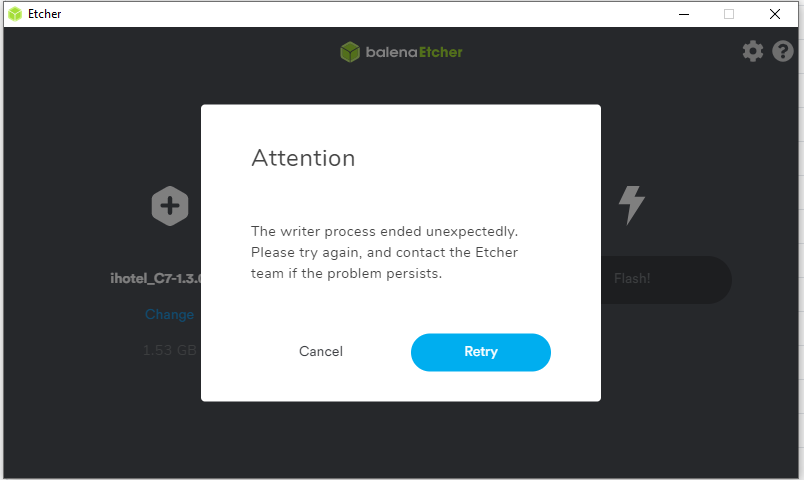
USB drive was previously flashed with an hybrid ISO image.
Tried starting Etcher as Administrator and it does the same.
In this state Windows does not recognize the USB drive at all and you can't format it using the "Disk Management" tool
Formatted the USB drive as FAT on macOS and tried to flash with Etcher on Windows and this time it worked. Repeated the process a second time with the same key (format to FAT on macOS and flash in Windows) and it worked again.
I tried formatting the USB drive with Windows diskpart tool, but it fails, even as an administrator...
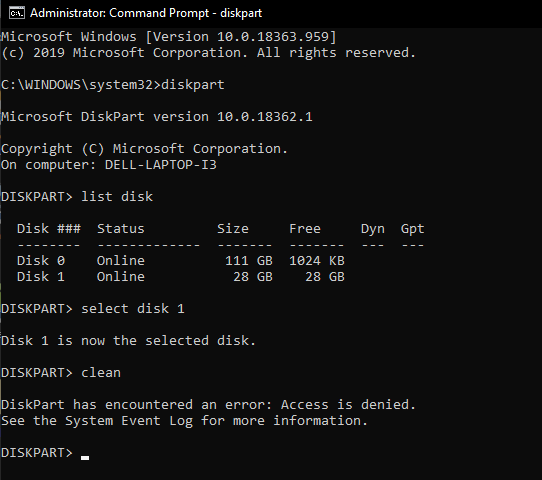
 NetForces
on 16 Oct 2020
NetForces
on 16 Oct 2020
Having a similar problem on a Windows 10 machine (Windows 10 Enterprise, v1903)
Using balenaEtcher v1,5,109
Trying to flash a brand new micro SD card, I get the following error:
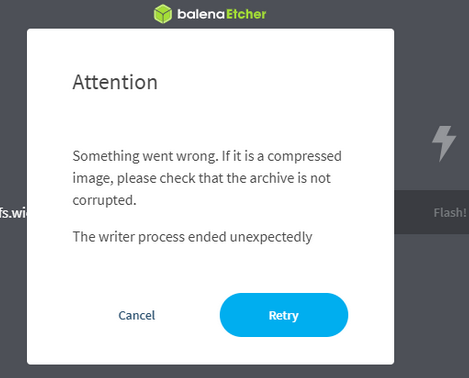
I'm trying to flash the following Chirpstack image

 KatyKoenen
on 20 Oct 2020
KatyKoenen
on 20 Oct 2020
Any good news?
Meanwhile I noticed that if I let it flash from URL method it work flawlessly. The issue occurs only while flashing a downloaded ISO.
MrPhil17
on 5 Nov 2020
I concur with MrPhil17 - interestingly, when Flash From File, i get certificate errors that probably can explain this bug everybody seems to have, i tried on windows, macos, same error:
❯ sudo /Applications/balenaEtcher.app/Contents/MacOS/balenaEtcher
Password:
(node:58460) Electron: Loading non-context-aware native module in renderer: '/Applications/balenaEtcher.app/Contents/Resources/app/generated/modules/xxhash/build/Release/hash.node'. This is deprecated, see https://github.com/electron/electron/issues/18397.
(node:58460) Electron: Loading non-context-aware native module in renderer: '/Applications/balenaEtcher.app/Contents/Resources/app/generated/modules/ext2fs/build/Release/bindings.node'. This is deprecated, see https://github.com/electron/electron/issues/18397.
(node:58460) Electron: Loading non-context-aware native module in renderer: '/Applications/balenaEtcher.app/Contents/Resources/app/generated/modules/drivelist/build/Release/drivelist.node'. This is deprecated, see https://github.com/electron/electron/issues/18397.
(node:58460) Electron: Loading non-context-aware native module in renderer: '/Applications/balenaEtcher.app/Contents/Resources/app/generated/modules/@balena.io/usb/build/Release/usb_bindings.node'. This is deprecated, see https://github.com/electron/electron/issues/18397.
Checking for update
Generated new staging user ID: 64b49c0b-e67f-5c5b-ba38-604b07b627e7
ready-to-show: 619.027ms
Error: Error: net::ERR_CERT_INVALID
at SimpleURLLoaderWrapper.
at SimpleURLLoaderWrapper.emit (events.js:223:5)
{"stack":"Error: net::ERR_CERT_INVALIDn at SimpleURLLoaderWrapper.
{"stack":"Error: net::ERR_CERT_INVALIDn at SimpleURLLoaderWrapper.
Checking for update
Error: Error: net::ERR_CERT_INVALID
at SimpleURLLoaderWrapper.
at SimpleURLLoaderWrapper.emit (events.js:223:5)
{"stack":"Error: net::ERR_CERT_INVALIDn at SimpleURLLoaderWrapper.
{"stack":"Error: net::ERR_CERT_INVALIDn at SimpleURLLoaderWrapper.
When then trying from URL (for example i tried to burn Kubuntu: https://cdimage.ubuntu.com/kubuntu/releases/20.10/release/kubuntu-20.10-desktop-amd64.iso) it works.
If I then use 'Flash Another' but this time from file IT ALSO WORKS :-)
Hopefully this insight can help the devs.
 rosselm
on 17 Nov 2020
rosselm
on 17 Nov 2020
Related issues
 TheEpicNoobZilla
·
4Comments
TheEpicNoobZilla
·
4Comments
 lurch
·
3Comments
lurch
·
3Comments
 robmcc1983
·
5Comments
robmcc1983
·
5Comments
 zamber
·
5Comments
zamber
·
5Comments
 dilbert-tctc
·
5Comments
dilbert-tctc
·
5Comments
Most helpful comment
Good to hear! First person to bisect and find the actual version where it breaks gets this cookie -> 🍪 😁