Etcher: The writer process ended unexpectedly, please contact etcher team if issue persists
- Etcher version:
Version 1.5.101 (1.5.101) - Operating system and architecture:
Mac OS Big Sur 11.0 Beta (20A4300b) - Image flashed:
tails-amd64-4.8.img - Do you see any meaningful error information in the DevTools?
Sat Jul 18 2020 16:31:53 GMT-0400 (Eastern Daylight Time) Flash error ({"image":"/Users/leach/Desktop/tails-amd64-4.8.img","drives":[{"size":61505273856,"isVirtual":false,"enumerator":"DiskArbitration","logicalBlockSize":512,"raw":"/dev/rdisk2","error":null,"isReadOnly":false,"displayName":"/dev/disk2","blockSize":512,"isSCSI":false,"isRemovable":true,"device":"/dev/disk2","busVersion":null,"isSystem":false,"busType":"USB","isCard":false,"isUSB":true,"devicePath":"IODeviceTree:/PCI0@0/PEG1@1,1/UPSB@0/DSB2@2/XHC2@0","mountpoints":[],"description":"SanDisk Ultra USB 3.0 Media","isUAS":null}],"driveCount":1,"uuid":"9023bce7-339c-47d3-812d-fa006292089b","flashInstanceUuid":"9023bce7-339c-47d3-812d-fa006292089b","unmountOnSuccess":true,"validateWriteOnSuccess":true,"error":{"name":"Error","message":"EPERM: operation not permitted, open '/dev/rdisk2'","stack":"Error: EPERM: operation not permitted, open '/dev/rdisk2'","code":"EPERM","syscall":"open","errno":-1},"sample":0.1,"applicationSessionUuid":"b92bb5a8-3bce-49db-852c-3b6d8ffb7b3a","flashingWorkflowUuid":"a44db8d8-98cf-4ee1-99cc-0085ca43b63b"})
 leachy14
All 16 comments
Sat Jul 18 2020 16:31:53 GMT-0400 (Eastern Daylight Time) Write failed ({"image":"/Users/leach/Desktop/tails-amd64-4.8.img","drives":[{"size":61505273856,"isVirtual":false,"enumerator":"DiskArbitration","logicalBlockSize":512,"raw":"/dev/rdisk2","error":null,"isReadOnly":false,"displayName":"/dev/disk2","blockSize":512,"isSCSI":false,"isRemovable":true,"device":"/dev/disk2","busVersion":null,"isSystem":false,"busType":"USB","isCard":false,"isUSB":true,"devicePath":"IODeviceTree:/PCI0@0/PEG1@1,1/UPSB@0/DSB2@2/XHC2@0","mountpoints":[],"description":"SanDisk Ultra USB 3.0 Media","isUAS":null}],"driveCount":1,"uuid":"9023bce7-339c-47d3-812d-fa006292089b","status":"failed","flashInstanceUuid":"9023bce7-339c-47d3-812d-fa006292089b","unmountOnSuccess":true,"validateWriteOnSuccess":true,"error":{"description":"Please try again, and contact the Etcher team if the problem persists","report":false,"code":"ECHILDDIED"},"sample":0.1,"applicationSessionUuid":"b92bb5a8-3bce-49db-852c-3b6d8ffb7b3a","flashingWorkflowUuid":"a44db8d8-98cf-4ee1-99cc-0085ca43b63b"})
leachy14
on 18 Jul 2020
Can you try running balenaEtcher directly with sudo?
 thundron
on 21 Jul 2020
thundron
on 21 Jul 2020
Can you try running balenaEtcher directly with
sudo?
Yea I can when I'm off work I'll let you know if it works
leachy14
on 21 Jul 2020
It works when running directly w/ sudo /Applications/balenaEtcher.app/Contents/MacOS/balenaEtcher, with the following output:
(node:12555) Electron: Loading non-context-aware native module in renderer: '/Applications/balenaEtcher.app/Contents/Resources/app/generated/modules/xxhash/build/Release/hash.node'. This is deprecated, see https://github.com/electron/electron/issues/18397.
(node:12555) Electron: Loading non-context-aware native module in renderer: '/Applications/balenaEtcher.app/Contents/Resources/app/generated/modules/ext2fs/build/Release/bindings.node'. This is deprecated, see https://github.com/electron/electron/issues/18397.
(node:12555) Electron: Loading non-context-aware native module in renderer: '/Applications/balenaEtcher.app/Contents/Resources/app/generated/modules/drivelist/build/Release/drivelist.node'. This is deprecated, see https://github.com/electron/electron/issues/18397.
(node:12555) Electron: Loading non-context-aware native module in renderer: '/Applications/balenaEtcher.app/Contents/Resources/app/generated/modules/@balena.io/usb/build/Release/usb_bindings.node'. This is deprecated, see https://github.com/electron/electron/issues/18397.
ready-to-show: 850.306ms
Checking for update
Generated new staging user ID: 5c37d3f5-67d3-55ef-9dc7-73691ff002f0
Error: Error: net::ERR_CERT_INVALID
    at SimpleURLLoaderWrapper.<anonymous> (electron/js2c/browser_init.js:2575:21)
    at SimpleURLLoaderWrapper.emit (events.js:223:5)
{"stack":"Error: net::ERR_CERT_INVALID\n    at SimpleURLLoaderWrapper.<anonymous> (electron/js2c/browser_init.js:2575:21)\n    at SimpleURLLoaderWrapper.emit (events.js:223:5)","message":"net::ERR_CERT_INVALID"}
{"stack":"Error: net::ERR_CERT_INVALID\n    at SimpleURLLoaderWrapper.<anonymous> (electron/js2c/browser_init.js:2575:21)\n    at SimpleURLLoaderWrapper.emit (events.js:223:5)","message":"net::ERR_CERT_INVALID"}
 bdruth
on 24 Jul 2020
bdruth
on 24 Jul 2020
I haven't had a chance to test it because I don't have a spare USB stick right now
leachy14
on 25 Jul 2020
No problem. You could also try going to "System Preferences" -> "Security & Privacy" -> "Privacy" then adding the application under "Full Disk Access"
thundron
on 28 Jul 2020
No problem. You could also try going to "System Preferences" -> "Security & Privacy" -> "Privacy" then adding the application under "Full Disk Access"
this does not solve the issue though
 blijblijblij
on 28 Jul 2020
blijblijblij
on 28 Jul 2020
@blijblijblij hence the "trying" part, for some it does, for others it doesn't so it helps us narrow the solution and see if it's something that depends on the package builder (which we have control of, to a certain extent) or the OS/user/etc.
thundron
on 28 Jul 2020
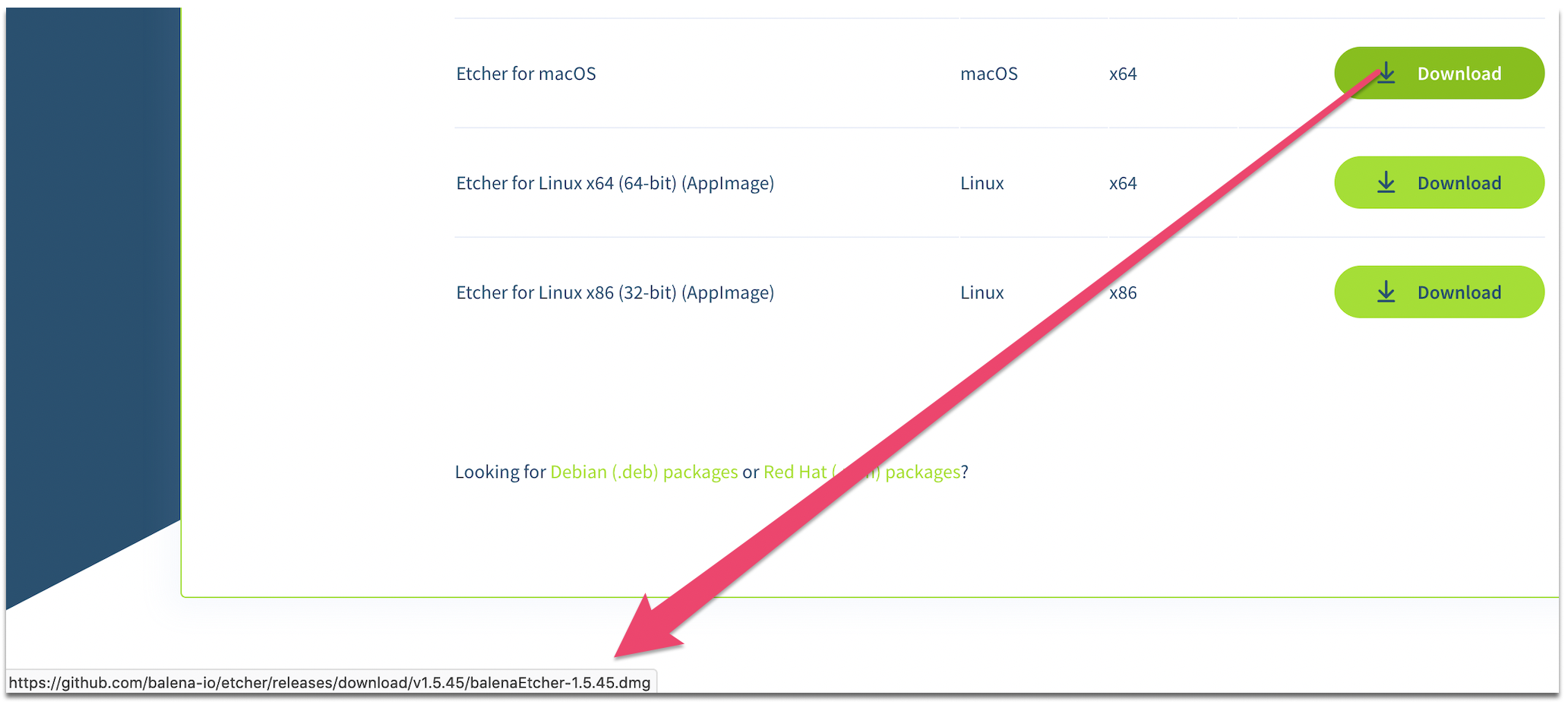
Bumping the version helped, though updating the URL to that latest release from the website might be a smart thing @thundron, it's linked to an older version causing some off the confusement:
blijblijblij
on 28 Jul 2020
I've added full disk permission and I'm going to try and write a Kali Linux distro on to a flash drive.
This didn't fix the issue
Going to attempt to run it with sudo
leachy14
on 28 Jul 2020
I had this same issue on macOS Big Sur, I just fixed it by going to System Preferences > Security and Privacy > Privacy and adding etcher as an app under Accessibility. I also downgraded back to Sierra but I would imagine it would work on Big Sur.
 rebble24
on 28 Jul 2020
rebble24
on 28 Jul 2020
it's linked to an older version
IIRC that only happens when you have javascript disabled? :shrug:
 lurch
on 29 Jul 2020
lurch
on 29 Jul 2020
it's linked to an older version
IIRC that only happens when you have javascript disabled? 🤷
confirmed, IMHO not so pretty...
blijblijblij
on 29 Jul 2020
I also face this issue,Please help me and I am not tech guy,Just trying to boot in my flash drive my first Linux distro but it showing error.I also did cmd to boot my flask but it show error so I follow and found this(pic 3)
Etcher version:
v1.5.102
- Operating system and architecture:
Window 10 pro Education
- Image flashed:


That is event log
Device USBSTOR\Disk&Ven_SanDisk&Prod_Ultra&Rev_1.00\4C530000050304120291&0 was not migrated due to partial or ambiguous match.
Last Device Instance Id: USBSTOR\Disk&Ven_Lexar&Prod_USB_Flash_Drive&Rev_1100\AAP3C4HS4SQA4UCH&0
Class Guid: {4d36e967-e325-11ce-bfc1-08002be10318}
Location Path:
Migration Rank: 0xF000FC000000F120
Present: false
Status: 0xC0000719
 SelfExalt
on 29 Jul 2020
SelfExalt
on 29 Jul 2020
No problem. You could also try going to "System Preferences" -> "Security & Privacy" -> "Privacy" then adding the application under "Full Disk Access"
this one working for me. using Version 1.5.102
 ridhwandaud
on 30 Jul 2020
ridhwandaud
on 30 Jul 2020
So I got it solved, adding the application under security and privacy section -> accessibility worked. I'm now able to run the application no problem.
leachy14
on 1 Aug 2020
Related issues
 GGShinobi
·
4Comments
GGShinobi
·
4Comments
 jviotti
·
5Comments
jviotti
·
5Comments
 grash54
·
5Comments
grash54
·
5Comments
 Deej0406
·
4Comments
Deej0406
·
4Comments
 mwiegant
·
5Comments
mwiegant
·
5Comments