Etcher: .deb fails to install on Debian Bullseye due to incorrect libpango1.0-0 dependency
- Etcher version:
1.5.80 - Operating system and architecture:
Debian Bullseye amd64 - Image flashed:
- Do you see any meaningful error information in the DevTools?
The transitional package libpango1.0-0 has been removed from Debian Bullseye. The package dependency needs to be changed to libpango-1.0-0 or libpango-1.0-0 | libpango1.0-0.
 arrowmaster
All 6 comments
~$ sudo apt dist-upgrade
Reading package lists... Done
Building dependency tree
Reading state information... Done
Calculating upgrade... Done
The following packages were automatically installed and are no longer required:
gconf-service gconf2 gconf2-common libappindicator1 libdbusmenu-gtk4 libgconf-2-4 libindicator7 libpangox-1.0-0
Use 'sudo apt autoremove' to remove them.
The following packages will be REMOVED:
balena-etcher-electron libpango1.0-0
The following packages will be upgraded:
gir1.2-pango-1.0 libpango-1.0-0 libpango-1.0-0:i386 libpangocairo-1.0-0 libpangocairo-1.0-0:i386 libpangoft2-1.0-0 libpangoft2-1.0-0:i386 libpangoxft-1.0-0
8 upgraded, 0 newly installed, 2 to remove and 0 not upgraded.
Need to get 683 kB of archives.
After this operation, 283 MB disk space will be freed.
Please fix the dependencies. Thank you!
 YiiRocks
on 22 Apr 2020
YiiRocks
on 22 Apr 2020
Had a quick browse, and the reference to libpango seems to be here.
 lurch
on 23 Apr 2020
lurch
on 23 Apr 2020

Etcher version:
1.5.82
Operating system and architecture:
Debian Bullseye amd64
 carlosnewmusic
on 28 Apr 2020
carlosnewmusic
on 28 Apr 2020
I just fixed it but had to rebuild the deb package.
Download the .deb installer file
Inside the folder your downloaded the file run dpkg-deb -R ./balena-etcher-electron_1.5.80_amd64.deb balena-etcher-electron
Edit file balena-etcher-electron/DEBIAN/control and replace libpango1.0-0 with libpango-1.0-0
Rebuild .deb installer running dpkg-deb -b balena-etcher-electron balena-etcher-electron_1.5.80-fixed_amd64.deb
Install balena-etcher-electron using the fixed installer running sudo dpkg balena-etcher-electron_1.5.80-fixed_amd64.deb
sudo dpkg -i balena-etcher-electron_1.5.80-fixed_amd64.deb
Seleccionando el paquete balena-etcher-electron previamente no seleccionado.
(Leyendo la base de datos ... 508614 ficheros o directorios instalados actualmente.)
Preparando para desempaquetar balena-etcher-electron_1.5.80-fixed_amd64.deb ...
Desempaquetando balena-etcher-electron (1.5.80) ...
Configurando balena-etcher-electron (1.5.80) ...
Procesando disparadores para desktop-file-utils (0.24-1) ...
Procesando disparadores para mime-support (3.64) ...
Procesando disparadores para hicolor-icon-theme (0.17-2) ...

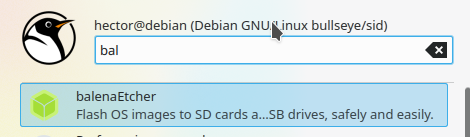
Final steps
cd /opt/balenaEtcher
sudo chown root:$USER chrome-sandbox
sudo chmod 4755 chrome-sandbox


 alu18999959g
on 2 May 2020
alu18999959g
on 2 May 2020
cd /opt/balenaEtcher
sudo chown root:$USER chrome-sandbox
sudo chmod 4755 chrome-sandbox
Is that the fix for #3129 ? :shrug:
lurch
on 4 May 2020
fixed in v1.5.84
 zvin
on 5 May 2020
zvin
on 5 May 2020
Related issues
 markcorbinuk
·
5Comments
markcorbinuk
·
5Comments
 m-p-3
·
5Comments
m-p-3
·
5Comments
 TheEpicNoobZilla
·
4Comments
TheEpicNoobZilla
·
4Comments
 grash54
·
5Comments
grash54
·
5Comments
 AreDubya
·
3Comments
AreDubya
·
3Comments
Most helpful comment
I just fixed it but had to rebuild the deb package.
Download the .deb installer file
Inside the folder your downloaded the file run dpkg-deb -R ./balena-etcher-electron_1.5.80_amd64.deb balena-etcher-electron
Edit file balena-etcher-electron/DEBIAN/control and replace libpango1.0-0 with libpango-1.0-0
Rebuild .deb installer running dpkg-deb -b balena-etcher-electron balena-etcher-electron_1.5.80-fixed_amd64.deb
Install balena-etcher-electron using the fixed installer running sudo dpkg balena-etcher-electron_1.5.80-fixed_amd64.deb
sudo dpkg -i balena-etcher-electron_1.5.80-fixed_amd64.deb
Seleccionando el paquete balena-etcher-electron previamente no seleccionado.
(Leyendo la base de datos ... 508614 ficheros o directorios instalados actualmente.)
Preparando para desempaquetar balena-etcher-electron_1.5.80-fixed_amd64.deb ...
Desempaquetando balena-etcher-electron (1.5.80) ...
Configurando balena-etcher-electron (1.5.80) ...
Procesando disparadores para desktop-file-utils (0.24-1) ...
Procesando disparadores para mime-support (3.64) ...
Procesando disparadores para hicolor-icon-theme (0.17-2) ...
Final steps
cd /opt/balenaEtchersudo chown root:$USER chrome-sandboxsudo chmod 4755 chrome-sandbox