Etcher: Etcher broken on macOS Catalina
- Etcher version: 1.5.50
- Operating system and architecture: macOS Catalina 10.15 Beta (19A487l)
- Image flashed: http://director.downloads.raspberrypi.org/raspbian_full/images/raspbian_full-2019-06-24/2019-06-20-raspbian-buster-full.zip
- Do you see any meaningful error information in the DevTools?
{"stack":"Error: EPERM: operation not permitted, open '/Users/nathfreder/Downloads/2019-06-20-raspbian-buster-full.img'","message":"EPERM: operation not permitted, open '/Users/nathfreder/Downloads/2019-06-20-raspbian-buster-full.img'","name":"Error","code":"EPERM","syscall":"open","errno":-1,"image":"2019-06-20-raspbian-buster-full.img"}
 nathfreder
All 134 comments
Having this same issue.
 coreyasmith35
on 24 Jun 2019
coreyasmith35
on 24 Jun 2019
Workaround:
Moving your image inside balenaEtcher.app seems to do the trick.
You can do this by selecting "Show Package Contents" on balenaEtcher.app and dragging your image inside of it. Then you can select your image as usual from Finder and the flashing will go ahead. Make sure you select the image inside balenaEtcher.app
nathfreder
on 24 Jun 2019
Workaround listed above works for me as well. I think this error is in part to the recent changes made by apple (see here) regarding disk access permissions. "... apps must now get your permission before directly accessing files in your Documents and Desktop folders, iCloud Drive, and external volumes, so you’re always in control of your data."
 willswire
on 25 Jun 2019
willswire
on 25 Jun 2019
@nathfreder suggestion worked for me as well.
 mydudechris
on 26 Jun 2019
mydudechris
on 26 Jun 2019
@nathfreder Suggestion worked for me too! Times like these, I realise there really is no alternative to Etcher!
 RefineryX
on 28 Jun 2019
RefineryX
on 28 Jun 2019
related to #2843
 DG12
on 30 Jun 2019
DG12
on 30 Jun 2019
Maybe Balena should codesign the app with disk access? Apple as been tightening the sandbox.
 xcvista
on 1 Jul 2019
xcvista
on 1 Jul 2019
@xcvista That would be a good idea. It's required for Catalina.
nathfreder
on 1 Jul 2019
Above approaches didn't work for me, what did:
sudo /Applications/balenaEtcher.app/Contents/MacOS/balenaEtcher
Hope this helps.
 cameroncooke
on 13 Jul 2019
cameroncooke
on 13 Jul 2019
@cameroncooke That's way simpler than my approach. 😀
nathfreder
on 13 Jul 2019
@cameroncooke Thank you, this worked for me.
 livefeed
on 1 Aug 2019
livefeed
on 1 Aug 2019
macOS Catalina 10.15 Beta (19A526h) doesn't even allow the app (>= v1.5.51 as far as I know) to start due to "check against the malicious software".
v1.5.33 can start, but sudo hack doesn't work anymore.
 MiroHibler
on 10 Aug 2019
MiroHibler
on 10 Aug 2019
@micopiira so the app doesn't start at all, or doesn't start with the sudo hack?
nathfreder
on 10 Aug 2019
Launching with sudo currently works with v1.5.52 on 10.15 Beta (19A512f)
 thehappydinoa
on 11 Aug 2019
thehappydinoa
on 11 Aug 2019
For macOS Catalina 10.15 I believe we'll have to notarise the Etcher application package as it'll be a requirement for all applications from 10.15 on, which we're already preparing for
 thundron
on 12 Aug 2019
thundron
on 12 Aug 2019
Above approaches didn't work for me, what did:
sudo /Applications/balenaEtcher.app/Contents/MacOS/balenaEtcherHope this helps.
this works for me.
 Betabao
on 21 Aug 2019
Betabao
on 21 Aug 2019
Above approaches didn't work for me, what did:
sudo /Applications/balenaEtcher.app/Contents/MacOS/balenaEtcherHope this helps.
this worked for me!!!
 kaushaltrivedi
on 30 Aug 2019
kaushaltrivedi
on 30 Aug 2019
Wont work for my mac..... What started out as an attempt to load Home Assistant onto a SD card has become a nightmare of chasing shadows. I have to give up after 3 hours of stuffing around... What now is the question
 ucdailoi
on 2 Sep 2019
ucdailoi
on 2 Sep 2019
Moving images inside the etcher package not working on Catalina Beta 8. Launching with SUDO does work. Log below:
Sandbox: balenaEtcher Hel(9055) System Policy: deny(1) file-read-data /dev/rdisk2
Violation: System Policy: deny(1) file-read-data /dev/rdisk2
Process: balenaEtcher Hel [9055]
Path: /Applications/balenaEtcher.app/Contents/Frameworks/balenaEtcher Helper.app/Contents/MacOS/balenaEtcher Helper
Load Address: 0x1098a9000
Identifier: io.balena.etcher.helper
Version: 1.5.56 (???)
Code Type: x86_64 (Native)
Parent Process: bash [9054]
Responsible: /System/Library/Frameworks/Security.framework/authtrampoline
 iglesias294
on 11 Sep 2019
iglesias294
on 11 Sep 2019
@cameroncooke thank you, launching with SUDO works for me
 ghost
on 17 Sep 2019
ghost
on 17 Sep 2019
@cameroncooke @kschembri thank you, sudo works for me too
 kapong
on 18 Sep 2019
kapong
on 18 Sep 2019
Above approaches didn't work for me, what did:
sudo /Applications/balenaEtcher.app/Contents/MacOS/balenaEtcherHope this helps.
10.15 Beta (19A558d)
sudo solution works for me. Other potential solutions provided did not work.
 netyrk
on 20 Sep 2019
netyrk
on 20 Sep 2019
Workaround fixed it for me swell on OS X Catalina. Thanks nathfreder!
 zaltal
on 20 Sep 2019
zaltal
on 20 Sep 2019
I bumped into this "issue" while looking for a solution for my own application (ApplePi-Baker).
Since we're all here with the same goal in mind (writing SD cards for RaspberryPi), I thought I'd help out and post my fix.
Under Catalina one must add the application to the security exceptions:
Go to “System Preferences” -> “Security & Privacy” -> “Privacy“.
Add the application to the list of “Full Disk Access“ items, and you should be good to go.
No need to run as sudo.
 Hansaplast
on 25 Sep 2019
Hansaplast
on 25 Sep 2019
I had tried this in the betas and it still didn't work.
Also shouldn't the system prompt you to allow this as soon as it [Etcher]
attempts to make full-disk access?
On Wed, 25 Sep 2019 at 12:50, Hansaplast notifications@github.com wrote:
I bumped into this "issue" while looking for a solution for my own
application (ApplePi-Baker
https://www.tweaking4all.com/software/macosx-software/applepi-baker-v2/
).
Since we're all here with the same goal in mind (writing SD cards for
RaspberryPi), I thought I'd help out and post my fix.Under Catalina one must add the application to the security exceptions:
Go to “System Preferences” -> “Security & Privacy” -> “Privacy“.
Add the application to the list of “Full Disk Access“ items, and you
should be good to go.
No need to run as sudo.—
You are receiving this because you were mentioned.
Reply to this email directly, view it on GitHub
https://github.com/balena-io/etcher/issues/2833?email_source=notifications&email_token=AAEZ6SJNEZ75DH5EEN4LXBLQLNGAJA5CNFSM4H27SRX2YY3PNVWWK3TUL52HS4DFVREXG43VMVBW63LNMVXHJKTDN5WW2ZLOORPWSZGOD7RTONA#issuecomment-534984500,
or mute the thread
https://github.com/notifications/unsubscribe-auth/AAEZ6SOKKUNBW5MSECY7YEDQLNGAJANCNFSM4H27SRXQ
.
cameroncooke
on 25 Sep 2019
Sorry to hear that, I just tested it again with Catalina beta 9 (19A573a) and it worked on my Mac.
I noticed that I had to reboot Mac (since I use a Privileged Helpertool, which needs to be restarted as well and keeps being "available" in the background, so the changes may not have affected it yet - I suspect).
I'm sure the Etcher devs would agree with me that it would be appropriate if the system would actually prompt the user (either asking for permission, or pointing out why it didn't work). But it doesn't seem to do it for "Full Disk Access". Still looking for a solution though ...
I've been looking for info all day long already and have not been able to find a proper answer.
Hansaplast
on 25 Sep 2019
EDIT: This does not work for some reason. Should have tested before posting.
As a temporary solution for anyone wanting to run etcher on Catalina easily, I made an Apple script to run etcher with administrator privileges. You can just run the script or turn it into an app which is what I have done personally.
display dialog "Start balinaEtcher with Admin Privilages?" buttons {"Start", "Cancel"}
do shell script "Applications/balenaEtcher.app/Contents/MacOS/balenaEtcher" with administrator privileges
 ReubenBTalbott
on 28 Sep 2019
ReubenBTalbott
on 28 Sep 2019
@thundron You are right. macOS Catalina requires applications to be notarized, we are facing a similar issue. Have you had success with notarization yet?
 idoodler
on 29 Sep 2019
idoodler
on 29 Sep 2019
I managed to notarize ApplePi-Baker successfully, but it will not resolve the disk access issue, as it only notarizes the distribution DMG or ZIP file (reference).
You will need to get an application specific password at https://appleid.apple.com/.
This app specific password can be reused for following versions of the application.
Then with that code you have to notarize with:
xcrun altool --notarize-app --primary-bundle-id "com.compay.appname" -u "[email protected]" -p "app-specific-password" -t osx -f "yourappdmg.dmg"
This will produce a Request UUID.
Once notarized, you will get an email confirming that it has been notarized.
You can also check your status from Terminal:
xcrun altool --notarization-history 0 -u "[email protected]" -p "app-specific-password"
After being notarized you will need to "staple" your DMG (or ZIP) before you can distribute it.
xcrun stapler staple “yourappdmg.dmg"
This is how it worked out for me, and does not seem to be sensitive to using non X-Code development tools.
Hope this is helpful.
Hansaplast
on 29 Sep 2019
MacOS Catalina was released today, is there any update on getting balinaEtcher running properly?
ReubenBTalbott
on 8 Oct 2019
Just trying this out on Catalina.
It works with the sudo trick (above).
My guess is that devs need to add a couple of permissions to the info.plist
 p-i-
on 8 Oct 2019
p-i-
on 8 Oct 2019
I was having trouble flashing an image while running the Official Release of macOS Catalina (10.15.0).
I tried the:
"Go to “System Preferences” -> “Security & Privacy” -> “Privacy“.
Add the application to the list of “Full Disk Access“ items" from above and that didn't work either.
Then I did the "sudo /Applications/balenaEtcher.app/Contents/MacOS/balenaEtcher" and I was able to flash my image just fine.
Perhaps balenaEtcher app needs to be updated. In the meantime, the sudo workaround seems to work fine.
Thank you everyone for the discussion and I will be following this thread for future developments.
~e
🍻
 EricGoodrich
on 8 Oct 2019
EricGoodrich
on 8 Oct 2019
It also has to have the access to removable media. When running inside a terminal, the access request window can pop up correctly then it'll work well.
 boltomli
on 9 Oct 2019
boltomli
on 9 Oct 2019
Yesterday update MacBook to Catalina. BalenaEther 1.5.56 stops work ;)
Terminal gives popup with access to Downloads folder and ok, but balena not. Just writing error message. Adding full access to disk under Privacy preferences gives nothing.
This workaround with
sudo /Applications/balenaEtcher.app/Contents/MacOS/balenaEtcher
...works great for now. But must run with this method every time. Access privileges in remembered only via terminal run and not work with later common app running by mouse clicking.
Hope soon will be balena update with fix.
 tymoteuszrogalewski
on 9 Oct 2019
tymoteuszrogalewski
on 9 Oct 2019
Above approaches didn't work for me, what did:
sudo /Applications/balenaEtcher.app/Contents/MacOS/balenaEtcherHope this helps.
This method worked for me, thanks a lot.
 fortyKnoxy
on 9 Oct 2019
fortyKnoxy
on 9 Oct 2019
Worked for me as well. Thanks!
 tgwaste
on 10 Oct 2019
tgwaste
on 10 Oct 2019
The workaround is two-fold: (tested with 1.5.58 on macOS 10.15)
- Go to
Security & Privacyand allow etcher to run. There should be a warning that etcher was blocked but you can allow to run it anyway. This will get rid of the initial warning that the app has to be updated. However, then flashing still fails with the error message that the image is corrupt. - Run etcher with
sudo /Applications/balenaEtcher.app/Contents/MacOS/balenaEtcherallows you to flash as before.
 magiconair
on 10 Oct 2019
magiconair
on 10 Oct 2019
I didn't see this post when I tried flashing:
I managed to flash by copying inside balenaetcher app itself and selecting it from there and disabling system integrity protection (command+r while restarting -> terminal -> csrutil disable)
 alexmuntean
on 12 Oct 2019
alexmuntean
on 12 Oct 2019
The system integrity protection is there for a reason. I don’t think it is a good idea to disable it and to explain this as a way to work around the problem if there are other alternatives.
So try all the other approaches first and only if they all fail try the system integrity approach.
magiconair
on 12 Oct 2019
sudo /Applications/balenaEtcher.app/Contents/MacOS/balenaEtcher
works on version 10.15.1 Beta (19B68f)
 stacywebb
on 13 Oct 2019
stacywebb
on 13 Oct 2019
Sudo workaround works on macOS 10.15 (19A583) with balenaEtcher 1.5.57.
Thank's
 Black0wI
on 13 Oct 2019
Black0wI
on 13 Oct 2019
Yes. God bless the sudo /Applications/balenaEtcher.app/Contents/MacOS/balenaEtcher workaround!
 Hammid
on 13 Oct 2019
Hammid
on 13 Oct 2019
Still having this issue. Running 1.5.58 on OS X 10.15 Beta (19A582a)
mydudechris
on 14 Oct 2019
Hi all - I build a 2-line shell command and put this into "Automator" ... a simply Wrapper - now I can start it by mousclick.
its easy:
- Build a shell-script with using your password for "sudo - command" and Balena Etcher standard install.
Open your Textedit and type ( replace
#!/bin/zsh
echo <YOURPASSWORD> | sudo -S /Applications/balenaEtcher.app/Contents/MacOS/balenaEtcher
Save it as "WrapperBalena.sh" in your $HOME directory Applications folder ($HOME/Applications)
make the scrip executable - Open "Terminal" and type
cd $HOME/Applications
chmod a+x WrapperBalena.shNow open Automator and look for "Shell-Script Execution"
and insert - s.Screenshot

Save it on your desktop as e.x. Belena-starter and your done ...
Doubleclick the new automator-file and BelenaEtcher starts as "root" and works on Catalina...
It´s only a fix - not a final solution !
-frank
 fraban
on 14 Oct 2019
fraban
on 14 Oct 2019
Sudo trick now does not work with macOS 10.15 (19A602).
 gh0st
on 16 Oct 2019
gh0st
on 16 Oct 2019
Sudo trick now does not work with macOS 10.15 (19A602).
Same problem, with sudo flash starts, but at the end it says that checksum of image and usb is different
 GiuseppeLaurenza
on 17 Oct 2019
GiuseppeLaurenza
on 17 Oct 2019
For me 'sudo solution ' is working for now but the have to fix it !!!
(Etcher 1.5.59)
 leonkoum
on 17 Oct 2019
leonkoum
on 17 Oct 2019
Above approaches didn't work for me, what did:
sudo /Applications/balenaEtcher.app/Contents/MacOS/balenaEtcherHope this helps.
Still working
 muddydev
on 20 Oct 2019
muddydev
on 20 Oct 2019
Sudo trick is working on Catalina 10.15 and Etcher 1.5.59
 jorgemanzo
on 20 Oct 2019
jorgemanzo
on 20 Oct 2019
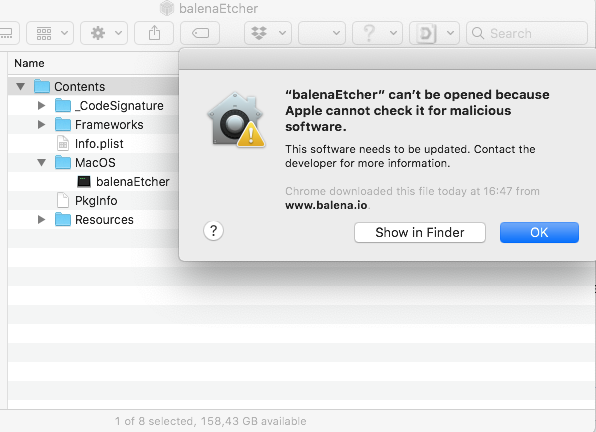
Just updated to MacOS Catalina (10.15 (19A602) ). When I start balenaEtcher (1.5.59) I get the following message:
“balenaEtcher” can’t be opened because Apple cannot check it for malicious software.
the sudo command just ends in: Killed and nothing happens.
So I can't use balenaEtcher anymory
 daballiemo
on 21 Oct 2019
daballiemo
on 21 Oct 2019
Go to the Application folder and open the program with a right-click: Open
 chrschmitz
on 21 Oct 2019
chrschmitz
on 21 Oct 2019
Go to the Application folder and open the program with a right-click: Open
Same result
daballiemo
on 21 Oct 2019
FYI, just saying that the app does not work does not help. Please include your version of macOS with sw_vers in a terminal window or the hard way by clicking the Apple icon in the top left hand corner of finder and clicking _About This Mac_ and then the _System Report..._ button in the _Overview_ tab. Then clicking _Software_ in the navtree on the left hand side of the _System Information_ window. Or use the thumbs up/down button on an existing comment that matches your version/build.
gh0st
on 21 Oct 2019
fyi I already put all information (including MacOS version in my first post. But to be clear again:
MBP2018-2:~$ sw_vers
ProductName:    Mac OS X
ProductVersion: 10.15
BuildVersion:   19A602
MBP2018-2:~ $
balenaEtcher version: 1.5.59
Etcher won't start either from Launcher (see screenshot in my previous post) of via sudo in terminal session with the following command:
sudo /Applications/balenaEtcher.app/Contents/MacOS/balenaEtcher
The result I get is: Killed
can't make it anymore clear than that.
daballiemo
on 21 Oct 2019
@daballiemo try xattr -d com.apple.quarantine /Applications/balenaEtcher.app in Terminal, and then opening the app either via sudo in Terminal or double-clicking in the Finder.
 ideologysec
on 21 Oct 2019
ideologysec
on 21 Oct 2019
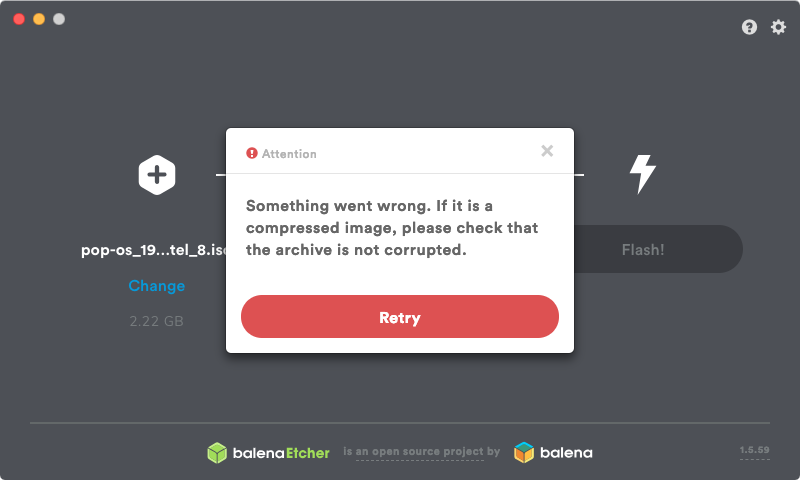
Also getting 'Something went wrong... check the archive is not corrupted' for every single ISO I try - over a dozen so far (Ubuntu 19.10, Void Linux, Pop_OS! 19.10, NomadBSD etc). The error pops up the second I enter my password, before the USB even starts being written.
I tried a complete removal (AppCleaner.app) and reinstall of the latest Version 1.5.59 (1.5.59), but still the issue persists. I'm on macOS Catalina 10.15 (with supplemental update). I have also ensured that the app has full disk access in Security & Privacy's prefpane.
I'm also seeing the error that macOS could not scan the app for malware, and I have to command-click/right click it to launch (though xattr -d com.apple.quarantine /Applications/balenaEtcher.app sorted that).
 RainmakerRaw
on 23 Oct 2019
RainmakerRaw
on 23 Oct 2019
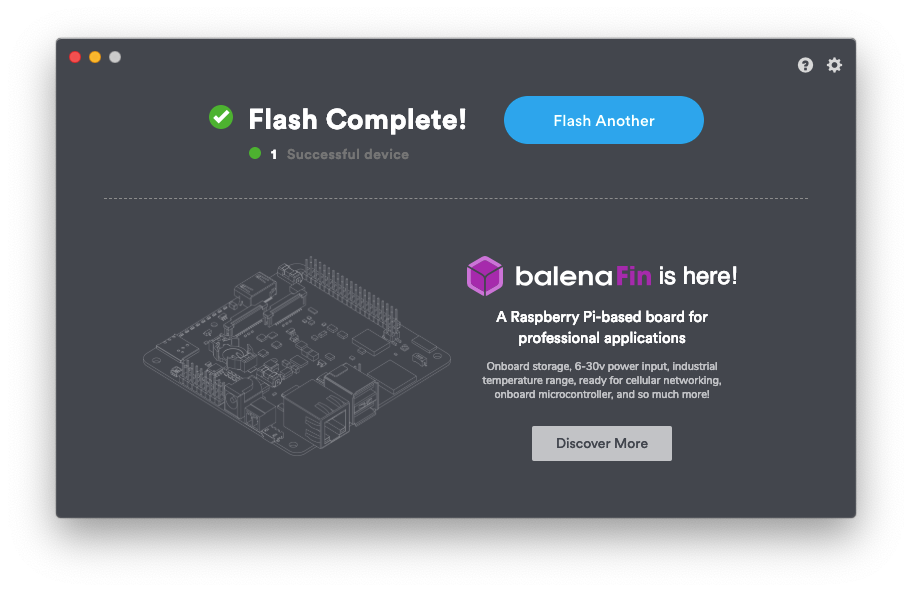
After updated to Catalina. I have reinstalled i open up. It says macos says its a mailware. So i go to System Preferences >> Security & Privacy >> Open Anyway for Etcher Balena
And Try to reopen again. Close the opened Window.
Open a New terminal window and type
xattr -d com.apple.quarantine /Applications/balenaEtcher.app
And then sudo /Applications/balenaEtcher.app/Contents/MacOS/balenaEtcher
Type password for user.
Then Select image & USB drive Then press Flash
Then it starts working & Successfully Flashed
 tejavegesna
on 23 Oct 2019
tejavegesna
on 23 Oct 2019
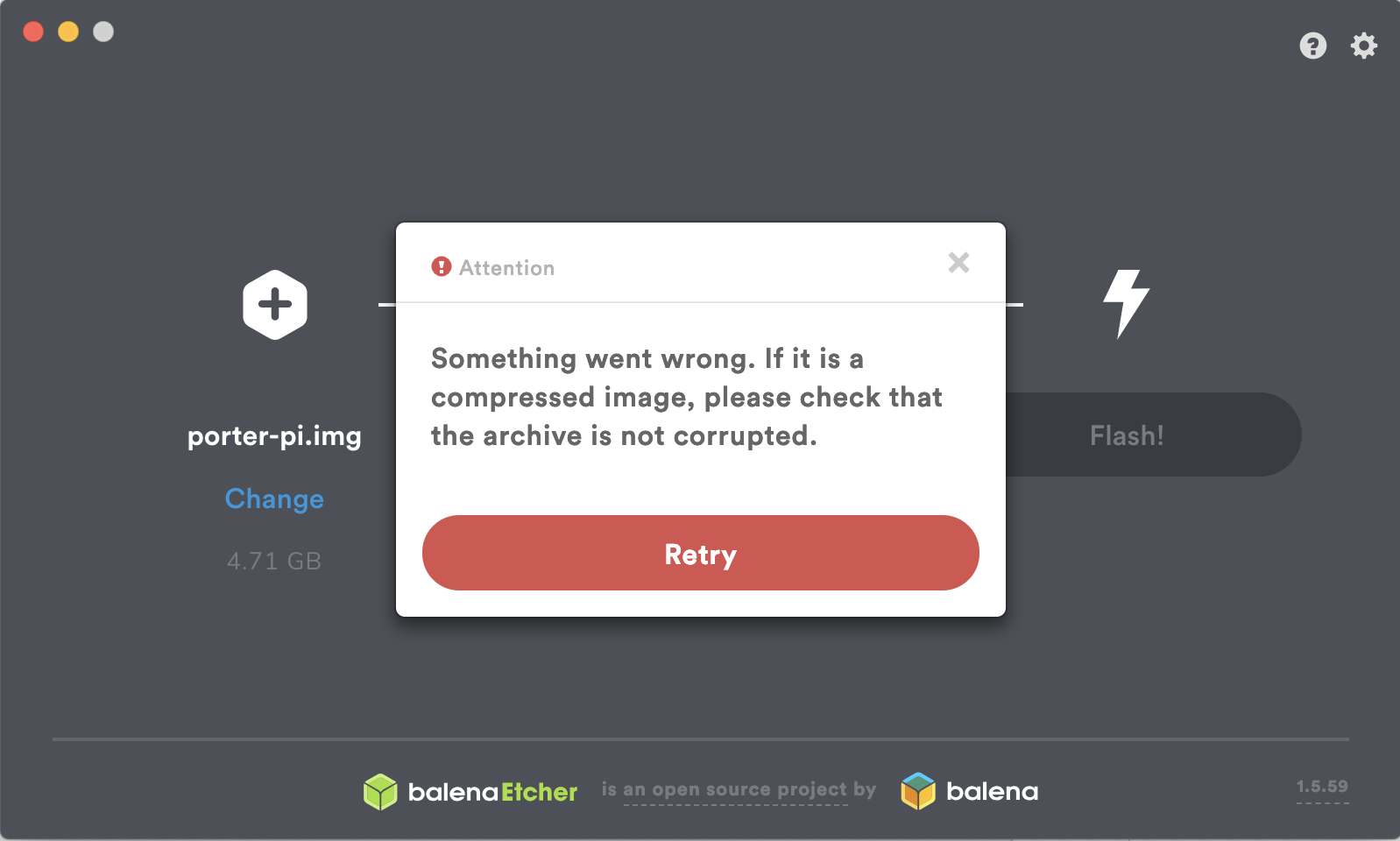
MacOS Catalina 10.15
balenaEtcher v1.5.59
I'm facing with that screen too.
EDIT: This one worked for me
 kaangokdemir
on 23 Oct 2019
kaangokdemir
on 23 Oct 2019
After updated to Catalina. I have reinstalled i open up. It says macos says its a mailware. So i go to System Preferences >> Security & Privacy >> Open Anyway for Etcher Balena
And Try to reopen again. Close the opened Window.Open a New terminal window and type
xattr -d com.apple.quarantine /Applications/balenaEtcher.app
And thensudo /Applications/balenaEtcher.app/Contents/MacOS/balenaEtcher
Type password for user.
Then Select image & USB drive Then press Flash
Then it starts working & Successfully Flashed
This is working for me.
 fallenprogrammr
on 24 Oct 2019
fallenprogrammr
on 24 Oct 2019
[thundron] This issue has attached support thread https://jel.ly.fish/#/support-thread~837b8033-7b1e-4dc5-bcba-7b76347b0b08
 balena-ci
on 24 Oct 2019
balena-ci
on 24 Oct 2019
After updated to Catalina. I have reinstalled i open up. It says macos says its a mailware. So i go to System Preferences >> Security & Privacy >> Open Anyway for Etcher Balena
And Try to reopen again. Close the opened Window.Open a New terminal window and type
xattr -d com.apple.quarantine /Applications/balenaEtcher.app
And thensudo /Applications/balenaEtcher.app/Contents/MacOS/balenaEtcher
Type password for user.
Then Select image & USB drive Then press Flash
Then it starts working & Successfully Flashed
I did exactly as you said and I have an other crash message:
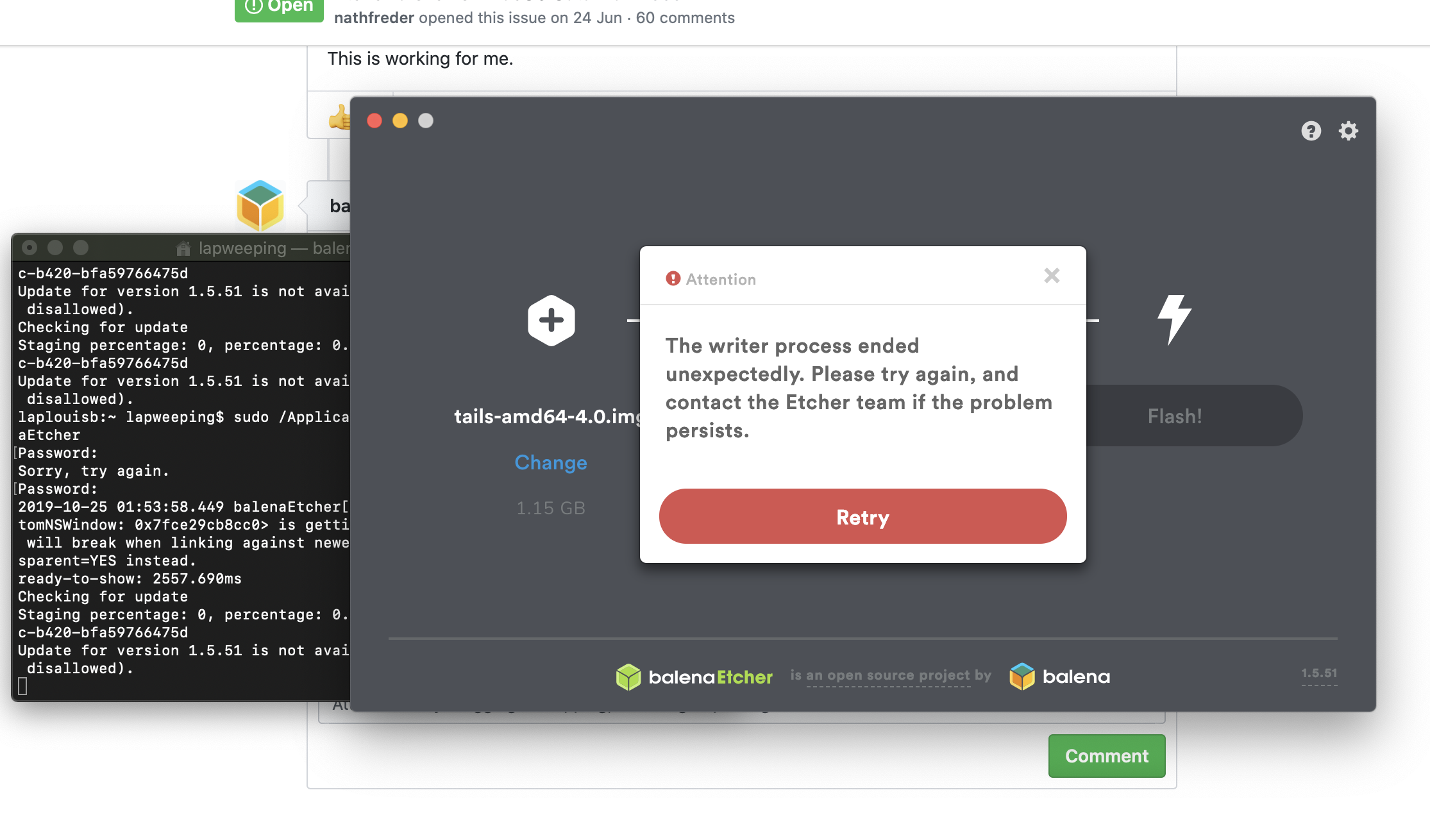
and it say :
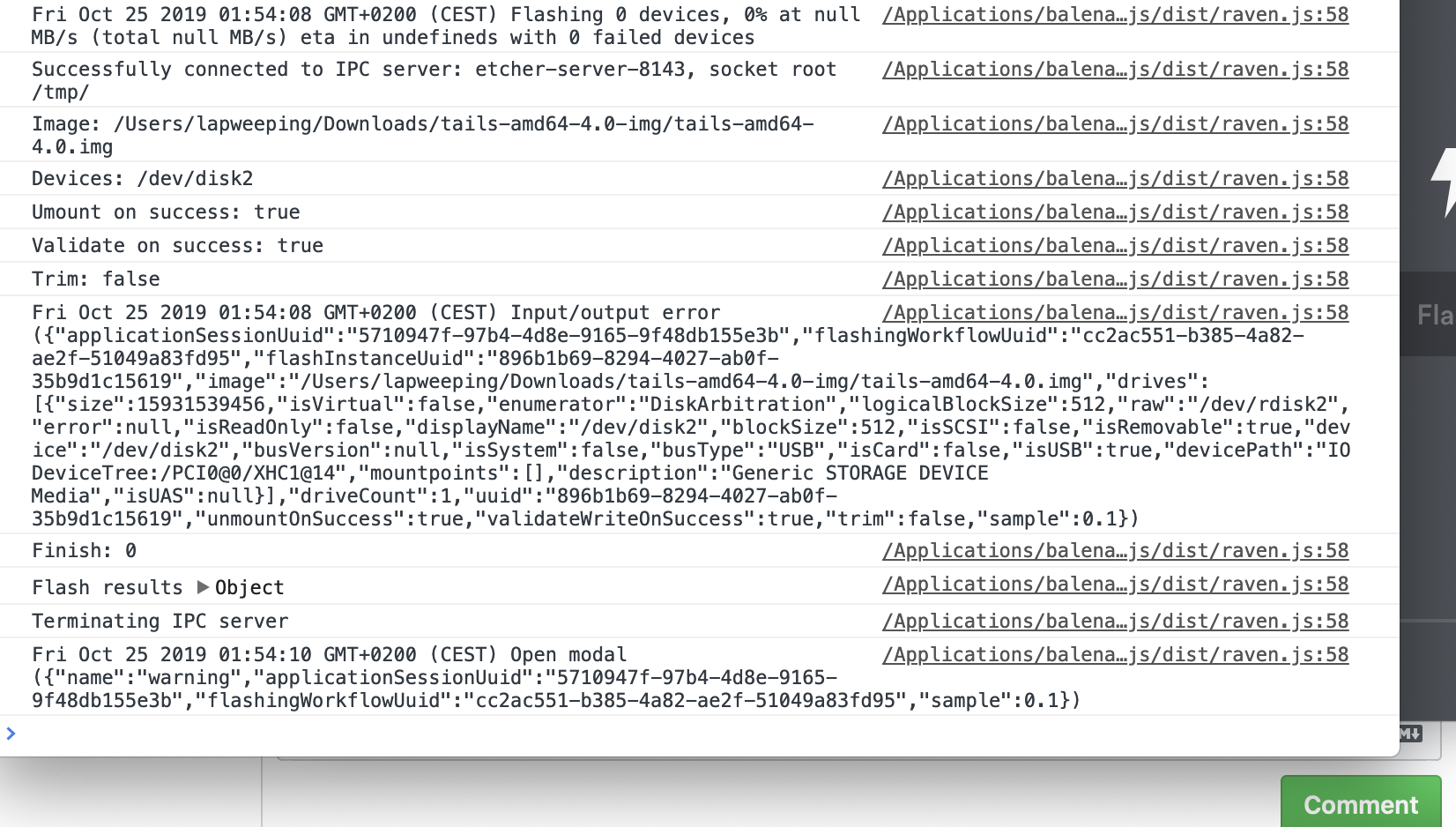
thanks for your help
 louisgex
on 25 Oct 2019
louisgex
on 25 Oct 2019
@louisgex i have tested with version 1.5.59. You are running with version 1.5.51 . Please update to 1.5.59 or higher. Test it again
tejavegesna
on 25 Oct 2019
okay now it WORKS THANKSSSSS
louisgex
on 25 Oct 2019
@louisgex method worked.
BalenaEtcher 1.5.59
Catalina 10.15
 Melkaz
on 25 Oct 2019
Melkaz
on 25 Oct 2019
So workarounds are good, but is someone working on an actual fix right now? I don't want to hack around it.
 muuvmuuv
on 25 Oct 2019
muuvmuuv
on 25 Oct 2019
[thundron] This issue has attached support thread https://jel.ly.fish/#/support-thread~12bde35d-e625-466e-9db0-3e4f239aa53c
balena-ci
on 25 Oct 2019
@muuvmuuv yes we are actively working on this.
 curcuz
on 26 Oct 2019
curcuz
on 26 Oct 2019
@cameroncooke Thanks! That worked perfectly. I imagine there is a good chance this workaround could be helpful with other issues like this, too. ✅
 0evmc
on 26 Oct 2019
0evmc
on 26 Oct 2019
As a temporary workaround, you can navigate to your Applications folder and Option-Right-Click and Open.
Edit: It appears you'll still need to elevate privileges as well in order to be able to write to external volumes. You can do so, at your own discretion, with:
sudo /Applications/balenaEtcher.app/Contents/MacOS/balenaEtcher
Note: As a general rule, if you're using this workaround, be sure you:
- Know where the file came from.
- Know what you're opening.
- Trust the source.
 jhalt
on 27 Oct 2019
jhalt
on 27 Oct 2019
Above approaches didn't work for me, what did:
sudo /Applications/balenaEtcher.app/Contents/MacOS/balenaEtcherHope this helps.
this method also worked for me !! Thanks a lot 👌🏻
fortyKnoxy
on 30 Oct 2019
After updated to Catalina. I have reinstalled i open up. It says macos says its a mailware. So i go to System Preferences >> Security & Privacy >> Open Anyway for Etcher Balena
And Try to reopen again. Close the opened Window.Open a New terminal window and type
xattr -d com.apple.quarantine /Applications/balenaEtcher.app
And thensudo /Applications/balenaEtcher.app/Contents/MacOS/balenaEtcher
Type password for user.
Then Select image & USB drive Then press Flash
Then it starts working & Successfully Flashed
This was worked for me as well
 smecham
on 30 Oct 2019
smecham
on 30 Oct 2019
if running with sudo doesn't work. update etcher to the latest version (in my case 1.5.59) and then try again by running with sudo.
 FUTC-Coding
on 31 Oct 2019
FUTC-Coding
on 31 Oct 2019
worked for me :
sudo /Applications/balenaEtcher.app/Contents/MacOS/balenaEtcher
 Akshaykkapoor
on 31 Oct 2019
Akshaykkapoor
on 31 Oct 2019
It seems to be related to terminal permissions over removable volume?
 zanderzhng
on 31 Oct 2019
zanderzhng
on 31 Oct 2019
After updated to Catalina. I have reinstalled i open up. It says macos says its a mailware. So i go to System Preferences >> Security & Privacy >> Open Anyway for Etcher Balena
And Try to reopen again. Close the opened Window.
Open a New terminal window and type
xattr -d com.apple.quarantine /Applications/balenaEtcher.app
And thensudo /Applications/balenaEtcher.app/Contents/MacOS/balenaEtcher
Type password for user.
Then Select image & USB drive Then press Flash
Then it starts working & Successfully Flashed
This was worked for me as well
Catalina 10.15 and etcher 1.5.59. sudo command wouldn't work without setting it to Always Open, then it opened right up
 ByteTheHand
on 31 Oct 2019
ByteTheHand
on 31 Oct 2019
sudo /Applications/balenaEtcher.app/Contents/MacOS/balenaEtcher
Worked for me on v1.5.59
 dinohorvat
on 1 Nov 2019
dinohorvat
on 1 Nov 2019
Above approaches didn't work for me, what did:
sudo /Applications/balenaEtcher.app/Contents/MacOS/balenaEtcherHope this helps.
This worked for me!
 jjsimonAB
on 1 Nov 2019
jjsimonAB
on 1 Nov 2019
sudo /Applications/balenaEtcher.app/Contents/MacOS/balenaEtcher
this works
 rameshvishnoi90904
on 3 Nov 2019
rameshvishnoi90904
on 3 Nov 2019
Not sure if this works for Etcher as well, but for ApplePi-Baker it did:
Apple released Catalina 10.1.5.1 a few days ago, which seems to fix the bug in Security and Privacy.
Hansaplast
on 3 Nov 2019
Launching with
sudocurrently works withv1.5.52on10.15 Beta (19A512f)
This worked for me!!
 julioMayorga
on 3 Nov 2019
julioMayorga
on 3 Nov 2019
This should be fixed in v1.5.61
 zvin
on 6 Nov 2019
zvin
on 6 Nov 2019
After updated to Catalina. I have reinstalled i open up. It says macos says its a mailware. So i go to System Preferences >> Security & Privacy >> Open Anyway for Etcher Balena
And Try to reopen again. Close the opened Window.Open a New terminal window and type
xattr -d com.apple.quarantine /Applications/balenaEtcher.app
And thensudo /Applications/balenaEtcher.app/Contents/MacOS/balenaEtcher
Type password for user.
Then Select image & USB drive Then press Flash
Then it starts working & Successfully Flashed
This worked for me also!
 MKE1138
on 6 Nov 2019
MKE1138
on 6 Nov 2019
Above approaches didn't work for me, what did:
sudo /Applications/balenaEtcher.app/Contents/MacOS/balenaEtcherHope this helps.
This worked for me.
 Labohkip81
on 7 Nov 2019
Labohkip81
on 7 Nov 2019
@MKE1138 @Labohkip81
Apparently it's already fixed in the latest versions of Etcher https://github.com/balena-io/etcher/issues/2833#issuecomment-550109402
No need for the sudo workaround any more.
 lurch
on 7 Nov 2019
lurch
on 7 Nov 2019
Still does not work for me on 1.5.62
Zeroing out the card with dd and then will recreate partitions but I have been at it for about 3 hours and still getting the unexpected stop read/write error. This is on Mac OS X El Capitan Version 10.11.6. I am not sure if that is the issue or not.
 vevinkirk
on 8 Nov 2019
vevinkirk
on 8 Nov 2019
Above approaches didn't work for me, what did:
sudo /Applications/balenaEtcher.app/Contents/MacOS/balenaEtcherHope this helps.
This worked for me. Thanks.
 cephasiii
on 9 Nov 2019
cephasiii
on 9 Nov 2019
Same issue, updated to 1.5.63 from 1.5.4x, went to Applications, balenaEtcher, right click, Open... and it worked. Thanks!!
 jcexposito
on 12 Nov 2019
jcexposito
on 12 Nov 2019
This issue is reoccuring (albeit in a slightly different fashion) on 10.15.2; the only workaround is again to use sudo /Applications/balenaEtcher.app/Contents/MacOS/balenaEtcher
ideologysec
on 19 Dec 2019
I've enabled full disk access and tried running with sudo, but it still won't work. I'm at a loss.
 gerryhernandez
on 23 Dec 2019
gerryhernandez
on 23 Dec 2019
I have no issues running on 10.15.2, what is the slight difference you're talking about? Might be a different issue
thundron
on 24 Dec 2019
You can comment on https://github.com/balena-io/etcher/issues/3022 assuming it's the same issue. If it's not, you can open a new one as this was about updating the whole permission system for Catalina
thundron
on 24 Dec 2019
Download latest version of Etcher 1.5.70 and replace the older one that for some reason won't update. Seems to work fine now on latest OS versionCatalina 10.15.2
 mph76
on 26 Dec 2019
mph76
on 26 Dec 2019
Above approaches didn't work for me, what did:
sudo /Applications/balenaEtcher.app/Contents/MacOS/balenaEtcherHope this helps.
Although I did what the first 4-5 people suggested, it didn't work and only when I ran Etcher from superuser it did start flashing! Thanks for this hint!
 WolfgangSchiller
on 9 Jan 2020
WolfgangSchiller
on 9 Jan 2020
Has anyone ever had a problem where the USB is not bootable afterwards? Even though the flash was done successfully?
 TMcSquared
on 15 Jan 2020
TMcSquared
on 15 Jan 2020
The new version 1.5.71 seems to working good for me now....
leonkoum
on 15 Jan 2020
@TMcSquared I'd recommend opening a balena forum issue in the Etcher room as this is a different issue to permissions, however the usual reason for this is that the image written to the media is corrupt, or the media itself is faulty. I'd recommend testing with a new download of the image (if it's been downloaded and not created by yourself) and a different USB stick to start with. If you have the same issue, post an issue and we'll look at it for you!
 hedss
on 15 Jan 2020
hedss
on 15 Jan 2020
I updated to 1.5.74 (prior version failed to write). Now, the window opens and stays gray with nothing in it. Developer tools says
Version = 1.5.74, Type = dmg
/Applications/balenaEtcher.app/Contents/Resources/app/node_modules/raven-js/dist/raven.js:58 Tue Feb 04 2020 16:41:41 GMT-0800 (Pacific Standard Time) Application start ({"packageType":"dmg","version":"1.5.74","applicationSessionUuid":"894abd28-fbca-44dd-9b38-821f0c4a4f4e","sample":0.1})
/Applications/balenaEtcher.app/Contents/Resources/app/node_modules/raven-js/dist/raven.js:58 {"stack":"TypeError: Cannot convert undefined or null to object\n    at Function.entries (<anonymous>)\n    at Object.init (file:///Applications/balenaEtcher.app/Contents/Resources/app/generated/gui.js:3951:49)\n    at main (file:///Applications/balenaEtcher.app/Contents/Resources/app/generated/gui.js:3633:12)","message":"Cannot convert undefined or null to object"}
console.<computed> @ /Applications/balenaEtcher.app/Contents/Resources/app/node_modules/raven-js/dist/raven.js:58
The window can't even be dragged anywhere. I tried the sudo fix and the system preferences one; neither work. This is on Catalina 10.15.1 (19B88). If there's no fix known, is this the right post, or do I need to open a new issue?
 barrypress
on 5 Feb 2020
barrypress
on 5 Feb 2020
Seems the 1.5.74 release is problematic - check #3057 (and its duplicates)
lurch
on 5 Feb 2020
#3057 did work - thanks! - but not being familiar with the codebase or the dev tools, I had to fumble around a lot before I finally set enough breakpoints (discovering cmd-R was a biggie, too) and pasted in the patch in enough files. I believe I had to do at least gui.js and leds.ts, but not altogether sure which one worked.
However, the fix is not persistent - closing and reopening the pap results in the same gray useless window.
barrypress
on 5 Feb 2020
Looks like a permissions issue where Etcher needs sudo on install. Uninstalling and installing the latest version worked for me.
 ezy
on 19 Apr 2020
ezy
on 19 Apr 2020
How did you give it sudo on install?
 chriskinsman
on 20 May 2020
chriskinsman
on 20 May 2020
still not working for me with 1.5.90 - when I start flashing, the sudo TouchID prompt appears, but the flashing fails immediately afterward even though it appears to start. I am still having to launch the main application via a sudo invocation in Terminal.
ideologysec
on 24 May 2020
@ideologysec probably the same as https://github.com/balena-io/etcher/issues/3107
thundron
on 29 May 2020
I bumped into this "issue" while looking for a solution for my own application (ApplePi-Baker).
Since we're all here with the same goal in mind (writing SD cards for RaspberryPi), I thought I'd help out and post my fix.Under Catalina one must add the application to the security exceptions:
Go to “System Preferences” -> “Security & Privacy” -> “Privacy“.
Add the application to the list of “Full Disk Access“ items, and you should be good to go.
No need to run as sudo.
Thank you very much, this worked for me
 vivekramaswamy
on 15 Jun 2020
vivekramaswamy
on 15 Jun 2020
I bumped into this "issue" while looking for a solution for my own application (ApplePi-Baker).
Since we're all here with the same goal in mind (writing SD cards for RaspberryPi), I thought I'd help out and post my fix.
Under Catalina one must add the application to the security exceptions:
Go to “System Preferences” -> “Security & Privacy” -> “Privacy“.
Add the application to the list of “Full Disk Access“ items, and you should be good to go.
No need to run as sudo.Thank you very much, this worked for me
This is the fix that worked for me, running 1.5.102 I needed to give Etcher Full Disk Access to flash an ISO from my Downloads directory to an external USB
 kirkdave
on 28 Jul 2020
kirkdave
on 28 Jul 2020
I tried these various solutions - but balenaEtcher kept kicking me to the curb with "Something went wrong" and I was unable to flash my copy of Ubuntu 20.04.1.
I decided to try flashing Xubuntu 20.04.1 instead - worked right away.
I'm also using Catalina 10.15.7 if that helps. Thanks guys for the great troubleshooting and inspiration.
 davidde67
on 30 Oct 2020
davidde67
on 30 Oct 2020
@zvin commented on 6 Nov 2019
This should be fixed in v1.5.61
@zvin zvin closed this on 6 Nov 2019
This is still an issue in 1.5.109. It's not asking for permission still.
_EDIT: I realised it IS now asking for permissions to the USB but NOT the source location. My ISO for example was in the download folder and I think that's the issue._
@Hansaplast commented on 25 Sep 2019:
I bumped into this "issue" while looking for a solution for my own application (ApplePi-Baker).
Since we're all here with the same goal in mind (writing SD cards for RaspberryPi), I thought I'd help out and post my fix.Under Catalina one must add the application to the security exceptions:
Go to “System Preferences” -> “Security & Privacy” -> “Privacy“.
Add the application to the list of “Full Disk Access“ items, and you should be good to go.
No need to run as sudo.
Following @Hansaplast's instructions to manually add it works.
 GarethBlain
on 31 Oct 2020
GarethBlain
on 31 Oct 2020
Hi Gareth,
Yeahhhhh that did not work for me.
The only thing that worked is running Xubuntu on this Catalina iMac. Or
running Etcher on my Mojave Macbook.
On Sat, Oct 31, 2020 at 6:21 AM Gareth Blain notifications@github.com
wrote:
@zvin https://github.com/zvin commented on 6 Nov 2019
This should be fixed in v1.5.61
@zvin https://github.com/zvin zvin closed this on 6 Nov 2019This is still an issue in 1.5.109. It's not asking for permission still.
@Hansaplast https://github.com/Hansaplast commented on 25 Sep 2019:
I bumped into this "issue" while looking for a solution for my own
application (ApplePi-Baker).
Since we're all here with the same goal in mind (writing SD cards for
RaspberryPi), I thought I'd help out and post my fix.Under Catalina one must add the application to the security exceptions:
Go to “System Preferences” -> “Security & Privacy” -> “Privacy“.
Add the application to the list of “Full Disk Access“ items, and you
should be good to go.
No need to run as sudo.Following @Hansaplast https://github.com/Hansaplast's instructions to
manually add it works.—
You are receiving this because you commented.
Reply to this email directly, view it on GitHub
https://github.com/balena-io/etcher/issues/2833#issuecomment-719932980,
or unsubscribe
https://github.com/notifications/unsubscribe-auth/ARSMRPYRUR7ZOXHPAX6QN3TSNQFM3ANCNFSM4H27SRXQ
.
--
David De Anda
[email protected]
(323) 691-7000
davidde67
on 31 Oct 2020
Hi Gareth, Yeahhhhh that did not work for me. The only thing that worked is running Xubuntu on this Catalina iMac. Or running Etcher on my Mojave Macbook.
The solution I mentioned worked for me. I think it’s just the app isn’t asking for ENOUGH permission. It needs to ask for the ISO’s location as well
GarethBlain
on 31 Oct 2020
I think it’s just the app isn’t asking for ENOUGH permission. It needs to ask for the ISO’s location as well
I don't have a Mac myself (and I don't work on Etcher), but if this assumption is correct, it would also correlate with the other MacOS issues where people have said they were able to solve their Etcher problems by dragging their ISO _inside_ their "Package Contents" folder e.g. https://github.com/balena-io/etcher/issues/2835#issuecomment-693601178
lurch
on 3 Nov 2020
I upgrade to 1.5.100 from 1.4 , It seems to be working well
 jessieeeee
on 10 Nov 2020
jessieeeee
on 10 Nov 2020
If you're still running into this: If you go to the Etcher page, and you have Noscript installed, and scroll down to the bottom and download a copy of Etcher, it'll get you 1.5.45, which is ancient. Enable javascript for the page and it'll update the links to the latest version.
 jwalton
on 11 Nov 2020
jwalton
on 11 Nov 2020
I was finally able to get this working with the latest version of Etcher (1.5.111) on MacOS Catalina (10.15.3).
I had to first run the application using: sudo /Applications/balenaEtcher.app/Contents/MacOS/balenaEtcher
Then I had to choose "Flash from URL" and provide the url of the hosted iso instead of flashing from a file.
 cheebz
on 29 Nov 2020
cheebz
on 29 Nov 2020
Workaround:
Moving your image insidebalenaEtcher.appseems to do the trick.
You can do this by selecting "Show Package Contents" onbalenaEtcher.appand dragging your image inside of it. Then you can select your image as usual from Finder and the flashing will go ahead. Make sure you select the image insidebalenaEtcher.app
This, and then running the sudo /Applications/balenaEtcher.app/Contents/MacOS/balenaEtcher did the trick for me, after trying what feels like everything on Catalina
 Bcdo
on 30 Nov 2020
Bcdo
on 30 Nov 2020
This error is back on the latest version of Etcher 1.5.111 and the above solutions didn't work for Catalina 10.15.5
I reverted the version of Etcher to 1.5.52 and sudo trick worked!
 arashnh11
on 1 Dec 2020
arashnh11
on 1 Dec 2020
This worked for me on Catalina with the latest version of Etcher (1.5.111 downloaded today)
It was the only thing that worked.
https://github.com/balena-io/etcher/issues/2833#issuecomment-534984500
 graemeblackwood
on 1 Dec 2020
graemeblackwood
on 1 Dec 2020
I've tried everything - nothing is working - so frustrating!
Running macOS Big Sur V11.0.1
"Attention - Something went wrong - process ended unexpectedly."
Any help would be appreciated.
Also same issue on PC Win10.
I'm going to give up I think - 5 hours chasing shadows...
 JDSWAN66
on 2 Dec 2020
JDSWAN66
on 2 Dec 2020
https://github.com/balena-io/etcher/issues/3358#issuecomment-737162618 says that it works when you flash directly from URL (instead of a local file).
https://github.com/balena-io/etcher/issues/3363#issuecomment-736935696 says that Etcher 1.5.109 works where 1.5.111 doesn't.
:man_shrugging: :man_shrugging:
lurch
on 2 Dec 2020
I also found that I had to reformat the USB drive to the same file system as the OS I am on. In the case of MacOS, I had to reformat the USB to use Apple's file system, and also ensure the sub-partition was formatted. Only then would Etcher work @JDSWAN66
graemeblackwood
on 3 Dec 2020
This worked for me on Catalina with the latest version of Etcher (1.5.111 downloaded today)
It was the only thing that worked.
Still having to start the application via sudo, even after granting both Full Disk Access, and permitting Etcher to access removable volumes (Big Sur).
ideologysec
on 5 Dec 2020
ping @shawaj
lurch
on 6 Dec 2020
@ideologysec which version are you using? Does this still happen with the latest v1.5.112?
 shawaj
on 7 Dec 2020
shawaj
on 7 Dec 2020
Hey, I was having this same issue today.
I was able to get it to write by using the ISO link option instead of writing it from a local file. Hope this works for y'all too.
 tizzlerino
on 13 Dec 2020
tizzlerino
on 13 Dec 2020
@tizzlerino have you tried updating to version 1.5.112?
shawaj
on 13 Dec 2020
Actually, no! I just looked and I'm still using 1.5.111. Thanks for pointing that out, I'll update it and see if it resolves the issue for me.
tizzlerino
on 13 Dec 2020
Thanks @tizzlerino - it seems to have fixed this issue for most people including me! So definitely give it a go 😊
shawaj
on 13 Dec 2020
@cameroncooke
Above approaches didn't work for me, what did:
sudo /Applications/balenaEtcher.app/Contents/MacOS/balenaEtcherHope this helps.
This do solved the problem for me, but I got another EPERM error when I flash the image:
Mon Dec 21 2020 08:31:06 GMT+0800 (CST) Flash error ({"error":{"name":"Error","message":"EPERM: operation not permitted, open '/dev/rdisk2'","stack":"Error: EPERM: operation not permitted, open '/dev/rdisk2'","code":"EPERM","syscall":"open","errno":-1},"applicationSessionUuid":"bb23765a-e5e9-477a-8366-11e15d58f6c7","flashingWorkflowUuid":"80ed0b3c-fc65-4a2f-be04-4859feb3ba39","flashInstanceUuid":"2ddb47d5-0c08-4fd9-93b9-19829ce9333a","image":"/Applications/balenaEtcher.app/gladys-4.0.0.img","drives":[{"size":63864569856,"isVirtual":false,"enumerator":"DiskArbitration","logicalBlockSize":512,"raw":"/dev/rdisk2","error":null,"isReadOnly":false,"displayName":"/dev/disk2","blockSize":512,"isSCSI":false,"isRemovable":true,"device":"/dev/disk2","busVersion":null,"isSystem":false,"busType":"USB","isCard":false,"isUSB":true,"devicePath":"IODeviceTree:/PCI0@0/PEG1@1,1/UPSB@0/DSB2@2/XHC2@0","mountpoints":[{"path":"/Volumes/SANDISK64G","label":"SANDISK64G"}],"description":"SanDisk SDDR-B531 Media","isUAS":null}],"driveCount":1,"uuid":"2ddb47d5-0c08-4fd9-93b9-19829ce9333a","unmountOnSuccess":true,"validateWriteOnSuccess":true,"sample":0.1})
It seems that my sdcard writer plugged in with MacOS usb type-c is not permitted. Does anyone got this error before?
 zhuyingda
on 21 Dec 2020
zhuyingda
on 21 Dec 2020
@zhuyingda what version of Etcher are you using?
Could you try updating to version 1.5.113 please
shawaj
on 21 Dec 2020
@zhuyingda what version of Etcher are you using?
Could you try updating to version 1.5.113 please
MacOS Catalina 10.15.7
Etcher version: 1.5.45
I have opened another issue 3390 for problem of the permission error to /dev/disk2.
zhuyingda
on 21 Dec 2020
@zhuyingda what version of Etcher are you using?
Could you try updating to version 1.5.113 please
How can I download the 1.5.113 version for MacOS? Our official website download option is 1.5.45
@shawaj
zhuyingda
on 21 Dec 2020
@zhuyingda it's because your have JavaScript turned off on your browser.
Either turn JavaScript on and try the page again or download from here https://github.com/balena-io/etcher/releases/tag/v1.5.113
shawaj
on 21 Dec 2020
Relates to #3387 and #3390
shawaj
on 21 Dec 2020
@zhuyingda it's because your have JavaScript turned off on your browser.
Either turn JavaScript on and try the page again or download from here https://github.com/balena-io/etcher/releases/tag/v1.5.113
@shawaj Thanks, after updating etcher version to 1.5.113, all of my problem about permission have solved.
And also, the official website latest version is also 1.5.113, my case is because of the network error of the request for fetching latest version.
Anyway, thanks for your help. :) 😊
zhuyingda
on 21 Dec 2020
No problem at all. Glad everything is working now
shawaj
on 21 Dec 2020
Related issues
 davidrnewman
·
4Comments
davidrnewman
·
4Comments
 jwa5426
·
5Comments
jwa5426
·
5Comments
 Bean6754
·
5Comments
Bean6754
·
5Comments
 codeinabox
·
5Comments
codeinabox
·
5Comments
 markcorbinuk
·
5Comments
markcorbinuk
·
5Comments
Most helpful comment
Above approaches didn't work for me, what did:
Hope this helps.