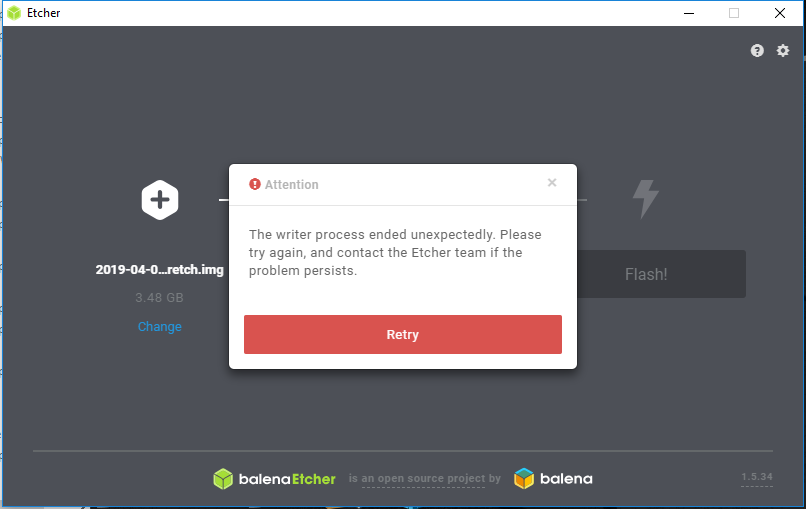
Etcher: Etcher fails to write any file on any version AFAIK.
Etcher version 1.5.30 (but also AFAIK ANY version)
Windows 10 version 1803 build 17134.706
Feren OS, Ubuntu, AFAIK ANY image...
I'm wondering if there's something weird about my computer setup/software/dependencies that breaks this software or something because I cannot get it to work and it doesn't give any meaningful errors. Are there some DirectX packages I'm missing or...? Failing that is there a debugging software I can run to help sort out the mystery?

EDIT: V 1.1.1 portable doesn't work but version 1.2.0 does. v1.1.1 can't find the drives and v1.2.0 works fine.
 Inkertus
All 26 comments
This seems to have happened a few times https://github.com/balena-io/etcher/search?q=writer+process+ended+unexpectedly&type=Issues
but I dunno if any solution was ever found.
 lurch
on 29 Apr 2019
lurch
on 29 Apr 2019
Doesn't appear that any fix was found but via one of the three identical posts (more or less) I went way back and tried a couple versions with results listed in the edit above. I wonder what they changed between then and now.
Inkertus
on 29 Apr 2019
I wonder what they changed between then and now.
LOTS! :wink: https://github.com/balena-io/etcher/blob/master/CHANGELOG.md
lurch
on 29 Apr 2019
@Inkertus Probably trivial question: did you already try running it as admin?
Have you got any antivirus/malware or any file protection that might get in the way of etcher?
 thundron
on 29 Apr 2019
thundron
on 29 Apr 2019
I tried running it as normal (just double-click) and running as admin up front. Same result across every version tested. My anti-malware program is Malwarebytes and it gave no alerts. Have not tried disabling it.
Inkertus
on 29 Apr 2019
I'm getting the same error as in the screenshot above. I tried the installed and portable version of etcher, running them as a regular user and as an admin.
FWIW. I tried on two different cards Samsung, 32G and 64G with the same result/error message.
Running on: Windows 10 Pro Version 1803 Build 17134.706 64-bit
How do I get an old version of the app? I can't seem to find the "old" downloads.
Thanks!
 thunderhelper
on 3 May 2019
thunderhelper
on 3 May 2019
I used this download (the portable one)> https://github.com/balena-io/etcher/releases/tag/v1.2.0
Inkertus
on 4 May 2019
@thunderhelper You can find all versions here
@Inkertus Did you try disabling Malwarebytes temporarily then re-run Etcher? If it works, you might consider adding an exception for it in the settings if it's possible
thundron
on 6 May 2019
Did that and no change. Only thing that was different was that it failed _faster_ than before. Otherwise the same result.
Inkertus
on 7 May 2019
I started getting this non stop in .30 after updating Windows 10 today. So I updated Etcher. Reinstalled too. No luck.it is broken.
 uchuugaka
on 23 May 2019
uchuugaka
on 23 May 2019
I started getting this non stop in .30 after updating Windows 10 today. So I updated Etcher. Reinstalled too. No luck.it is broken.
You tried the above mentioned version (1.2.0)? Only one that works for me.
Inkertus
on 24 May 2019
I found it was a target USB flash drive that had Fedora 30 iso on it.
Booting into Fedora I erased the drive and formatted it as NTFS and then booting back into Windows it worked fine.
Probably some limitation of the app on Windows with foreign file systems.
On May 24, 2019, at 7:58, Inkertus notifications@github.com wrote:
I started getting this non stop in .30 after updating Windows 10 today. So I updated Etcher. Reinstalled too. No luck.it is broken.
You tried the above mentioned version (1.2.0)? Only one that works for me.
—
You are receiving this because you commented.
Reply to this email directly, view it on GitHub, or mute the thread.
uchuugaka
on 24 May 2019
@uchuugaka Is the problem reproducible? i.e. if you flash a Fedora 30 iso to the USB drive again, does Etcher again become unable to flash the drive?
lurch
on 24 May 2019
I’ll let you know.
On May 24, 2019, at 21:07, Andrew Scheller notifications@github.com wrote:
@uchuugaka Is the problem reproducible? i.e. if you flash a Fedora 30 iso to the USB drive again, does Etcher again become unable to flash the drive?
—
You are receiving this because you were mentioned.
Reply to this email directly, view it on GitHub, or mute the thread.
uchuugaka
on 24 May 2019
So it’s not Fedora necessarily.
Pop_OS! from System76 does it too.
It seems to be that they’re both using encryption on a partition.
Removing it in Gparted or Disks app in Gnome helps.
I think I saw similar with SD cards for these on macOS too.
Probably a missing thing in this app.
On May 24, 2019, at 21:07, Andrew Scheller notifications@github.com wrote:
@uchuugaka Is the problem reproducible? i.e. if you flash a Fedora 30 iso to the USB drive again, does Etcher again become unable to flash the drive?
—
You are receiving this because you were mentioned.
Reply to this email directly, view it on GitHub, or mute the thread.
uchuugaka
on 24 May 2019
@uchuugaka @Inkertus Could you please share the logs you see in Etcher's console? You can open it with ctrl + shift + i, then focusing the Console tab in the window that opens
thundron
on 24 May 2019
right-click zip file > properties > check "unblock". Worked for me after that
 splatkin
on 28 May 2019
splatkin
on 28 May 2019
I receive exactly this same error when attempting to install Raspbian.
I have tried versions 1.5.45 and 1.5.34 of Etcher. I have tried all three; I have also tried multiple USB adapters for Micro SD, and multiple Micro SD cards. Finally, I have tried on two different computers (Windows 10 x64 and Windows 7 x64.
There is no ZIP file to unblock, so I am unsure what splatkin is talking about. I did 'unblock' the .IMG files, not that it mattered.
Link to image files:
https://www.raspberrypi.org/downloads/raspbian/
Logs:
-1560045544813.log
 ccroussore
on 9 Jun 2019
ccroussore
on 9 Jun 2019
After you download the zip file on Windows, right-click > properties > then
check "Unblock"

splatkin
on 9 Jun 2019
splatkin : That is not the solution to the problem I described above. I have done it. I did it again, just now, since you re-posted. Same result.
It may be worth noting that the process does not fail until right at 99% of the burn.
ccroussore
on 9 Jun 2019
@thundron I see Flash results Object in the log that @ccroussore provided above, which seems to be coming from https://github.com/balena-io/etcher/blob/master/lib/gui/app/modules/image-writer.js#L250
Perhaps it should be using JSON.stringifyto get more meaningful debug output?
lurch
on 9 Jun 2019
Recently I had the same issue as well.
Host OS: Ubuntu 18.04.2 LTS
Etcher: https://github.com/balena-io/etcher/releases/download/v1.5.50/balena-etcher-electron-1.5.50-linux-x64.zip
Image: https://github.com/rancher/os/releases/download/v1.5.2/rancheros-raspberry-pi64.zip
Target device: microSD card
 fkromer
on 26 Jun 2019
fkromer
on 26 Jun 2019
@fkromer Could you share your logs as well? (ctrl + shift + i to bring the console up)
@ccroussore Did you try updating etcher to the latest version? Is it still behaving the same?
thundron
on 14 Aug 2019
Just had this issue on Windows 10 - it was the Windows 10 Ransomware Protection.
Windows Security | Virus & threat protection | Ransomware protection (at the bottom)
Then you can either:
- temporarily disable Controlled folder access (easier) or
- click on "Allow an app through Controlled folder access", and then choose "Add an allowed app". I find choosing the recently blocked apps is easiest. Then just select balena-etcher (NOT the installer, that won't help).
I hope that helps,
Robert
 Robert923
on 22 Aug 2019
Robert923
on 22 Aug 2019
I am having the same issue, this has been happening to me for a while, I decided to try Etcher again after a few months and I still get this error. When I click flash, I click yes on the UAC prompt and then the writer process ends unexpectedly. I have tried this on multiple different images and on SD cards and USB drives.
Here is the log: https://pastebin.com/raw/rfzmFzAn
I am on version 1.5.56, I have "unblocked" the file as mentioned above, and I do not have the ransomware protection setting enabled as @Robert923 mentioned. Earlier versions of Etcher like 1.2 do work.
 andyjsmith
on 22 Aug 2019
andyjsmith
on 22 Aug 2019
@Robert923 you are my hero - i have 2 pcs, on one of them i have the writer error issue, on the other on everything works fine, now i know why :-) the ransom protection was disabled on the working pc...
now it works on both of them again, thank you microsoft for changing settings with updates and nobody knows it :-)
 geraldpublic
on 1 Sep 2019
geraldpublic
on 1 Sep 2019
Related issues
 Silver978
·
3Comments
Silver978
·
3Comments
 jviotti
·
5Comments
jviotti
·
5Comments
 AreDubya
·
3Comments
AreDubya
·
3Comments
 dilbert-tctc
·
5Comments
dilbert-tctc
·
5Comments
 davidrnewman
·
4Comments
davidrnewman
·
4Comments
Most helpful comment
Just had this issue on Windows 10 - it was the Windows 10 Ransomware Protection.
Windows Security | Virus & threat protection | Ransomware protection (at the bottom)
Then you can either:
I hope that helps,
Robert