- Etcher version: 1.5.24
- Operating system and architecture: Win10 Pro 64-bit
- Do you see any meaningful error information in the DevTools? No (Did not know how to access this while the bug showed).
The window turns blank/grey after loading properly. This error happens with or without burning an image. It does happen while burning images. It is not 100% predictable.

 AMDphreak
All 9 comments
@AMDphreak You can check the dev tools' console by pressing ctrl + shift + i
 thundron
on 29 Apr 2019
thundron
on 29 Apr 2019
I have exactly the same issue here. Can't even finish install process... Any solution?
 MimbaMonkeyHouse
on 25 May 2019
MimbaMonkeyHouse
on 25 May 2019
@MimbaMonkeyHouse could you paste here the logs you see in the devtools console mentioned above? ctrl + shift + i then focus the Console tab
thundron
on 26 May 2019
This maybe the same issue ?
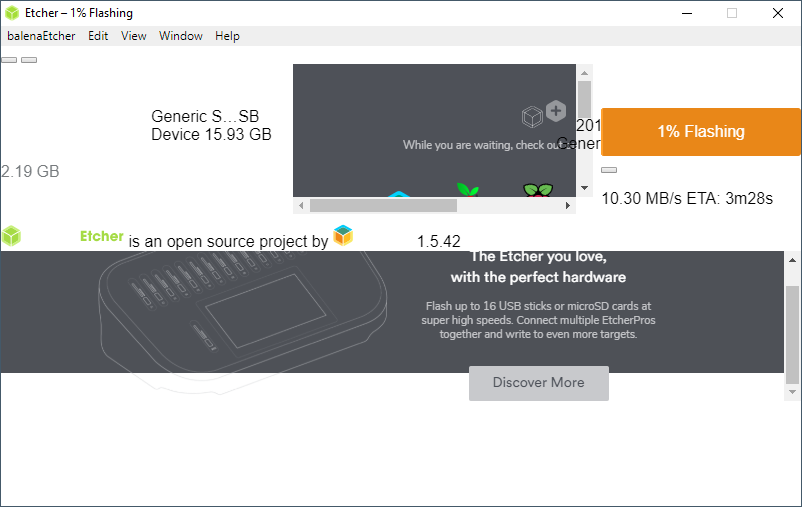
gui bug.txt
 jkuehl
on 28 May 2019
jkuehl
on 28 May 2019
@jkuehl just released a new version for that, 1.5.43
thundron
on 28 May 2019
@jkuehl just released a new version for that, 1.5.43
Looks fixed to me 👍
 jkuehl
on 28 May 2019
jkuehl
on 28 May 2019
It was never a sure thing. It would randomly do this. I closed the app and didn't bother testing it for the random bug again. It's a high incidence rate, so I will add a log later. It would most often happen while I wasn't watching, while it burned an image.
AMDphreak
on 31 May 2019
I have a similar issue on my PC. After installing, I run Etcher (Windows 10) and all I get is a blank, dark grey/gray window titled Etcher.
From memory, I believe Etcher has _never_ worked correctly on this computer. It works on my wife's laptop, so I'm unsure if there's some underlying config problem on this computer that causes the trouble?
Etcher version installed: balenaEtcher-Setup-1.5.74

 Cabji
on 5 Feb 2020
Cabji
on 5 Feb 2020
Seems the 1.5.74 release is problematic - check #3057 (and its duplicates)
 lurch
on 5 Feb 2020
lurch
on 5 Feb 2020
Related issues
 grash54
·
5Comments
grash54
·
5Comments
 m-p-3
·
5Comments
m-p-3
·
5Comments
 davidrnewman
·
4Comments
davidrnewman
·
4Comments
 jviotti
·
5Comments
jviotti
·
5Comments
 thaivic
·
4Comments
thaivic
·
4Comments
Most helpful comment