- Etcher version: 1.5.24
- Operating system and architecture: Mac OSX Mojave 10.14.4
- Image flashed: Raspian 9
- Do you see any meaningful error information in the DevTools? No
I've noticed that when I open etcher it takes almost 5 seconds to display the initial screen. The same happens every time I press a button (to select an image, to pick the device, to open the settings menu, to enable or disable any of the setting...) Is like the UI does some loop or somehting in the background that freezes the UI constantly.
If I run profiling from the inspector I see that 99% of the time is spent on scripting and the CPU load is really high (and it's mostly carried by raven).
 fbricker
All 52 comments
Having the same issue with the portable windows x64 version 1.5.24. Haven't had the same issue with prior releases.
 alexanderfrancis
on 24 Apr 2019
alexanderfrancis
on 24 Apr 2019
I can report the same observations with 1.5.30 on OSX 10.14.3, however it's much worse than 5 seconds for me. In some cases up to a minute for anything to respond. Slow to open the app, slow to bring up the ISO selection dialog, very slow to select a flash device, and then over two minutes between clicking "Flash" and it changing from "Starting" to actually writing to the device.
The write speed of an uncompressed ISO over USB3 to a modern 16GB flash drive is about 8.4MB/sec which is terrible. I know for a fact that these USB drives are much faster than this.
I did have an older version (1.4.7) and this started with a very verbose error dialog, but was also slow to start. That's why I updated to 1.5.30.
 DavidAntliff
on 25 Apr 2019
DavidAntliff
on 25 Apr 2019
Same problem here assuming youre talking about the UI, it takes like 15-20 seconds to open the settings menu for some reason.
 HunterAhlquist
on 27 Apr 2019
HunterAhlquist
on 27 Apr 2019
@fbricker Raven is the error reporting tool we use but we're not noticing any alert spikes, so I'm wondering if you have any utility program that is preventing errors from being sent.
Could you try disabling error reporting in the settings and check again CPU usage?
 thundron
on 29 Apr 2019
thundron
on 29 Apr 2019
Hi, I don't have any program or firewall blocking anything (I don't even use ad blockers).
I've tried disabling the reporting tool with the same results. I've made a video showing the performance and doing some profiling from the developers console / inspector. Maybe this can help you identify something about this :)
https://www.dropbox.com/s/p0aosiav4nk7i7y/Balena%20Etcher.mov
Thanks!
fbricker
on 30 Apr 2019
@fbricker could you please share the profile?
You can save it by right-clicking on Main on the left and selecting Save profile....
 zvin
on 30 Apr 2019
zvin
on 30 Apr 2019
Sure! 😃
Profile-20190501T004652.json.gz
fbricker
on 1 May 2019
For all the raven.js calls to take exactly 5.0 seconds each, it looks suspiciously like some kind of timeout is being hit?
 lurch
on 1 May 2019
lurch
on 1 May 2019
Hmmm... shouldn't raven calls be completely ignored if I disable the send anonymous report option?
Maybe there's something to check about this.
Also, if you provide me the DNS address or IP of you statistics server(s), I can run some test from here (Argentina). Maybe there are some broken routes to your datacenter, and that's why from some parts of the world we have issues and from others don't.
fbricker
on 2 May 2019
@fbricker I can run similar tests from New Zealand if you give brief instructions.
DavidAntliff
on 2 May 2019
The errors are reported to sentry, see https://docs.sentry.io/ip-ranges/ .
Raven is always active, the checkbox only decides if it should send the errors or not.
I don't think this issue comes from raven.
zvin
on 6 May 2019
hmm the traffic to those IPs are just fine from over here... I'm running out of ideas 😞
If you have something you want me to try just let me know.
fbricker
on 6 May 2019
@fbricker do you see drives when you plug them?
zvin
on 6 May 2019
@zvin yes... it takes near 10 seconds to display the drive, but it automatically selects the drive when I plug in and deselects if I unplug (always with a 10 secs delay).
PS: Today I've updated to version 1.5.33 for mac but still happens the same.
fbricker
on 6 May 2019
@fbricker can you try this in the console?
d=require('drivelist'); console.time('drivelist'); d.list().then((l) => { console.log(l); console.timeEnd('drivelist') })
Sure...
drivelist: 56.094970703125ms

fbricker
on 7 May 2019
I get about the same results (60ms), so I think it must be something else
thundron
on 7 May 2019
Here's a screenshot a colleague provided, this happened only once and he was not able to reproduce it.
Looks like this is related to node_usb (or libusb).

zvin
on 22 May 2019
@fbricker could you try to check if the following is slow in Etcher's console:
const u = require('usb');
u.getDeviceList();
Hi guys! Yesterday my mac was updated to version 10.14.5 (18F132) and now balena etcher works great.
@zvin running that command works really fast -less than 0.1 seconds-.
I'm not sure how it would have run yesterday. I guess it was some issue on MacOS (Mojave brought a lot of performance issues to some people -I guess I was included on that list-, and now they're fixing them slowly.
Here's a new video showing how it works really fast now:
https://www.dropbox.com/s/0ebpae4m924lcow/etcher%20works%20fine.mov?dl=0
So I guess we can close the issue now and blame apple for this... 😄
(I'm not sure about @alexanderfrancis who's having issues on windows... maybe it's something else on windows and requires a separate ticket?)
fbricker
on 22 May 2019
Have 10.14.5 and it's still very slow. Takes several MINUTES to react to mouse buttons press
 BbIKTOP
on 18 Jun 2019
BbIKTOP
on 18 Jun 2019
Hi Guys,
Maybe not minutes, but same as for BbIKTOP, annoyingly laggy.
 donpollako
on 7 Jul 2019
donpollako
on 7 Jul 2019
Same here, on a mac, burning a 1.2gb zipped image. Even though the computing is idling, Etcher behaves as if there is no memory left. Every step takes at least 10 seconds.
 flatsiedatsie
on 26 Jul 2019
flatsiedatsie
on 26 Jul 2019
@flatsiedatsie You mean the flashing process (e.g. the % steps) or that clicking anything in the UI (before flashing) takes several seconds?
thundron
on 29 Jul 2019
@thundron I meant clicking anything in the UI.
From memory:
- After clicking on the 'select image' button it took about 10 seconds for the file dialog to show up.
- After closing the file dialogue, it took 20 seconds before the image information would show up beneath the button. The 'select image' button did almost immediately change back to its clickable state, but the image information underneath it would not show up until a while longer. Because of this I would click the 'select image' button again, never realizing it was processing the file (I assume).
- Same situation with the button to select a device to 'burn' the image to.
Today Etcher it's totally responsive though. I don't know what happened, but it seems to have fixed itself.
flatsiedatsie
on 1 Aug 2019
Same issue here. UI is incredibly laggy. The window is completely responsive (i can drag it around the screen) but the actual interface freezes for 10-30 seconds at a time.
2018 15" MBP Running macOS Version 10.15 Beta (19A471t)
Also, when I finally mac it to the end I get this error:

But I'm not sure if it's related to the lag or if the image is actually bad.
 iKrushYou
on 6 Aug 2019
iKrushYou
on 6 Aug 2019
But I'm not sure if it's related to the lag or if the image is actually bad.
You could try manually extracting the image from the archive, and use Etcher to flash the raw image instead? Does the image you've downloaded provide download checksums?
lurch
on 6 Aug 2019
It’s strange. Tried it yesterday on debian image file and it was working ok, no lags. Today, on the same system and same image it’s slow again
BbIKTOP
on 15 Aug 2019
@BbIKTOP Other users have reported that sometimes an OS reboot gets Etcher "working properly" again? :man_shrugging:
lurch
on 15 Aug 2019
@BbIKTOP Other users have reported that sometimes an OS reboot gets Etcher "working properly" again? 🤷♂
Yes, that happened after one or more reboots
BbIKTOP
on 15 Aug 2019
Same problem here with OSX 10.14.4
After several reboot it still is slow :/
 s0ca
on 5 Sep 2019
s0ca
on 5 Sep 2019
Still having this issue on the latest version, on Mojave latest version.
 melyux
on 14 Oct 2019
melyux
on 14 Oct 2019
I just noticed that my Ether version said it was version 1.5.52. I wanted to see if there was a new version that fixes this issue.. and the latest version wat 1.4.45? How is that possible?
flatsiedatsie
on 8 Nov 2019
lurch
on 8 Nov 2019
@flatsiedatsie See also #2956
lurch
on 10 Nov 2019
Still not fixed? The app is literally unusable.
melyux
on 26 Dec 2019
@melikyuksel AFAIK the Etcher developers haven't been able to reproduce (or diagnose the cause of) this problem, and that's why it hasn't been "fixed" yet.
Seems to be a very rare thing that only affects a handful of users? :man_shrugging:
lurch
on 26 Dec 2019
How can we help them reproduce it?
I ran
const u = require('usb');
u.getDeviceList();
and got:
Uncaught Error: Cannot find module 'usb'
Require stack:
- /Applications/balenaEtcher.app/Contents/Resources/app/lib/gui/app/index.html
    at Module._resolveFilename (internal/modules/cjs/loader.js:627)
    at Function.Module._resolveFilename (/Applications/balenaEtcher.app/Contents/Resources/electron.asar/common/reset-search-paths.js:41)
    at Function.Module._load (internal/modules/cjs/loader.js:531)
    at Module.require (internal/modules/cjs/loader.js:685)
    at require (internal/modules/cjs/helpers.js:16)
    at <anonymous>:1:11
I ran require("@balena.io/usb").getDeviceList() in the console and it took a long time to return -- maybe 10-15 seconds. Running a profile for ~15 seconds showed a ton of time spent in the interval timer set up in UsbbootScanner.start() calling usb.getDeviceList() The profiler reported that all of the time was being spent in _disableHotplugEvents @ (unknown) (native code?)
I was able to stop the UsbbootScanner interval timer by setting a breakpoint inside of it and calling this.stop(), and the application's UI sprang back to life. Completely responsive once that process is stopped.
I have a lot of USB devices plugged into this machine, the array returned by getDeviceList() is 28 entries long. Not sure if that's related. Still, there's no way enumerating the USB devices should take this long.
 Fraxul
on 26 Jan 2020
Fraxul
on 26 Jan 2020
@Fraxul Are you on macOS?
thundron
on 27 Jan 2020
Yeah, sorry, forgot to specify. This was balenaEtcher 1.5.70 on Mac OS X 10.15.2 (19C57) on a Mac Pro (2019).
Fraxul
on 27 Jan 2020
@Fraxul I know it sounds cheesy, but have you tried restarting the mac? For what we know the degraded performance seems to be caused by the OS although the reasons are still unknown. Do you have a complete log/mem dump so we can dig into it, before changing anything?
thundron
on 28 Jan 2020
I rebooted the machine for an unrelated software update and it doesn't reproduce now. Guess I'll have to wait for it to happen again before I can debug further.
Fraxul
on 28 Jan 2020
Had the same issue several times. Reboot solves the issue for the moment. However, the issue reoccurs. (1.5.71 on MacOS 10.14.6)
 ranger81
on 8 Feb 2020
ranger81
on 8 Feb 2020
@ranger81 Actually, have you tried restarting just etcher without rebooting?
thundron
on 10 Feb 2020
@thundron Yes, usually I try to restart the app first before rebooting my entire Mac.
ranger81
on 11 Feb 2020
@thundron
Rebooting should not be the "solution", I understand its the quick fix but by the time the computer is restarted, the whole process of unresponsive UI from selecting image (already decompressed) to selecting or usb auto detected, to clicking the Flash button, takes less time.. so I just think the focus should be on debugging the actual part that is causing it.. I am sure many want to help troubleshoot this, which is why screenshots and console logs etc, should continue..
I also understand that the mac OS system might have played a role because when I was on 10.12.x this did not happen at all, then 10.13.x update started, so I understand the underlying cause might be a shared library or something from the OS.. but that's the point that we should focus on figuring out which of these files is causing this timeout.. because again, the app ultimately works, it is just the very slow unresponsiveness of it that sucks.
As you suggested to others, I also ran this in console:
const u = require('usb');
u.getDeviceList();
and got this: (screenshot attached)
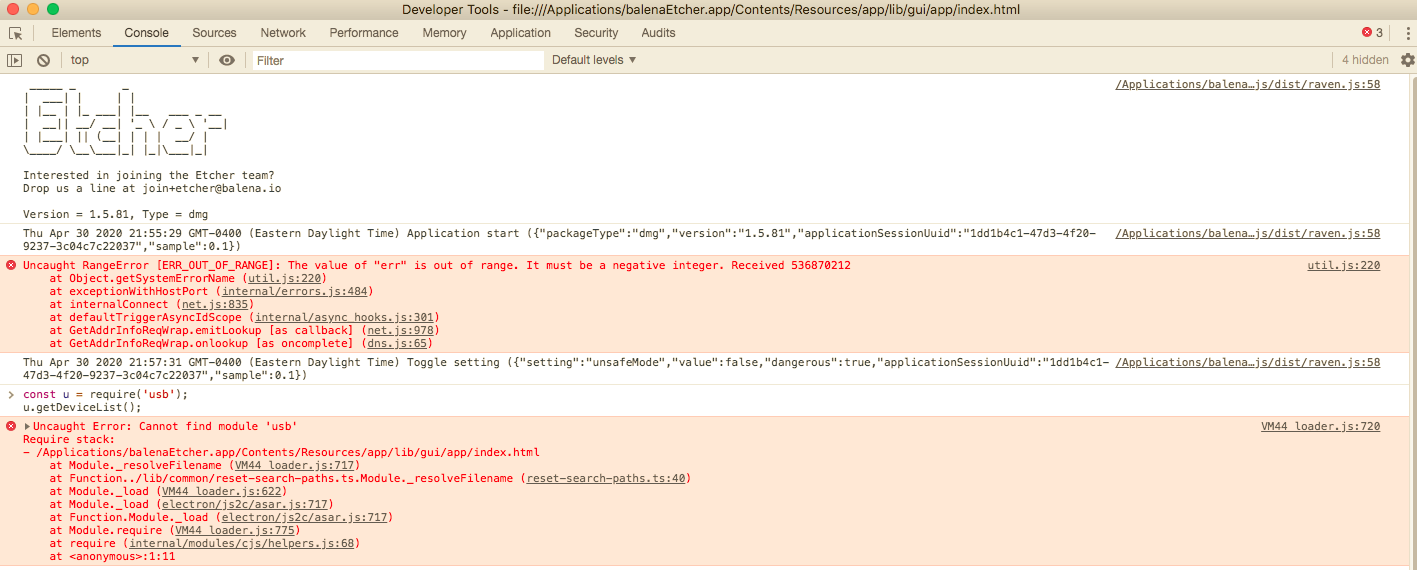
Let me know anything else you would like us to try..
Also, the app was trying to call on two fonts that dont exist, I checked the folder and the fonts names dont match:
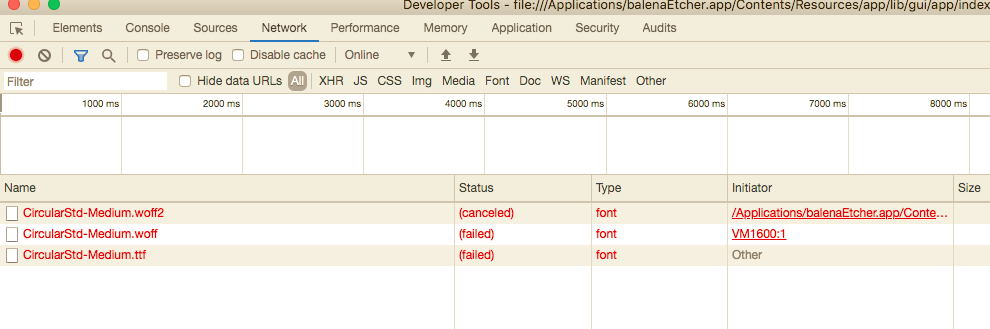
_Just an update_, I run LuLu firewall and when I allowed the balenaEtcher Helper (Renderer) to access external internet, this error on the top about utils.js went away... so I allowed all connections from balenaEtcher but still unresponsive UI persists.
 ealmonte32
on 1 May 2020
ealmonte32
on 1 May 2020
@ealmonte32 it's u=require('@balena.io/usb') now.
zvin
on 1 May 2020
Thx @zvin , no errors but still very unresponsive.
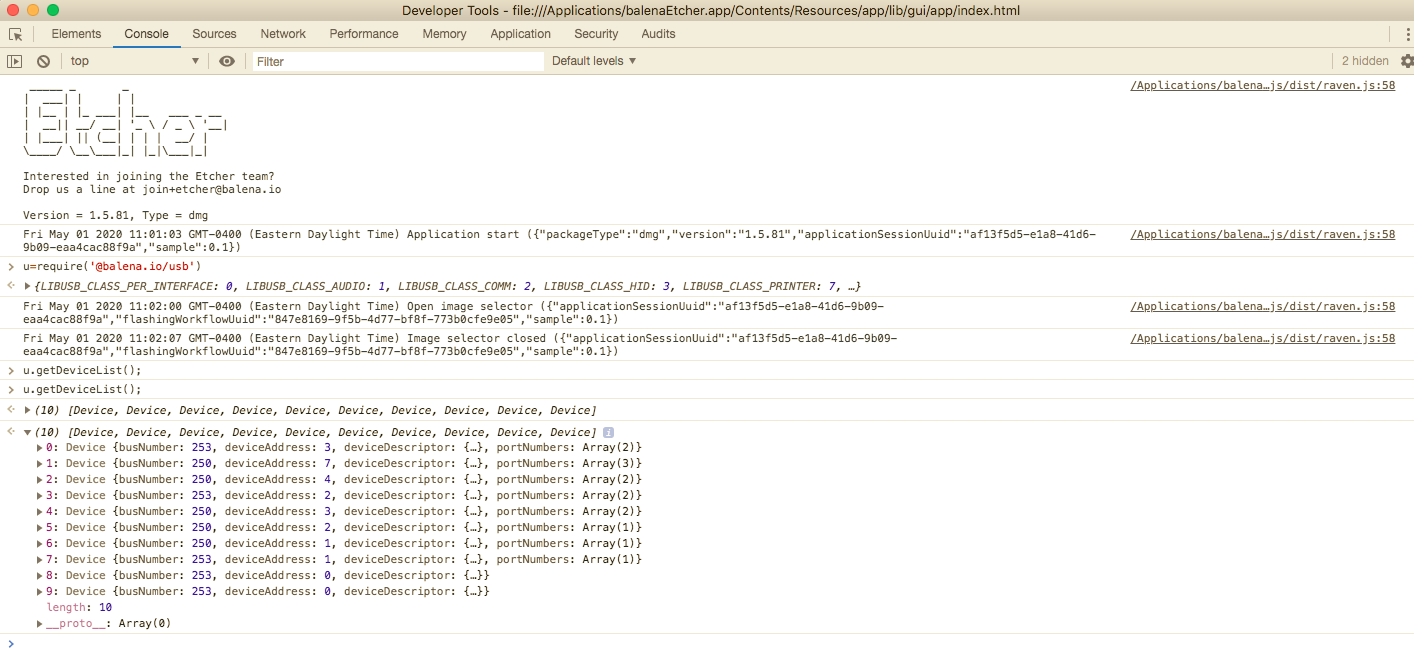
This was a performance reload, 8 seconds for total, and the self time task taking longest was the raspberry pi usbboot module?

ealmonte32
on 1 May 2020
@zvin
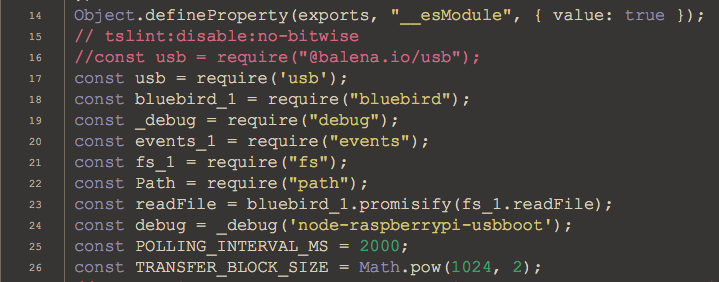
I found the issue, that's it.. as soon as I commented out this line:
//const usb = require("@balena.io/usb");
from /Applications/balenaEtcher.app/Contents/Resources/app/node_modules/node-raspberrypi-usbboot/build/index.js
The UI speed went into split-second reaction/response...
Do you think you can take a look into that?
I know almost nothing about javascript, but wondering if I instead of requiring the @balena.io/usb I can just use the package that simply says 'usb' ? I was able to still access my plugged in SD card and sandisk USB drive with the change to const usb = require('usb'); can you tell me the downside to this if possible? thanks..
ealmonte32
on 1 May 2020
I haven't looked into this properly yet, but it seems to happen in the balena-io-modules/node-raspberrypi-usbboot module, where this line can take up to 5 seconds to return any devices, causing the entire UI to hang. Commenting it out fixes the issue.
 manualmanul
on 18 Jul 2020
manualmanul
on 18 Jul 2020
I've decided to take another look at this issue, and it is indeed being caused by balena-io/node-usb module where getDeviceList takes a long time to return anything, but unfortunately it doesn't have issues enabled and my C skills aren't sharp enough to fix this myself. If anybody wants to help, please let me know, I can consistently reproduce this issue.
For now, this (admittedly dirty) patch will remove the constant polling for BCM2835/6/7 devices, only checking for them on launch:
sed -i '' 's|usb.getDeviceList().forEach(this.boundAttachDevice);|// usb.getDeviceList().forEach(this.boundAttachDevice);|g' /Applications/balenaEtcher.app/Contents/Resources/app/generated/gui.js
manualmanul
on 15 Aug 2020
Related issues
 jwa5426
·
5Comments
jwa5426
·
5Comments
 davidrnewman
·
4Comments
davidrnewman
·
4Comments
 m-p-3
·
5Comments
m-p-3
·
5Comments
 thaivic
·
4Comments
thaivic
·
4Comments
 mwiegant
·
5Comments
mwiegant
·
5Comments
Most helpful comment
I've decided to take another look at this issue, and it is indeed being caused by balena-io/node-usb module where getDeviceList takes a long time to return anything, but unfortunately it doesn't have issues enabled and my C skills aren't sharp enough to fix this myself. If anybody wants to help, please let me know, I can consistently reproduce this issue.
For now, this (admittedly dirty) patch will remove the constant polling for BCM2835/6/7 devices, only checking for them on launch:
sed -i '' 's|usb.getDeviceList().forEach(this.boundAttachDevice);|// usb.getDeviceList().forEach(this.boundAttachDevice);|g' /Applications/balenaEtcher.app/Contents/Resources/app/generated/gui.js