Etcher: [bug] Can't etch drive because "Drive Contains Image"
- balena-etcher-electron-1.4.8-x86_64.AppImage
- Linux lnx-nateg 4.4.0-138-generic #164~14.04.1-Ubuntu SMP Fri Oct 5 08:56:16 UTC 2018 x86_64 x86_64 x86_64 GNU/Linux
- N/A
- no
I use to use etcher all the time with the same kind of image. Recently there was a new "Feature" added that does not allow a drive that is already partitioned to be flashed. This makes etcher useless for my purposes - it use to be a great tool
Please allow a way to disable this check because it reduces the capability significantly.
 NGenetzky
All 17 comments
@NGenetzky Etcher does not prevent from flashing a drive that is already partitioned (most drives are partitioned).
This feature is supposed to prevent you from selecting the drive that contains the image as destination.
If the drive does not contain the image you selected, this is a bug.
Can you please provide a bit more details? Like the path of the image and the selected drive?
 zvin
on 7 Dec 2018
zvin
on 7 Dec 2018
Might be a duplicate of #2281 ?
 lurch
on 7 Dec 2018
lurch
on 7 Dec 2018
@lurch is correct, and @jhermsmeier provided much better detail into the issue. @zvin , if you would still like more details please comment on that issue and I would be happy to supply them.
NGenetzky
on 11 Dec 2018
@NGenetzky I'd like to understand your situation better.
I'm not sure we need to fix anything about the linked issue, except maybe changing the label from "Drive Contains Image" to "The image path starts with one of this drive mountpoints".
It would not make sense to allow flashing /dev/sda mounted at / if the image is in /dev/sdb mounted on /whatever/mountpoint/image.img. (As soon as you unmount /dev/sda, the image will disappear).
Could you please provide us the path of the image you're flashing and the output of the mount command?
zvin
on 11 Dec 2018
@zvin , I will provide details tomorrow during/after work. The scenario you describe does not match my scenario.
In the meantime here are some more general answers:
- File is in Downloads folder of a Ubuntu 14.04 instance that uses LVM on a 500 Gb SSD which has multiple mountpoints - one of which is root
/and contains the Downloads directory. - The Drive is a microsd card that is plugged in and has 8 or so partitions. These mounts are automatic and are in
/media/${USER}/and the drive is/dev/sdh.
NGenetzky
on 12 Dec 2018
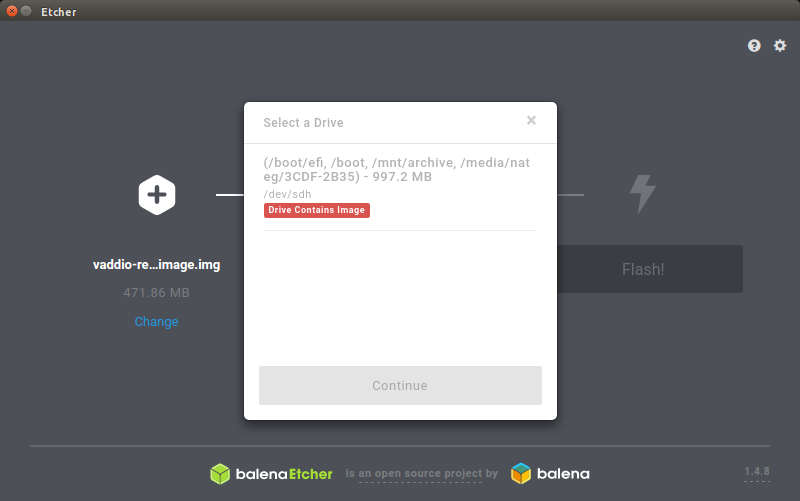
Could you please provide us the path of the image you're flashing and the
output of the mount command?
(Note some output has be redacted)
→ readlink -f vaddio-remus-debug-image.img
/home/nateg/Downloads/vaddio-remus-debug-image.img
→ mount
/dev/mapper/ubuntu--vg-root on / type ext4 (rw,errors=remount-ro)
proc on /proc type proc (rw,noexec,nosuid,nodev)
sysfs on /sys type sysfs (rw,noexec,nosuid,nodev)
none on /sys/fs/cgroup type tmpfs (rw)
none on /sys/fs/fuse/connections type fusectl (rw)
none on /sys/kernel/debug type debugfs (rw)
none on /sys/kernel/security type securityfs (rw)
none on /sys/firmware/efi/efivars type efivarfs (rw)
udev on /dev type devtmpfs (rw,mode=0755)
devpts on /dev/pts type devpts (rw,noexec,nosuid,gid=5,mode=0620)
tmpfs on /run type tmpfs (rw,noexec,nosuid,size=10%,mode=0755)
none on /run/lock type tmpfs (rw,noexec,nosuid,nodev,size=5242880)
none on /run/shm type tmpfs (rw,nosuid,nodev)
none on /run/user type tmpfs (rw,noexec,nosuid,nodev,size=104857600,mode=0755)
none on /sys/fs/pstore type pstore (rw)
cgroup on /sys/fs/cgroup/cpuset type cgroup (rw,relatime,cpuset)
cgroup on /sys/fs/cgroup/cpu type cgroup (rw,relatime,cpu)
cgroup on /sys/fs/cgroup/cpuacct type cgroup (rw,relatime,cpuacct)
cgroup on /sys/fs/cgroup/blkio type cgroup (rw,relatime,blkio)
cgroup on /sys/fs/cgroup/memory type cgroup (rw,relatime,memory)
cgroup on /sys/fs/cgroup/devices type cgroup (rw,relatime,devices)
cgroup on /sys/fs/cgroup/freezer type cgroup (rw,relatime,freezer)
cgroup on /sys/fs/cgroup/net_cls type cgroup (rw,relatime,net_cls)
cgroup on /sys/fs/cgroup/perf_event type cgroup (rw,relatime,perf_event)
cgroup on /sys/fs/cgroup/net_prio type cgroup (rw,relatime,net_prio)
cgroup on /sys/fs/cgroup/hugetlb type cgroup (rw,relatime,hugetlb)
cgroup on /sys/fs/cgroup/pids type cgroup (rw,relatime,pids)
/dev/sda2 on /boot type ext2 (rw)
/dev/sda1 on /boot/efi type vfat (rw)
/dev/sdc1 on /mnt/archive type ext4 (rw)
/dev/mapper/ubuntu--vg-work--b--tvol on /mnt/work-b type ext4 (rw)
/dev/mapper/ubuntu--vg-work--a--tvol on /mnt/work-a type ext4 (rw)
/dev/mapper/ubuntu--vg-work--c--tvol on /mnt/work-c type ext4 (rw)
rpc_pipefs on /run/rpc_pipefs type rpc_pipefs (rw)
systemd on /sys/fs/cgroup/systemd type cgroup (rw,noexec,nosuid,nodev,none,name=systemd)
/var/lib/snapd/snaps/core_6034.snap on /snap/core/6034 type squashfs (ro,nodev)
/var/lib/snapd/snaps/hugo_3144.snap on /snap/hugo/3144 type squashfs (ro,nodev)
/var/lib/snapd/snaps/hugo_2973.snap on /snap/hugo/2973 type squashfs (ro,nodev)
/var/lib/snapd/snaps/tio_212.snap on /snap/tio/212 type squashfs (ro,nodev)
/var/lib/snapd/snaps/core_5897.snap on /snap/core/5897 type squashfs (ro,nodev)
/var/lib/snapd/snaps/hugo_3347.snap on /snap/hugo/3347 type squashfs (ro,nodev)
/var/lib/snapd/snaps/core_5742.snap on /snap/core/5742 type squashfs (ro,nodev)
/var/lib/snapd/snaps/slack_9.snap on /snap/slack/9 type squashfs (ro,nodev)


gvfsd-fuse on /run/user/1000/gvfs type fuse.gvfsd-fuse (rw,nosuid,nodev,user=nateg)
[email protected]:/ on /mnt/10.30.208.73 type fuse.sshfs (rw,nosuid,nodev,user=nateg)
/dev/sdh1 on /media/nateg/3CDF-2B35 type vfat (rw,nosuid,nodev,uid=1000,gid=1000,shortname=mixed,dmask=0077,utf8=1,showexec,flush,uhelper=udisks2)
Some extra info about mountpoints.
→ mountpoint -d /
252:0
→ mountpoint -d /home/nateg/Downloads/
252:0
→ mountpoint -x /dev/sdh
8:112
→ mountpoint -x /dev/sdh1
8:113
@NGenetzky drivelist seems to be mixing things up here. It shows mountpoints unrelated to /dev/sdh.
Can you please provide us the output of lsblk --all --json --paths --output-all
zvin
on 14 Dec 2018
I've found that simply removing the partitions, fixes the problem.
You could do something like " dd if=/dev/zero of=/dev/sdX bs=512 count=1 conv=notrunc", but YMMV.
 Oddly
on 25 Dec 2018
Oddly
on 25 Dec 2018
Merry Christmas @Oddly , at that point I should just use dd to flash the image. Which is what I do on a regular basis.
Will provide lsblk --all --json --paths --output-all when I get the chance.
NGenetzky
on 26 Dec 2018
Almost all of those options were invalid for my version of lsblk.
→ lsblk --all
NAME                                         MAJ:MIN RM   SIZE RO TYPE MOUNTPOINT
sda                                            8:0    0 465.8G  0 disk
├─sda1                                         8:1    0   512M  0 part /boot/efi
├─sda2                                         8:2    0   244M  0 part /boot
└─sda3                                         8:3    0   465G  0 part
  ├─ubuntu--vg-root (dm-0)                   252:0    0   100G  0 lvm  /
  ├─ubuntu--vg-swap_1 (dm-1)                 252:1    0  31.9G  0 lvm  [SWAP]
  ├─ubuntu--vg-work--tp_tmeta (dm-2)         252:2    0   100M  0 lvm
  │ └─ubuntu--vg-work--tp-tpool (dm-4)       252:4    0   200G  0 lvm
  │   ├─ubuntu--vg-work--tp (dm-5)           252:5    0   200G  0 lvm
  │   ├─ubuntu--vg-work--a--tvol (dm-6)      252:6    0   100G  0 lvm  /mnt/work-a
  │   ├─ubuntu--vg-work--b--tvol (dm-7)      252:7    0   100G  0 lvm
  │   ├─ubuntu--vg-work--c--tvol (dm-8)      252:8    0   100G  0 lvm  /mnt/work-c
  │   ├─ubuntu--vg-work--d--tvol (dm-9)      252:9    0   100G  0 lvm
  │   ├─ubuntu--vg-work--z--b--tsnap (dm-10) 252:10   0   100G  0 lvm  /mnt/work-b
  │   └─ubuntu--vg-work--z--c--tsnap (dm-11) 252:11   0   100G  0 lvm
  └─ubuntu--vg-work--tp_tdata (dm-3)         252:3    0   200G  0 lvm
    └─ubuntu--vg-work--tp-tpool (dm-4)       252:4    0   200G  0 lvm
      ├─ubuntu--vg-work--tp (dm-5)           252:5    0   200G  0 lvm
      ├─ubuntu--vg-work--a--tvol (dm-6)      252:6    0   100G  0 lvm  /mnt/work-a
      ├─ubuntu--vg-work--b--tvol (dm-7)      252:7    0   100G  0 lvm
      ├─ubuntu--vg-work--c--tvol (dm-8)      252:8    0   100G  0 lvm  /mnt/work-c
      ├─ubuntu--vg-work--d--tvol (dm-9)      252:9    0   100G  0 lvm
      ├─ubuntu--vg-work--z--b--tsnap (dm-10) 252:10   0   100G  0 lvm  /mnt/work-b
      └─ubuntu--vg-work--z--c--tsnap (dm-11) 252:11   0   100G  0 lvm
sdb                                            8:16   0 465.8G  0 disk
└─sdb1                                         8:17   0   512M  0 part
sdc                                            8:32   0   1.8T  0 disk
└─sdc1                                         8:33   0   1.8T  0 part /mnt/archive
sdd                                            8:48   1         0 disk
sde                                            8:64   1         0 disk
sdf                                            8:80   1         0 disk
sdg                                            8:96   1         0 disk
sdh                                            8:112  1   951M  0 disk
└─sdh1                                         8:113  1   951M  0 part /media/nateg/3CDF-2B35
sdi                                            8:128  1         0 disk
sdj                                            8:144  1         0 disk
loop0                                          7:0    0  89.5M  1 loop /snap/core/6034
loop1                                          7:1    0  24.2M  1 loop /snap/hugo/3144
loop2                                          7:2    0  24.1M  1 loop /snap/hugo/3347
loop3                                          7:3    0         1 loop
loop4                                          7:4    0  89.5M  1 loop /snap/core/6130
loop5                                          7:5    0    40K  1 loop /snap/tio/212
loop6                                          7:6    0  88.2M  1 loop /snap/core/5897
loop7                                          7:7    0 141.6M  1 loop /snap/slack/9
loop8                                          7:8    0  24.1M  1 loop /snap/hugo/3565
@NGenetzky If your version of lsblk doesn't support JSON output, drivelist goes down a different (possibly less-tested?) code-path: https://github.com/balena-io-modules/drivelist/blob/master/lib/lsblk/index.js#L65
Could you provide the output of lsblk --bytes --pairs --all ?
EDIT: Although looking at your output above, I wonder if it's LVM that is confusing drivelist?
EDIT2: Nope, looking at what the drivelist code is doing, it's actually https://github.com/balena-io-modules/drivelist/blob/master/lib/lsblk/pairs.js#L92 which needs fixing. It currently assumes that everything with the same major device-number (in your case 8) is part of the same disk, but in fact it looks like all the major-number does is determine which driver is used, and in your case you have /dev/sda, /dev/sdb, /dev/sdc, /dev/sdd, /dev/sde, /dev/sdf, /dev/sdg, /dev/sdh, /dev/sdi, /dev/sdj as separate disks all using the same device-driver. So @zvin I think the partition-to-disk grouping code in drivelist needs to be fixed?
lurch
on 26 Dec 2018
I have the same issue as originally reported.
System: Ubuntu 14.04.5 LTS (trusty)
- Using v1.4.9 (balena-etcher-electron-1.4.9-linux-x64) -> i get the same notice for the removable drive (SD card mounted via sd-card slot in laptop) -> /dev/mmcblk0 cannot be accessed
(also, I had to enable unsafe mode first, otherwise nothing will show up !)
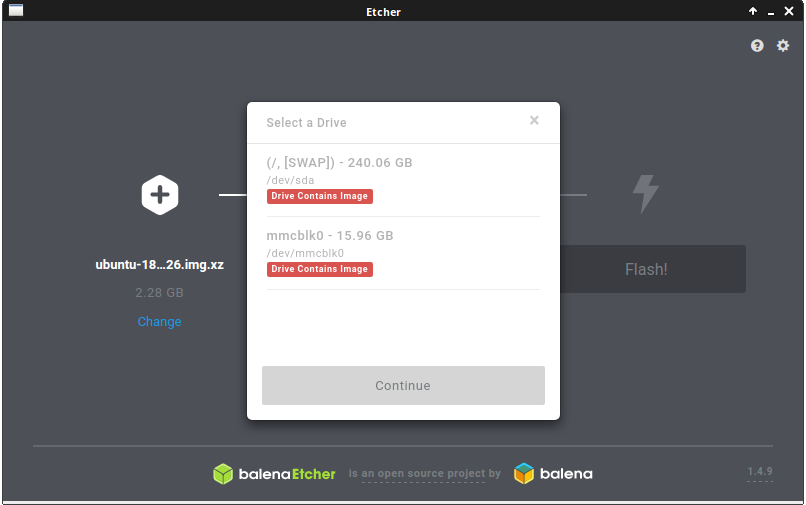
- Using v1.3.1 (etcher-1.3.1-linux-x86_64) -> it immediately finds the SD card and is able to write the image i selected
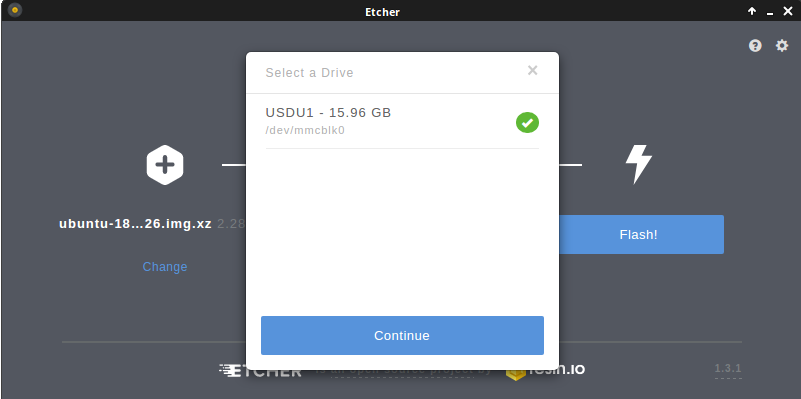

So clearly something is not working from 1.4.x on...
 CajunDust
on 4 Feb 2019
CajunDust
on 4 Feb 2019
@CajunDust I believe there's a bug in the version of drivelist used by Etcher v1.4.9. However the bug in drivelist has since been fixed https://github.com/balena-io-modules/drivelist/pull/312 so this problem should disappear in the next release of Etcher.
lurch
on 6 Feb 2019
 muratBekgi
on 12 Mar 2019
muratBekgi
on 12 Mar 2019
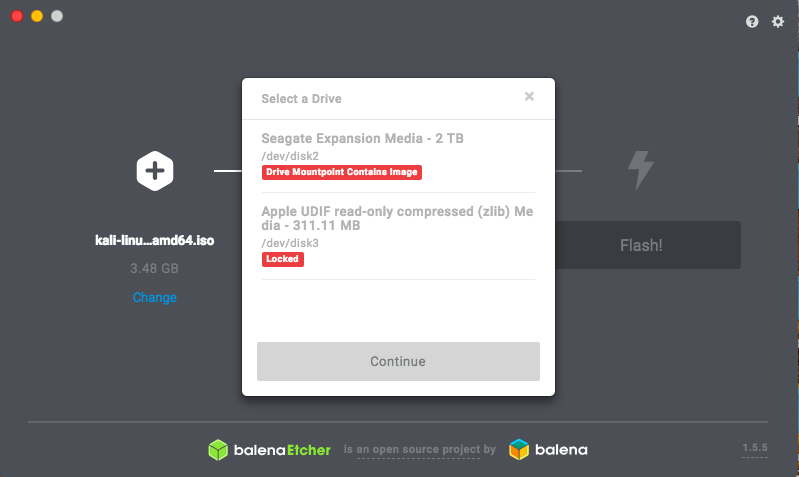
I am having the same issue with v1.5.5
muratBekgi
on 12 Mar 2019
@muratBekgi The problem this issue was discussing only affected Linux, whereas you seem to be using a Mac, so I think you should post your problem as a separate (new) issue.
lurch
on 12 Mar 2019
@zvin I assume the version of drivelist that fixed this bug is now included in Etcher, so this issue can be closed?
lurch
on 4 Apr 2019
Related issues
 Silver978
·
3Comments
Silver978
·
3Comments
 GGShinobi
·
4Comments
lurch
·
3Comments
GGShinobi
·
4Comments
lurch
·
3Comments
 markcorbinuk
·
5Comments
markcorbinuk
·
5Comments
 davidrnewman
·
4Comments
davidrnewman
·
4Comments
Most helpful comment
I have the same issue as originally reported.
System: Ubuntu 14.04.5 LTS (trusty)
(also, I had to enable unsafe mode first, otherwise nothing will show up !)
So clearly something is not working from 1.4.x on...