I've been flashing Ubuntu and Pop!_OS images to my Sandisk 64GB stick the past few days. Everytime it finished I was left with an unreadable drive by windows. No problem, since the stick boots fine and I assume windows can't read it because it's formatted as ext4. I had some trouble everytime to get the stick formatted in Windows again, I had to go into diskpart and "clean" the drive two times before it was formattable by windows again. This worked everytime.
However, after the last time I wrote the same image to the drive with Etcher, things changed. When I want to format it in windows it just won't work. The HP USB Disk Storage Format Tool, usually my lord and saviour, now tells me the USB is write protected.
Things I tried:
- every possible method in diskpart
- regedit tweak to prevent drive write protection
- AOMEI Partition utility (funnily enough this actually seems to format the drive fine but in Disk Management it shows as RAW)
- Disk Management
How is a program like Etcher supposed to completely kill a USB drive? That's not supposed to happen am I right? The USB drive was working like a charm before the last deadly write by Etcher.
 Octopous
All 64 comments
Which Windows version, and which Etcher version are you running?
 jhermsmeier
on 4 Mar 2018
jhermsmeier
on 4 Mar 2018
Newest Windows, newest Etcher at the time of writing. I fixed it by buying a new USB, booting a live ubuntu and formatting the "broken" drive with gparted. Still, this is a pretty big issue since not everyone has access to a linux environment and it seems to be unfixable in Windows.
Octopous
on 4 Mar 2018
It broke my USB in MAC OS. PLEASE HELP, is there a way of fixing the USB with MAC OS? thanks. I'm using the Versión 1.3.1 (1.3.1) of Etcher and 10.13.3 in MAC .
 flo10000
on 10 Mar 2018
flo10000
on 10 Mar 2018
@flo10000 Have you looked at https://github.com/resin-io/etcher/blob/master/docs/USER-DOCUMENTATION.md#recovering-broken-drives ?
 lurch
on 11 Mar 2018
lurch
on 11 Mar 2018
Good news!!! I did it in Terminal (with MAC OS) writing the following command:
diskutil eraseDisk FAT32 DiskNameGoesHere /dev/DiskNodeIDHere
:)
flo10000
on 11 Mar 2018
Good to hear :) Closing this then
jhermsmeier
on 20 Mar 2018
I am running a mac and have a similar problem, but the stated fix doesn't work.
First I tried diskutil eraseDisk FAT32 DiskNameGoesHere /dev/disk2s2
and got
A volume was specified instead of a whole disk: /dev/disk2s2
Specify a whole disk, or instead use diskutil eraseVolume to erase a volume on a specific partition
So I have run
diskutil eraseVolume free NAME /dev/disk2s2
and got
Unmounting disk
Error: -69877: Couldn't open device
 Nathanael8
on 11 Jun 2018
Nathanael8
on 11 Jun 2018
@Nathanael8 for the eraseDisk command you'll have to use the entire device, i.e. /dev/disk2 instead of /dev/disk2s2 (which refers to a partition on the device)
jhermsmeier
on 12 Jun 2018
@jhermsmeier Thank you, it works 👍
$ sudo diskutil eraseDisk FAT32 123 disk2
Started erase on disk2
Unmounting disk
Creating the partition map
Waiting for partitions to activate
Formatting disk2s2 as MS-DOS (FAT32) with name 123
512 bytes per physical sector
/dev/rdisk2s2: 30063920 sectors in 1878995 FAT32 clusters (8192 bytes/cluster)
bps=512 spc=16 res=32 nft=2 mid=0xf8 spt=32 hds=255 hid=411648 drv=0x80 bsec=30093312 bspf=14680 rdcl=2 infs=1 bkbs=6
Mounting disk
Finished erase on disk2
 zyfu90
on 14 Jun 2018
zyfu90
on 14 Jun 2018
so is there a way to flash eg ubuntu iso with etcher on macos now? cause I broke two flash drives with it :D
 mchsk
on 17 Jun 2018
mchsk
on 17 Jun 2018
Broke my third usb stick with etcher trying to flash deepin and antergos ISOs, recovering methods are not working either. newest windows and etcher 1.3.1 installed
given error message was saying something about permissions, probably because usb sticks cannot be read anymore by OS. im losing my mind being stuck with windows with constantly breaking down usb sticks...
 hitchhooker
on 4 Jul 2018
hitchhooker
on 4 Jul 2018
@hitchhooker you might want to try the latest Etcher version (1.4.4)
jhermsmeier
on 4 Jul 2018
good to know, ill try some another software. can not take more risks for losing my mental health with writing software on windows environment. i have now been failing to install AntergOS on my pc for 4 months realizing it was all the time about the failure of software I was making the installation media.
hitchhooker
on 4 Jul 2018
In my experience, Etcher has been pretty reliable. Are you sure it's not your USB sticks (or Windows permissions) that are faulty? :man_shrugging: But see https://github.com/resin-io/etcher/blob/master/docs/USER-DOCUMENTATION.md#why-is-my-drive-not-bootable and https://github.com/resin-io/etcher/blob/master/docs/USER-DOCUMENTATION.md#flashing-ubuntu-isos in case that helps...?
lurch
on 5 Jul 2018
2 last ones were straight from the shop. Other I manage to burn ISO couple times with etcher but failed installing, especially AntergOS(cnnchi crashed in installation). but after couple reflashes with etcher it become unusable. last usb2.0 16gb stick went straight unusable on the first try even without process of burning files beginning giving the error message, so that might have been also poor quality of memory stick. I have not manage to try testing sticks out on Linux based distro that are they completely dead but at least diskpart cleaning aint helping out as well as windows doesnt recognize any memory space on them.
okay seems like rufus managed to recover and rebuild usb.
hitchhooker
on 5 Jul 2018
the flash drives are physically ok, i can recover them even on macos (the os that is pretty unwilling to talk to anything else except from what it wants)
cant it be that the etcher initally patches the drive with GPT/GUID instead of MBR? cause I believe it was the case after fu*ked up flashing :)
mchsk
on 5 Jul 2018
cant it be that the etcher initally patches the drive with GPT/GUID instead of MBR?
Etcher just raw-writes whatever's in your image file directly to your destination drive - in that regard it's similar to the way dd operates. So if your image file contains an MBR your flash drive will have an MBR, but if your image file contains a GPT your flash drive will have a GPT.
lurch
on 5 Jul 2018
if that is the case you would be simply using dd on linux. so I thing there is some other logic. when I use unetbootin, it does MBR I believe, or? Again, latest etcher on macos created gpt.
mchsk
on 5 Jul 2018
if that is the case you would be simply using dd on linux
:roll_eyes:
https://resin.io/blog/etcher-1-0-is-here/
https://resin.io/blog/etcher-now-with-multi-write-and-compute-module-support/
lurch
on 5 Jul 2018
I thought I had broken a USB drive this way as well. However, if you go to Disk Utility and set the view option (top left corner) to Show All Devices, you can see the drive itself rather than the partition inside. Simply click on the drive and the click Erase. You can format the USB drive however you want to and it should work as it used to.
 czfries
on 12 Jul 2018
czfries
on 12 Jul 2018
Oh, thanks @czfries! This is actually a not unimportant detail – we should add this to our recovery guide docs.
jhermsmeier
on 12 Jul 2018
Hey there,
had today the same issue after "Etching" my Sandisk Cruzer 8 GB.
Here is a simple solution for those using windows:
Press WIN/Logo+R type: diskpart
Now you should see the console of diskpart (looks like default cmd)
just type: list disk the ouput should look like:
`
Datenträger XXX  Status         Größe    Frei     Dyn  GPT

Datenträger 0    Online         1863 GB  1024 KB
Datenträger 1    Online         1863 GB      0 B
Datenträger 2    Online          465 GB      0 B
Datenträger 3    Online          335 GB      0 B
Datenträger 4    Online         7691 MB      0 B
`
in my case its the 7691 MB device. Type: select disk 4 (replace the ID with your device ID)
To make sure that you really got the right device, check it with detail disk. If the device match to your USB device, type: clean (This will erase all data on the device!)
The main part is done, now you can create a new partition with:
`
create partition primary

select partition=1

format fs=fat32 quick
`
(You can also replace the fs=fat32 with ntfs)
additional, you can set it active by just typing: active. Now you should be able to use your device by typing: assign
And magically a window pop's up which should ask you what you want do with your device ;)
Regards,
Sebastian
 k1ll3r8e
on 6 Oct 2018
k1ll3r8e
on 6 Oct 2018
Just wondering if you ever got this fixed.
Etcher did the same thing to me when I was trying to create an Iso for ElementaryOS5.0.
My system is Asus G752, i7 6700HQ, 64GB DDR4 RAM, 1TB NVMe Samsung 970 Pro,
Windows 10 Home, 64-bit OS. I've never done a fresh install and I have all current updates as of 10/20/2018.
I tried AOMEI Partition Assistant and scanned my drive for bad sectors... all Green, if you have Red Sectors, your USB is done and this method will not work. Unfortunately, AOMEI still could not activate or assign letters to my bad USB, and the "HP USB Storage Tool" didn't even "see" the drive after I removed it and reinstalled because Windows and AOMEI could not attach a drive letter.
I attempted to use all the Windows 10 utilities; CMD prompt, diskpart, device manager, disk management, none of them worked!!!! I would see it in "disk list", select it, but "clean" would fail with {diskpart has encountered an error access denied}
So, I ended up using the GParted (version 0.30.0) on the live linux version of elementary OS 5.0 stable edition on a Live USB. I do recommend using a linux distro that has GParted installed (like elementary5.0, Debian, LinuxMint) because you can copy and paste files from your internal hard drive to the "bad" usb after you format it with GParted to check if the USB is mounted and is functioning correctly.
You will need the the following items. Your computer, another "good" USB drive with a different size than your "bad" drive, that is reformatted and empty. And last, your "bad/bricked" Etcher created USB. In my case, I had a known "good" 64GB drive and my "bad" 32GB drive that Etcher had bricked. The reason you want 2 different sizes, is so you can easily recognize these drives once inside Linux. You won't see the drive letter on most Linux OS's, but the file size will be there.
Download Rufus or Unetbootin (I don't recommend using Etcher again) to create another USB ISO file.
Download a Linux Distro with GParted installed (elementary OS 5.0, Debian, LinuxMint)
Create Bootable Linux copy with Rufus or Unetbootin... I used the following (Rufus3.3 + elemetaryOS 5.0 stable 20181016) and created bootable elementary OS.
- I removed the "bad" USB from my computer and set it aside.
- Inserted the bootable ISO for elementaryos5.0stable drive. Rebooted into BIOS with my appropriate "F"key (each computer is different google your motherboard or laptop manufacturer for BIOS boot info if it isn't on the flash screen), selected USB ISO as my primary boot option, saved & exited. Then restarted the computer.
- Logged in to the linux "TRY LIVE" version of elementaryOS and clicked the applications menu.
- After full linux boot, installed "bad" USB drive.
- Was pleasantly surprised to see GParted installed in the menu, clicked on GParted. Found the "bad" USB in the GParted drop down menu and selected it... Note * it won't have a drive letter, but it will have the size of the drive space to identify it, in my case, this "bad" drive was the one with 29.4GiB (my corrupted 32GB) your value may vary. I was able to see that the "bad" drive was formatted in msdos which windows 10 was reading as RAW and would not format.
- Formatted the bad usb drive into FAT32 using GParted, it changed color and became active, and I finally did not experience a fail message.
- Opened File Explorer from the applications menu, checked to see if the newly formatted drive was mounted, mine was not... Right-clicked and selected "MOUNT".
- Copied files to the newly formatted drive from my system ssd, to check if the USB was working.
- Shut down elementaryOS and removed the LINUX ISO USB from my computer, leaving the "bad" usb installed.
- Booted into windows 10, drive was now discovered automatically, with the files I had installed.
- Right clicked the drive and reformatted, and it finally worked, and was able to see the drive letter.
Now, you can do this with any linux distro that already has GParted installed, or you can create a GParted only, LIVE USB using Rufus or Unetbootin. This was my first and only time I had tried Etcher... Never again!!!!! Rufus is 1 for 1, and Unetbootin has never let me down.
This worked for me and I saved my drive. Hopefully you will save yours.
 doomatrix
on 20 Oct 2018
doomatrix
on 20 Oct 2018
Here's how i fixed mine on windows 10, after using etcher to flash pop!_os iso to my usb drive:
diskpart.exe's clean failed to complete and noticed the usb drive doesn't have gpt:
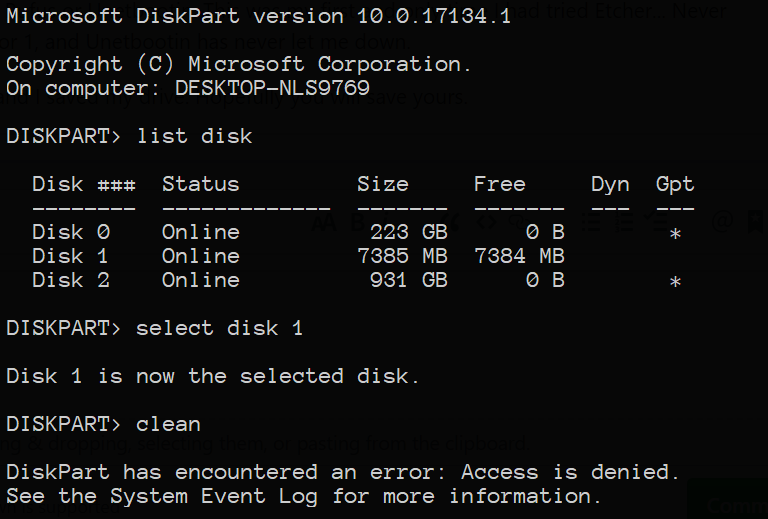
so i convert it to gpt and then run again and it completes:

then just do the regular format in windows disk management, and voila, usb drive can be used again.
 Wotzhs
on 2 Dec 2018
Wotzhs
on 2 Dec 2018
@cata0309 Chances are that you flashed an OS that yours cannot read fully, so it tries to read w/e which happens to be only 2MB.
What image did you flash on your USB?
 thundron
on 18 Jan 2019
thundron
on 18 Jan 2019
@cata0309 That's it, your OS (the one you're running Etcher on) can't read that image's partitions correctly so it might as well give you a warning about it, which is totally fine, I receive warnings all the time on OSX when flashing Linux distros on sdcards/USBs.
Afaik ubuntu iso's should be bootable even if flashed by Etcher, you can verify it and let us know how it goes. If it doesn't boot though, you might need to use a different tool, check here for more infos.
thundron
on 18 Jan 2019
Your flash drive can be recovered, read here --> https://www.techsolveprac.com/repair-flash-drive/
 techsolveprac
on 1 Mar 2019
techsolveprac
on 1 Mar 2019
Thanks @Wotzhs for the tip :)
Saved my ass
 MarcelloLins
on 25 Apr 2019
MarcelloLins
on 25 Apr 2019
sorry about that but really FU## to your stupid software ,and ETch my :rocket: ,
your stupid 'Safe usage' broke my laptop and my USB too.
 annymosse
on 16 May 2019
annymosse
on 16 May 2019
The USB may not be broken, the flash drive becomes unusable on Windows Operating System after flashing with Balena Etcher software as Linux File System is not readable by Windows. It may appear that the flash drive is no more appropriate for use. Still, the flash drive may be safe and can be repaired. Trying deleting the newly created partition in the type of OS you have flashed for and it may become reusable again. Read the complete Article or watch out the Video.
Hope it is found useful.
techsolveprac
on 16 May 2019
Etcher still breaks USB Drives. Do not use Etcher! I tried to make a pop os bootable drive and it messed my pen drive. No Windows trickery could resolve it. Ultimately, I used rufus and it worked.
USE RUFUS. THIS ETCHER THING IS A BIG SCAM.
 utk-dev
on 20 Jun 2019
utk-dev
on 20 Jun 2019
Do NOT use Etcher, it can turn USB unreadable & big disk space into very small ones even if you try normal format in Windows. The version used was the latest balenaEtcher 1.5.51.
Use Rufus to make bootable usb from iso.
Try using USB stick formatter in Linux Mint to get the USB stick back to its original size. Worked for me just now.
 simonjoeca
on 15 Jul 2019
simonjoeca
on 15 Jul 2019
NO IT WONT
WHY ARE YOU SCREAMING
It's surprising how many people don't realise how hard it actually is to break a flash drive other than just writing to it until it wears out.
The reason that it shows up as a lower amount is the image you wrote was only that big. Any extra space is ignored until the drive is clean formatted which removes the partition table and restores the drive to the normal size
 Masamune3210
on 21 Jul 2019
Masamune3210
on 21 Jul 2019
Broke my flash drive on 8/5
twas on a windows 10 1809 device trying flash to tails. 3.15
 nhoj01
on 6 Aug 2019
techsolveprac
on 6 Aug 2019
nhoj01
on 6 Aug 2019
techsolveprac
on 6 Aug 2019
For anyone coming by, Etcher writes the OS in a specific way so it is properly readable in Linux but not in Windows. If you, like me, need to recover the USB drive while on Windows, diskpart helped me as per this video.
 katktv
on 10 Aug 2019
katktv
on 10 Aug 2019
Check this comment above. The only issue is Windows can't read Linux partition. So flash drive becomes unreadable on Windows. Check out here https://github.com/balena-io/etcher/issues/2102#issuecomment-492973446
techsolveprac
on 10 Aug 2019
Hello, trying to recover a disk broken on mac while writing a windows ISO with Etcher
The disk shows up in diskutil list:
/dev/disk2 (external, physical):
#: TYPE NAME SIZE IDENTIFIER
0: FDisk_partition_scheme *253.8 GB disk2
1: Windows_NTFS MYDISK 253.8 GB disk2s1
But when I try eraseDisk it says: Error: -69877: Couldn't open device
$ diskutil eraseDisk Fat32 MYDISK disk2
Started erase on disk2
Unmounting disk
Error: -69877: Couldn't open device
Trying to write another iso fails also. Anyone could get over this?
 newearthmartin
on 25 Aug 2019
newearthmartin
on 25 Aug 2019
broke my new usb drive on mac following this https://tutorials.ubuntu.com/tutorial/tutorial-create-a-usb-stick-on-macos#3
was able to restore it with
sudo fdisk -i /dev/disk7
 Modi34
on 27 Dec 2019
Modi34
on 27 Dec 2019
broke my new usb drive on mac following this https://tutorials.ubuntu.com/tutorial/tutorial-create-a-usb-stick-on-macos#3
was able to restore it with
sudo fdisk -i /dev/disk7
Any idea which version of Etcher and macOS you are using? I followed this same tutorial a while back to create an Ubuntu install USB and it worked flawlessly. I've used it for CentOS 7 as well and received the same results.
Ik these versions are now old, but when I made the install media I had macOS Mojave 10.14.4 and Etcher 1.4.4
 turtleisaac
on 27 Dec 2019
turtleisaac
on 27 Dec 2019
I am using mac os 10.15.2 with etcher 1.5.70
I think something wrong with my ubuntu iso file
I took it from http://cdimage.ubuntu.com/releases/16.04.6/release/ (Mac (PowerPC) and IBM-PPC (POWER5) server install image)
Tried creating usb with rufus on windows 10 and had same issue
Im not very familiar with linux so I probably screwup somewhere :)
to be honest I used word broken because it was used in this topic the reality is

my usb disk has some weird partition table - APT after using etcher/rufus and neither my Mac or Win computers are able to work with it
Modi34
on 27 Dec 2019
Etcher didn't break your drive, in fact it seems to have done exactly what you told it to do. It applied a PowerPC based Ubuntu iso to your drive. The reason it wouldn't show up in Finder is likely that APT. APT stands for Apple Partition Table, it's what Macs used to require to boot before they moved over to Intel. What are you trying to do and I might be able to help
Masamune3210
on 27 Dec 2019
Yeah, Etcher really broke my SanDisk drive. It's not even available when using diskpart or in my BIOS under boot
 marcus-sa
on 12 Jan 2020
marcus-sa
on 12 Jan 2020
Unless there is a bug in the firmware for your drive, there is literally no way for Etcher or any program to kill your drive. The only way for a program to kill your drive is to exhaust all the write cycles left in the flash memory
Masamune3210
on 12 Jan 2020
Can you "literally" read what people are saying?
Echter broke my drive, I couldn't repair it with windows, Linux or Mac. No
matter if the hardware is ok, all OSes seem to go crazy with it.
El sáb., 11 ene. 2020 22:35, deadair3210 notifications@github.com
escribió:
Unless there is a bug in the firmware for your drive, there is literally
no way for Etcher or any program to kill your drive. The only way for a
program to kill your drive is to exhaust all the write cycles left in the
flash memory—
You are receiving this because you commented.
Reply to this email directly, view it on GitHub
https://github.com/balena-io/etcher/issues/2102?email_source=notifications&email_token=AALP7QVS3H4RT7W5OIE5ZNLQ5JXUVA5CNFSM4ETLVW4KYY3PNVWWK3TUL52HS4DFVREXG43VMVBW63LNMVXHJKTDN5WW2ZLOORPWSZGOEIWPJVI#issuecomment-573371605,
or unsubscribe
https://github.com/notifications/unsubscribe-auth/AALP7QWDDBD64VDUYRSRJ53Q5JXUVANCNFSM4ETLVW4A
.
newearthmartin
on 12 Jan 2020
not sure if this tip is helpful for anyone but..
I solved all my problems by installing everything I need on my ssd via parallels desktop
You simply mount your iso, dmg, img or whatever in one click, mount your ssd via usb cord and install everything you need...
after that I just put my ssd into my old macbook and it just works..... it took me less than 15 min to try what I wanted...
Modi34
on 12 Jan 2020
@jhermsmeier can you reopen this case and not as "support"? There is enough evidence with all these reports that etcher is breaking people's drives.
If you don't do anything about it, then you are being negligent.
newearthmartin
on 12 Jan 2020
@newearthmartin I stopped working on Etcher in late 2018, and am not with balena anymore. Also, the evidence (plenty of it in this and other threads) kind of tells the opposite story.
Anyways, you can always just open a new issue, if there's anything that didn't work for you.
jhermsmeier
on 14 Jan 2020
I'm not getting the bad karma for negligence by ignoring all the people
that say that etcher broke their pen drives, and the future guys whose
pendrive you will break... So you do whatever you want, it's on you guys.
Our responsibility is to come here and report it. You are dropping the ball.
And what's the opposite story from evidence? That etcher didn't break
plenty of other pendrives. It should break none!
El lun., 13 ene. 2020 23:47, Jonas Hermsmeier notifications@github.com
escribió:
@newearthmartin https://github.com/newearthmartin I stopped working on
Etcher in late 2018, and am not with balena anymore. Also, the evidence
(plenty of it in this and other threads) kind of tells the opposite story.
Anyways, you can always just open a new issue, if there's anything that
didn't work for you.—
You are receiving this because you were mentioned.
Reply to this email directly, view it on GitHub
https://github.com/balena-io/etcher/issues/2102?email_source=notifications&email_token=AALP7QX22BHN2NNVROIZDQDQ5URVBA5CNFSM4ETLVW4KYY3PNVWWK3TUL52HS4DFVREXG43VMVBW63LNMVXHJKTDN5WW2ZLOORPWSZGOEI3CLDI#issuecomment-573973901,
or unsubscribe
https://github.com/notifications/unsubscribe-auth/AALP7QRVACMZVGTA76OI26TQ5URVBANCNFSM4ETLVW4A
.
newearthmartin
on 14 Jan 2020
There is no more evidence that Etcher breaks flash drives any more than Rufus, unetbootin, or any other image program does. Flash memory dies, it's not a if, it's a when. It's not like there is some evil command you can send to flash drives to kill them
Masamune3210
on 14 Jan 2020
It's not that my drive died coincidentally. Can you see how much you refuse
to take what we are saying?
I tried to Flash a windows ISO and etcher gave some warning and I
continued, and it broke my drive. So given that it gave me a warning,
etcher was aware that it might do something wrong.
Then I used unetbootin and flashed the same ISO in another drive without
problem. So there must be room to improve.
And apparently there is a state in which you can leave the drive in which
OSes fail to open the drive or fix it. If I knew how to make a dump of the
drive and send it, maybe you could use that for debugging. It's a 256gb
drive though
El mar., 14 ene. 2020 00:12, deadair3210 notifications@github.com
escribió:
There is no more evidence that Etcher breaks flash drives any more than
Rufus, unetbootin, or any other image program does. Flash memory dies, it's
not a if, it's a when. It's not like there is some evil command you can
send to flash drives to kill them—
You are receiving this because you were mentioned.
Reply to this email directly, view it on GitHub
https://github.com/balena-io/etcher/issues/2102?email_source=notifications&email_token=AALP7QTNJACKWVYIQ437FY3Q5UURPA5CNFSM4ETLVW4KYY3PNVWWK3TUL52HS4DFVREXG43VMVBW63LNMVXHJKTDN5WW2ZLOORPWSZGOEI3DS6Q#issuecomment-573979002,
or unsubscribe
https://github.com/notifications/unsubscribe-auth/AALP7QVVMWDGG7UUCAZXJ7LQ5UURPANCNFSM4ETLVW4A
.
newearthmartin
on 14 Jan 2020
I tried to Flash a windows ISO and etcher gave some warning and I
continued, and it broke my drive. So given that it gave me a warning,
etcher was aware that it might do something wrong.
Do you remember what the warning was? If it was a Windows ISO, it was probably the warning about Windows ISOs not being bootable (i.e. nothing to do with "breaking drives").
https://github.com/balena-io/etcher/blob/master/docs/USER-DOCUMENTATION.md#why-is-my-drive-not-bootable
https://github.com/balena-io/etcher/blob/master/lib/shared/messages.js#L131
It's a 256gb drive though
There's so much price-competition in the flash drive market, I suspect that the bigger the drive, the more chance there is that it's a "fake" flash drive.
https://sosfakeflash.wordpress.com/
https://fightflashfraud.wordpress.com/
lurch
on 16 Jan 2020
I fixed my USB using rufus (if someone has not tried that method). It is the simplest way to do it.
 PratyaySarkar
on 3 May 2020
PratyaySarkar
on 3 May 2020
Most iso files are not bootable by default, you have to make them bootable. Etcher doesn't apparently do this while Rufus does.
Rufus is also more robust at handling different states that the drive can get in, mostly to make up for the fact that Windows is brain dead when it comes to anything that isn't a completely normally formatted drive
Masamune3210
on 4 May 2020
Most iso files are not bootable by default, you have to make them bootable. Etcher doesn't apparently do this while Rufus does.
Indeed - in order to do that, Rufus has special knowledge about how to modify the image files (see #413 for more info). In contrast, Etcher doesn't modify the image and just writes it byte-by-byte onto the target drive. ISOs written by Etcher are bootable if they're in a specific format.
lurch
on 4 May 2020
Etcher somehow knows that the iso is not bootable because it shows a
warning. It showed me a warning and I thought "what's the worst that could
happen?". Now my drive is unrecoverable. Etcher shouldn't write those isos
at all because it can break drives.
El lun., 4 may. 2020 09:14, Andrew Scheller notifications@github.com
escribió:
Most iso files are not bootable by default, you have to make them
bootable. Etcher doesn't apparently do this while Rufus does.Indeed - in order to do that, Rufus has special knowledge about how to
modify the image files (see #413
https://github.com/balena-io/etcher/issues/413 for more info). In
contrast, Etcher doesn't modify the image and just writes it byte-by-byte
onto the target drive. ISOs written by Etcher are bootable if they're
in a specific format
https://github.com/balena-io/etcher/blob/master/docs/USER-DOCUMENTATION.md#flashing-ubuntu-isos
.—
You are receiving this because you were mentioned.
Reply to this email directly, view it on GitHub
https://github.com/balena-io/etcher/issues/2102#issuecomment-623427949,
or unsubscribe
https://github.com/notifications/unsubscribe-auth/AALP7QTXVGSVRXYPV7FMK5TRP2WS7ANCNFSM4ETLVW4A
.
newearthmartin
on 4 May 2020
Now my drive is unrecoverable.
See https://github.com/balena-io/etcher/blob/master/docs/USER-DOCUMENTATION.md#recovering-broken-drives
lurch
on 4 May 2020
I tried all these methods in all os and no success
On Mon, 4 May 2020 at 13:03 Andrew Scheller notifications@github.com
wrote:
Now my drive is unrecoverable.
See
https://github.com/balena-io/etcher/blob/master/docs/USER-DOCUMENTATION.md#recovering-broken-drives—
You are receiving this because you were mentioned.
Reply to this email directly, view it on GitHub
https://github.com/balena-io/etcher/issues/2102#issuecomment-623553320,
or unsubscribe
https://github.com/notifications/unsubscribe-auth/AALP7QQWMLEKJII4ME462ELRP3RNPANCNFSM4ETLVW4A
.>
Om
newearthmartin
on 4 May 2020
It's up to the user to make decisions about what to do with their hardware/software. If the user wants to write literal random garbage, it's not the systems job to stop them.
For hopefully the last time, it is literally impossible for a user level program to do anything to kill a USB drive, as the only failure states that would stop a drive from working is either a firmware bug or the flash memory dying
Masamune3210
on 4 May 2020
Evidence says otherwise. It's actually pointless to tell it to you guys,
your developer ego is so fragile that you won't take hundreds of reports
and always find a way to blame it on something else. Keep up the good work
breaking drives 👍🏻
El lun., 4 may. 2020 13:17, deadair3210 notifications@github.com escribió:
>
1.
It's up to the user to make decisions about what to do with their
hardware/software. If the user wants to write literal random garbage, it's
not the systems job to stop them.
2.For hopefully the last time, it is literally impossible for a user
level program to do anything to kill a USB drive, as the only failure
states that would stop a drive from working is either a firmware bug or the
flash memory dying—
You are receiving this because you were mentioned.
Reply to this email directly, view it on GitHub
https://github.com/balena-io/etcher/issues/2102#issuecomment-623561084,
or unsubscribe
https://github.com/notifications/unsubscribe-auth/AALP7QVYB4J7EEXXJYWTPB3RP3TAXANCNFSM4ETLVW4A
.
newearthmartin
on 4 May 2020
It might as well be that the drives are not broken but the OSs get broken
when you put such drive, they don't know what to do and give up on the
drive.
El lun., 4 may. 2020 13:24, Martín Massera martinmassera@gmail.com
escribió:
Evidence says otherwise. It's actually pointless to tell it to you guys,
your developer ego is so fragile that you won't take hundreds of reports
and always find a way to blame it on something else. Keep up the good work
breaking drives 👍🏻El lun., 4 may. 2020 13:17, deadair3210 notifications@github.com
escribió:>
1.
It's up to the user to make decisions about what to do with their
hardware/software. If the user wants to write literal random garbage, it's
not the systems job to stop them.
2.For hopefully the last time, it is literally impossible for a user
level program to do anything to kill a USB drive, as the only failure
states that would stop a drive from working is either a firmware bug or the
flash memory dying—
You are receiving this because you were mentioned.
Reply to this email directly, view it on GitHub
https://github.com/balena-io/etcher/issues/2102#issuecomment-623561084,
or unsubscribe
https://github.com/notifications/unsubscribe-auth/AALP7QVYB4J7EEXXJYWTPB3RP3TAXANCNFSM4ETLVW4A
.
newearthmartin
on 4 May 2020
It's actually pointless to tell it to you guys, your developer ego is so fragile that you won't take hundreds of reports and always find a way to blame it on something else.
*sigh* Have a read of https://github.com/pbatard/rufus/wiki/FAQ#Help_Rufus_damaged_my_flash_drive - AFAIK everything written there applies to Etcher too.
lurch
on 4 May 2020
Like I've said before, it's usually not the drive being broke, so much as Windows is crap at dealing with any abnormal setups that it doesnt expect, and writing a disk image to a flash drive without modification confuses both windows and parted, which is the program that most Linux distros use to handle partition management
Masamune3210
on 4 May 2020
@newearthmartin No, evidence doesn't say otherwise. It just shows how many people are not informed on the subject and just assume that the problem comes from a process, that of flashing, of which they just don't know enough to provide a correct insight on, let alone a whole tool built for it.
While we understand the frustration that may come from seeing that Windows suddenly doesn't recognise a newly-flashed drive because it has a different partitioning than what the OS is able to read, it is no excuse for anyone to be rude and insult a tool that is otherwise being used by countless other people who know what happens when you flash a Ubuntu image on a target and try to read it from Windows afterwards, just as an example.
I think there's no reason to keep this discussion open anymore, it's quite an old one and there's plenty of evidence both here and other places that Etcher can't possibly break a target.
thundron
on 6 May 2020
Related issues
 davidrnewman
·
4Comments
davidrnewman
·
4Comments
 m-p-3
·
5Comments
m-p-3
·
5Comments
 robmcc1983
·
5Comments
robmcc1983
·
5Comments
 AreDubya
·
3Comments
AreDubya
·
3Comments
 thaivic
·
4Comments
thaivic
·
4Comments
Most helpful comment
Hey there,
had today the same issue after "Etching" my Sandisk Cruzer 8 GB.
Here is a simple solution for those using windows:
Press WIN/Logo+R type: diskpart
Now you should see the console of diskpart (looks like default cmd)
just type: list disk the ouput should look like:
`
`
in my case its the 7691 MB device. Type: select disk 4 (replace the ID with your device ID)
To make sure that you really got the right device, check it with detail disk. If the device match to your USB device, type: clean (This will erase all data on the device!)
The main part is done, now you can create a new partition with:
`
`
(You can also replace the fs=fat32 with ntfs)
additional, you can set it active by just typing: active. Now you should be able to use your device by typing: assign
And magically a window pop's up which should ask you what you want do with your device ;)
Regards,
Sebastian