Etcher: Error couldn't clean the drive...
- Etcher version:1.2.1
- Operating system and architecture: Windows 10 Home v. 1703, built-in SD card reader (Samsung 32 GB micro SD card in adapter)
- Image #flashed: Retropie 4.3
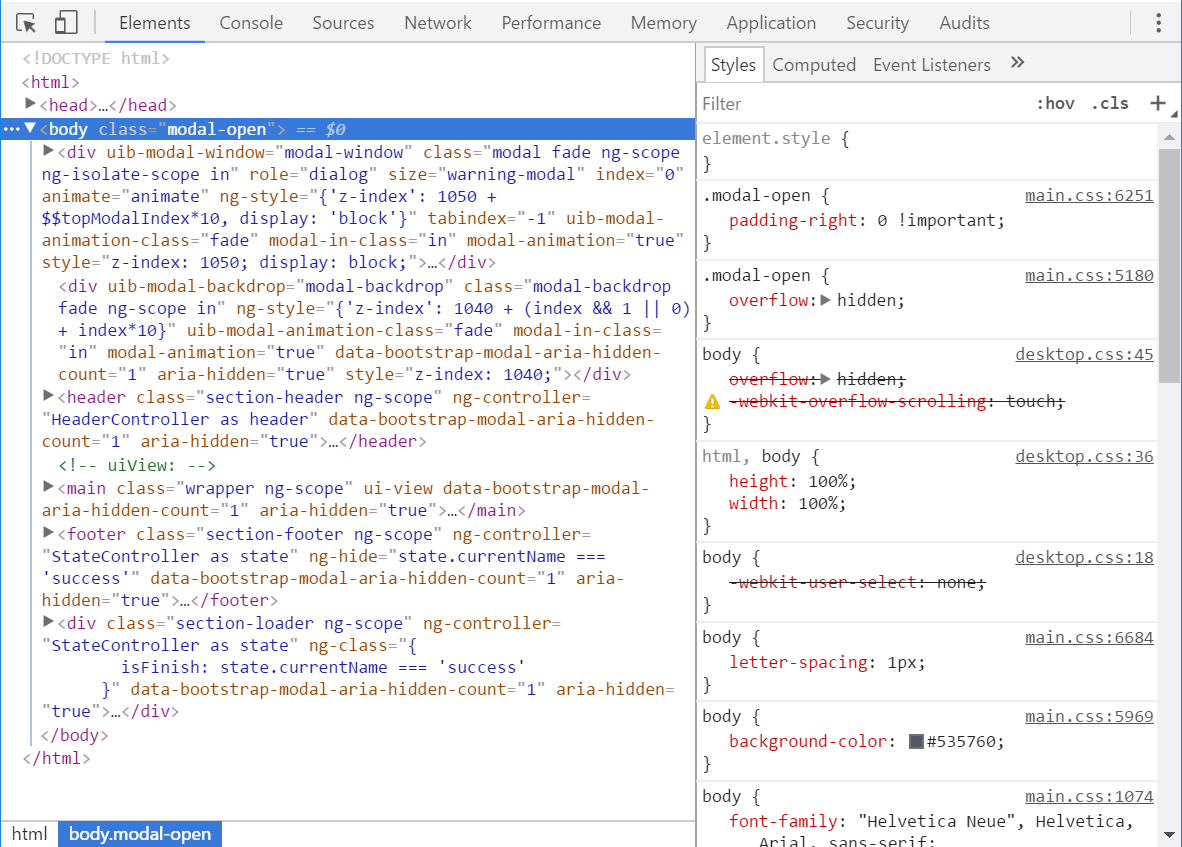
- Do you see any meaningful error information in the DevTools? Yes, although I'm not sure what it means.
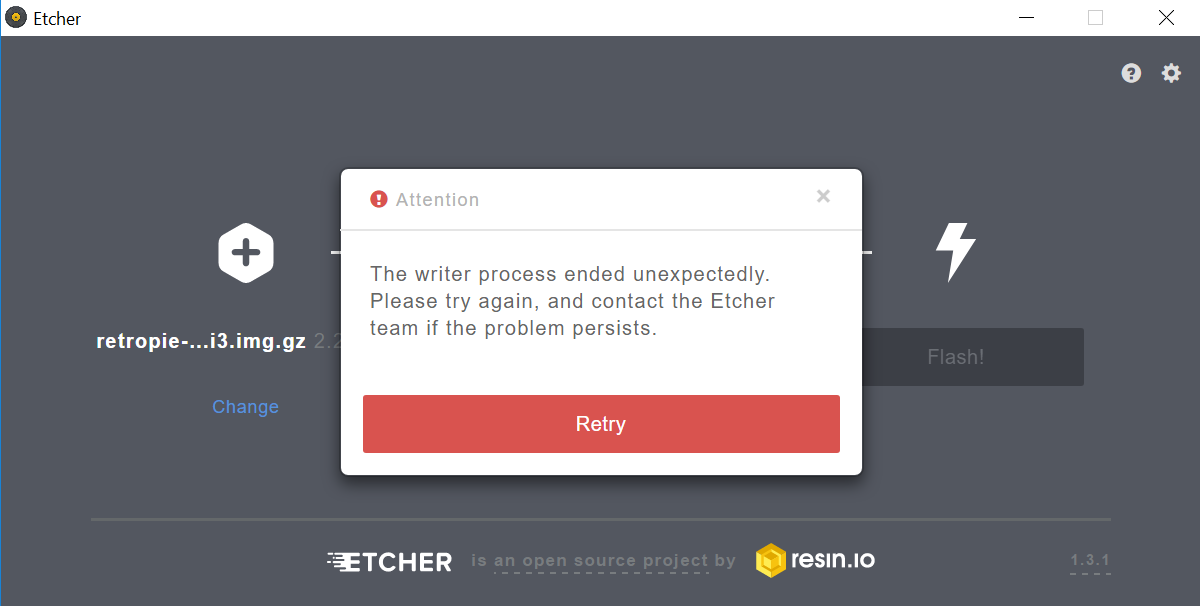
I am trying to install the retropie onto my SD card, however Etcher keeps hanging on "starting" for a few seconds then erroring out (see below). So far I have tried to reinstall Etcher a couple times, tried to run Etcher as both administrator (I get the error) and not as the administrator (just hangs on "starting"). I tried cleaning the SD card with diskpart, however I keep getting this error. I can manually copy files onto the SD card from within windows, so the SD card isn't locked out.
Any advice that can be offered would be greatly appreciated.
Thank you.
Windows Error Message:

Etcher DevTools

 cwsyt7
All 26 comments
Hey, this is a known issue with Windows; the drive cleaning will be retried 5 times, but sometimes it takes more than that, or Windows won't do it at all (and would need a restart to do so). It's surprisingly fragile.
One way you can work around this is with Disk Management; first remove all volumes on the device there, and then retry flashing it.
 jhermsmeier
on 24 Jan 2018
jhermsmeier
on 24 Jan 2018
You also might want to try Etcher v1.3.1, which we've released yesterday
jhermsmeier
on 24 Jan 2018
Thanks for the info, my google fu didn't turn up anything. So if I keep retrying it, eventually it will work?
cwsyt7
on 25 Jan 2018
Ok, I downloaded the updated version of Etcher, but now I'm getting a new error (same PC hardware, Retropie version).
Popup error window:
Code:
cwsyt7
on 25 Jan 2018
Thanks @cwsyt7 . Please could you switch to the "Console" tab of the DevTools window, and copy'n'paste the whole thing here please?
 lurch
on 25 Jan 2018
lurch
on 25 Jan 2018
Here is the console tab.
Interested in joining the Etcher team?
Drop us a line at [email protected]
Version = 1.3.1, Type = nsis
C:\Users\Chris & Marie\AppData\Local\Programs\etcher\resources\app.asar\node_modules\raven-js\dist\…:55 Thu Jan 25 2018 07:09:02 GMT-0500 (Eastern Standard Time) Application start ({"packageType":"nsis","version":"1.3.1"})
C:\Users\Chris & Marie\AppData\Local\Programs\etcher\resources\app.asar\node_modules\raven-js\dist\…:55 Thu Jan 25 2018 07:09:02 GMT-0500 (Eastern Standard Time) Checking for updates ({"currentVersion":"1.3.1","stable":true,"updateSemverRange":"<2.0.0","includeUnstableChannel":false})
C:\Users\Chris & Marie\AppData\Local\Programs\etcher\resources\app.asar\node_modules\raven-js\dist\…:55 sdk start +869ms true
C:\Users\Chris & Marie\AppData\Local\Programs\etcher\resources\app.asar\node_modules\raven-js\dist\…:55 Thu Jan 25 2018 07:09:03 GMT-0500 (Eastern Standard Time) Update notification skipped ({"reason":"Latest version"})
C:\Users\Chris & Marie\AppData\Local\Programs\etcher\resources\app.asar\node_modules\raven-js\dist\…:55 Thu Jan 25 2018 07:09:06 GMT-0500 (Eastern Standard Time) Open image selector
C:\Users\Chris & Marie\AppData\Local\Programs\etcher\resources\app.asar\node_modules\raven-js\dist\…:55 Thu Jan 25 2018 07:09:10 GMT-0500 (Eastern Standard Time) Select image ({"path":"C:\\Users\\Chris & Marie\\Downloads\\retropie-4.3-rpi2_rpi3.img.gz","archiveExtension":"gz","extension":"img","size":{"original":641640647,"final":{"estimation":true,"value":2249195520}},"hasMBR":true,"hasGPT":false,"partitions":[{"type":14,"id":null,"name":null,"firstLBA":8192,"lastLBA":124928,"extended":false},{"type":131,"id":null,"name":null,"firstLBA":124928,"lastLBA":4390912,"extended":false},{"type":0,"id":null,"name":null,"firstLBA":0,"lastLBA":0,"extended":false},{"type":0,"id":null,"name":null,"firstLBA":0,"lastLBA":0,"extended":false}],"logo":false,"bmap":false})
C:\Users\Chris & Marie\AppData\Local\Programs\etcher\resources\app.asar\node_modules\raven-js\dist\…:55 sdk stop +10s true
C:\Users\Chris & Marie\AppData\Local\Programs\etcher\resources\app.asar\node_modules\raven-js\dist\…:55 Thu Jan 25 2018 07:09:12 GMT-0500 (Eastern Standard Time) Progress (undefined): 0% at 0 MB/s (eta undefineds)
C:\Users\Chris & Marie\AppData\Local\Programs\etcher\resources\app.asar\node_modules\raven-js\dist\…:55 Thu Jan 25 2018 07:09:12 GMT-0500 (Eastern Standard Time) Flash ({"image":"C:\\Users\\Chris & Marie\\Downloads\\retropie-4.3-rpi2_rpi3.img.gz","drive":{"size":32010928128,"isVirtual":false,"enumerator":"USBSTOR","logicalBlockSize":512,"raw":"\\\\.\\PhysicalDrive1","error":null,"isReadOnly":false,"displayName":"D:\\","blockSize":512,"adapter":"standard","isSCSI":false,"isRemovable":true,"device":"\\\\.\\PhysicalDrive1","busVersion":"2.0","isSystem":false,"busType":"USB","isCard":false,"isUSB":true,"mountpoints":[{"path":"D:\\"}],"description":"SDHC Card","isUAS":false},"uuid":"25b0f12a-5499-47d5-8043-b16f2bca6560","unmountOnSuccess":true,"validateWriteOnSuccess":true})
C:\Users\Chris & Marie\AppData\Local\Programs\etcher\resources\app.asar\node_modules\raven-js\dist\…:55 Elevating command: C:\Users\Chris & Marie\AppData\Local\Programs\etcher\Etcher.exe C:\Users\Chris & Marie\AppData\Local\Programs\etcher\resources\app.asar
C:\Users\Chris & Marie\AppData\Local\Programs\etcher\resources\app.asar\node_modules\raven-js\dist\…:55 Flash results Object
C:\Users\Chris & Marie\AppData\Local\Programs\etcher\resources\app.asar\node_modules\raven-js\dist\…:55 Terminating IPC server
C:\Users\Chris & Marie\AppData\Local\Programs\etcher\resources\app.asar\node_modules\raven-js\dist\…:55 Thu Jan 25 2018 07:09:12 GMT-0500 (Eastern Standard Time) Child died unexpectedly ({"image":"C:\\Users\\Chris & Marie\\Downloads\\retropie-4.3-rpi2_rpi3.img.gz","drive":{"size":32010928128,"isVirtual":false,"enumerator":"USBSTOR","logicalBlockSize":512,"raw":"\\\\.\\PhysicalDrive1","error":null,"isReadOnly":false,"displayName":"D:\\","blockSize":512,"adapter":"standard","isSCSI":false,"isRemovable":true,"device":"\\\\.\\PhysicalDrive1","busVersion":"2.0","isSystem":false,"busType":"USB","isCard":false,"isUSB":true,"mountpoints":[{"path":"D:\\"}],"description":"SDHC Card","isUAS":false},"uuid":"25b0f12a-5499-47d5-8043-b16f2bca6560","unmountOnSuccess":true,"validateWriteOnSuccess":true})
C:\Users\Chris & Marie\AppData\Local\Programs\etcher\resources\app.asar\node_modules\raven-js\dist\…:55 Thu Jan 25 2018 07:09:12 GMT-0500 (Eastern Standard Time) Open modal ({"template":"./components/warning-modal/templates/warning-modal.tpl.html"})
C:\Users\Chris & Marie\AppData\Local\Programs\etcher\resources\app.asar\node_modules\raven-js\dist\…:55 sdk start +160ms true
C:\Users\Chris & Marie\AppData\Local\Programs\etcher\resources\app.asar\node_modules\raven-js\dist\…:55 Thu Jan 25 2018 07:09:21 GMT-0500 (Eastern Standard Time) Modal accepted ({"value":true})
C:\Users\Chris & Marie\AppData\Local\Programs\etcher\resources\app.asar\node_modules\raven-js\dist\…:55 Thu Jan 25 2018 07:09:21 GMT-0500 (Eastern Standard Time) Restart after failure
C:\Users\Chris & Marie\AppData\Local\Programs\etcher\resources\app.asar\node_modules\raven-js\dist\…:55 sdk stop +15s true
C:\Users\Chris & Marie\AppData\Local\Programs\etcher\resources\app.asar\node_modules\raven-js\dist\…:55 Thu Jan 25 2018 07:09:27 GMT-0500 (Eastern Standard Time) Progress (undefined): 0% at 0 MB/s (eta undefineds)
C:\Users\Chris & Marie\AppData\Local\Programs\etcher\resources\app.asar\node_modules\raven-js\dist\…:55 Thu Jan 25 2018 07:09:27 GMT-0500 (Eastern Standard Time) Flash ({"image":"C:\\Users\\Chris & Marie\\Downloads\\retropie-4.3-rpi2_rpi3.img.gz","drive":{"size":32010928128,"isVirtual":false,"enumerator":"USBSTOR","logicalBlockSize":512,"raw":"\\\\.\\PhysicalDrive1","error":null,"isReadOnly":false,"displayName":"D:\\","blockSize":512,"adapter":"standard","isSCSI":false,"isRemovable":true,"device":"\\\\.\\PhysicalDrive1","busVersion":"2.0","isSystem":false,"busType":"USB","isCard":false,"isUSB":true,"mountpoints":[{"path":"D:\\"}],"description":"SDHC Card","isUAS":false},"uuid":"301d448c-325f-4d41-a0e0-8a1ab3f80f55","unmountOnSuccess":true,"validateWriteOnSuccess":true})
C:\Users\Chris & Marie\AppData\Local\Programs\etcher\resources\app.asar\node_modules\raven-js\dist\…:55 Elevating command: C:\Users\Chris & Marie\AppData\Local\Programs\etcher\Etcher.exe C:\Users\Chris & Marie\AppData\Local\Programs\etcher\resources\app.asar
C:\Users\Chris & Marie\AppData\Local\Programs\etcher\resources\app.asar\node_modules\raven-js\dist\…:55 Flash results Object {cancelled: false}
C:\Users\Chris & Marie\AppData\Local\Programs\etcher\resources\app.asar\node_modules\raven-js\dist\…:55 Terminating IPC server
C:\Users\Chris & Marie\AppData\Local\Programs\etcher\resources\app.asar\node_modules\raven-js\dist\…:55 Thu Jan 25 2018 07:09:27 GMT-0500 (Eastern Standard Time) Child died unexpectedly ({"image":"C:\\Users\\Chris & Marie\\Downloads\\retropie-4.3-rpi2_rpi3.img.gz","drive":{"size":32010928128,"isVirtual":false,"enumerator":"USBSTOR","logicalBlockSize":512,"raw":"\\\\.\\PhysicalDrive1","error":null,"isReadOnly":false,"displayName":"D:\\","blockSize":512,"adapter":"standard","isSCSI":false,"isRemovable":true,"device":"\\\\.\\PhysicalDrive1","busVersion":"2.0","isSystem":false,"busType":"USB","isCard":false,"isUSB":true,"mountpoints":[{"path":"D:\\"}],"description":"SDHC Card","isUAS":false},"uuid":"301d448c-325f-4d41-a0e0-8a1ab3f80f55","unmountOnSuccess":true,"validateWriteOnSuccess":true})
C:\Users\Chris & Marie\AppData\Local\Programs\etcher\resources\app.asar\node_modules\raven-js\dist\…:55 Thu Jan 25 2018 07:09:27 GMT-0500 (Eastern Standard Time) Open modal ({"template":"./components/warning-modal/templates/warning-modal.tpl.html"})
C:\Users\Chris & Marie\AppData\Local\Programs\etcher\resources\app.asar\node_modules\raven-js\dist\…:55 sdk start +120ms true
(edited by lurch to add backticks)
cwsyt7
on 25 Jan 2018
Just wanted to let y'all know I was able to get it installed with Win32 disk imager, although if you are able to figure out what is going on with this one I would love to know, etcher was quite a bit more user friendly.
Thanks for the support.
cwsyt7
on 27 Jan 2018
I'm consistently seeing this error on multiple USB drives once I've used Etcher to create a USB installer for Centos 7 minimal.
I have this error in my event viewer for VDS basic provider:
Cannot zero sectors on disk \\?\PhysicalDrive2. Error code: 5@0101000F
This error appears in groups of 5 (roughly 2 seconds apart) when caused by Etcher, and just once when caused by me using diskpart.
I have found the solution (at least for me) is to run 2 successive clean operations _before_ using etcher.
DISKPART> list disk
DISKPART> select disk 2
DISKPART> clean
DISKPART> list disk
DISKPART> select disk 2
DISKPART> clean
DISKPART> exit
Edit: If using the above commands to fix your own flash drive, ensure that you are using the correct drive number (which is shown by the list disk output).
 stevencliff
on 28 Jan 2018
stevencliff
on 28 Jan 2018
Possibly related to #1955 ? Maybe this card are "bricked" by the 1.3 error?
 manuti
on 29 Jan 2018
manuti
on 29 Jan 2018
@manuti #1955 is not anything that could brick cards by itself, and is completely unrelated to this
jhermsmeier
on 29 Jan 2018
Diskpart on Windows is a fickle beast, and has become less reliable in newer Windows versions for some reason; rarely works first time around – which is why Etcher retries that 5 times, and hence you're seeing those groupings @Inphinity
jhermsmeier
on 29 Jan 2018
@cwsyt7 Could you please test this version of Etcher to see if it fixes your problems? Thanks :)
https://resin-nightly-downloads.s3.amazonaws.com/etcher/2018-02-20/1.3.1%2B5be64e1/Etcher-Portable-1.3.1%2B5be64e1-x64.exe
lurch
on 28 Feb 2018
Hi,
I'm getting the same error. Using the portable version I got a different one:

Any help?
Cheers!
 toledanosjesus
on 8 Mar 2018
toledanosjesus
on 8 Mar 2018
Note on the above, you will also get this error when you have bitlocker enabled (sigh). Not encrypting the media makes it read only, cleaning removes encryption, makes it read only. Got to find a device without bitlocker...
 thor-schueler
on 21 Mar 2018
thor-schueler
on 21 Mar 2018
Hi All,
Small thing, but I also get the "couldn't clean the drive' error.
Then I created a new local account with a username that has no spaces in it.
Works like a charm.
I suspect that the 'diskpart' operation isn't escaping spaces in the path.
I'm not able to test it now, but perhaps a small tweak to the line
https://github.com/resin-io/etcher/blob/93b772f1976d5f7989d900d6fdcf9f9c84759694/lib/cli/diskpart.js#L72
childProcess.exec(diskpart/s "${filename}", (execError, stdout, stderr) =>'
Would solve the problem.
 HennieLouw
on 17 May 2018
HennieLouw
on 17 May 2018
Thanks @HennieLouw – will have a look at that shortly!
jhermsmeier
on 17 May 2018
Possibly similar to #1411 then?
lurch
on 17 May 2018
@HennieLouw good catch! Fix is in https://github.com/resin-io/etcher/pull/2351
jhermsmeier
on 17 May 2018
I was able to fix the issue by using the easeus partition master free edition. It will recreate the MBR for the drive.
 ishanrakitha
on 20 May 2018
ishanrakitha
on 20 May 2018
Pretty much same problem for me, etcher works initially but when trying to flash on top of another image diskpart doesn't seem to work. (neither from etcher nor from the command line) I thought it might be a problem with my usb stick as it is a little old but a new one (different model, bought today) had the same problem. Not sure how they do it but that easeus thing also solved the problem for me. Would be cool if their solution could be merged into etcher somehow but it doesn't seem to be open source. I could try to reproduce the issue another time if that helps.
 ghost
on 11 Jun 2018
ghost
on 11 Jun 2018
Thanks @ishanrakitha, @HelpMeGitGud – we've figured out the cause of it in this particular situation, and are fixing that soon as well; basically Windows doesn't consider a device "empty" if it doesn't have an empty MBR, so for a device to show up as "clean" on Windows, it actually needs a bit of formatting. If there's no empty partition table, or something Windows can't read / handle, it gets into this state.
jhermsmeier
on 11 Jun 2018
@HelpMeGitGud try "SD Card Formatter". worked for me. @jhermsmeier glad you guys are looking into it.
ishanrakitha
on 11 Jun 2018
Had the same problem, Etcher didnt write to the sd card and gave the error as above/couldnt clean and so on. Formatting the card was useless, also with Rufus. Solution was simple:
- Formatting card in a canon compact cam (A800)
- Activating the service for virtual drives in the 'Dienste und Anwendungen' from windows (7-64) setting, that you get by the administrate function by clicking on 'Arbeitsplatz' with right mouse. My english is awful, so I use better the original windows titles in german...
 Charios01
on 26 Jun 2018
Charios01
on 26 Jun 2018
Here is a workaround (for me at least) for "cannot zero sectors on disk" with error code 5@0101000F. All is done through diskpart so Etcher can incorporate this with your own diskpart script:
list disk #find out which disk you want to wipe
clean #throw out error, just a confirmation step but I always do this before applying workaround
convert gpt #disk in question is in MBR. I only burnt MBR image so I don't have a case where disk is in GPT
clean #this time you should be able to wipe the disk
No reboot or unplug reqiured. By doing this Etcher will be able to clean the disk again and complete the burning process.
 MakiseKurisu
on 15 Sep 2018
MakiseKurisu
on 15 Sep 2018
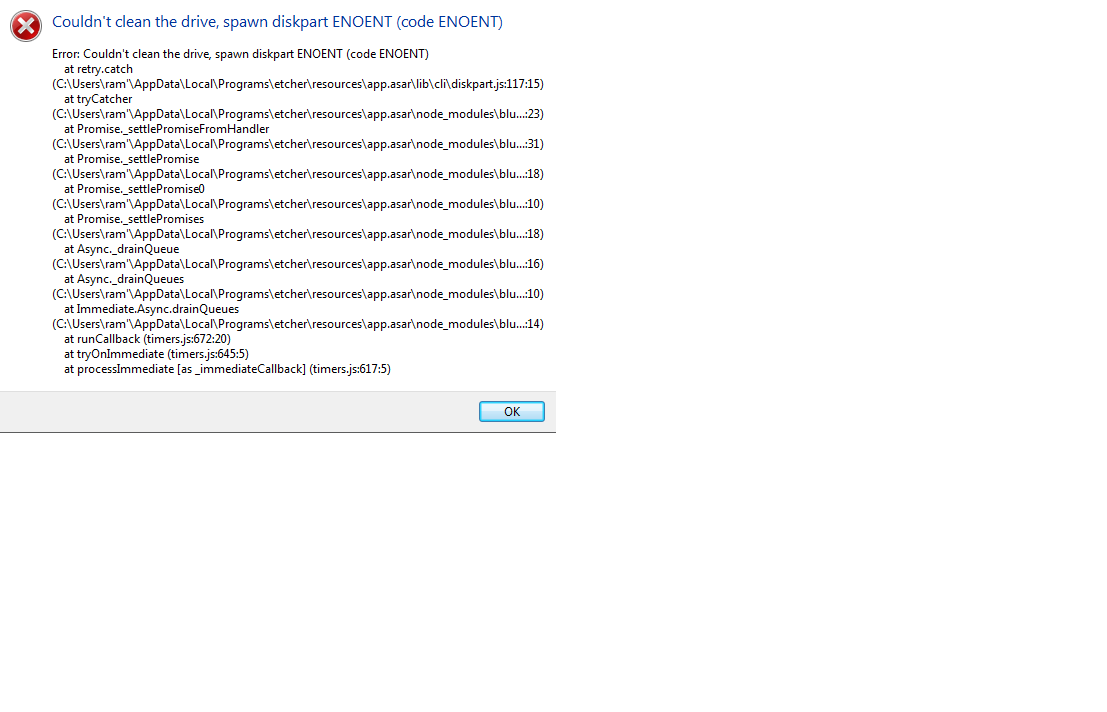
why do i get this error when i try to flash???
 Ramya1509
on 24 Nov 2018
Ramya1509
on 24 Nov 2018
@Ramya1509 If you're getting that error with the latest version of Etcher, it might be worth opening a new issue.
lurch
on 3 Dec 2018
Related issues
 jwa5426
·
5Comments
jwa5426
·
5Comments
 Deej0406
·
4Comments
Deej0406
·
4Comments
 zamber
·
5Comments
zamber
·
5Comments
 jviotti
·
5Comments
jviotti
·
5Comments
 TheEpicNoobZilla
·
4Comments
TheEpicNoobZilla
·
4Comments
Most helpful comment
Here is a workaround (for me at least) for "cannot zero sectors on disk" with error code 5@0101000F. All is done through diskpart so Etcher can incorporate this with your own diskpart script:
No reboot or unplug reqiured. By doing this Etcher will be able to clean the disk again and complete the burning process.