Etcher: Etcher CLI Win x86 (32-bit) v1.3.1
- Etcher version: Etcher CLI Win x86 (32-bit) v1.3.1
- Operating system and architecture: Windows 7 Ultimate
- Image flashed: N/A
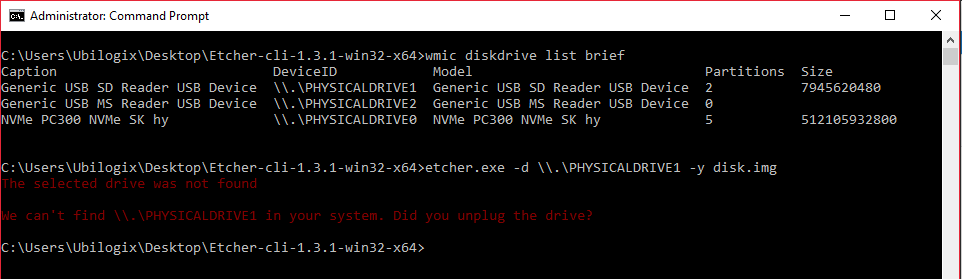
- Do you see any meaningful error information in the DevTools? The selected drive was not found
We can't find \.\PHYSICALDRIVE1 in your system. Did you unplug the drive?
Hello, I was previously using version 1.1.2 and had no trouble using \.\PHYSICALDRIVE addresses to flash images. I was working on a Windows 10 (64-bit) machine and now I need to replicate my setup on a Windows 7 (32-bit) computer, but version 1.3.1 doesn't work (in either) when I use \.\PHYSICALDRIVE type addresses.
Thank you!
 mauricionh
All 15 comments
The physical drive path needs two backslashes, i.e. etcher -d \\.\PhysicalDrive5 disk.img - can you post the command you've been trying to run?
 jhermsmeier
on 31 Jan 2018
jhermsmeier
on 31 Jan 2018
Hello,
Yes, sorry the physical drive path has 2 backslashes. I was able to execute this command etcher.exe -d \\.\PHYSICALDRIVE1 -y disk.img just fine on version 1.1.2. I'm now using both the 64-bit and 32-bit executables of version 1.1.2 and they work great.
mauricionh
on 31 Jan 2018
Right, and that doesn't work with the Etcher v1.3.1 CLI?
jhermsmeier
on 31 Jan 2018
That's correct. I'm pretty sure about it, but I'll triple check later today. I'm using a basic python script (which is working perfectly with version 1.1.2 64-bit and now with the 32-bit version. I run with admin privileges, and the command is always the same (I always double check the drive path). I'll share my findings!
mauricionh
on 31 Jan 2018
mauricionh
on 31 Jan 2018
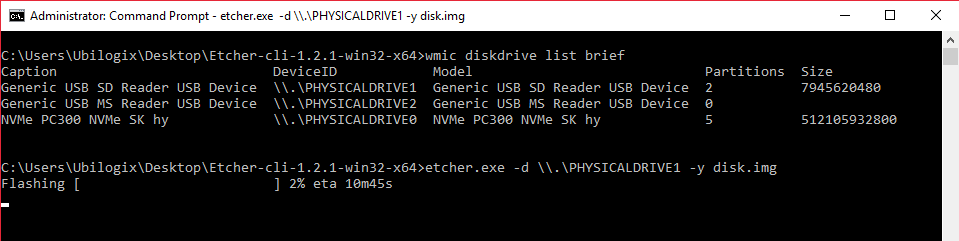
I just tested with version 1.2.1 (64-bit) and it works..
mauricionh
on 31 Jan 2018
Thanks @mauricionh – that's odd, will have a look!
jhermsmeier
on 31 Jan 2018
Sure, no problem!
mauricionh
on 31 Jan 2018


Well that's interesting; I couldn't reproduce this behavior (on Windows 10) - does it only fail for you on Windows 7, or does 10 also not work?
jhermsmeier
on 31 Jan 2018
Mmm.. The last screen snips I shared were taken from a Windows10 64-bit Pro.
mauricionh
on 1 Feb 2018
@jhermsmeier I assume the fact that you were using mixed-case (i.e. \\.\PhysicalDrive2) and @mauricionh is using upper-case (i.e. \\.\PHYSICALDRIVE1) has no bearing on this problem?
 lurch
on 28 Feb 2018
lurch
on 28 Feb 2018
It shouldn't – Windows is generally case-insensitive
jhermsmeier
on 28 Feb 2018
Turns out the casing is actually part of the problem here, because the part that lists the drives uses a different version of drivelist (fixed in https://github.com/resin-io-modules/resin-cli-visuals/pull/49). Further there are some dependencies that needed updating (#2095) for the packaged CLI to resolve native bindings properly, and a bug in the writer's error handling (#2097) also contributes to the CLI being mildly broken atm.
jhermsmeier
on 1 Mar 2018

This is a workaround/quickfix
The physicaldriveX MUST be with Capital P and Capital D like in .\PhysicalDrive1 (not .\PHYSICALDRIVE1 like "wmic diskdrive list" is reporting..
 cabbagecreek
on 2 Mar 2018
cabbagecreek
on 2 Mar 2018
Closing, as all relevant PRs (https://github.com/resin-io/etcher/pull/2095, https://github.com/resin-io/etcher/pull/2097, https://github.com/resin-io/etcher/pull/2099) have been merged. Next release will have a working CLI again :)
jhermsmeier
on 21 Mar 2018
Related issues
 dilbert-tctc
·
5Comments
dilbert-tctc
·
5Comments
 davidrnewman
·
4Comments
davidrnewman
·
4Comments
 jwa5426
·
5Comments
jwa5426
·
5Comments
 jviotti
·
5Comments
jviotti
·
5Comments
 robmcc1983
·
5Comments
robmcc1983
·
5Comments
Most helpful comment
Closing, as all relevant PRs (https://github.com/resin-io/etcher/pull/2095, https://github.com/resin-io/etcher/pull/2097, https://github.com/resin-io/etcher/pull/2099) have been merged. Next release will have a working CLI again :)