Etcher: Etcher waits for a thread. GUI not showing. Win10
- Etcher version: 1.1.2
- Operating system and architecture: Windows 10 - 64 bits
- Image flashed: No
- Do you see any meaningful error information in the DevTools? No, gui could not be started
When starting nothing is displayed, but it shows in running processes. When analyzing wait threads, it appears that etcher is waiting for a thread in etcher.
I had to restart the machine and use the portable version.
 hmendozap
All 88 comments
This is definitely an unusual problem, which I don't think anybody has reported before. Can you think of anything "unusual" about your system setup that might explain why you're seeing this problem when we haven't? :-S What CPU / RAM / etc. does your computer have?
 lurch
on 28 Nov 2017
lurch
on 28 Nov 2017
Unusual? I don't think so... I have a NVIDIA GPU GTX960M other than that your usual Win Developer environment: i7, 8GB RAM, VStudio 2017, Bash on windows, CUDA, Python... don't know if that helps.
Thanks for the work, guys. If I can be of service I'd gladly help
hmendozap
on 8 Dec 2017
Thanks for the offer of help :+1:
Etcher v1.2.1 was released yesterday, so please give that a go. And it might be worth trying both the installer version and the portable version, to see if they behave differently? Some users have reported that starting Etcher with Administrator privileges sometimes fixes problems. (?)
lurch
on 8 Dec 2017
Same problem with v1.2.1 installer AND portable. Windows 7 64bits in my case.
I have no problem with v1.1.2 portable, I have not tested with the v1.1.2 installer.
 euh
on 15 Dec 2017
euh
on 15 Dec 2017
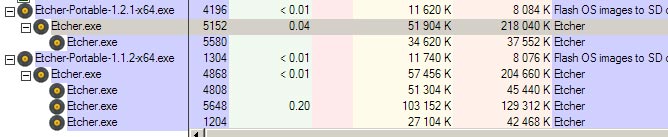
Could the people suffering from this problem also try starting Etcher from the Command Prompt, to see if that reveals any additional output?
lurch
on 15 Dec 2017
From Command Prompt.. I see no output.

euh
on 17 Dec 2017
I have the same issue as @euh.
Etcher 1.3.0 is not showing the UI on windows 7 64 bit but the processes are running in the background.
1.1.2 works correctly. Here is a link to the last working version.
 adipascu
on 6 Jan 2018
adipascu
on 6 Jan 2018
Same here. Running Win7 64
Where to get older versions>
 megusd
on 6 Jan 2018
megusd
on 6 Jan 2018
@megusd You can find old releases here: https://github.com/resin-io/etcher/releases
adipascu
on 6 Jan 2018
Thank you so much for this tip. I had the same problem of the missing GUI on my Win7Pro-64 when trying the latest versions of etcher. The older 1.1.2 version worked just fine!
 lizzyfin
on 6 Jan 2018
lizzyfin
on 6 Jan 2018
Hey people, same problem or even more :/ as described latest version doesnt even shows a window both portable and setup, unfortunately 1.1.2 doesnt do the job either. Window stays blank white all the time also both options... EDIT: Restart and 1.1.1 also doesnt help. Now I am trying Win32 Disk Imager...
Now i need to search for an alternative :/ very disappointing.
My system:
Win 10 Pro
i5-4500k
16GB DDR4 RAM
GTX 960OC
 4biddenfruit
on 15 Jan 2018
4biddenfruit
on 15 Jan 2018
Same problem here and I did some testing, all on the Portable versions.
1.3.1, 1.2.1 and 1.1.2 64bit versions wont start, ie. GUI missing.
1.3.1 32bit I get a GUI but with missing buttons
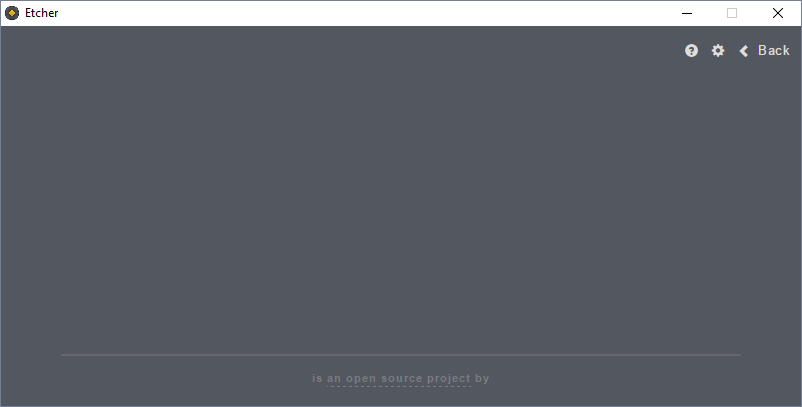
1.2.1 and 1.1.2 32bit works ok
Acer laptop with
Win 10 Pro 64bit
i7-3632QM,
16gig ram
 Nionor
on 20 Feb 2018
Nionor
on 20 Feb 2018
@Nionor can you open the DevTools in v1.3.1 (Ctrl+Shift+I) and post what appears in the console there?
 jhermsmeier
on 21 Feb 2018
jhermsmeier
on 21 Feb 2018
Sure thing
ELECTRON_ASAR.js:173 Uncaught Error: %1 is not a valid Win32 application.
\\?\C:\Users\Nionor\AppData\Local\Temp\nswA4CF.tmp\app\resources\app.asar.unpacked\node_modules\lzma-native\binding\lzma_native.node
    at process.module.(anonymous function) [as dlopen] (ELECTRON_ASAR.js:173:20)
    at Object.Module._extensions..node (module.js:598:18)
    at Object.module.(anonymous function) [as .node] (ELECTRON_ASAR.js:187:18)
    at Module.load (module.js:488:32)
    at tryModuleLoad (module.js:447:12)
    at Function.Module._load (module.js:439:3)
    at Module.require (module.js:498:17)
    at require (internal/module.js:20:19)
    at C:\Users\Nionor\AppData\Local\Temp\nswA4CF.tmp\app\resources\app.asar\node_modules\lzma-native\index.js:14:14
    at Object.<anonymous> (C:\Users\Nionor\AppData\Local\Temp\nswA4CF.tmp\app\resources\app.asar\node_modules\lzma-native\index.js:626:3)
    at Object.<anonymous> (C:\Users\Nionor\AppData\Local\Temp\nswA4CF.tmp\app\resources\app.asar\node_modules\lzma-native\index.js:628:3)
    at Module._compile (module.js:571:32)
    at Object.Module._extensions..js (module.js:580:10)
    at Module.load (module.js:488:32)
    at tryModuleLoad (module.js:447:12)
    at Function.Module._load (module.js:439:3)
Getting the same issue with 1.4.4 64 bit installer and portable (Win 10 pro)
 m3talstorm
on 11 May 2018
m3talstorm
on 11 May 2018
Same problem on Win10, latest Etcher.
 JTT-AE
on 25 May 2018
JTT-AE
on 25 May 2018
@Nionor thanks – we'll dig into it!
jhermsmeier
on 25 May 2018
Same problem with Etcher-Portable-1.4.4-x64.exe running on Win 7 64bit.
 matmai
on 10 Jun 2018
matmai
on 10 Jun 2018
same problem here (no GUI at all, dangling process) with Etcher-Setup-1.4.4-x64.exe on Win10 64bit.
No output at all in the console.
 toussa
on 23 Jun 2018
toussa
on 23 Jun 2018
Same issue on latest version as well
 GrandNewbien
on 13 Jul 2018
GrandNewbien
on 13 Jul 2018
I am having the same problem.
 ccjoness
on 18 Jul 2018
ccjoness
on 18 Jul 2018
@jhermsmeier: Can you verify the problem or do you need any additional information? Is it a problem with electron?
matmai
on 18 Jul 2018
@matmai I've seen this problem in other electron apps as well.
GrandNewbien
on 21 Jul 2018
@matmai we've not been able to successfully reproduce this so far (and thus also can't tell yet if it's Etcher- or Electron-specific), so any detailed info would help!
jhermsmeier
on 23 Jul 2018
https://github.com/electron-userland/electron-prebuilt-compile/issues/36
I've found this thread that helped solve the issue. I can confirm this issue only occurs on my acer laptop.
GrandNewbien
on 23 Jul 2018
@GrandNewbien nice find, thanks!
jhermsmeier
on 23 Jul 2018
same here
 Ramzi-Sah
on 25 Jul 2018
Ramzi-Sah
on 25 Jul 2018
@Ramzi-Sah do you also have an Acer laptop?
jhermsmeier
on 25 Jul 2018
I do not have an Acer computer and no ePowerEvent.exe is running.
matmai
on 26 Jul 2018
@matmai what manufacturer is your computer from?
jhermsmeier
on 26 Jul 2018
@jhermsmeier It is a selfmade Desktop computer without any preinstalled software. I also tried to deactivate virus protection and EMET Tool without success.
matmai
on 27 Jul 2018
Interesting, thanks @matmai!
jhermsmeier
on 27 Jul 2018
I also have this issue.
One thing to note, is that I have a Hashtag (#) in the username C:\Users\#Chiya\
This has caused a similar issue before with Postman
On Windows 8.1 64-Bit
 D3faIt
on 15 Aug 2018
D3faIt
on 15 Aug 2018
Same problem with 1.4.4 on Windows 10 64bit running GTX960
 afflicted
on 9 Oct 2018
afflicted
on 9 Oct 2018
Windows 7 Pro 64 En
I've tried Etcher-Portable-1.4.5-x64 and every version down to 1.2.0. I've also tried x86. Always 3 processes are spawn (initially more) and no GUI is displayed.
Installed version also does not work.
 Marooned-MB
on 13 Oct 2018
Marooned-MB
on 13 Oct 2018
Same here with 1.4.8-x64
 sbela
on 6 Dec 2018
sbela
on 6 Dec 2018
same again today's stable 64 bit version, running on portable with Win 10. Ran get & install updates, reboot. No interface empty window.
Shows 5 threads 4 running 0% top one 0.2-3%
A window labelled Etcher with minimise, max, end icons at top right.
 GeoffWM
on 19 Jan 2019
GeoffWM
on 19 Jan 2019
Are you using the latest v1.4.9 balenaEtcher?
 thundron
on 19 Jan 2019
thundron
on 19 Jan 2019
I downloaded etcher from the balena site yesterday. I cannot ltell if it is not the latest as I cannot access the about menu.
GeoffWM
on 20 Jan 2019
@GeoffWM You can check it in the bottom-right portion of the app, but if it's called Etcher I think it's the old one pre-rename
thundron
on 21 Jan 2019
It was download from the balena etcher website so it should be balenaetcher. Is there another way to determine which it is? I worked round it with Rufus, but balenaetcher shouldn't hang.
GeoffWM
on 21 Jan 2019
Can confirm start problem with balenaEtcher-Portable-1.4.9-x64.exe under Windows 10
I got a error window with the message that at least Windows 7 is needed.
 beerisgood
on 8 Mar 2019
beerisgood
on 8 Mar 2019
Also current v1.5.5 release is still affected.
matmai
on 11 Mar 2019
Same thing happens on Linux Mint with 1.5.18
 tmanthey
on 28 Mar 2019
tmanthey
on 28 Mar 2019
@tmanthey I think that's a different problem - see #2715
lurch
on 29 Mar 2019
I am using Version 1.5.24.
It ran straight after installing, but after a reboot, it will only run when started in Administrator mode.
 TracesOfNut
on 16 Apr 2019
TracesOfNut
on 16 Apr 2019
[ edit - ignore this one, I had restored something into my User folder with Acronis and had overwritten the acls with a non-existant user as owner ]
I ran 1.5.24 in normal and administrator mode and logged with procmon.exe
Just after etcher references electron.asar, access to users folder is denied. After that a whole load of things start to close. The following has the event time removed to make comparison easier.
The one started in admin mode gets access to the user folder and continues ok.
balenaEtcher.exe,13356,CreateFile,C:\Users\Redacted\AppData\Local\Programs\balena-etcher\resources\electron.asar,SUCCESS,"Desired Access: Generic Read, Disposition: Open, Options: Synchronous IO Non-Alert, Non-Directory File, Attributes: n/a, ShareMode: Read, Write, AllocationSize: n/a, OpenResult: Opened"
balenaEtcher.exe,13356,ReadFile,C:\Users\Redacted\AppData\Local\Programs\balena-etcher\resources\electron.asar,SUCCESS,"Offset: 0, Length: 8, Priority: Normal"
balenaEtcher.exe,13356,ReadFile,C:\Users\Redacted\AppData\Local\Programs\balena-etcher\resources\electron.asar,SUCCESS,"Offset: 8, Length: 4,196"
balenaEtcher.exe,13356,CreateFile,C:\Users\Redacted\AppData\Local\Programs\balena-etcher\resources\electron.asar,SUCCESS,"Desired Access: Generic Read, Disposition: Open, Options: Synchronous IO Non-Alert, Non-Directory File, Attributes: n/a, ShareMode: Read, Write, AllocationSize: n/a, OpenResult: Opened"
balenaEtcher.exe,13356,ReadFile,C:\Users\Redacted\AppData\Local\Programs\balena-etcher\resources\electron.asar,SUCCESS,"Offset: 0, Length: 8, Priority: Normal"
balenaEtcher.exe,13356,ReadFile,C:\Users\Redacted\AppData\Local\Programs\balena-etcher\resources\electron.asar,SUCCESS,"Offset: 8, Length: 4,196"
balenaEtcher.exe,13356,CreateFile,C:\,SUCCESS,"Desired Access: Read Attributes, Synchronize, Disposition: Open, Options: Synchronous IO Non-Alert, Open Reparse Point, Attributes: n/a, ShareMode: Read, Write, Delete, AllocationSize: n/a, OpenResult: Opened"
balenaEtcher.exe,13356,QueryAllInformationFile,C:\,SUCCESS,"CreationTime: 26/11/2018 5:47:46 AM, LastAccessTime: 16/04/2019 10:44:12 AM, LastWriteTime: 16/04/2019 10:44:12 AM, ChangeTime: 16/04/2019 10:44:12 AM, FileAttributes: HSD, AllocationSize: 20,480, EndOfFile: 20,480, NumberOfLinks: 1, DeletePending: False, Directory: True, IndexNumber: 0x5000000000005, EaSize: 0, Access: Read Attributes, Synchronize, Position: 0, Mode: Synchronous IO Non-Alert, AlignmentRequirement: Long"
balenaEtcher.exe,13356,QueryInformationVolume,C:\,SUCCESS,"VolumeCreationTime: 14/04/2019 7:16:12 AM, VolumeSerialNumber: 0450-498F, SupportsObjects: True, VolumeLabel: "
balenaEtcher.exe,13356,CloseFile,C:\,SUCCESS,
balenaEtcher.exe,13356,CreateFile,C:\Users,SUCCESS,"Desired Access: Read Attributes, Synchronize, Disposition: Open, Options: Synchronous IO Non-Alert, Open Reparse Point, Attributes: n/a, ShareMode: Read, Write, Delete, AllocationSize: n/a, OpenResult: Opened"
balenaEtcher.exe,13356,QueryAllInformationFile,C:\Users,BUFFER OVERFLOW,"CreationTime: 15/09/2018 3:39:26 PM, LastAccessTime: 13/04/2019 2:09:21 PM, LastWriteTime: 5/04/2019 12:23:39 PM, ChangeTime: 16/04/2019 10:03:57 AM, FileAttributes: RD, AllocationSize: 4,096, EndOfFile: 4,096, NumberOfLinks: 1, DeletePending: False, Directory: True, IndexNumber: 0x1000000001495, EaSize: 0, Access: Read Attributes, Synchronize, Position: 0, Mode: Synchronous IO Non-Alert, AlignmentRequirement: Long"
balenaEtcher.exe,13356,QueryInformationVolume,C:\Users,SUCCESS,"VolumeCreationTime: 14/04/2019 7:16:12 AM, VolumeSerialNumber: 0450-498F, SupportsObjects: True, VolumeLabel: "
balenaEtcher.exe,13356,CloseFile,C:\Users,SUCCESS,

balenaEtcher.exe,13356,CreateFile,C:\Users\Redacted,ACCESS DENIED,"Desired Access: Read Attributes, Synchronize, Disposition: Open, Options: Synchronous IO Non-Alert, Open Reparse Point, Attributes: n/a, ShareMode: Read, Write, Delete, AllocationSize: n/a"

balenaEtcher.exe,13356,CloseFile,C:\Users\Redacted\AppData\Local\Programs\balena-etcher\resources\electron.asar,SUCCESS,
balenaEtcher.exe,13356,CloseFile,C:\Users\Redacted\AppData\Local\Programs\balena-etcher\resources\electron.asar,SUCCESS,
balenaEtcher.exe,13356,Thread Exit,,SUCCESS,"Thread ID: 14620, User Time: 0.0000000, Kernel Time: 0.0000000"
balenaEtcher.exe,13356,Thread Exit,,SUCCESS,"Thread ID: 15996, User Time: 0.0000000, Kernel Time: 0.0000000"
balenaEtcher.exe,13356,Thread Exit,,SUCCESS,"Thread ID: 22360, User Time: 0.0000000, Kernel Time: 0.0156250"
balenaEtcher.exe,13356,Thread Exit,,SUCCESS,"Thread ID: 25500, User Time: 0.0000000, Kernel Time: 0.0000000"
balenaEtcher.exe,13356,Thread Exit,,SUCCESS,"Thread ID: 27416, User Time: 0.0000000, Kernel Time: 0.0000000"
balenaEtcher.exe,13356,Thread Exit,,SUCCESS,"Thread ID: 19948, User Time: 0.0000000, Kernel Time: 0.0000000"
balenaEtcher.exe,13356,Thread Exit,,SUCCESS,"Thread ID: 21352, User Time: 0.0000000, Kernel Time: 0.0312500"
balenaEtcher.exe,13356,Thread Exit,,SUCCESS,"Thread ID: 7520, User Time: 0.0312500, Kernel Time: 0.0000000"
balenaEtcher.exe,13356,Thread Exit,,SUCCESS,"Thread ID: 19848, User Time: 0.0000000, Kernel Time: 0.0000000"
Same here, Windows 10 1809, Etcher 1.5.38. Doesn't show a completed GUI, not even as admin, not even after a reboot.
 rjoomen
on 14 May 2019
rjoomen
on 14 May 2019
@rjoomen That's a different issue though, see https://github.com/balena-io/etcher/issues/2756 if that's what you see or open a new issue and fill out the information if it's not (and try the portable version as well)
thundron
on 14 May 2019
Same issue with latest version
 Askill
on 28 Jun 2019
Askill
on 28 Jun 2019
Same issue, version 1.5.72 gui never appears. Running from powershell returns:
PS C:\Users\paul> C:\Users\paul\AppData\Local\Programs\balena-etcherbalenaEtcher.exe
PS C:\Users\paul>
Checking for update
Update for version 1.5.72 is not available (latest version: 1.5.72, downgrade is disallowed).
Just a blinking cursor, whether as a user or as an Administrator. Has a Windows update broke this?
 pauldsmyth
on 29 Jan 2020
pauldsmyth
on 29 Jan 2020
Same, I had to install the program.
 BlueSaturn
on 3 Feb 2020
BlueSaturn
on 3 Feb 2020
No GUI appearing with version 1.5.74 with either Portable or Install.
Same result after rebooting the system and trying to Run as administrator.
||| just a blank grey window |||
CTRL+SHIFT+I >>> _Developer Tools _Console
[error message in red]
=======================================
C:\Users-_-\AppData\Local\Temp\1XMKJPoYGSl05MPXtmXo2X7Ea9d\resources\app.asar\node_modules\raven-js\dist\raven.js:58 {"stack":"TypeError: Cannot convert undefined or null to object\n at Function.entries (
console.
=======================================
msi GP63 Leopard 8RF [Laptop]
^ NVIDIA GeForce GTX 1070 + Intel UHD 630
Win 10.0.18363 [no updates available]
nothing unusual about system nor having any problems with anything else
trying an earlier version next
 areyoumadlad
on 5 Feb 2020
areyoumadlad
on 5 Feb 2020
Same problem here, exactly the same error message as @areyoumadlad (Cannot convert undefined or null to object). I tried both the normal version and the portable version of 1.5.74.
Windows 10 64 bit v1809
NVIDIA Gefore RTX 2080
 roy-t
on 5 Feb 2020
roy-t
on 5 Feb 2020
For problems with 1.5.74 see #3062 (which I'm assuming will get merged fairly soon)
lurch
on 5 Feb 2020
Working on it, the CI is building the packages which takes ~1h so we can test the new release
thundron
on 5 Feb 2020
After Upgrading from Win7 to Win10 Etcher 1.5.5 now starts and shows its GUI.
matmai
on 8 Feb 2020
Solved in v1.5.75+
thundron
on 10 Feb 2020
@thundron Has 1.5.75+ actually solved the problem that was _originally_ reported in this issue (which IIRC nobody at Balena has been able to reproduce yet?), or does it just fix the unrelated issues reported in the last week that were tacked onto the end of this thread? :wink:
(if it's the latter, IMHO this shouldn't be closed yet :man_shrugging: )
lurch
on 10 Feb 2020
@lurch right.
This issue though refers to very old versions and many things have changed, some of them were also fundamental changes/version upgrades.
Last report was from 1.5.72 so before reopening, I think it's worth asking @pauldsmyth if he has had any luck with the latest versions, both Portable and Installer, and if not, if he can share a bit more wrt the behaviour
thundron
on 12 Feb 2020
I'll test again tomorrow. I gave up and went back to win32diskimager and
haven't needed to retest
On Wed, 12 Feb 2020, 15:26 Lorenzo Alberto Maria Ambrosi, <
[email protected]> wrote:
@lurch https://github.com/lurch right.
This issue though refers to very old versions and many things have
changed, some of them were also fundamental changes/version upgrades.
Last report was from 1.5.72 so before reopening, I think it's worth asking
@pauldsmyth https://github.com/pauldsmyth if he has had any luck with
the latest versions, both Portable and Installer, and if not, if he can
share a bit more wrt the behaviour—
You are receiving this because you were mentioned.
Reply to this email directly, view it on GitHub
https://github.com/balena-io/etcher/issues/1866?email_source=notifications&email_token=ACP3QAKAGVGD2PPPQBNROCDRCQIJBA5CNFSM4EENAHCKYY3PNVWWK3TUL52HS4DFVREXG43VMVBW63LNMVXHJKTDN5WW2ZLOORPWSZGOELRFRDA#issuecomment-585259148,
or unsubscribe
https://github.com/notifications/unsubscribe-auth/ACP3QAL6QM7JHMS7S3WLQTLRCQIJBANCNFSM4EENAHCA
.
pauldsmyth
on 12 Feb 2020
Sorry to be late in responding. Absolutely no change. Set up runs to install, progress box dissapears and that's it. 3 balenaSketcher processes showing in task manager but the gui never appears. Since you've closed this hastily without fully confirming the bug is fixed I'm out of here. I'll stick with win32diskimager.
pauldsmyth
on 26 Feb 2020
@lurch right.
This issue though refers to very old versions and many things have changed, some of them were also fundamental changes/version upgrades.
Last report was from 1.5.72 so before reopening, I think it's worth asking @pauldsmyth if he has had any luck with the latest versions, both Portable and Installer, and if not, if he can share a bit more wrt the behaviour
Nope, 1.5.78 exactly the same behaviour
pauldsmyth
on 26 Feb 2020
I am the author of #3088 and would be happy to provide additional information or do additional testing / debugging either here or there.
 b-morgan
on 27 Feb 2020
b-morgan
on 27 Feb 2020
Can confirm, running Windows 10 too, Etcher version 1.5.88.0, same behaviour. I see 3 processes running but nothing happens. I tried running in Admin mode, but no change.
 donjakobo
on 14 May 2020
donjakobo
on 14 May 2020
I just installed v1.5.93 on a fresh Windows 10 1809 x64 install and I have this problem.
 hmoffatt
on 27 May 2020
hmoffatt
on 27 May 2020
I also, appear to be getting this issue with v1.5.93.
 Elliotsmith
on 27 May 2020
Elliotsmith
on 27 May 2020
Apparently, the fix in #3160 didn't make the mainstream because this issue seems to indicate that the issue has returned in 1.5.93.
It would also be nice if the developers could tie all the issues that report the same problem together. I am aware of https://github.com/balena-io/etcher/issues/3088, https://github.com/balena-io/etcher/issues/3160#ref-pullrequest-622331470, and https://github.com/balena-io/etcher/pull/3165.
b-morgan
on 27 May 2020
It's likely that there are actually multiple separate problems, some of which happen to display the same symptoms? :shrug:
lurch
on 27 May 2020
@lurch Im not sure, but either way more communication from the devs would be highly appreciated. This is a very popular piece of software that is referred to from many large names (Such as arduino, RPI, various linux distros, etc). With such an enormous user-base I would imagine that the developers would be scrambling to find a fix as all these people are reporting the same issue (which I am having as well. Hi, I'm having this issue too, fix yet?) and would be on PR the entire time to ensure that their brand isn't damaged from lack of basic operation. Imagine the number of new organic users coming in from these other large names like, for example, the RaspberryPI website, which does mention that this is the preferred software for flashing. Those new organic users are going to come up to this blank UI and you'll lose a good percent of them there. A good percent that could have really gotten into it and maybe purchased your pro product.
Idk man, great power comes great responsibility, and many people complaining of the same issue with no response or fix doesn't seem responsible given the amount of brand trust other (Bigger, might I add) brands put into your product. It doesn't seem responsible that this issue is marked as closed, yet many to this day are having the same issue that popped up years ago.
 stoneRdev
on 28 May 2020
stoneRdev
on 28 May 2020
@stoneRdev Don't want to sound salty but just informative so bear with me for a minute - a minority of users having an issue doesn't justify dropping all the work-in-progress we have for an issue that we're not even able to reproduce, given the fact that we're just two people working on this project.
Often users are also chiming in on different versions which have different issues so what you see might be the GUI not showing on an old version, which then is fixed, and then the issue comes back for another reason but yet it's reported in the same place, so it's sometimes also hard to understand what a user is reporting - e.g. if an issue is closed and a user is running a different version than the one reported, it's most likely better to just open a new issue with the new details as the old issue isn't valid for that version anymore and might be due to a totally different aspect that came after.
thundron
on 29 May 2020
I don't mean to sound salty but I've tried multiple versions of this and
got dismissive responses. As a result I've moved on to different
applications to service my needs. That fact that you're just dismissing
several users having the same issue which likely means many others would
likely have the same problem but don't know how to report it. Your lack of
concern means I've moved on. When you do deem this important enough to
resolve I want be testing it and I suspect others will give you the same
response.
On Fri, 29 May 2020, 18:18 Lorenzo Alberto Maria Ambrosi, <
[email protected]> wrote:
@stoneRdev https://github.com/stoneRdev Don't want to sound salty but
just informative so bear with me for a minute - a minority of users having
an issue doesn't justify dropping all the work-in-progress we have for an
issue that we're not even able to reproduce, given the fact that we're just
two people working on this project.
Often users are also chiming in on different versions which have different
issues so what you see might be the GUI not showing on an old version,
which then is fixed, and then the issue comes back for another reason
but yet it's reported in the same place, so it's sometimes also hard to
understand what a user is reporting - e.g. if an issue is closed and a user
is running a different version than the one reported, it's most likely
better to just open a new issue with the new details as the old issue isn't
valid for that version anymore and might be due to a totally different
aspect that came after.—
You are receiving this because you were mentioned.
Reply to this email directly, view it on GitHub
https://github.com/balena-io/etcher/issues/1866#issuecomment-636088234,
or unsubscribe
https://github.com/notifications/unsubscribe-auth/ACP3QANELKF52SBFU7ODVJLRT7U5VANCNFSM4EENAHCA
.
pauldsmyth
on 30 May 2020
@pauldsmyth Unfortunately it's very hard for developers to try and fix a problem, if they're not even able to reproduce that problem themselves.
lurch
on 31 May 2020
I wanted to pop in with a possible workaround, since I experienced a no-launch situation on Windows 10, as well (on an Insiders build, fwiw). I was able to get Etcher to launch the GUI by running the exe in Windows 8 compatibility mode.
 jcragg
on 4 Jun 2020
jcragg
on 4 Jun 2020
As I wrote above this occurred to me on a brand new Windows 10 install. I literally installed Windows, downloaded Etcher and ran into this problem. This would be easy to debug with a VM and remote debugging (https://docs.microsoft.com/en-us/visualstudio/debugger/remote-debugging?view=vs-2019)
hmoffatt
on 4 Jun 2020
@hmoffatt If it was 1.5.96 it was a problematic release (for some), we rolled it back to 1.5.95 in case that was it
thundron
on 4 Jun 2020
@thundron it was 1.5.93.
hmoffatt
on 5 Jun 2020
Sorry guys but i am currently facing this problem with the latest etscher release 1.5.97. I am a Microsoft Insider on slow my build as reported by winver is 2004 Build 19628.1
Greetings
Ronny
 cybersorcerer
on 10 Jun 2020
cybersorcerer
on 10 Jun 2020
also on windws 10, etcher is running on task manager, but no GUI is visible. Do something about this devs. It's a 3 year old problem...
 6squarefeet
on 16 Jun 2020
6squarefeet
on 16 Jun 2020
v1.5.99 fails to start for me on Windows 10 64bit.
I checked my download history and v1.5.89 was the last one I used. I downloaded it again and it works.
I tested both of these with the install version and the portable version. The older one works with both. The new does not work.
Hope that helps!
 Korpip
on 19 Jun 2020
Korpip
on 19 Jun 2020
@6squarefeet have you already tried setting different compatibility settings?
thundron
on 19 Jun 2020
I had the same issue with 1.5.99 and running the compatibility troubleshooter let the program run. It selected Windows 8 startup mode automatically.
 Trixter313
on 20 Jun 2020
Trixter313
on 20 Jun 2020
Still an issue with 1.5.101 on Windows 10. Tested the installer and portable with compatibility troubleshooter, could not get them to display GUI.
 mjforanVT
on 26 Jul 2020
mjforanVT
on 26 Jul 2020
not
Bro...I had the same problem..... And it's sobbed for me...
Don't keep any image files in the same drive in which etcher software is present... It will open... Sure
 prakash50160
on 3 Sep 2020
prakash50160
on 3 Sep 2020
I just downloaded this today, Nov 6th, installed it and was perplexed as to why nothing happened when I clicked on it. Windows 10 home, latest updates. And running in compatibility mode doesn't help, windows suggested Windows 8 but still doesn't start.
Quick question for all of those who it is not working for, is the region of your windows machine US/english? Mine is not, my region is set to Korea, and I have in the past seen that cause an issue with one or two programs. I also have a dual monitor setup if that might be related in someway.
Edit: Just tested this by resetting my region to english US and it still doesn't work. I get like 3 processes when I try to run it, but no gui.
Just read through the rest of the comments:
custom built machine, not a laptop, Nvidia geforce 1070, latest drivers
This may be related: https://github.com/electron/electron/issues/10863
 crossmr
on 6 Nov 2020
crossmr
on 6 Nov 2020
Have you tried running from command line with the --disable-gpu option? I haven't been able to reproduce this one, I think it requires a somewhat specific configuration, it would be interesting to know if it's hardware or software... I use a gtx 1070 too and have no issues, even running it through WSL2 now, but regardless - I think there's not much we can do in Etcher itself
thundron
on 7 Nov 2020
I haven't been able to reproduce this one, I think it requires a somewhat specific configuration, it would be interesting to know if it's hardware or software
I suspect it is as well, and my question is, why over the last 3 years has there been no indication of anyone collecting detailed information from all the affected people to see if there is a common thread?Also if there is a clear point where it seems to have happened, the above version 1.1.2 works for me, the differences between that version and the next non-working version should be checked.
Are there any frameworks or anything this software uses?
C:\Users\crossmr\AppData\Local\Programs\balena-etcher>balenaEtcher.exe --disable-gpu
C:\Users\crossmr\AppData\Local\Programs\balena-etcher>
(node:16800) [DEP0005] DeprecationWarning: Buffer() is deprecated due to security and usability issues. Please use the Buffer.alloc(), Buffer.allocUnsafe(), or Buffer.from() methods instead.
That's the result when I run it with -disable-gpu
still doesn't start, but a minor issue is present.
crossmr
on 7 Nov 2020
Etcher version: 1.5.109
Operating system and architecture: Windows 10 Pro x64
Image flashed: None
Do you see any meaningful error information in the DevTools? Not accessible
CPU: i7-4770k
GPU: 1080ti
After installing and trying to start the program, nothing happens. There is an open task, but it does nothing until I kill it. Trying to open it by console gave me 2 times nothing and once this:
(node:37100) [DEP0005] DeprecationWarning: Buffer() is deprecated due to security and usability issues. Please use the Buffer.alloc(), Buffer.allocUnsafe(), or Buffer.from() methods instead.
 Kirschi94
on 14 Nov 2020
Kirschi94
on 14 Nov 2020
Related issues
 zamber
·
5Comments
zamber
·
5Comments
 Silver978
·
3Comments
Silver978
·
3Comments
 m-p-3
·
5Comments
m-p-3
·
5Comments
 Bean6754
·
5Comments
Bean6754
·
5Comments
 thaivic
·
4Comments
thaivic
·
4Comments
Most helpful comment
Working on it, the CI is building the packages which takes ~1h so we can test the new release