Etcher: Unable to detect SD card as a removeable drive
- Etcher version: LATEST
- Operating system and architecture: macOS Sierra
- Image flashed: You are fucking kidding, right?
- Do you see any meaningful error information in the DevTools? Hahahahahahah
 pslootweg
All 20 comments
Etcher takes FOREVER to load. Then when I select "select image" it takes an age to open the select dialog and even when I have selected the ISO image, the select drive option takes another century to open.
Then, the SD card is apparently not a removeable drive - so I'm simply blocked at this point from doing anything further.
BTW I ventured into dangerous territory and enabled 'Unsafe mode' - is that what made it recognise my SD card?
Has anyone tested this shit lately? WTF.
pslootweg
on 30 Oct 2017
I'm sorry to hear you've been having problems with Etcher. I can assure you that we do test Etcher, and we have many many users who are perfectly happy with it.
If you'd like to change your tone to that of a more positive one, and give a more detailed description, we may be able to help you diagnose your problems...
 lurch
on 31 Oct 2017
lurch
on 31 Oct 2017
Apologies - I was having a VERY bad day where NOTHING appeared to be
working properly - Mac, network etc.
I just lost my cool.
On 31 October 2017 at 15:09, Andrew Scheller notifications@github.com
wrote:
I'm sorry to hear you've been having problems with Etcher. I can assure
you that we do test Etcher, and we have many many users who are perfectly
happy with it.If you'd like to change your tone to that of a more positive one, and give
a more detailed description, we may be able to help you diagnose your
problems...—
You are receiving this because you authored the thread.
Reply to this email directly, view it on GitHub
https://github.com/resin-io/etcher/issues/1820#issuecomment-340792899,
or mute the thread
https://github.com/notifications/unsubscribe-auth/ARrVY0sYozxISnM5t8vGyuUCUw_lXSYRks5sxzgagaJpZM4QLssG
.
pslootweg
on 31 Oct 2017
Thanks for the apology, I hope you're having a better day today :-)
Could your problems with Etcher be linked to problems elsewhere? If your other problems have now been resolved, would you mind seeing if Etcher now works properly, or if it's still misbehaving?
And with regards to Unsafe mode - sometimes the OS mis-identifies removable drives as "non-removable" (see e.g. #649 and #1788 ), and in Etcher we label these as "System" drives, to prevent people accidentally overwriting drives that they didn't mean to.
lurch
on 31 Oct 2017
The next day is always a better day :)
I'll go over it all again. I did eventually get a card written, but really
can't remember how/if the UX might have been affected by wider system
issues.
I did take a clone of the repo, so might investigate, if it continues being
problematic.
Cheers.
On 31 October 2017 at 15:24, Andrew Scheller notifications@github.com
wrote:
Thanks for the apology, I hope you're having a better day today :-)
Could your problems with Etcher be linked to problems elsewhere? If your
other problems have now been resolved, would you mind seeing if Etcher now
works properly, or if it's still misbehaving?And with regards to Unsafe mode - sometimes the OS mis-identifies
removable drives as "non-removable" (see e.g. #649
https://github.com/resin-io/etcher/issues/649 and #1788
https://github.com/resin-io/etcher/issues/1788 ), and in Etcher we
label these as "System" drives, to prevent people accidentally overwriting
drives that they didn't mean to.—
You are receiving this because you authored the thread.
Reply to this email directly, view it on GitHub
https://github.com/resin-io/etcher/issues/1820#issuecomment-340797901,
or mute the thread
https://github.com/notifications/unsubscribe-auth/ARrVYzi2u1dIqU5okfn25b4UjsN5Y_sPks5sxzu0gaJpZM4QLssG
.
pslootweg
on 31 Oct 2017
So I start Etcher - it takes quite a long time to appear.
I left it sat there for a while - did not interact with it at all. Then the
attached error pops up and the program no longer responds.
I restart Etcher - this time once it appears I try to point it to an ISO
image - again, response is quite slow, but eventually gets there.
Load the image - let it ponder for a while until it is ready to write the
SD card.
All seems to be OK, except 1) Some half dead process seems to have taken
over my desktop and 2) the SD card didn't work.
I'll try again.
Paul
On 31 October 2017 at 15:34, Paul Slootweg paul.slootweg@gmail.com wrote:
The next day is always a better day :)
I'll go over it all again. I did eventually get a card written, but really
can't remember how/if the UX might have been affected by wider system
issues.I did take a clone of the repo, so might investigate, if it continues
being problematic.Cheers.
On 31 October 2017 at 15:24, Andrew Scheller notifications@github.com
wrote:Thanks for the apology, I hope you're having a better day today :-)
Could your problems with Etcher be linked to problems elsewhere? If your
other problems have now been resolved, would you mind seeing if Etcher now
works properly, or if it's still misbehaving?And with regards to Unsafe mode - sometimes the OS mis-identifies
removable drives as "non-removable" (see e.g. #649
https://github.com/resin-io/etcher/issues/649 and #1788
https://github.com/resin-io/etcher/issues/1788 ), and in Etcher we
label these as "System" drives, to prevent people accidentally overwriting
drives that they didn't mean to.—
You are receiving this because you authored the thread.
Reply to this email directly, view it on GitHub
https://github.com/resin-io/etcher/issues/1820#issuecomment-340797901,
or mute the thread
https://github.com/notifications/unsubscribe-auth/ARrVYzi2u1dIqU5okfn25b4UjsN5Y_sPks5sxzu0gaJpZM4QLssG
.
pslootweg
on 6 Nov 2017
Thanks for the info @pslootweg
I don't know what you mean by "attached error"? Github doesn't handle email attachments, so assuming you meant a screenshot, you need to login to the Github webinterface and add it there.
Regarding the "half dead process" - I wonder if you might be experiencing https://github.com/resin-io/etcher/issues/1288 (which we thought we'd fixed in Etcher 1.1.2, but https://github.com/resin-io/etcher/issues/1288#issuecomment-331350986 says is sometimes still happening)
Regarding "the SD card didn't work" - how exactly did it "not work"? Did the Etcher verification-stage fail, or something else?
lurch
on 6 Nov 2017
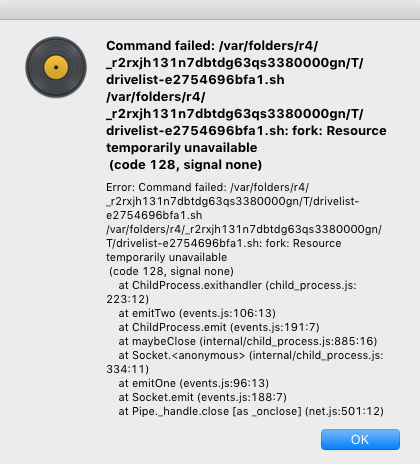
Just now I launched Etcher, and am ignoring it to see if/when the error manifests itself...
Etcher 1.1.2, OS X 10.11.6 (15G1611)
No error after a good while.. However, there was no SD card in the system. So I quit Etcher and launched it again after plugging in the SD card.
Shortly after launching, Etcher detected the SD card - but I just left it sat there. And then it throws that error! And thrashing the CPU. (See attached result of 'top' - just one after another bash shell spawned.

Managed to kill it by killing the program group.
The SD card had PiDesktop written to but then wouldn't boot.
TBH it was early hours of the morning, so I tried just one more time and when that didn't work I gave up. Not sure what the problem was.
pslootweg
on 6 Nov 2017
https://github.com/resin-io/etcher/issues/1495 Indicates the same (or very similar) error.
pslootweg
on 6 Nov 2017
So last experiment of the day; No SD card inserted, start Etcher and wait.
No error message after some time - now insert SD Card and wait again.
Eventually Etcher recognises the card - I'm still waiting.
Nothing happens - so I go to select the ISO image (boy, the UI is SLOW!) - and after a bit the 'Flash!' button waits to get pressed. Soon after Etcher throws 'the' error.
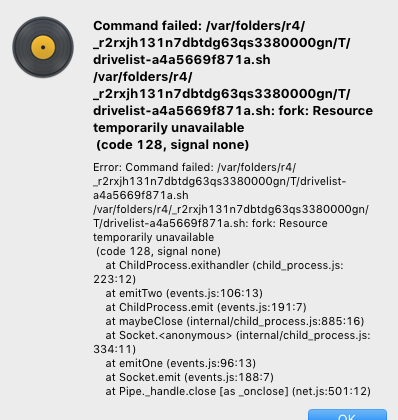
Doesn't seem to like SD cards.
pslootweg
on 6 Nov 2017
Yeah, seems like drivelist is having problems on your Mac :-( I don't have a Mac myself, so either @jhermsmeier or @jviotti will have to take over here with helping you investigate / debug this...
In the meantime, could you try a snapshot build of Etcher, to see if that works any better / differently?
https://resin-nightly-downloads.s3.amazonaws.com/etcher/2017-10-31/1.1.2%2B03b2520/Etcher-1.1.2%2B03b2520.dmg
lurch
on 7 Nov 2017
Many thanks @pslootweg – this is helpful info, I shall have a look. Typically the "fork: Resource temporarily unavailable" error hints at the system running out of file descriptors.
This is most likely an issue with drivelist, or Etcher running it too often in succession without waiting for a return. But just to exclude other possibilities, could you tell us what the following three commands report in your terminal?
ulimit
sysctl kern.maxproc
sysctl kern.maxprocperuid
 jhermsmeier
on 8 Nov 2017
jhermsmeier
on 8 Nov 2017
@pslootweg Would you mind re-testing with Etcher 1.3.1 to see if that fixes the problems you were having earlier?
lurch
on 26 Feb 2018
Hi,
Tried Etcher 1.3.1 and it seems more stable and looks to be working.
However, when I flash the a 16G card with 2017-06-22-rpd-x86-jessie.iso
when I plug it into my Raspberry Pi, it doesn't start up.
Which suggests the image isn't correct.
On 26 February 2018 at 18:19, Andrew Scheller notifications@github.com
wrote:
@pslootweg https://github.com/pslootweg Would you mind re-testing with
Etcher 1.3.1 to see if that fixes the problems you were having earlier?—
You are receiving this because you were mentioned.
Reply to this email directly, view it on GitHub
https://github.com/resin-io/etcher/issues/1820#issuecomment-368597293,
or mute the thread
https://github.com/notifications/unsubscribe-auth/ARrVY-YGBTOg_RVKYWGOYOwzV4VrELRZks5tYvWlgaJpZM4QLssG
.
pslootweg
on 26 Feb 2018
Which suggests the image isn't correct.
Correct. 2017-06-22-rpd-x86-jessie.iso is designed for booting on a PC (hence the x86 in the filename), see https://www.raspberrypi.org/downloads/raspberry-pi-desktop/ for more info.
For booting on a Raspberry Pi, you'll need to download Raspbian from https://www.raspberrypi.org/downloads/raspbian/
lurch
on 27 Feb 2018
I'm trying again with an up-to-date image
On 27 February 2018 at 00:09, Andrew Scheller notifications@github.com
wrote:
Which suggests the image isn't correct.
Correct. 2017-06-22-rpd-x86-jessie.iso is designed for booting on a PC,
see https://www.raspberrypi.org/downloads/raspberry-pi-desktop/ for more
info.
For booting on a Raspberry Pi, you'll need to download Raspbian from
https://www.raspberrypi.org/downloads/raspbian/—
You are receiving this because you were mentioned.
Reply to this email directly, view it on GitHub
https://github.com/resin-io/etcher/issues/1820#issuecomment-368697500,
or mute the thread
https://github.com/notifications/unsubscribe-auth/ARrVY8J7ekRqEPM0bTPbrar-SGHKhQA_ks5tY0exgaJpZM4QLssG
.
pslootweg
on 27 Feb 2018
Ah, that explains a lot. Don't know why I used that image file.
Just tried it with 2017-11-29-raspbian-stretch.zip and the RPi booted fine
:)
TBH Etcher is much more stable and handles errors pretty well. Didn't steal
all my CPU either :)
Thanks for asking me to try it out.
Paul
On 27 February 2018 at 00:09, Andrew Scheller notifications@github.com
wrote:
Which suggests the image isn't correct.
Correct. 2017-06-22-rpd-x86-jessie.iso is designed for booting on a PC,
see https://www.raspberrypi.org/downloads/raspberry-pi-desktop/ for more
info.
For booting on a Raspberry Pi, you'll need to download Raspbian from
https://www.raspberrypi.org/downloads/raspbian/—
You are receiving this because you were mentioned.
Reply to this email directly, view it on GitHub
https://github.com/resin-io/etcher/issues/1820#issuecomment-368697500,
or mute the thread
https://github.com/notifications/unsubscribe-auth/ARrVY8J7ekRqEPM0bTPbrar-SGHKhQA_ks5tY0exgaJpZM4QLssG
.
pslootweg
on 27 Feb 2018
I guess we can close this issue then? :)
jhermsmeier
on 27 Feb 2018
Guess so :)
On 27 February 2018 at 22:30, Jonas Hermsmeier notifications@github.com
wrote:
I guess we can close this issue then? :)
—
You are receiving this because you were mentioned.
Reply to this email directly, view it on GitHub
https://github.com/resin-io/etcher/issues/1820#issuecomment-369050142,
or mute the thread
https://github.com/notifications/unsubscribe-auth/ARrVY4fAx8wnWo9Qs4knFZzlmLtv4nFLks5tZIHxgaJpZM4QLssG
.
pslootweg
on 28 Feb 2018
Sweet!
jhermsmeier
on 28 Feb 2018
Related issues
 m-p-3
·
5Comments
m-p-3
·
5Comments
 grash54
·
5Comments
grash54
·
5Comments
 dilbert-tctc
·
5Comments
dilbert-tctc
·
5Comments
 jviotti
·
5Comments
jviotti
·
5Comments
 Silver978
·
3Comments
Silver978
·
3Comments
Most helpful comment
I'm sorry to hear you've been having problems with Etcher. I can assure you that we do test Etcher, and we have many many users who are perfectly happy with it.
If you'd like to change your tone to that of a more positive one, and give a more detailed description, we may be able to help you diagnose your problems...