- Etcher version: 1.1.2
- Operating system and architecture: windows 7 64bit
- Image flashed:2017-06-21-octopi-jessie-lite-0.14.0
- Do you see any meaningful error information in the DevTools?nope
``
 csa2k3
All 23 comments
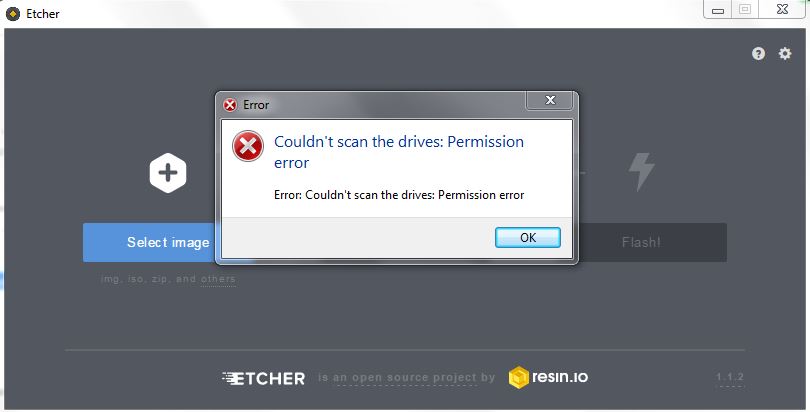
Can you please describe your problem in more detail? i.e. the exact steps you performed, when exactly does the error appear, etc. A screenshot of the error would be useful too.
 lurch
on 14 Aug 2017
lurch
on 14 Aug 2017
step1: download it
step2: open it /install it
step3: open it /get the error
On Mon, Aug 14, 2017 at 2:58 PM, Andrew Scheller notifications@github.com
wrote:
Can you please describe your problem in more detail? i.e. the exact steps
you performed, when exactly does the error appear, etc. A screenshot of the
error would be useful too.—
You are receiving this because you authored the thread.
Reply to this email directly, view it on GitHub
https://github.com/resin-io/etcher/issues/1693#issuecomment-322321351,
or mute the thread
https://github.com/notifications/unsubscribe-auth/AdlPmAnz2dHIgGBUKV3jR6ZedDxgJ0UGks5sYML8gaJpZM4O26P7
.
csa2k3
on 15 Aug 2017
Thanks @csa2k3 that screenshot is helpful.
@jviotti Looks like this is coming from the Windows portion of drivelist https://github.com/resin-io-modules/drivelist/search?utf8=%E2%9C%93&q=permission+error&type=code
lurch
on 15 Aug 2017
how do i fix this ?
csa2k3
on 15 Aug 2017
I seem to have the same issue - nothing special - just Windows 10, just downloaded and installed Etcher and tried to flash the SD card with Debian Lite from a zip-file. I even tried with running Etcher as Administrator, but that didn't help either unfortunately.

 github-user-1
on 20 Aug 2017
github-user-1
on 20 Aug 2017
Can you run the Etcher.exe executable from cmd.exe and paste the debugging information that should be printed in the console?
 jviotti
on 21 Aug 2017
jviotti
on 21 Aug 2017
Just to let you know - I tried a lot (e.g. including diskpart run as admin to format the card but that all didn't help) so I finally decided to just get me a brand-new SD card. The old one I disposed already and the new one was working fine. Maybe there was just something wrong physicallly with the old one (?).
github-user-1
on 22 Aug 2017
Thanks for letting us know @github-user-1 , and glad to hear things are working fine now :+1:
If you'd still like to try a couple of things on the old card, you could try the steps here or you could try using the official SDFormatter tool. But yeah, there's always a possibility that it's physically damaged.
lurch
on 22 Aug 2017
I think ill just go back to win32 at lest it works
On Aug 22, 2017 2:38 AM, "Andrew Scheller" notifications@github.com wrote:
Thanks for letting us know @github-user-1
https://github.com/github-user-1 , and glad to hear things are working
fine now 👍
If you'd still like to try a couple of things on the old card, you could
try the steps here
https://github.com/resin-io/etcher/blob/master/docs/USER-DOCUMENTATION.md#recovering-broken-drives
or you could try using the official SDFormatter tool. But yeah, there's
always a possibility that it's physically damaged.—
You are receiving this because you were mentioned.
Reply to this email directly, view it on GitHub
https://github.com/resin-io/etcher/issues/1693#issuecomment-323974222,
or mute the thread
https://github.com/notifications/unsubscribe-auth/AdlPmFruOYWXHCSmtaRRCP3LpwioL4NBks5saqF5gaJpZM4O26P7
.
csa2k3
on 22 Aug 2017
@csa2k3 Please feel free to try helping out on https://github.com/resin-io-modules/drivelist/issues/208 (where there's more detail about this problem)
lurch
on 1 Sep 2017
If I run ethcher from a Windows 10 x64 admin CMD prompt, i do not get the error and also cannot select a drive to write to.
 cron410
on 3 Oct 2017
cron410
on 3 Oct 2017
@cron410 Have you tried enabling Etcher's "Unsafe mode"? Sometimes removable drives incorrectly get identified as System drives.
lurch
on 12 Oct 2017
I used Etcher 1.1.2 on Windows 10 x64 and I had the same problem. I realised that it is because of my drive mapping. I used
subst H: C:\Users\user
So I solved this by removing this mapping:
subst H: \D
Attention after this I had to run the Etcher with Administrator privileges, because automatic privileges aquiration did not work properly.
 sebetovsky
on 13 Nov 2017
sebetovsky
on 13 Nov 2017
@sebetovsky The issue with subst drives is being tracked in https://github.com/resin-io-modules/drivelist/issues/158
lurch
on 14 Nov 2017
@lurch Thanks, but my problem was the error in title and I solved it using deletion of subst. Now my situation is solved and I wrote it here only to help others who will have the same problem.
sebetovsky
on 14 Nov 2017
Could any of the people who previously experienced this problem please re-test with Etcher 1.3.1 ? We've made some significant changes to the way drivelist works on Windows.
(Or maybe this should just be closed directly @jhermsmeier ?)
lurch
on 28 Feb 2018
Yeah, I'll close this for now; please comment & reopen should this come up again with Etcher v1.3.1+
 jhermsmeier
on 28 Feb 2018
jhermsmeier
on 28 Feb 2018
Well I fixed my issue all I had to do is uninstall it and re install it
under administrator mode and mine was fix
On Feb 28, 2018 10:21 AM, "Jonas Hermsmeier" notifications@github.com
wrote:
Yeah, I'll close this for now; please comment & reopen should this come up
again with Etcher v1.3.1+—
You are receiving this because you were mentioned.
Reply to this email directly, view it on GitHub
https://github.com/resin-io/etcher/issues/1693#issuecomment-369332985,
or mute the thread
https://github.com/notifications/unsubscribe-auth/AdlPmDX7aDpDeKsF24g2MZEYy0Gr4YsEks5tZZjdgaJpZM4O26P7
.
csa2k3
on 28 Feb 2018
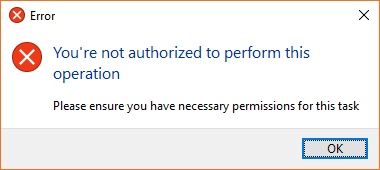
I had this issue when trying to flash raspbian to a 32gb sandisk sd card on Win10
You're not authorized to perform this operation
Please ensure you have necessary permissions for this task
Fixed by temporarily turning off Win 10 Controlled File Access
- open windows defender
- open virus & threat protection
- open ransomware protection
- turn off controlled file access
- Etcher was able to flash the raspbian image to the sd card
- turn controlled file access back on
 lfg6000
on 2 Jun 2018
lfg6000
on 2 Jun 2018
I also had this problem and the above solution fixed it for me too. Note that it was called "controlled folder access" on my version of Windows 10.
 ghost
on 29 Jul 2018
ghost
on 29 Jul 2018
Hi,
if somebody is troubleshoot anyway, like me.
i stopped processes from Acronis and could figure out that, these processes caused access denied problems. This works for me 👍
Regards Sven
 pandabeard
on 15 Dec 2018
pandabeard
on 15 Dec 2018
I had this issue when trying to flash raspbian to a 32gb sandisk sd card on Win10
You're not authorized to perform this operation
Please ensure you have necessary permissions for this taskFixed by temporarily turning off Win 10 Controlled File Access
- open windows defender
- open virus & threat protection
- open ransomware protection
- turn off controlled file access
- Etcher was able to flash the raspbian image to the sd card
- turn controlled file access back on
Thank you, you saved my life.
 Desoky01
on 22 Feb 2019
Desoky01
on 22 Feb 2019
See also #1960
lurch
on 22 Feb 2019
Related issues
 markcorbinuk
·
5Comments
lurch
·
3Comments
markcorbinuk
·
5Comments
lurch
·
3Comments
 robmcc1983
·
5Comments
robmcc1983
·
5Comments
 Bean6754
·
5Comments
Bean6754
·
5Comments
 GGShinobi
·
4Comments
GGShinobi
·
4Comments
Most helpful comment
I had this issue when trying to flash raspbian to a 32gb sandisk sd card on Win10
You're not authorized to perform this operation
Please ensure you have necessary permissions for this task
Fixed by temporarily turning off Win 10 Controlled File Access