Etcher: Drives locked by Bitlocker causes "Couldn't scan the drives: An unknown error occurred" error message
- Etcher version:
1.1.2 (64bit and 32bit) Operating system and architecture:
Windows 10 Pro 64bitImage flashed:
AnyDo you see any meaningful error information in the DevTools?
Not sure
Under resolved issue 1639 I also had the error message "Couldn't scan the drives: An unknown error occurred". I had locked drives using bitlocker but once unlocked the program works as expected. I was asked to make a new issue from the closed issue 1639.
Original message:
I just joined github to leave this comment, I was also receiving the error "Couldn't scan the drives: An unknown error occurred". I have 2 drives that I lock with bitlocker. Once I unlocked them I was then able to scan my drive like it should. Once I locked my drives again I ended up getting the error again and can repeat it.
I am running the 64bit version on windows.
 mgalde
All 7 comments
Thanks for the bug report @mgalde. I reproduced the issue and sent a patch to drivelist, which should get to Etcher very soon: https://github.com/resin-io-modules/drivelist/pull/206
 jviotti
on 11 Aug 2017
jviotti
on 11 Aug 2017
@jviotti So presumably this error message only relates to specific drives?
Rather than have Etcher display an error "Couldn't scan the drives: An unknown error occurred" and not proceed any further, would it be better UX to display a warning like "Couldn't scan all your drives: An unknown error occurred" and then allow Etcher to work normally, just listing the drives that it _could_ scan? (or is that potentially too dangerous, as it may allow the selection (and over-writing) of drives that we wouldn't otherwise allow?)
 lurch
on 14 Aug 2017
lurch
on 14 Aug 2017
Sounds great, but it'd require some non-trivial amount of refactoring on the drivelist module (e.g. to emit errors but still emit the drives that worked fine). Do you mind creating a new ticket so we can come back to it later?
jviotti
on 21 Aug 2017
@mgalde This should be fixed by https://resin-nightly-downloads.s3.amazonaws.com/etcher/2017-08-21/1.1.2%2Bf9d7dd2/Etcher-Setup-1.1.2%2Bf9d7dd2-x64.exe
lurch
on 22 Aug 2017
@lurch Thank you, I tried it on the computer I had issues with and am able to run the program with no issue.
mgalde
on 23 Aug 2017
@Lurch: I tested also https://resin-nightly-downloads.s3.amazonaws.com/etcher/2017-08-21/1.1.2%2Bf9d7dd2/Etcher-Setup-1.1.2%2Bf9d7dd2-x64.exe
Still the same error!
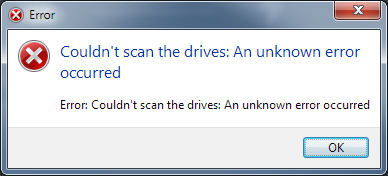
 mubed
on 29 Aug 2017
mubed
on 29 Aug 2017
@mubed Can you please copy'n'paste the DevTools console output? (press Ctrl + Alt + i)
lurch
on 4 Sep 2017
Related issues
jviotti
·
5Comments
 TheEpicNoobZilla
·
4Comments
TheEpicNoobZilla
·
4Comments
 GGShinobi
·
4Comments
GGShinobi
·
4Comments
 Silver978
·
3Comments
Silver978
·
3Comments
 Bean6754
·
5Comments
Bean6754
·
5Comments