Etcher: Couldn't scan the drives: An unknown error occurred
- Etcher version: 1.1.1
- Operating system and architecture: Win10 x64
- Image flashed: --
- Do you see any meaningful error information in the DevTools?


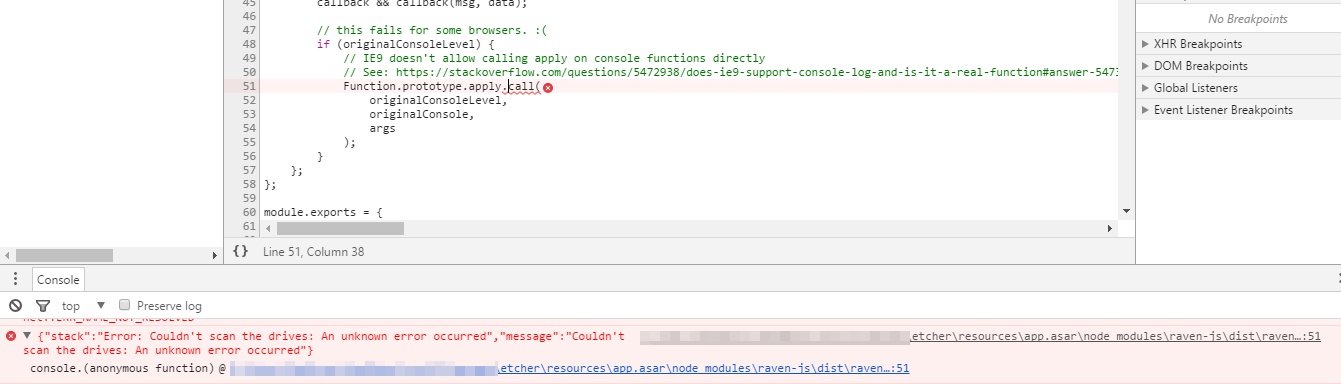
The error comes right away after the start. (no img selection)
There is a SD card in the slot.
Tried running as Admin as well.
{"stack":"Error: Couldn't scan the drives: An unknown error occurred","message":"Couldn't scan the drives: An unknown error occurred"}
Everything works with version 1.0.0
Tried with both "-portable" and installer version.
 maxgrass
All 18 comments
Duplicate of #1646
 lurch
on 3 Aug 2017
lurch
on 3 Aug 2017
@lurch Do you think we should post links to the snapshot builds here?
 jviotti
on 3 Aug 2017
jviotti
on 3 Aug 2017
Good call :) (I wasn't sure how soon you were planning on releasing 1.1.2, given that this bug seems to be affecting multiple people?)
lurch
on 3 Aug 2017
I was planning to release today/tomorrow, but I rather do it on Monday, to avoid having to spend my weekend hot fixing stuff :P
jviotti
on 3 Aug 2017
Can you try the following snapshot build that contains the fix: https://drive.google.com/file/d/0B7tkbonGU-RyTUNKaVpLb2VCZ1E/view?usp=sharing? If that still doesn't work, can you set the DRIVELIST_DEBUG environment variable and execute the application from cmd.exe, so you can see the debug logs?
For example:
set DRIVELIST_DEBUG=1
cd C:\Program Files\Etcher
etcher.exe
It's working. Thank you.
maxgrass
on 3 Aug 2017
@jviotti Out of curiosity, how come you're linking to a snapshot build on google drive rather than one of the snapshot builds in our S3 bucket?
lurch
on 3 Aug 2017
@maxgrass Thanks a lot for confirming this!
@lurch I accidentally broke snapshot builds in a previous commit. See https://github.com/resin-io/etcher/pull/1666
jviotti
on 3 Aug 2017
The snapshot build is working for me as well, the release version was not.
 mwsasser
on 4 Aug 2017
mwsasser
on 4 Aug 2017
I suspect in my case it was failing to scan because I had a floppy disk drive attached to the system. The floppy drive appears as a disk path but it will error out if there is no disk in the drive.
C:\>A:
The device is not ready.

C:\>
The snapshot build works but appears to continuously poll the drive for access until a drive is finally selected.
Windows 10 x64, Floppy Drive at (A:)
 hadjilucasL
on 5 Aug 2017
hadjilucasL
on 5 Aug 2017
I had a floppy disk drive attached to the system
Wow, old-skool :sunglasses: :wink:
appears to continuously poll the drive for access until a drive is finally selected.
Yeah, Etcher re-runs drivelist every two seconds, to take account for USB drives / SD cards / etc. being inserted and removed (unfortunately repeated polling is the only reliable cross-platform way to get this info). @jviotti @jhermsmeier I wonder if we added a user-configurable "delay betweeen drivelist-rescans" that'd make the Etcher experience less bad for @hadjilucasL ?
lurch
on 6 Aug 2017
@lurch Recent changes cause drivelist to only poll X amount of seconds after the previous run completed, so that should be enough to mitigate these kinds of issues.
jviotti
on 7 Aug 2017
@maxgrass, what you posted does work as a work around.
My question is shouldn't the application be able to run without setting this value in a command prompt?
@lurch ,
Wouldn't that be old school :P :)
 drencorxeen
on 7 Aug 2017
drencorxeen
on 7 Aug 2017
I wonder if the release version didn't like my WevDAV network mapped drives?
mwsasser
on 7 Aug 2017
@drencorxeen
My question is shouldn't the application be able to run without setting this value in a command prompt?
The environment value I suggested above is just to get more debugging information in case the snapshot build didn't work.
jviotti
on 7 Aug 2017
@mwsasser Could be! The fix seems general enough to cover most cases. We basically check if we are not allowed to get the device number of a certain drive, and if so omit it.
jviotti
on 7 Aug 2017
Etcher v1.1.2 is available at https://github.com/resin-io/etcher/releases/tag/v1.1.2. Let me know how it goes!
jviotti
on 8 Aug 2017
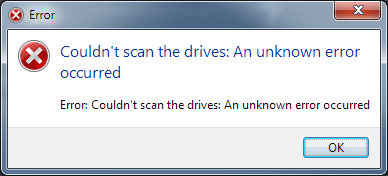
I still have this problem in Version 1.1.2 (Win7):
 mubed
on 29 Aug 2017
mubed
on 29 Aug 2017
Related issues
 robmcc1983
·
5Comments
lurch
·
3Comments
robmcc1983
·
5Comments
lurch
·
3Comments
 davidrnewman
·
4Comments
davidrnewman
·
4Comments
 Bean6754
·
5Comments
Bean6754
·
5Comments
 codeinabox
·
5Comments
codeinabox
·
5Comments
Most helpful comment
It's working. Thank you.