Etcher: "Error: Couldn't scan the drives: An unknown error occurred" when launching Etcher (Windows)
- Etcher version: 1.1.1
- Operating system and architecture: Windows 10 x64
- Image flashed: N/A
- Do you see any meaningful error information in the DevTools?
{"stack":"Error: Couldn't scan the drives: An unknown error occurred","message":"Couldn't scan the drives: An unknown error occurred"}
console.(anonymous function) @ C:\Users\<user>\AppData\Local\Programs\etcher\resources\app.asar\node_modules\raven-js\dist\raven.js:51
This error appears immediately after launching the app. It leaves Etcher in a state where I can go through the normal image selection process, but the "select a drive" step is never enabled.
 WasabiFan
All 22 comments
 lurch
on 27 Jul 2017
lurch
on 27 Jul 2017
@lurch technically yes, but given this is also an issue within Etcher, let's tie this to #1637 and close this once that's through.
 jhermsmeier
on 27 Jul 2017
jhermsmeier
on 27 Jul 2017
Can you try the following snapshot build that contains the fix: https://drive.google.com/file/d/0B7tkbonGU-RyTUNKaVpLb2VCZ1E/view?usp=sharing? If that still doesn't work, can you set the DRIVELIST_DEBUG environment variable and execute the application from cmd.exe, so you can see the debug logs?
For example:
set DRIVELIST_DEBUG=1
cd C:\Program Files\Etcher
etcher.exe
 jviotti
on 3 Aug 2017
jviotti
on 3 Aug 2017
I ran into the same issue and downloaded the snapshot build. It exhibits the same error. Here are my debug logs:
[drivelist] Initializing scanner

[drivelist] Initializing COM
[drivelist] Initializing COM security levels
[drivelist] Creating connection instance
[drivelist] Connecting to server
[drivelist] Setting proxy security levels
[drivelist] Interpreting error 0x0
[drivelist] Getting list of drives from WMI
[drivelist] Getting id
[drivelist] Processing \\.\PHYSICALDRIVE1
[drivelist] Getting caption
[drivelist] Getting disk information
[drivelist] Opening handle on \\.\PHYSICALDRIVE1
[drivelist] Getting drive geometry
[drivelist] Getting id
[drivelist] Processing \\.\PHYSICALDRIVE0
[drivelist] Getting caption
[drivelist] Getting disk information
[drivelist] Opening handle on \\.\PHYSICALDRIVE0
[drivelist] Getting drive geometry
[drivelist] Getting system volume drive letter
[drivelist] Getting available volumes
[drivelist] Getting volume type
[drivelist] Checking if volume has filesystem
[drivelist] Getting device number
[drivelist] Checking if disk is writable
[drivelist] Getting volume type
[drivelist] Checking if volume has filesystem
[drivelist] Getting device number
[drivelist] Checking if disk is writable
[drivelist] Getting volume type
[drivelist] Checking if volume has filesystem
[drivelist] Getting device number
[drivelist] Checking if disk is writable
[drivelist] Getting volume type
[drivelist] Ignoring, drive type not removable nor local
[drivelist] Getting volume type
[drivelist] Checking if volume has filesystem
[drivelist] Getting device number
[drivelist] Interpreting error 0x80070006
 wakitcha
on 4 Aug 2017
wakitcha
on 4 Aug 2017
I can no longer repro the issue with any Etcher version, so I can't say whether this works or not. It looks like @wakitcha has what you needed though.
WasabiFan
on 5 Aug 2017
@jviotti I managed to find that error code at https://msdn.microsoft.com/en-us/library/windows/desktop/dd542643(v=vs.85).aspx
E_HANDLE 0x80070006 Invalid handle
@wakitcha Could you tell us what drives you have connected to your computer (both internal and external), in case that helps us debug the problem?
lurch
on 5 Aug 2017
I have a C: and a D: drive. Then the SD is the E: drive. Then, I have a local sub H: that maps to a folder in D:. I also have numerous network mapped drives. F, I, M, Q, R, U, W, X, Y, Z Many of the latter are not accessible except in certain networks.
wakitcha
on 5 Aug 2017
@lurch We are the ones returning that error. I sent https://github.com/resin-io-modules/drivelist/pull/204, which gets the actual error message, so we should catch it next time. I plan to release tomorrow, so hopefully we'll have enough data to fix the error very soon.
jviotti
on 7 Aug 2017
@wakitcha Oh, could it be happening because of inaccessible network drives? I'll test that soon.
jviotti
on 7 Aug 2017
I did some additional testing this morning based on the disconnected network drive hypothesis. I deleted all of the inaccessible drives and was able to run Etcher successfully in some cases. Specifically, if Etcher runs as Administrator it worked. Etcher did not request admin rights by default. I'm guessing that's just this debug build?
If not run as administrator, I get this log. With this I had four drives. C:, D:, H: (mapped to a folder in D:), and E: being the SD card.
[drivelist] Initializing scanner
[drivelist] Initializing COM
[drivelist] Initializing COM security levels
[drivelist] Creating connection instance
[drivelist] Connecting to server
[drivelist] Setting proxy security levels
[drivelist] Interpreting error 0x0
[drivelist] Getting list of drives from WMI
[drivelist] Getting id
[drivelist] Processing \.\PHYSICALDRIVE1
[drivelist] Getting caption
[drivelist] Getting disk information
[drivelist] Opening handle on \.\PHYSICALDRIVE1
[drivelist] Getting drive geometry
[drivelist] Getting id
[drivelist] Processing \.\PHYSICALDRIVE0
[drivelist] Getting caption
[drivelist] Getting disk information
[drivelist] Opening handle on \.\PHYSICALDRIVE0
[drivelist] Getting drive geometry
[drivelist] Getting system volume drive letter
[drivelist] Getting available volumes
[drivelist] Getting volume type
[drivelist] Checking if volume has filesystem
[drivelist] Getting device number
[drivelist] Checking if disk is writable
[drivelist] Getting volume type
[drivelist] Checking if volume has filesystem
[drivelist] Getting device number
[drivelist] Checking if disk is writable
[drivelist] Getting volume type
[drivelist] Checking if volume has filesystem
[drivelist] Getting device number
[drivelist] Checking if disk is writable
[drivelist] Getting volume type
[drivelist] Checking if volume has filesystem
[drivelist] Getting device number
[drivelist] Interpreting error 0x80070006
wakitcha
on 7 Aug 2017
If it helps any, I'm getting this error when I attempt to run Etcher as an Administrator.
Couldn't scan the drives: An unknown error occurred
Followed by:
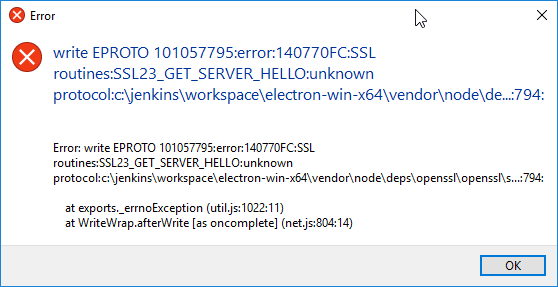
I currently have 2 local drives, 1 "USB Drive" (actually an adapter holding the microSD card that I wish to flash to), 1 RamDrive, and 1 network drive.
When I attempt to run as a normal user, I get the 1st error message, but not the 2nd one.
 wmsoto
on 8 Aug 2017
wmsoto
on 8 Aug 2017
I just joined github to leave this comment, I was also receiving the error "Couldn't scan the drives: An unknown error occurred". I have 2 drives that I lock with bitlocker. Once I unlocked them I was then able to scan my drive like it should. Once I locked my drives again I ended up getting the error again and can repeat it.
I am running the 64bit version on windows.
 mgalde
on 10 Aug 2017
mgalde
on 10 Aug 2017
@mgalde Thanks for your report. Can you confirm that you're using the latest version 1.1.2 of Etcher?
lurch
on 10 Aug 2017
Sorry, yes the newest version was tried and also had the same issue. As I was trying to diagnose this issue I tried the version listed above and the 32bit version on download page. Once I unlocked my drives I was able to get it to run with no issue on the current 64bit version.
mgalde
on 10 Aug 2017
@mgalde This particular issue (1639) has been closed, as the particular problem it was addressing has been fixed. It sounds like your problem is slightly different, so would you mind opening a new issue for it please?
lurch
on 10 Aug 2017
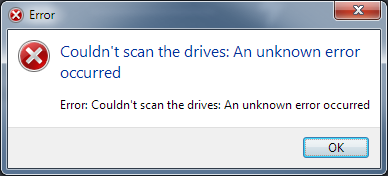
The problem isn't solved yet. I yesterday downloaded the newest version (1.1.2) and have this problem (Win7):
 mubed
on 29 Aug 2017
mubed
on 29 Aug 2017
HI. I got the same error on etcher 1.1.2 as well.
Windows 10 in my case, 64 bits.
 clperez
on 30 Aug 2017
clperez
on 30 Aug 2017
I had a similar and possibly related error and narrowed it down to a 'bind-mounted' folder as a drive. I have a folder in my documents folder that is mounted as my A: drive and Etcher would throw the error about permission denied for scanning drives. Once I unmounted the drive, Etcher worked.
 mattzuba
on 6 Sep 2017
mattzuba
on 6 Sep 2017
I've just performed a fresh windows install and installed the latest etcher, I noticed the problem only occurs when my bitlocker drive is locked, after unlocking the drive etcher will work as expected.
 rodrigoasrodrigues
on 10 Sep 2017
rodrigoasrodrigues
on 10 Sep 2017
@serdasteclas is right. I can verify this problem occurs when there is a locked Bitlocker drive present. It goes away once I unlock it.
 rakete
on 17 Sep 2017
rakete
on 17 Sep 2017
Same issue.
Windows 10, x64.
Error only occurs if my BitLocker drive is unlocked. Problem goes away if I unlock my BitLocker drive.
 gpresland
on 23 Sep 2017
gpresland
on 23 Sep 2017
I had the same problem.
Etcher is in conflit with virtual drive "L:" on my system Windows 10.
To avoid it, I remove my virtual drive (ex subst \d L: )
 behel33
on 1 Oct 2017
behel33
on 1 Oct 2017
Related issues
 davidrnewman
·
4Comments
davidrnewman
·
4Comments
 m-p-3
·
5Comments
lurch
·
3Comments
m-p-3
·
5Comments
lurch
·
3Comments
 TheEpicNoobZilla
·
4Comments
TheEpicNoobZilla
·
4Comments
 robmcc1983
·
5Comments
robmcc1983
·
5Comments
Most helpful comment
@serdasteclas is right. I can verify this problem occurs when there is a locked Bitlocker drive present. It goes away once I unlock it.