Etcher: Make behavior of protected system drives more obvious to user
This came out of a discussion on Gitter, but I wanted to materialize it here for tracking.
@alexandrosm: @WasabiFan in general I wonder if instead of not showing system drives at all, instead Etcher should just not auto-select them, de-emphasise them on the selection menu, and if the user actively selects it, it gives a warning, but ultimately goes ahead.
@alexandrosm: in other words treat the system drive heuristic as a heuristic instead of as a law as it does now
@WasabiFan: Yeah, I like that. Or maybe gray them out and then put the "unsafe mode" checkbox on the selection screen (something like "Allow selection of system drives").
This would make it much easier for users to understand why their drives aren't showing up.
In general, the idea would be to make the filtering out of "system" drives visible to the user, so that they can see what is being filtered out and why.
 WasabiFan
All 75 comments
One more thing to highlight, I like the idea of moving things out of the
"garbage dump" settings page and into the specific screens they are
relevant on. If unsafe mode makes more sense in the drive selection, let's
move it in there.
_Alexandros Marinos_
Founder & CEO, Resin.io
+1 206-637-5498
@alexandrosm
On Mon, Nov 21, 2016 at 8:33 PM, Wasabi Fan [email protected]
wrote:
This came out of a discussion on Gitter, but I wanted to materialize it
here for tracking.@alexandrosm https://github.com/alexandrosm: @WasabiFan
https://github.com/WasabiFan in general I wonder if instead of not
showing system drives at all, instead Etcher should just not auto-select
them, de-emphasise them on the selection menu, and if the user actively
selects it, it gives a warning, but ultimately goes ahead.
@alexandrosm https://github.com/alexandrosm: in other words treat the
system drive heuristic as a heuristic instead of as a law as it does now@WasabiFan https://github.com/WasabiFan: Yeah, I like that. Or maybe
gray them out and then put the "unsafe mode" checkbox on the selection
screen (something like "Allow selection of system drives").
This would make it much easier for users to understand why their drives
aren't showing up.In general, the idea would be to make the filtering out of "system" drives
visible to the user, so that they can see what is being filtered out and
why.—
You are receiving this because you were mentioned.
Reply to this email directly, view it on GitHub
https://github.com/resin-io/etcher/issues/888, or mute the thread
https://github.com/notifications/unsubscribe-auth/ABLUCEIPET_NEdeG2FqNqMShOI3jjLLRks5rAnCPgaJpZM4K4_1J
.
 alexandrosm
on 22 Nov 2016
alexandrosm
on 22 Nov 2016
Agreed, especially if in doing so that checkbox gets a better name! It would be great to see "settings" become something more like "preferences" (logging, telemetry, debugging, etc.).
WasabiFan
on 22 Nov 2016
Sounds cool. Lets put a "system drive" badge as we do for locked, or small devices, and disable them as well. Once that's done, we can move the checkbox there.
 jviotti
on 23 Nov 2016
jviotti
on 23 Nov 2016
Yeah, overlaying badges on different types of drives is also something that we discussed with @taahirisaacs and @konmouz at the Summit. I think we decided that removable drives (that we don't detect as "system") should always be displayed at the top of the list.
IMHO if we're going to be displaying "System" drives to the user (with 'just' a simple tickbox to enable writing to them) then perhaps we also ought to attempt to identify "boot" drives, and never allow those to be overwritten? And we could/should also filter "source" drives, as mentioned in #830
So, there'd then be:
- Removable drives - always okay to write
- "System" drives - writable if the user enables "unsafe mode" (or whatever it gets renamed to)
- "Boot" drives (e.g. where the current Operating System was loaded from - should we also try detecting swap / pagefile drives currently being used?) - we should prevent the user writing to here
And then any of the above drives can also be:
- "Source" drives where the disk image is currently being read from - we should prevent the user writing to here
- "Locked" drives (e.g. SD cards with the read-only switch enabled) - non-writable at the hardware level
- "Small" drives where the capacity is less than the currently-selected image - should we allow these to be written to in "unsafe mode"?
Any other categories? :)
 lurch
on 28 Nov 2016
lurch
on 28 Nov 2016
I would recommend avoiding attempting to detect "boot drives". I suspect that Etcher wouldn't be able to do it reliably, and if it isn't reliable I don't think that it should be used at all. For example, on one of my PCs, I had my user folder stored on one drive while the system was on another; applications were stored on the same drive as my user folder. How would this be detected? I'd bet that edge cases like that would render this sort of "protection" unreliable at best and outright dangerous at worst. I'd favor just detecting generic "system" drives and putting protections in place there.
WasabiFan
on 28 Nov 2016
we discussed this today with @konmouz in person, and he has some sleek
designs, i suspect he might post them here for further comment
--
Alexandros Marinos
Founder & CEO, Resin.io
+1 206-637-5498
@alexandrosm
On Mon, Nov 28, 2016 at 6:55 PM, Wasabi Fan notifications@github.com
wrote:
I would recommend avoiding attempting to detect "boot drives". I suspect
that Etcher wouldn't be able to do it reliably, and if it isn't reliable I
don't think that it should be used at all. For example, on one of my PCs, I
had my user folder stored on one drive while the system was on another;
applications were stored on the same drive as my user folder. How would
this be detected? I'd bet that edge cases like that would render this sort
of "protection" unreliable at best and outright dangerous at worst. I'd
favor just detecting generic "system" drives and putting protections in
place there.—
You are receiving this because you were mentioned.
Reply to this email directly, view it on GitHub
https://github.com/resin-io/etcher/issues/888#issuecomment-263359586,
or mute the thread
https://github.com/notifications/unsubscribe-auth/ABLUCJCOZUL64_PG68z8HtrdkA8KLn27ks5rCyOqgaJpZM4K4_1J
.
alexandrosm
on 28 Nov 2016
Yes, I will upload soon, I just want to recap with @taahirisaacs to sync the designs.
The idea is that there will be a pill label for system drives (drive selection modal). All drives, including system ones, are always selectable without enabling 'unsafe mode' (this option will be removed). However, if the user selects a system drive, there will be some sort of alert before continuing (also color change of button). In addition, after clicking 'Flash', user will get another alert modal to re-confirm that flashing a system drive is intended. So practically, it is quite impossible to flash a system drive accidentally.
As an advance setting, we could let users deactivate the final alert to speed up the process. However, I don't think that this will be a frequent use case so probably doesn't really worth it.
Finally, the boot drives concept sounds really good. If this can be implemented reliably it would be great.
 konmouz
on 29 Nov 2016
konmouz
on 29 Nov 2016
IMHO if we're going to be displaying "System" drives to the user (with 'just' a simple tickbox to enable writing to them) then perhaps we also ought to attempt to identify "boot" drives, and never allow those to be overwritten? And we could/should also filter "source" drives, as mentioned in #830
It sounds difficult to get right, but we could get almost there by detecting drives containing partitions mounted at /, /boot, /home, etc in the case of UNIX, and drives containing drive letters that match %SYSTEMDRIVE% and %HOMEPATH% in Windows.
jviotti
on 29 Nov 2016
Yeah, that's what I was thinking. And we could also scan /proc/cmdline on Linux for root=. And possibly also check for %PROGRAMFILES% on Windows?
lurch
on 29 Nov 2016
Sounds good. @lurch Do you mind opening a new issue in drivelist to track this?
jviotti
on 29 Nov 2016
lurch
on 29 Nov 2016
@taahirisaacs and I had a meeting earlier today, so we end up with the following Ui flow:
State after selecting an image:
- If only one removable drive is connected, it will be automatically selected
- Else, if no removable drive or more than one is connected, 'Browse Drives' CTA will be highlighted

Select drive modal:
- All drives are selectable, however, system drives have a clear label (hopefully boot drives as well)

Select drive modal:
- If a removable drive is selected, 'Continue' CTA will be highlighted in the usual blue color
- If a system drive is selected, 'Continue' CTA will be highlighted in a red color along with an 'alert' icon and a short confirmation message
- Regarding double click selection, we can implement it only on removable drives


- If a system drive is selected, a small 'alert' icon is placed next to the drive name
- If the drive name or the icon is clicked, a small modal appears containing all the info relevant to the drive


Flash:
- If user clicks 'Flash' while a system drive is selected, a new confirmation modal appears displaying the selected drive and double-checking if flashing a system drive is an intended action
- User can confirm flashing or directly change the selected drive

konmouz
on 30 Nov 2016
Looks very nice :grinning:
EDIT: I'm not sure "Browse" is the right verb to use on the button though? And IMHO we should sort the drive-list so that system / boot drives always appear at the bottom of the list. And if there's more than one removable drive, maybe we should sort the removable drives as smallest-first?
lurch
on 30 Nov 2016
...and WRT #884 , it's not explicitly spelled out above, but if we're always displaying system drives, then I guess the drive-list will never be empty (since there'll always be at least one system drive), and so the "connect a drive" button will never appear.
lurch
on 30 Nov 2016
Looks very cool! What about sorting? Should we sort the available drives so that the system one always get below?
jviotti
on 30 Nov 2016
@lurch Yes, exactly. System drives are always displayed. Currently, the only case where Etcher selects a drive automatically is when only one removable drive is connected. 'Unsafe mode' has been completely removed (and therefore advanced settings as well).
@jviotti That would make sense since selecting a removable drive should be more often
konmouz
on 30 Nov 2016
the "connect a drive" button will never appear.
This feels wrong. Isn't the idea that only removable drives are auto-selected?
WasabiFan
on 30 Nov 2016
I certainly thing system drives should go to the bottom, and potentially
should be grayed out and need a special checkbox/modal to be selected.
--
Alexandros Marinos
Founder & CEO, Resin.io
+1 206-637-5498
@alexandrosm
On Wed, Nov 30, 2016 at 6:04 PM, Wasabi Fan notifications@github.com
wrote:
the "connect a drive" button will never appear.
This feels wrong. Isn't the idea that only removable drives are
auto-selected?—
You are receiving this because you were mentioned.
Reply to this email directly, view it on GitHub
https://github.com/resin-io/etcher/issues/888#issuecomment-263947518,
or mute the thread
https://github.com/notifications/unsubscribe-auth/ABLUCBxfnN3k5XHPtb4SPwKUrG4zcEDQks5rDbq7gaJpZM4K4_1J
.
alexandrosm
on 30 Nov 2016
@konmouz 's design already requires the user to explicitly confirm twice before system drives will be written to. Not sure an extra tickbox to 'enable' system drives to be selectable is really necessary? *shrug*
lurch
on 1 Dec 2016
@WasabiFan, indeed only removable drives are auto-selected. If only a system drive is available, user will get the 'browse drivers' CTA and has to select it manually.
@alexandrosm, I agree with @lurch. We don't need an extra checkbox to confirm. Currently are notifying user in 4 ways. Red pill label, confirmation with alert icon, alert icon on main Ui page (next to drive) and final confirmation before flashing.
konmouz
on 1 Dec 2016
fair enough.
How about having system/boot drives at the bottom of the list and somehow
de-emphasised? (grayed out?)
--
Alexandros Marinos
Founder & CEO, Resin.io
+1 206-637-5498
@alexandrosm
On Thu, Dec 1, 2016 at 9:37 AM, Konstantinos Mouzakis <
[email protected]> wrote:
@WasabiFan https://github.com/WasabiFan, indeed only removable drives
are auto-selected. If only a system drive is available, user will get the
'browse drivers' CTA and has to select it manually.@alexandrosm https://github.com/alexandrosm, I agree with @lurch
https://github.com/lurch. We don't need an extra checkbox to confirm.
Currently are notifying user in 4 ways. Red pill label, confirmation with
alert icon, alert icon on main Ui page (next to drive) and final
confirmation before flashing.—
You are receiving this because you were mentioned.
Reply to this email directly, view it on GitHub
https://github.com/resin-io/etcher/issues/888#issuecomment-264125062,
or mute the thread
https://github.com/notifications/unsubscribe-auth/ABLUCDsvW8vLZ_NZHEmTeXyjbIyB7UzSks5rDpU-gaJpZM4K4_1J
.
alexandrosm
on 1 Dec 2016
The other thing to be careful about is the relevant text. Due to the fact
that we're still not 100% on this, we shouldn't say "This is a system
drive, are you sure you want to write to it" but something closer to
"Etcher has identified this as a system drive, are you sure you want to
write to it?". It's a small difference but important to communicate the
level of certainty.
--
Alexandros Marinos
Founder & CEO, Resin.io
+1 206-637-5498
@alexandrosm
On Thu, Dec 1, 2016 at 9:50 AM, Alexandros Marinos alexandros@resin.io
wrote:
fair enough.
How about having system/boot drives at the bottom of the list and somehow
de-emphasised? (grayed out?)--
Alexandros Marinos
Founder & CEO, Resin.io
+1 206-637-5498
@alexandrosm
On Thu, Dec 1, 2016 at 9:37 AM, Konstantinos Mouzakis <
[email protected]> wrote:@WasabiFan https://github.com/WasabiFan, indeed only removable drives
are auto-selected. If only a system drive is available, user will get the
'browse drivers' CTA and has to select it manually.@alexandrosm https://github.com/alexandrosm, I agree with @lurch
https://github.com/lurch. We don't need an extra checkbox to confirm.
Currently are notifying user in 4 ways. Red pill label, confirmation with
alert icon, alert icon on main Ui page (next to drive) and final
confirmation before flashing.—
You are receiving this because you were mentioned.
Reply to this email directly, view it on GitHub
https://github.com/resin-io/etcher/issues/888#issuecomment-264125062,
or mute the thread
https://github.com/notifications/unsubscribe-auth/ABLUCDsvW8vLZ_NZHEmTeXyjbIyB7UzSks5rDpU-gaJpZM4K4_1J
.
alexandrosm
on 1 Dec 2016
Good point, I think we can rephrase. Regarding drives' sorting, I agree that removable disks should be on top and system/boot drives at the bottom. We can try de-emphasising them, the only concern is that they might look appear as unavailable.
konmouz
on 1 Dec 2016
As discussed earlier, I guess there'll effectively be three "levels" of drives:
- Drives always writable (Removable drives)
- Drives only writable to after user-confirmation (System drives)
- Drives never writable (Boot drives, Too-small drives, Locked/Read-only drives, Source drives)
IMHO they should be displayed in that order, with the bottom category never selectable, and with drives within each category sorted from smallest-to-largest in terms of capacity.
And I also agree with @alexandrosm 's distinction :+1:
lurch
on 1 Dec 2016
What about the behaviour of plugging a removable drive in while Etcher is running? Should that then become the selected drive, if there are only system drives available otherwise?
 Shou
on 1 Dec 2016
Shou
on 1 Dec 2016
Assuming the user hasn't already specifically selected a drive, then yes. (IIRC it's what the current behaviour does)
lurch
on 1 Dec 2016
I like how the hive mind is working here :)
--
Alexandros Marinos
Founder & CEO, Resin.io
+1 206-637-5498
@alexandrosm
On Thu, Dec 1, 2016 at 11:26 AM, Andrew Scheller notifications@github.com
wrote:
Assuming the user hasn't already specifically selected a drive, then yes.
(IIRC it's what the current behaviour does)—
You are receiving this because you were mentioned.
Reply to this email directly, view it on GitHub
https://github.com/resin-io/etcher/issues/888#issuecomment-264147617,
or mute the thread
https://github.com/notifications/unsubscribe-auth/ABLUCCX-CC2YCZiPB9hM3pI_bgLkjBIlks5rDq7YgaJpZM4K4_1J
.
alexandrosm
on 1 Dec 2016
Example of list of drives, sorted as discussed (+ overflow).

Changed to @alexandrosm's suggestion. I am wondering -just to reduce words- if it makes sense to completely remove the question and keep only "Etcher has identified this as a system drive.", since we do make clear that this will erase your data in the last stage modal.

konmouz
on 2 Dec 2016
We can try de-emphasising them, the only concern is that they might look appear as unavailable.
Yeah, "SYSTEM DRIVE" and "BOOT DRIVE" now look equally un-selectable, even though one is and one isn't :-/
if it makes sense to completely remove the question and keep only "Etcher has identified this as a system drive."
Yeah, that's a good point - clicking "Continue" here doesn't actually write to the drive, so it probably makes sense to only mention "are you sure you want to write to it?" when we're actually about to write to the drive.
Or we could even make the text here say "Warning: Etcher has identified this as a system drive." (would that still fit on a single line?)
lurch
on 2 Dec 2016
We also provide the 'warning icon' so I think it is enough.
konmouz
on 2 Dec 2016
Actually it fits, just tested it. So it is still an option.
konmouz
on 2 Dec 2016
How does the warning look if there are enough drives to force scrolling (i.e. They've got the bottom of the list control)?
WasabiFan
on 2 Dec 2016
I am wondering -just to reduce words- if it makes sense to completely remove the question and keep only "Etcher has identified this as a system drive.", since we do make clear that this will erase your data in the last stage modal.
I'm all for reducing the amount of modals we use!
jviotti
on 2 Dec 2016
@WasabiFan I'll post an image soon.
konmouz
on 2 Dec 2016

konmouz
on 2 Dec 2016
Looks good! I think the disabled "boot drive" should be greyed out though.
WasabiFan
on 2 Dec 2016
So you can not select your Boot Drive in any case, is that right? In this case we should also remove the greyed out 'tick' on the right.
konmouz
on 2 Dec 2016
Yep, I believe that's right.
WasabiFan
on 2 Dec 2016
@konmouz -- the interaction as designed implies there will only be one
drive selected, which will change with multi-write. Any ideas for how to
alter this to not insert the single-drive assumption?
--
Alexandros Marinos
Founder & CEO, Resin.io
+1 206-637-5498
@alexandrosm
On Fri, Dec 2, 2016 at 7:00 PM, Wasabi Fan notifications@github.com wrote:
Yep, I believe that's right.
—
You are receiving this because you were mentioned.
Reply to this email directly, view it on GitHub
https://github.com/resin-io/etcher/issues/888#issuecomment-264534017,
or mute the thread
https://github.com/notifications/unsubscribe-auth/ABLUCLvWKmAKs8M9ozdcv5djOsa_qX-Lks5rEGq2gaJpZM4K4_1J
.
alexandrosm
on 2 Dec 2016
@konmouz Nice idea on removing the 'tick' for boot / locked drives :+1:
For multi-writes I guess we could change the text to something like "Warning: Etcher has identified some of the drives you've selected as system drives." ?
lurch
on 3 Dec 2016
yeah, something of that type.
--
Alexandros Marinos
Founder & CEO, Resin.io
+1 206-637-5498
@alexandrosm
On Sat, Dec 3, 2016 at 2:31 AM, Andrew Scheller notifications@github.com
wrote:
@konmouz https://github.com/konmouz Nice idea on removing the 'tick'
for boot / locked drives 👍For multi-writes I guess we could change the text to something like
"Warning: Etcher has identified some of the drives you've selected as
system drives." ?—
You are receiving this because you were mentioned.
Reply to this email directly, view it on GitHub
https://github.com/resin-io/etcher/issues/888#issuecomment-264609843,
or mute the thread
https://github.com/notifications/unsubscribe-auth/ABLUCPq14BMPh_APwq9KrwBxW4O8kPo_ks5rENR5gaJpZM4K4_1J
.
alexandrosm
on 3 Dec 2016
@alexandrosm, regarding multi-writes, we might need to alter the modal or the whole UI. The drives space is two small for this purpose. Image selecting 10 drive, it is very difficult to have an overview of your selections.
konmouz
on 5 Dec 2016
We should seriously consider what that new modal would look like and try to
see if we can make our modifications go in that direction, as I'd hate to
have to re-do a bunch of stuff when we get there.
--
Alexandros Marinos
Founder & CEO, Resin.io
+1 206-637-5498
@alexandrosm
On Mon, Dec 5, 2016 at 9:39 AM, Konstantinos Mouzakis <
[email protected]> wrote:
@alexandrosm https://github.com/alexandrosm, regarding multi-writes, we
might need to alter the modal or the whole UI. The drives space is two
small for this purpose. Image selecting 10 drive, it is very difficult to
have an overview of your selections.—
You are receiving this because you were mentioned.
Reply to this email directly, view it on GitHub
https://github.com/resin-io/etcher/issues/888#issuecomment-264807690,
or mute the thread
https://github.com/notifications/unsubscribe-auth/ABLUCMIMvXcm1j3PUem0a686KXxg2TMZks5rE9vAgaJpZM4K4_1J
.
alexandrosm
on 5 Dec 2016
Sure, I'll prepare some sketches.
konmouz
on 5 Dec 2016

konmouz
on 5 Dec 2016
While Etcher only supports writing to one drive I wonder if it makes sense to keep the current scrollable-list UI, and when Etcher switches to supporting multiple drives perhaps we could switch to using a 2D grid-layout (instead of a 1D list) so that all the drives are visible at once, without having to scroll?
lurch
on 5 Dec 2016
on a somewhat-related note, doesn't it feel like the green tick should be
on the left of the drive name etc?
--
Alexandros Marinos
Founder & CEO, Resin.io
+1 206-637-5498
@alexandrosm
On Mon, Dec 5, 2016 at 11:35 AM, Andrew Scheller notifications@github.com
wrote:
While Etcher only supports writing to one drive I wonder if it makes sense
to keep the current scrollable-list UI, and when Etcher switches to
supporting multiple drives perhaps we could switch to using a 2D
grid-layout (instead of a 1D list) so that all the drives are visible at
once, without having to scroll?—
You are receiving this because you were mentioned.
Reply to this email directly, view it on GitHub
https://github.com/resin-io/etcher/issues/888#issuecomment-264832525,
or mute the thread
https://github.com/notifications/unsubscribe-auth/ABLUCIbodC3vc-FMdVAtU5LOPUyMoq9vks5rE_cUgaJpZM4K4_1J
.
alexandrosm
on 6 Dec 2016
and maybe "continue" should be "select these 2 drives"?
--
Alexandros Marinos
Founder & CEO, Resin.io
+1 206-637-5498
@alexandrosm
On Mon, Dec 5, 2016 at 11:13 PM, Alexandros Marinos alexandros@resin.io
wrote:
on a somewhat-related note, doesn't it feel like the green tick should be
on the left of the drive name etc?--
Alexandros Marinos
Founder & CEO, Resin.io
+1 206-637-5498
@alexandrosm
On Mon, Dec 5, 2016 at 11:35 AM, Andrew Scheller <[email protected]
wrote:
While Etcher only supports writing to one drive I wonder if it makes
sense to keep the current scrollable-list UI, and when Etcher switches to
supporting multiple drives perhaps we could switch to using a 2D
grid-layout (instead of a 1D list) so that all the drives are visible at
once, without having to scroll?—
You are receiving this because you were mentioned.
Reply to this email directly, view it on GitHub
https://github.com/resin-io/etcher/issues/888#issuecomment-264832525,
or mute the thread
https://github.com/notifications/unsubscribe-auth/ABLUCIbodC3vc-FMdVAtU5LOPUyMoq9vks5rE_cUgaJpZM4K4_1J
.
alexandrosm
on 6 Dec 2016
Something else I've been meaning to suggest / ask for ages, but keep forgetting to:
Does it "make sense" that while the drive-selection modal is open, changes made in the modal are instantly reflected in the parent Etcher window visible behind the modal (e.g. the "Flash" button changing state)? Would it be better if the parent Etcher window only updated once the "Continue" button had been clicked on? (this is similar to https://github.com/resin-io/etcher/issues/729#issuecomment-256057600 )
lurch
on 6 Dec 2016
Agree with both @alexandrosm's and @lurch's points.
Just to be clear, is the multiple drive selection a feature for the current version or for v.1?
(For v.1 I am exploring a modal window free approach)
konmouz
on 6 Dec 2016
Update:
- Tick on the LHS
- 'Select drives (amount of drives)' CTA and 'Available (or detected) drives' as modal window name
- I tried to de-emphasize the system drives (I think they still look selectable, especially compared to the boot drive that has no tick available and also is greyed out)
- If drive's directory is too long, we can use a tooltip

konmouz
on 6 Dec 2016
My initial feeling on this one is that the nuanced grey shades won't be clearly distinct to all users (not just normal ones, but visually impaired ones too and people with low-contrast/brightness displays). It took me a bit to figure out what was going on (although to be fair I'm so tired I lost my phone in my own hand).
WasabiFan
on 6 Dec 2016
I see your point. In addition, since we have a bold visual warning when selecting a system drive, I am not sure if it really worth trying to de-emphasize them. The other thing we can do, is to just add a spacer/divider between removable drives and system/boot ones.
konmouz
on 6 Dec 2016
@konmouz
Just to be clear, is the multiple drive selection a feature for the current version or for v.1?
(For v.1 I am exploring a modal window free approach)
This will come after v1. Is a "nice to have" for v1, but I doubt we'll ship with it, since there are still some technical details to sort out.
jviotti
on 6 Dec 2016
Just to be clear, is the multiple drive selection a feature for the current version or for v.1?
Current version of Etcher only supports selecting a single drive at a time. When we _do_ have multiple drive selection, for the case where the user has only ticked one drive, would the button say "Select drive" or "Select drives (1)" ?
Hmm, that leads on to another interesting question: When Etcher supports writing to multiple drives at once, will that feature always be available (it might be confusing for newbies to accidentally select multiple drives, instead of automatically unselecting the previously-selected drive?), or would it only be available after enabling it in the settings screen?
Agreed the the labelling on the boot drive in the last image is possibly too-light of a grey.
@konmouz Only a small feature, but could you re-order the drives in that last image so that the Removable Drives are ordered smallest (8.0GB) to biggest (120.8GB) ?
EDIT: and if two drives have identical size, should we sort them alphabetically by description, or alphanumerically by drive-name (device path)?
lurch
on 6 Dec 2016
Current version of Etcher only supports selecting a single drive at a time. When we do have multiple drive selection, for the case where the user has only ticked one drive, would the button say "Select drive" or "Select drives (1)" ?
"Select drives (1)" would be better, since it always implies multi-selection
Hmm, that leads on to another interesting question: When Etcher supports writing to multiple drives at once, will that feature always be available (it might be confusing for newbies to accidentally select multiple drives, instead of automatically unselecting the previously-selected drive?), or would it only be available after enabling it in the settings screen?
We can use the same functionality with Gdrive's list view.
Only a small feature, but could you re-order the drives in that last image so that the Removable Drives are ordered smallest (8.0GB) to biggest (120.8GB) ?
No problem
konmouz
on 6 Dec 2016
When Etcher supports writing to multiple drives at once, will that feature always be available, or would it only be available after enabling it in the settings screen?
We can use the same functionality with Gdrive's list view.
Not sure what you mean there (not being a Gdrive user) - could you post some screenshots? :)
lurch
on 6 Dec 2016
@lurch, check this video:
https://www.youtube.com/watch?v=ZxAZfs4dqLs
konmouz
on 6 Dec 2016
Only a small feature, but could you re-order the drives in that last image so that the Removable Drives are ordered smallest (8.0GB) to biggest (120.8GB) ?
What is the advantage of re-ordering by size?
jviotti
on 6 Dec 2016
Ah-ha! The classic Shift-select / Ctrl-select technique (which nearly all file-managers use, not just limited to GDrive).
I'm not sure how well that would work when selecting multiple items out of a scrollable list though? Might be too easy to click-select (and therefore unselecting previously-selected drives that are scrolled out of view) instead of shift-selecting? I'd been expecting that when Etcher supports multi-drive-selection, it'd work like a traditional tickbox-list, i.e. click a drive to select it, click it again to unselect it.
Whereas at the moment (with just single-drive selection) it works like a traditional radiobox-list.
I may be barking up the wrong tree, but I think newbies would expect Etcher to work in a radiobox-list fashion (as it does now), and it's only advanced users who'll want to use multi-drive-selection, and they'll probably want it to work in a tickbox-list fashion (rather than shift-selecting), which is why I was suggesting there might need to be a settings-button to change the modes?
Sorry for rambling...
lurch
on 6 Dec 2016
What is the advantage of re-ordering by size?
a) Always nice to have a persistent sort-mode, rather than having the drives appearing in a random order each time you start the application
b) I was thinking that a user is more likely to want to flash an image onto their 8GB SD card, than it is they'll want to flash an image to their 500GB removable harddrive? Therefore it probably makes sense to move the most-likely option (which I'm assuming is smallest drive) to the top of the list?
lurch
on 6 Dec 2016
...and just to clarify, I'm only suggesting displaying removable-drives (smallest to largest), then system-drives (smallest to largest) and finally boot-drives (smallest to largest), and not sorting by size regardless of the 'type' of a drive ;-)
lurch
on 6 Dec 2016
Should an external HDD count as some sort of protected drive as well? I think it's safe to assume that users generally don't want to write to a medium that is usually used for backups. I swear this was discussed during the summit but I can't find any issues pertaining to it.
Anyway I should probably have a PR up with some preliminary changes for this issue soon today.
Shou
on 8 Dec 2016
But I guess it may be hard to tell the difference between a small external HDD, and a large SD card or large USB flash drive? (if it just appears as a generic "USB Mass Storage Device")
lurch
on 8 Dec 2016
We could potentially make the assumption that if it's very large even an SD card or flash drive is most likely a backup medium, and treat it as protected too. The only obvious problem I see with this is when users want to write to many such cards the warning modals could get annoying, but that could be mitigated by the multi-write or auto-write functionality.
Shou
on 8 Dec 2016
I guess you're effectively proposing an additional "large drive" category, which would work in a similar way to the design for "system drive" above, i.e. display a modal asking something like "The drive you're about to write is _XX_ GB. Are you sure you want to continue?" before actually writing to the drive?
Always tricky to know where to draw that "large drive" boundary though... :-/
lurch
on 8 Dec 2016
Always tricky to know where to draw that "large drive" boundary though... :-/
Yeah, I propose to stick with that the operating system says and try to have as few heuristics as possible here.
jviotti
on 8 Dec 2016
It would be nice to prevent user from accidentally flashing a backup drive, however we can't use too many labels and alerts. Users will just ignore them after a point. At the moment, we have a clear distinction of removable drives (free to flash), system drives (alert to flash) and boot drives (can't flash).
konmouz
on 8 Dec 2016
...and there's also readonly drives and too-small drives, which are (can't flash) too.
lurch
on 8 Dec 2016
...and there's also readonly drives and too-small drives, which are (can't flash) too.
...and locked SD cards as well. Readonly drives and too-small drives should be greyed out I guess
konmouz
on 8 Dec 2016
Yeah, I was including "locked SD cards" inside "readonly drives" :)
I agree it makes sense for all (can't flash) drives to be treated the same as the "boot drives" in the earlier UI/UX discussions.
(with the obvious exception that if the user chooses a smaller image, a drive that was previously too small _may_ now be big enough)
lurch
on 8 Dec 2016
@jviotti can we find out the percentage of users that do flash a system drive?
konmouz
on 21 Dec 2016
We don't have any directly available data for that sadly, given that we don't send data about drives (whether they are a system one or not, etc) apart from the size.
We plan to do this at some point (for drive usage analytics), but it needs to be done carefully, since it could annoy some people. I know our current analytics model kinda suck, which affects your UX decision making process, so maybe we should start prioritizing that.
In any case, flashing to a system drive usually signals that we didn't detect a drive type correctly (since flashing to a real system drive makes no sense except in incredibly particular cases), so I'm pretty sure the number is quite low.
jviotti
on 21 Dec 2016
We should also allow users to bypass any size checks and only flash the amount of data that fits the drive, like dd does, which is particularly useful for re flashing backed up images that contain a lot of unnecessary right padding.
Maybe an "ignore, proceed anyway" message somewhere?
jviotti
on 6 Jan 2017
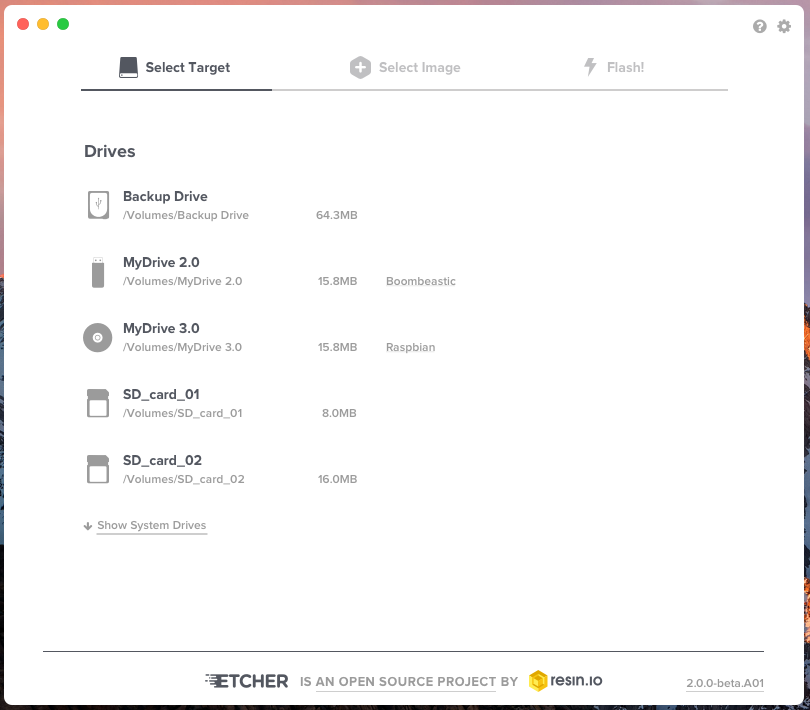
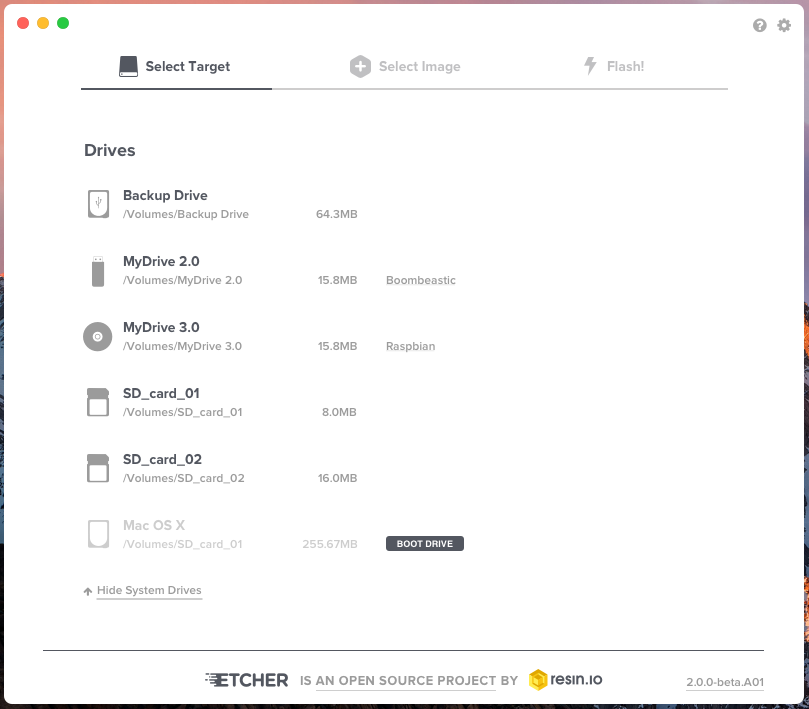
...for reference, I am posting Etcher v02 behaviour.
konmouz
on 15 Aug 2017
Related issues
lurch
·
3Comments
 davidrnewman
·
4Comments
davidrnewman
·
4Comments
 codeinabox
·
5Comments
codeinabox
·
5Comments
 robmcc1983
·
5Comments
robmcc1983
·
5Comments
 Bean6754
·
5Comments
Bean6754
·
5Comments
Most helpful comment
Yes, I will upload soon, I just want to recap with @taahirisaacs to sync the designs.
The idea is that there will be a pill label for system drives (drive selection modal). All drives, including system ones, are always selectable without enabling 'unsafe mode' (this option will be removed). However, if the user selects a system drive, there will be some sort of alert before continuing (also color change of button). In addition, after clicking 'Flash', user will get another alert modal to re-confirm that flashing a system drive is intended. So practically, it is quite impossible to flash a system drive accidentally.
As an advance setting, we could let users deactivate the final alert to speed up the process. However, I don't think that this will be a frequent use case so probably doesn't really worth it.
Finally, the boot drives concept sounds really good. If this can be implemented reliably it would be great.