Operating System:
NixOS 18.09, node 10.15.0, npm 6.8.0
Issue:
After installing esy globally i get an error that esy is not available, same for esy@latest:
λ esy
bash: /home/dejanr/.npm/bin/esy: No such file or directory
Actual behavior:
λ esy
bash: /home/dejanr/.npm/bin/esy: No such file or directory
Expected behavior:
esy is executed
Additional steps to reproduce:
λ npm i -g esy
/home/dejanr/.npm/bin/esy -> /home/dejanr/.npm/lib/node_modules/esy/_build/default/bin/esy.exe

> [email protected] postinstall /home/dejanr/.npm/lib/node_modules/esy/node_modules/esy-solve-cudf
> node ./postinstall.js

> [email protected] postinstall /home/dejanr/.npm/lib/node_modules/esy
> node ./postinstall.js

+ [email protected]
added 3 packages in 1.824s
~
λ esy
bash: /home/dejanr/.npm/bin/esy: No such file or directory
 dejanr
All 6 comments
What's in your /home/dejanr/.npm/bin/ or /home/dejanr/.npm/lib directories? Is there anything esy related in there? To be clear is the problem that when you install npm/node with nix, then npm install -g esy doesn't show up in your global path?
 jordwalke
on 24 Feb 2019
jordwalke
on 24 Feb 2019
The ENOENT that is happening here is not directly related to the paths that are being shown. The thing that is not being found is the linker. If you run readelf -l on the binaries you will see that it says "requesting interpreter: /bin/ld", this doesn't exist on nixos and thus you get the "no such file or directory".
What one could do is to run node2nix over the npm packages and apply patchelf on all binaries fixing up the headers for the binaries, I have a sketch on this lying around:
patchbin = let esySolveCudfCommandLibs = lib.makeLibraryPath [
stdenv.cc.cc.lib # libstdc++.so.6
];
in
''
echo "PATCHING esy"
patchelf \
--set-interpreter "$(cat $NIX_CC/nix-support/dynamic-linker)" \
$out/esy/_build/default/bin/esy.exe
echo "PATCHING cudf"
patchelf \
--set-interpreter "$(cat $NIX_CC/nix-support/dynamic-linker)" \
--set-rpath "${esySolveCudfCommandLibs}" \
$out/esy/node_modules/esy-solve-cudf/esySolveCudfCommand.exe
readelf -l $out/esy/node_modules/esy-solve-cudf/esySolveCudfCommand.exe
echo "PATCHING buildpackage"
patchelf \
--set-interpreter "$(cat $NIX_CC/nix-support/dynamic-linker)" \
$out/esy/_build/default/esy-build-package/bin/esyBuildPackageCommand.exe
readelf -l $out/esy/_build/default/esy-build-package/bin/esyBuildPackageCommand.exe
echo "PATCHING writePackage"
patchelf \
--set-interpreter "$(cat $NIX_CC/nix-support/dynamic-linker)" \
--set-rpath "${esySolveCudfCommandLibs}" \
$out/esy/_build/default/esy-build-package/bin/esyRewritePrefixCommand.exe
readelf -l $out/esy/_build/default/esy-build-package/bin/esyRewritePrefixCommand.exe
'';
So, this is slightly larger an issue than fixing up paths and such. I think that perhaps the best way of solving this is to package up esy with nix and installing it that way, you already have to bring your own of all of the rest of the ocaml ecosystem.
I really want esy for nixos, perhaps I should give it another try.
 Reasonable-Solutions
on 24 Feb 2019
Reasonable-Solutions
on 24 Feb 2019
@dejanr, I have this piece of FHSUserEnv that manages to build the example project. You still need to npm install -g esy@latest manually after entering the shell. Depending on where you put the shell.nix file you may also have to change the path at the bottom (it has $PWD).
{ pkgs ? import <nixpkgs> {} }:

(pkgs.buildFHSUserEnv {
  name = "esy-env";
  targetPkgs = pkgs: (with pkgs;
    [ gnum4
      perl # for shasum
      binutils
      gcc
      gnumake
      curl
      nodejs
      git
      neovim
      which
      ]);
  profile = ''
   export NPM_CONFIG_PREFIX=./vendor/node_modules
   export PATH=$PWD/vendor/node_modules/bin:$PATH
  '';.
}).env
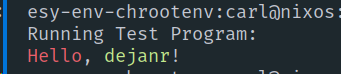
Hope this helps, even if it is kinda stopgap and clunky.
Reasonable-Solutions
on 24 Feb 2019
Hi @Reasonable-Solutions, you are right, esy is found inside ~/.npm/bin/esy, but linker is missing. Thanks for your effort on giving possible workarounds. I would probably go with the first approach and make a wrapper for esy with patched linker for now.
λ readelf -l ~/.npm/bin/esy

Elf file type is EXEC (Executable file)
Entry point 0x6ba5e0
There are 9 program headers, starting at offset 64

Program Headers:
  Type           Offset             VirtAddr           PhysAddr
                 FileSiz            MemSiz              Flags  Align
  PHDR           0x0000000000000040 0x0000000000400040 0x0000000000400040
                 0x00000000000001f8 0x00000000000001f8  R E    0x8
  INTERP         0x0000000000000238 0x0000000000400238 0x0000000000400238
                 0x000000000000001c 0x000000000000001c  R      0x1
      **[Requesting program interpreter: /lib64/ld-linux-x86-64.so.2]**
  LOAD           0x0000000000000000 0x0000000000400000 0x0000000000400000
                 0x0000000000957c44 0x0000000000957c44  R E    0x200000
  LOAD           0x0000000000957d28 0x0000000000f57d28 0x0000000000f57d28
                 0x00000000005e6d80 0x00000000005fd1b8  RW     0x200000
  DYNAMIC        0x0000000000957de8 0x0000000000f57de8 0x0000000000f57de8
                 0x0000000000000200 0x0000000000000200  RW     0x8
  NOTE           0x0000000000000254 0x0000000000400254 0x0000000000400254
                 0x0000000000000044 0x0000000000000044  R      0x4
  GNU_EH_FRAME   0x0000000000948060 0x0000000000d48060 0x0000000000d48060
                 0x0000000000002ad4 0x0000000000002ad4  R      0x4
  GNU_STACK      0x0000000000000000 0x0000000000000000 0x0000000000000000
                 0x0000000000000000 0x0000000000000000  RW     0x10
  GNU_RELRO      0x0000000000957d28 0x0000000000f57d28 0x0000000000f57d28
                 0x00000000000002d8 0x00000000000002d8  R      0x1

 Section to Segment mapping:
  Segment Sections...
   00
   01     .interp
   02     .interp .note.ABI-tag .note.gnu.build-id .gnu.hash .dynsym .dynstr .gnu.version .gnu.version_r .rela.dyn .rela.plt .init .plt .plt.got .text .fini .rodata .eh_frame_hdr .eh_frame
   03     .init_array .fini_array .jcr .data.rel.ro .dynamic .got .got.plt .data .bss
   04     .dynamic
   05     .note.ABI-tag .note.gnu.build-id
   06     .eh_frame_hdr
   07
   08     .init_array .fini_array .jcr .data.rel.ro .dynamic .got
I might also try to package esy for nixpkgs, will see how that goes.
dejanr
on 25 Feb 2019
Hi there, this one thing isn't fixed yet but shell.nix approach above?
 ahdyt
on 9 Aug 2020
ahdyt
on 9 Aug 2020
What's in your
/home/dejanr/.npm/bin/or/home/dejanr/.npm/libdirectories? Is there anything esy related in there? To be clear is the problem that when you install npm/node with nix, thennpm install -g esydoesn't show up in your global path?
Yep, that's right.
ahdyt
on 9 Aug 2020
Related issues
 bryphe
·
7Comments
bryphe
·
7Comments
 jaredly
·
7Comments
bryphe
·
6Comments
jaredly
·
7Comments
bryphe
·
6Comments
 zartstrom
·
3Comments
bryphe
·
5Comments
zartstrom
·
3Comments
bryphe
·
5Comments
Most helpful comment
@dejanr, I have this piece of FHSUserEnv that manages to build the example project. You still need to
npm install -g esy@latestmanually after entering the shell. Depending on where you put the shell.nix file you may also have to change the path at the bottom (it has $PWD).Hope this helps, even if it is kinda stopgap and clunky.