Essentials: Apple Sign-in always returns AccessToken = null
Description
I am trying to implement sign-in with apple following these instructions
https://docs.microsoft.com/en-us/xamarin/essentials/web-authenticator?context=xamarin%2Fxamarin-forms&tabs=ios#apple-sign-in
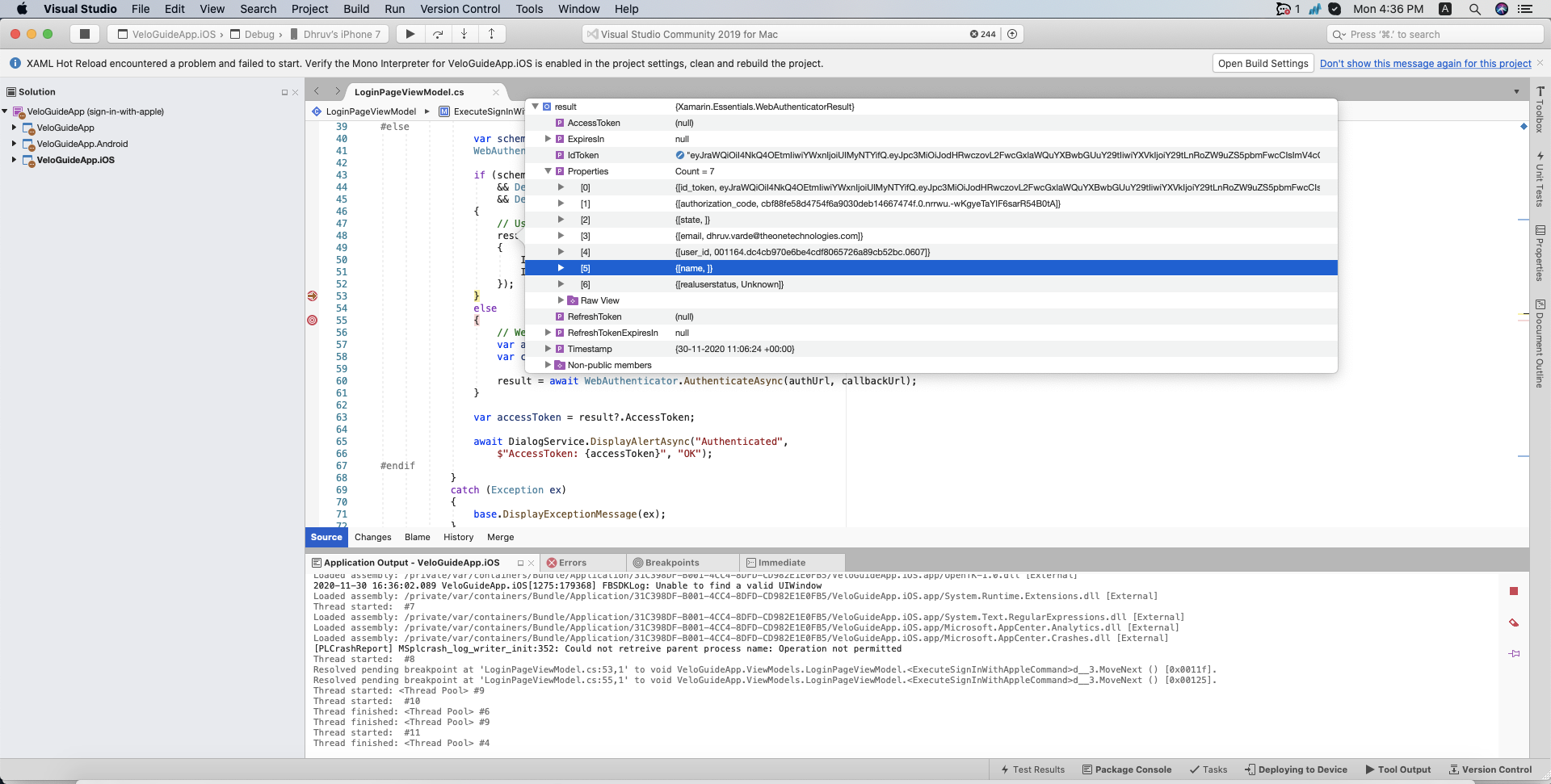
But I always get a null value for the AccessToken field.
What could be causing this?
Steps to Reproduce
- Execute this code in your app
var scheme = "Apple"; // Apple, Microsoft, Google, Facebook, etc.
WebAuthenticatorResult r = null;

if (scheme.Equals("Apple")
    && DeviceInfo.Platform == DevicePlatform.iOS
    && DeviceInfo.Version.Major >= 13)
{
    // Use Native Apple Sign In API's
    r = await AppleSignInAuthenticator.AuthenticateAsync();
}
else
{
    // Web Authentication flow
    var authUrl = new Uri(authenticationUrl + scheme);
    var callbackUrl = new Uri("xamarinessentials://");

    r = await WebAuthenticator.AuthenticateAsync(authUrl, callbackUrl);
}

var accessToken = r?.AccessToken;
Expected Behavior
r.AccessToken has a value.
Actual Behavior
r.AccessToken is null.
Basic Information
- Version with issue: 1.5.3.2
- IDE: Visual Studio 2019/VS for MAC
- Platform Target Frameworks:
- iOS: 14.2 and 14.3
Screenshots
 stesvis
All 12 comments
Basically it is not contacting the backend at all, it's like it ignores the callback_url.
stesvis
on 2 Dec 2020
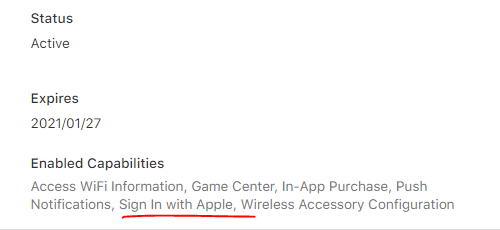
Do you have the entitlements added to the app and the check box in the provisioning profile on the developer portal? That is what got me initially.
 mattleibow
on 2 Dec 2020
mattleibow
on 2 Dec 2020
@mattleibow yes this is what I have in the Entitlements.plist
    <key>com.apple.developer.applesignin</key>
    <array>
      <string>Default</string>
    </array>
and in the provisioning profile:
stesvis
on 2 Dec 2020
I don't think it has an AccessToken, only an IdToken => https://github.com/xamarin/Essentials/blob/main/Xamarin.Essentials/WebAuthenticator/AppleSignInAuthenticator.ios.cs#L50
@Redth ?
 jamesmontemagno
on 3 Dec 2020
jamesmontemagno
on 3 Dec 2020
AuthToken = string.Empty;
                if (r.Properties.TryGetValue("name", out var name) && !string.IsNullOrEmpty(name))
                    AuthToken += $"Name: {name}{Environment.NewLine}";
                if (r.Properties.TryGetValue("email", out var email) && !string.IsNullOrEmpty(email))
                    AuthToken += $"Email: {email}{Environment.NewLine}";
                AuthToken += r?.AccessToken ?? r?.IdToken;
I need to update the docs on this
jamesmontemagno
on 3 Dec 2020
Hi @jamesmontemagno thanks.
My understanding is that the app executes r = await AppleSignInAuthenticator.AuthenticateAsync(); and then:
- Apple responds and you start the sign in process on the app thru the interface
- You submit your login info to Apple
- Apple authenticates you and then...
- Apple should contact your backend with extra info (
auth_url) - Your backend takes that info and continues with authentication to your own APIs
- Your backend generates an access token and returns it to Apple ('callback_url`)
- Apple puts that token into
AccessTokenand you have it available inr
Is that correct? We verified that this is what happens when we sign-in with Apple from our website UI, but it's not happening when we do it from the mobile app. Specifically, step #4 above never happens. Apple never contacts our backend...
What could cause this misbehavior?
stesvis
on 3 Dec 2020
r is our object and has a bucket of stuff in it. As you can see here it just looks to get the key if it is available https://github.com/xamarin/Essentials/blob/0dba844e8085f7cb36d62115b005620d541e0fbd/Xamarin.Essentials/WebAuthenticator/WebAuthenticatorResult.shared.cs#L43-L49
However, there is none: https://github.com/xamarin/Essentials/blob/main/Xamarin.Essentials/WebAuthenticator/AppleSignInAuthenticator.ios.cs#L49-L56
Only the id_token and authorization_code
jamesmontemagno
on 3 Dec 2020
Here are some docs as to what is inside of: https://developer.apple.com/documentation/authenticationservices/asauthorizationappleidcredential
Their full documentation: https://developer.apple.com/documentation/authenticationservices/implementing_user_authentication_with_sign_in_with_apple
jamesmontemagno
on 3 Dec 2020
Hmmm ok so at this point how is it going to be possible to obtain an access token from your own backend. Once apple authenticates you (you get userId etc), then you're just stuck there?
stesvis
on 3 Dec 2020
I believe you get back both id_token and authorization_code as well. https://medium.com/@priya_talreja/sign-in-with-apple-using-swift-5cd8695a46b6 is a good example as well
In all the samples I see tehre is no AuthToken that is returned or used. Idk.
jamesmontemagno
on 3 Dec 2020
The id_token is a JWT token which may? contain an accesstoken? But I don't think it does for Apple Sign In since there isn't really much to use that access token with.
 Redth
on 3 Dec 2020
Redth
on 3 Dec 2020
Actually, according to their docs it's not yet used: https://developer.apple.com/documentation/sign_in_with_apple/tokenresponse
So, no, you cannot get an access token from this service.
Redth
on 3 Dec 2020
Related issues
 janusw
·
4Comments
janusw
·
4Comments
 euquiq
·
3Comments
euquiq
·
3Comments
 TedMobile
·
3Comments
TedMobile
·
3Comments
 scotru
·
4Comments
scotru
·
4Comments
 jpmock
·
4Comments
jpmock
·
4Comments
Most helpful comment
Actually, according to their docs it's not yet used: https://developer.apple.com/documentation/sign_in_with_apple/tokenresponse
So, no, you cannot get an access token from this service.