Essentials: [Question] How to configure redirect URI of google while using webAuthenticator ?
Sample of web authenticator and asp core API works fine. But I wrote similar API for google web authentication and got below error.
This test.company.com page can’t be found
No web page was found for the web address: https://test.company.com/Authentocator/signin-google?state=*************************************************&scope=email+profile+https%3A%2F%2Fwww.googleapis.com%2Fauth%2Fuserinfo.profile+https%3A%2F%2Fwww.googleapis.com%2Fauth%2Fuserinfo.email+openid&authuser=1&prompt=none#
HTTP ERROR 404
Its not return back to application.
How and what do I need to configure in my google console. Can you help on this?
 manonaga2188
All 11 comments
If you can take a look at the samples: https://github.com/xamarin/Essentials/tree/develop/Samples/Sample.Server.WebAuthenticator has the full asp.net core backend that is setup to redirect back to the application.
Then you will need to configure the app to accept the redirect: https://docs.microsoft.com/en-us/xamarin/essentials/web-authenticator?context=xamarin%2Fxamarin-forms&tabs=android
 jamesmontemagno
on 15 Apr 2020
jamesmontemagno
on 15 Apr 2020
    [Route("mobileauth")]
    [ApiController]
    public class CflowAuthController : ControllerBase
    {

        const string callbackScheme = "cflow";
        [HttpGet("{scheme}")]
        public async Task Get([FromRoute]string scheme)
        {
            var auth = await Request.HttpContext.AuthenticateAsync(scheme);

            if (!auth.Succeeded
                || auth?.Principal == null
                || !auth.Principal.Identities.Any(id => id.IsAuthenticated)
                || string.IsNullOrEmpty(auth.Properties.GetTokenValue("access_token")))
            {
                // Not authenticated, challenge
                await Request.HttpContext.ChallengeAsync(scheme);
            }
            else
            {
                // Get parameters to send back to the callback
                var qs = new Dictionary<string, string>
            {
                { "access_token", auth.Properties.GetTokenValue("access_token") },
                { "refresh_token", auth.Properties.GetTokenValue("refresh_token") ?? string.Empty },
                { "expires", (auth.Properties.ExpiresUtc?.ToUnixTimeSeconds() ?? -1).ToString() }
            };

                // Build the result url
                var url = callbackScheme + "://#" + string.Join(
                    "&",
                    qs.Where(kvp => !string.IsNullOrEmpty(kvp.Value) && kvp.Value != "-1")
                    .Select(kvp => $"{WebUtility.UrlEncode(kvp.Key)}={WebUtility.UrlEncode(kvp.Value)}"));

                // Redirect to final url
                Request.HttpContext.Response.Redirect(url);
            }
        }
    }
And added this in my MainActivity too.
        [Activity(NoHistory = true, LaunchMode = LaunchMode.SingleTop)]
        [IntentFilter(new[] { Intent.ActionView },
    Categories = new[] { Intent.CategoryDefault, Intent.CategoryBrowsable },
    DataScheme = "cflow")]
        public class WebAuthenticationCallbackActivity : Xamarin.Essentials.WebAuthenticatorCallbackActivity
        {
        }
On Button click event
        async Task OnAuthenticate(string scheme)
        {
            try
            {
                WebAuthenticatorResult r = null;

                if (scheme.Equals("Apple")
                    && DeviceInfo.Platform == DevicePlatform.iOS
                    && DeviceInfo.Version.Major >= 13)
                {
                    r = await AppleSignInAuthenticator.AuthenticateAsync();
                }
                else
                {
                    var authUrl = new Uri(authenticationUrl + scheme);
                    var callbackUrl = new Uri("cflow://");
                    r = await WebAuthenticator.AuthenticateAsync(authUrl, callbackUrl);
                }

                AuthToken = r?.AccessToken ?? r?.IdToken;
                Debug.WriteLine(AuthToken);
            }
            catch (Exception ex)
            {
                AuthToken = string.Empty;
                Debug.WriteLine(ex.Message);
                await DisplayAlert("Cflow",$"Failed: {ex.Message}","OK");
            }
        }
@jamesmontemagno But after authentication its not return back to app.
manonaga2188
on 16 Apr 2020
Are you able to take a video of it? It is opening in chrome custom tab or a generic browser?
jamesmontemagno
on 16 Apr 2020
https://github.com/manonaga2188/WebAuthenticatorSampleIssue/blob/master/Record_2020-04-17-10-18-53_dda8afad953d6e78dd3cf84d7b4fe286.mp4
@jamesmontemagno Here I attached video of my issue.
I added redirect URI in google console as "https://test.cflowapps.com/Authentocator/signin-google",
My Startup class:
`public class Startup
{
public Startup(IConfiguration configuration, IWebHostEnvironment webHostEnvironment)
{
Configuration = configuration;
WebHostEnvironment = webHostEnvironment;
}
    public IConfiguration Configuration { get; }
    IWebHostEnvironment WebHostEnvironment { get; }
    // This method gets called by the runtime. Use this method to add services to the container.
    public void ConfigureServices(IServiceCollection services)
    {
        services.AddControllers();
        services.AddAuthentication(o =>
        {
            o.DefaultScheme = CookieAuthenticationDefaults.AuthenticationScheme;
        })
            .AddCookie()
            .AddGoogle(g =>
            {
                g.ClientId = "{Google client id}";
                g.ClientSecret = "{Google client secret id}";
                g.SaveTokens = true;
            })
            .AddMicrosoftAccount(ms =>
            {
                ms.ClientId = "{Microsoft client id}";
                ms.ClientSecret = "{Microsoft secret id}";
                ms.SaveTokens = true;
            });
            //.AddApple(a =>
            //{
            //    a.ClientId = Configuration["AppleClientId"];
            //    a.KeyId = Configuration["AppleKeyId"];
            //    a.TeamId = Configuration["AppleTeamId"];
            //    a.UsePrivateKey(keyId
            //        => WebHostEnvironment.ContentRootFileProvider.GetFileInfo($"AuthKey_{keyId}.p8"));
            //    a.SaveTokens = true;
            //});
    }

    // This method gets called by the runtime. Use this method to configure the HTTP request pipeline.
    public void Configure(IApplicationBuilder app, IWebHostEnvironment env)
    {
        if (env.IsDevelopment())
        {
            app.UseDeveloperExceptionPage();
        }

        app.UseHttpsRedirection();
        app.UseRouting();
        app.UseAuthorization();
        //app.UseAuthentication();
        app.UseEndpoints(endpoints =>
        {
            endpoints.MapControllers();
        });
    }
}`
You're using the wrong redirect uri. You need to redirect back to your mobileauth uri of your app so that the request returns to the custom controller.
 Redth
on 17 Apr 2020
Redth
on 17 Apr 2020
I added below redirect URI in google console
https://test.cflowapps.com/Authentocator/mobileauth
and
https://test.cflowapps.com/Authentocator/signin-google
manonaga2188
on 18 Apr 2020
Fixed it. Thanks for your time @Redth @jamesmontemagno
manonaga2188
on 22 Apr 2020
@manonaga2188 can you share some insight into how you solved it. I would like to update the documentation to ensure it is easier for other devs in the future.
jamesmontemagno
on 22 Apr 2020
@jamesmontemagno This part is helped me.
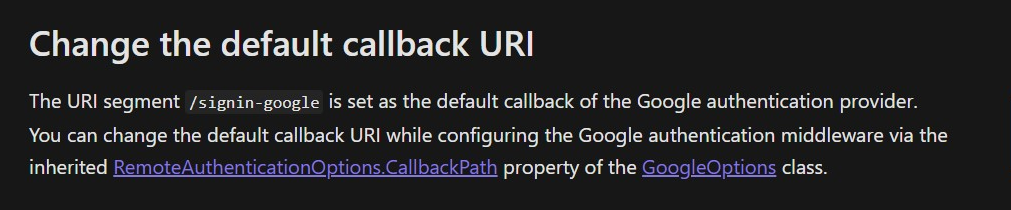
After Google authentication, return to https://{API-URL}/signin-google. So its not return to the app. It should return to api controller. So configure "CallbackPath" property of the GoogleOption as
.AddGoogle(g => {
                    g.ClientId = "{Client ID}";
                    g.ClientSecret = "{Client Secret}";
                    g.CallbackPath = "/mobileauth"; //mobileauth is api controller
                    g.SaveTokens = true;
                })
Also added redirect URI "https://{API-URL}/signin-google" and "https://{API-URL}/mobileauth" in google console. In my case "mobileauth" is api controller.
manonaga2188
on 23 Apr 2020
@manonaga2188 @Redth @jamesmontemagno can the Google login be implemented without the backend?
 manishkungwani
on 31 Oct 2020
manishkungwani
on 31 Oct 2020
@manishkungwani technically I think so, but you have to use an iOS/Android oauth secret/token and specify the redirect uri on google's configuration to be that which your app is registered to handle (and what you tell the Essentials API to listen for).
Many OAuth providers do not allow this implicit flow, and for good reason, since it's less secure. We are not documenting or encouraging this type of flow, but in the case of Google I think it can still be accomplished. Use at your own risk.
Redth
on 9 Nov 2020
Related issues
 gabry90
·
3Comments
gabry90
·
3Comments
 JohnGalt1717
·
4Comments
JohnGalt1717
·
4Comments
 nicolgit
·
4Comments
nicolgit
·
4Comments
 janusw
·
4Comments
janusw
·
4Comments
 noxe
·
3Comments
noxe
·
3Comments
Most helpful comment
You're using the wrong redirect uri. You need to redirect back to your
mobileauthuri of your app so that the request returns to the custom controller.