Essentials: [Bug] WebAuthenticator doesn't work at first time
Description
When I try to run the WebAuthenticator(WA) the modal permission request is discarded and the debug shows this message: [Warning] Attempting to load the view of a view controller while it is deallocating is not allowed and may result in undefined behavior (<SFAuthenticationViewController: 0x7fba5aa51c00>).
If I press the button again an exception is thrown and after that works fine.
Steps to Reproduce
- Create a button
- Create a Command in the ViewModel 3.
Expected Behavior
When the button is pressed the modal didn't dismiss and the browser can be launched.
Actual Behavior
When the button is pressed the modal dismisses and the debug shows the Warning mentioned above.
Basic Information
- Version with issue: 1.5.2
- Last known good version:
- IDE: Visual Studio Windows 16.4.5
- Platform Target Frameworks:
- iOS: 13.10.0.17
- Nuget Packages:
- Affected Devices: iPhone SE 12.4 (Simulator) and iPhone XS 13.4 (device)
Reproduction Link
https://github.com/magoolation/Xamarin.Bookshelf/tree/develop
 pictos
All 28 comments
Are you saying that the pop up comes up and then goes away really quick the first time?
 jamesmontemagno
on 6 Apr 2020
jamesmontemagno
on 6 Apr 2020
I guess what if you just make "LoginPage" your root page and then click on there without any modals or any animations to just to see if that works.
jamesmontemagno
on 6 Apr 2020
Hey @jamesmontemagno
We tryed it and it didn't work
We just referenced the Essentials source code both the master branch and the develop branch and in these cases it worked fine.
Maybe it's a bug in the current nugget version?
 magoolation
on 6 Apr 2020
magoolation
on 6 Apr 2020
That could be.... perhaps the linker is doing something. Did it work with "Don't Link"? or is this just happening in release version?
Current "develop" is 1.5.2, so should be the same.
jamesmontemagno
on 6 Apr 2020
Did it work with "Don't Link"? or is this just happening in release version?
Yes, it worked with the "Don't Link" option if I'm using the Xamarin.Essentials source code. If I'm using a release version (nuget) doesn't work, even with "Don't Link".
pictos
on 7 Apr 2020
Ah, fascinating! Seems like linker is being aggressive ... Hmmm. Will looks
jamesmontemagno
on 7 Apr 2020
Hmmm I turned on full linking on the Samples repo and it seemed to be working for me here....
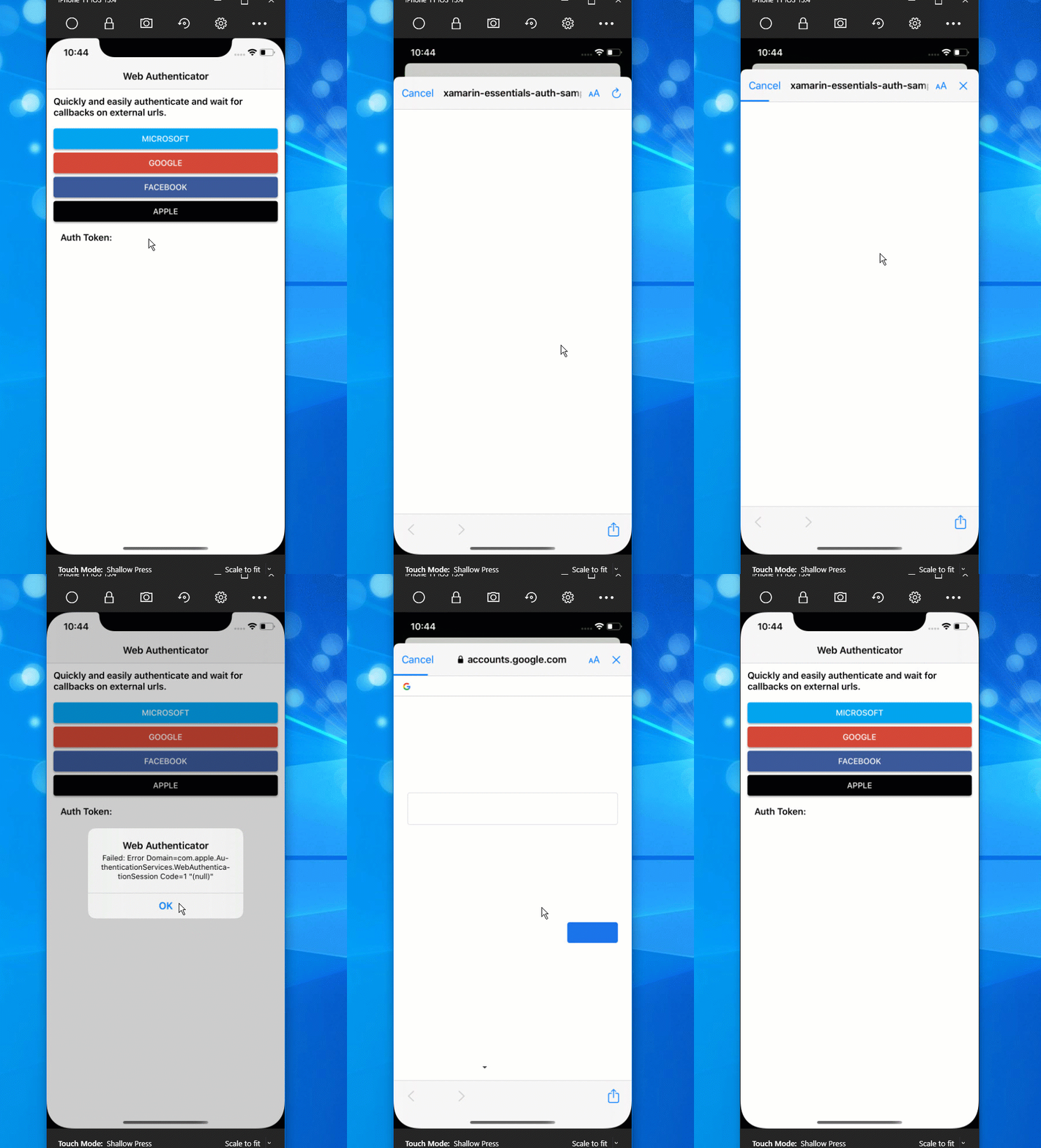
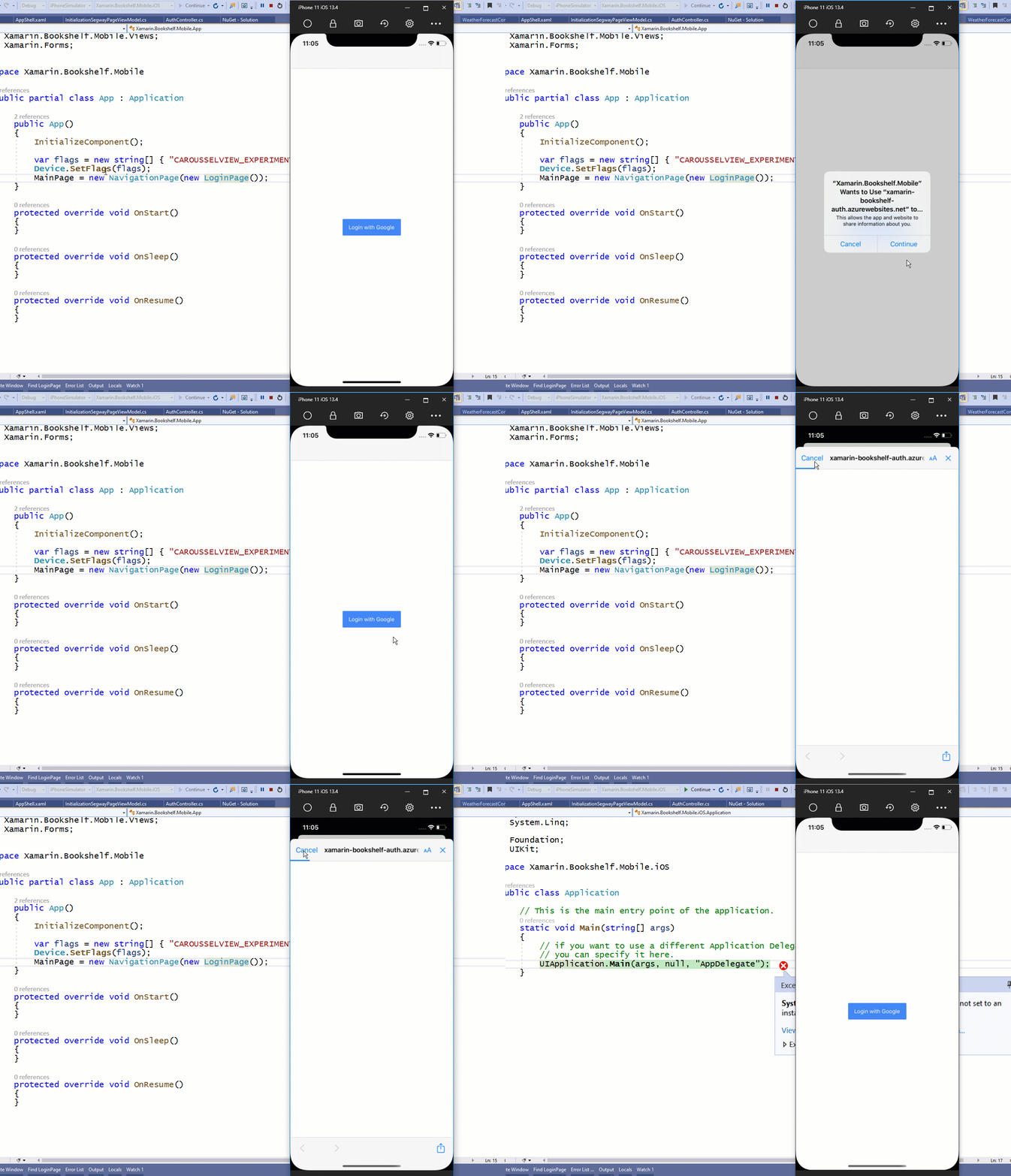
I downloaded the sample repo you sent and it does reproduce. However, I believe this is an issue with Xamarin.Forms Shell. I removed Shell from your project and it worked just fine. So my thinking is it is something where we are trying to gather the window and it grabs the wrong one perhaps......
jamesmontemagno
on 7 Apr 2020
I also tried to convert our samples app to a Shell app and that continue to work fine too.... very strange
jamesmontemagno
on 7 Apr 2020
It looks like if you use 1.5.1 it will work... we made some modifications to the code recently to ensure some back compat to VS 2017 and maybe that is causing an issue.
Can you double check that on your side.
jamesmontemagno
on 7 Apr 2020
This issue is happening to me to here with the 1.5.2 as well.
I'll give it a try on the 1.5.1 as suggested.
I'm facing also another issue that the authenticator is not working on iOS in release only, it authenticates but apparently can't go back properly to the app, for some reason the authentication process doesn't continue. I still don't have the clear steps to reproduce, but if I confirm that's another issue I'll open it. Just mentioning it here cause that could be something with the linker too as mentioned in the comments in this thread. I'll let you know if I have more info.
 winterdouglas
on 8 Apr 2020
winterdouglas
on 8 Apr 2020
Hi @jamesmontemagno it's really strange. I tryed 1.5.1 but it didn't work too I don't know if you are near release a 1.5.3-pre1 soon but if so I'd to like to try it as @pictos is able to run it from the source code.
magoolation
on 8 Apr 2020
I tried the 1.5.1 here too and that didn't work for me either, however there's a different symptom in my case, now with that version it's like the authentication process doesn't even begin. I'll keep an eye on this and once the 1.5.3 is released I'll give it another try.
winterdouglas
on 8 Apr 2020
@winterdouglas seems like your server redirect isn't calling back to your app. Make sure to read through the docs: https://docs.microsoft.com/en-us/xamarin/essentials/web-authenticator?context=xamarin%2Fxamarin-forms&tabs=android
There is currently nothing in 1.5.3 for anything WebAuthenticator currently.
jamesmontemagno
on 8 Apr 2020
Hey @jamesmontemagno. Like I said, the issue I'm facing happens only in release and only on iOS, in debug it works fine for both Droid and iOS, I mentioned it here only because it might have something to do with the linker that you and someone else were discussing in the comments above. I'll open a separate issue for that so we can continue the specific discussion there.
winterdouglas
on 9 Apr 2020
I guess what if you just make "LoginPage" your root page and then click on there without any modals or any animations to just to see if that works.
I tried same, but no luck.
 007vel
on 19 Apr 2020
007vel
on 19 Apr 2020
I temporally solved the issue cloning the repo and referencing it in my source. Waiting for a new release to give it another tryppp
Get Outlook for iOShttps://aka.ms/o0ukef
From: 007vel notifications@github.com
Sent: Sunday, April 19, 2020 1:11:36 AM
To: xamarin/Essentials Essentials@noreply.github.com
Cc: Alexandre Santos Costa alexandresantoscosta@gmail.com; Comment comment@noreply.github.com
Subject: Re: [xamarin/Essentials] [Bug] WebAuthenticator doesn't work at first time (#1210)
I guess what if you just make "LoginPage" your root page and then click on there without any modals or any animations to just to see if that works.
I tried same, but no luck.
—
You are receiving this because you commented.
Reply to this email directly, view it on GitHubhttps://github.com/xamarin/Essentials/issues/1210#issuecomment-616024372, or unsubscribehttps://github.com/notifications/unsubscribe-auth/AAEY5PGNJRVS3YHDV3SOWTDRNJ2XRANCNFSM4L5FZTLQ.
magoolation
on 19 Apr 2020
Adding reproduction here.
jamesmontemagno
on 20 Apr 2020
Confirmed fixed with: https://dev.azure.com/xamarin/public/_build/results?buildId=17227&view=artifacts&type=publishedArtifacts will go into 1.5.3
jamesmontemagno
on 20 Apr 2020
@jamesmontemagno This fix has stopped the issue that the popup will show and then quickly disappear, but I am able to still get the warning to show if I spam hitting a login button that calls the WebAuthenticator and then the cancel button on the UIAlertController that is shown.
[Warning] Attempting to load the view of a view controller while it is deallocating is not allowed and may result in undefined behavior (<SFAuthenticationViewController: 0x7fd53f2c4a00>)
Basic Information
Version with issue: 1.5.3
Last known good version:
IDE: Visual Studio Mac 8.5.3
Platform Target Frameworks:
iOS: 13.10.0.17
Nuget Packages:
Affected Devices: iPhone 8 13.4.1 and iPhone 11 13.4.1 (Both Simulators)
Here is a video of it:
https://github.com/Nordeast/WebAuthenticatorBug/blob/master/bug.mov
And here is a reproduce-able project:
https://github.com/Nordeast/WebAuthenticatorBug
 Nordeast
on 21 Apr 2020
Nordeast
on 21 Apr 2020
You should block this on the application side. The library does what it tells you to do.
jamesmontemagno
on 21 Apr 2020
I am a little confused about your reply. You are saying I should block which part? The library is still attempting to load the view of a view controller while it is deallocating. I am guessing you are saying I should stop the user from being able to call the library through the button until it has fully deallocated but I do not have information on when the decallocation is complete because the library is handling all of that. Or are you saying something different?
"Spam" is maybe a bad word to describe the actions you take when causing the error. You can tap the login button once and then hit the cancel button on the alert slowly. It isn't being caused by a double tap or something. Just successive loads of SFAuthenticationViewController and dismisses of it causes the warning.
Nordeast
on 21 Apr 2020
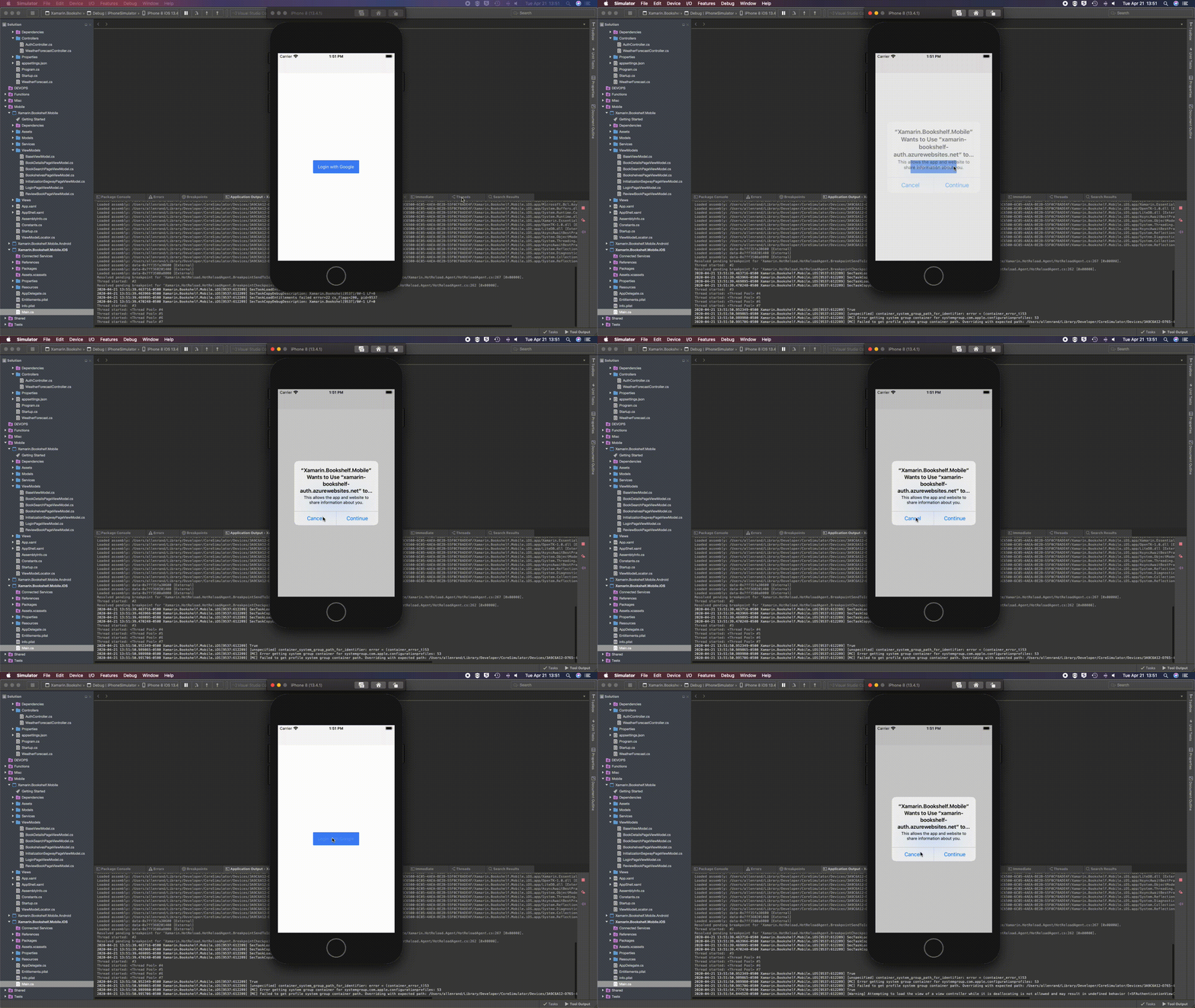
@jamesmontemagno Here I recreated it with the project you linked above. You can see I just tapped the "Login with Google" button once, tapped the cancel button and then tapped the login button once more and it shows the warning in the console output.
Nordeast
on 21 Apr 2020
Gotcha, I didn't understand your comment with "Spam" in there, I thought you were saying trying to call the method twice in a row.
I will look at it again, but it doesn't seem to have any impact on functionality correct?
jamesmontemagno
on 22 Apr 2020
Correct, everything seems to function fine. Probably low priority overall, but thought it was worth pointing out while the issue is still fresh in yours/teams mind. I guess the fear is whatever "undefined behavior" means in the warning.
While I agree that calling the method twice in a row would be bad programming on my part. I saw in the fix that you made the AS&SF Static. I am thinking as a user of API I would like to have a second call to the method simply ignored. If the static instance is not null, the API could write to the console (or throw an exception) that there is already an authentication in motion. I would think there should only ever be one instance of WebAuthenticator running but I am not sure if that is true for all the platforms you have to support with this repo.
Cheers
Nordeast
on 22 Apr 2020
@Nordeast can you comment on #1242 as maybe that is similar to what you are seeing... and if you are using universal links.
jamesmontemagno
on 24 Apr 2020
Can you try: https://dev.azure.com/xamarin/public/_build/results?buildId=17479&view=artifacts&type=publishedArtifacts
jamesmontemagno
on 24 Apr 2020
@Nordeast can you comment on #1242 as maybe that is similar to what you are seeing... and if you are using universal links.
I did try using universal links and I was getting crashes like that so I just switched to simple applinks. I wasn't sure at the time the cause of the crashes but maybe that was it.
I'll give that version a try.
Nordeast
on 24 Apr 2020
I am still getting the warning with that build.
Nordeast
on 24 Apr 2020
Related issues
 Howell1618
·
4Comments
Howell1618
·
4Comments
 noxe
·
3Comments
noxe
·
3Comments
 nicolgit
·
4Comments
nicolgit
·
4Comments
 charlespetzold
·
4Comments
charlespetzold
·
4Comments
 JohnGalt1717
·
4Comments
JohnGalt1717
·
4Comments
Most helpful comment
Confirmed fixed with: https://dev.azure.com/xamarin/public/_build/results?buildId=17227&view=artifacts&type=publishedArtifacts will go into 1.5.3