Essentials: [Bug] DeviceInfo.Idiom return TV instead of Phone while Xamarin.Forms.Device.Idiom return idiom correct
Description
Returns inconsistent values from Forms and Essentials.
Steps to Reproduce
- Compare returns values from Xamarin.Essentials.DeviceInfo.Idiom and Xamarin.Forms.Device.Idiom on Xiaomi Mi9 SE
Expected Behavior
Xamarin.Forms.Device.Idiom and Xamarin.Essentials.DeviceInfo.Idiom behave in same way.
Actual Behavior
Xamarin.Forms.Device.Idiom returns TargetIdiom.Phone
Xamarin.Essentials.DeviceInfo.Idiom returns DeviceIdiom.TV
Basic Information
- Version with issue: 1.3.1
- Last known good version: null
- IDE: Visual Studio 2019 16.4
- Platform Target Frameworks:
- Android: 9.0, stable MIUI Global 11.0.4.0
- Affected Devices: Xiaomi Mi9 SE
Screenshots
I have modified Sample Xamarin.Essentials project to compare Essentials to Forms.

Additional Information
My device return CurrentModeType = 12 which means CurrentModeType.HasFlag(UiMode.TypeTelevision); will returns true.

 kcrg
kcrg
All 7 comments
Seems like this is a bug in the phone ourselves. Not sure if there is anything we can do based on your screenshot. https://stackoverflow.com/questions/27138838/how-can-i-check-if-an-app-is-running-on-an-android-tv
Technically we could check if there is a touchscreen..... that may be the fix.
 jamesmontemagno
on 17 Dec 2019
jamesmontemagno
on 17 Dec 2019
Actually, i think instead of "hasflag" it needs to be a direct comparison
jamesmontemagno
on 17 Dec 2019
I believe that device is outputting that it is multiple things: https://docs.microsoft.com/en-us/dotnet/api/android.content.res.uimode?view=xamarin-android-sdk-9 as you can see here Television's enum is 4
Can you see what other types it is reporting that it is?
jamesmontemagno
on 17 Dec 2019
Our code is actually identical:
https://github.com/xamarin/Xamarin.Forms/blob/190dda803621cb61a2d93834cdbddae2bac3c777/Xamarin.Forms.Platform.Android/Forms.cs#L355
and
https://github.com/xamarin/Essentials/blob/master/Xamarin.Essentials/DeviceInfo/DeviceInfo.android.cs#L82
jamesmontemagno
on 17 Dec 2019
oh nm, i found it.
jamesmontemagno
on 17 Dec 2019
I think that checking enum UiMode with HasFlag is wrong. We should check it using Equals() or == https://docs.microsoft.com/en-us/dotnet/api/android.content.res.uimode?view=xamarin-android-sdk-9. I made simple app to prove my point. For example: Checking UIMode = 6 (Watch) will give you true on TypeDesk, TypeTelevision, TypeWatch, NightUndefined and TypeUndefined.

Checking for UIMode = 12(some Xiaomi wierd phone) from this issue will give you true on TypeTelevision and NightUndefined and TypeUndefined.
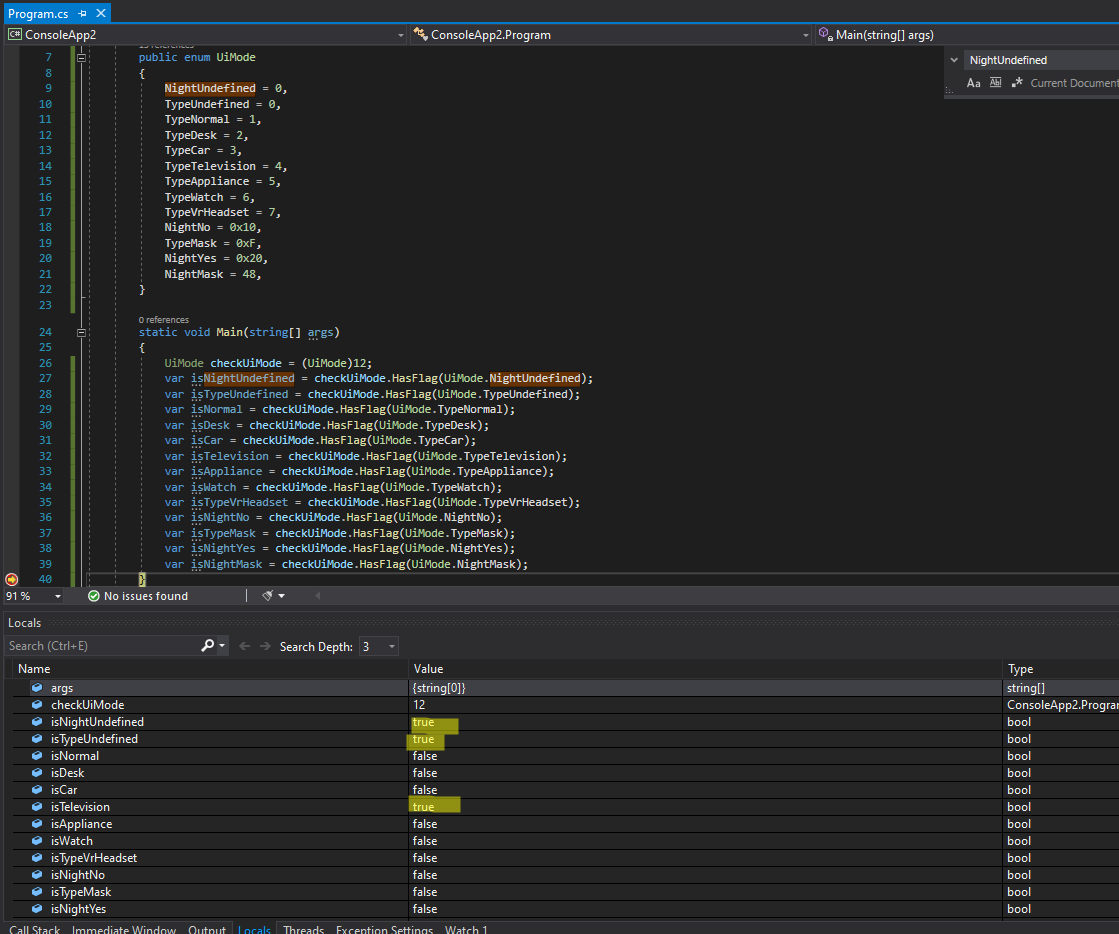
We should change checking enum from HasFlag() to equality check, that will give us unequivocal results. That should be also fixed in Xamarin.Forms code.
 PawKanarek
on 18 Dec 2019
PawKanarek
on 18 Dec 2019
From what i tested, all my phones are type 1, TypeNormal
PawKanarek
on 18 Dec 2019
Related issues
 MarkIvanDev
·
4Comments
MarkIvanDev
·
4Comments
 Howell1618
·
4Comments
Howell1618
·
4Comments
 RogerSchmidlin
·
4Comments
RogerSchmidlin
·
4Comments
 euquiq
·
3Comments
euquiq
·
3Comments
 noxe
·
3Comments
noxe
·
3Comments