Essentials: [Bug] Launcher.OpenAsync with file on iPad not working
Description
I am testing v1.2.0-Pre the new Launcher.OpenAsync included with this: https://github.com/xamarin/Essentials/pull/773
The Share and the Open work wonderful with Android. On iOS I seem to be struggling with the Open. Share works fine on iOS.
Steps to Reproduce
- Download a file (I have tried .png and .pdf). e.g. "/var/mobile/Containers/Data/Application/34F7C5-D1-E4-906C-B02/Library/Caches/10044_13583.pdf"
- Call:
await Launcher.OpenAsync(new OpenFileRequest(this.fileCaption, new ReadOnlyFile(fn)));
Expected Behavior
The native app selection dialog opens up like it does on Android. Selecting this opens the file in the selected app.
Actual Behavior
Nothing at all happens.
Basic Information
This only affects iOS. I have tried on a physical 12.3 iPad and a 12.2 emulator.
Xamarin.Essentials v1.2.0-Pre
Please note: when I call this:
var uri = new Uri(fn);
var supportsUri = await Launcher.CanOpenAsync(uri.Scheme + @"://");
the uri.Scheme = "file" and the Launcher.CanOpenAsync returns false.
Reproduction Link
string fn = this.FileName_FullIncludingPath;
var uri = new Uri(fn);
var supportsUri = await Launcher.CanOpenAsync(uri.Scheme + @"://");
if (supportsUri)
await Launcher.OpenAsync(new OpenFileRequest(this.fileCaption, new ReadOnlyFile(fn)));
 RhomGit
All 6 comments
CanOpenAsync is only for non-files... so no need to check that. Try it without that.
 jamesmontemagno
on 5 Jul 2019
jamesmontemagno
on 5 Jul 2019
Yep, sorry if it was ambiguous. I was using just:
await Launcher.OpenAsync(new OpenFileRequest(this.fileCaption, new ReadOnlyFile(fn)));
but I had also tried the "CanOpenAsync" and added that info in as I thought it might be the cause.
Launcher.OpenAsync() just does nothing. No exception or diagnostic message that I can see.
RhomGit
on 6 Jul 2019
Hi again, I decided to download the Xamarin.Essentials code and link it up to see what is going on. Unfortunately I don't have anything interesting to report
In the "PlatformOpenAsync" function:
- request.File.ContentType = "image/png" and "application/pdf"
- documentController is created and vc.View and vc.View.Frame seem ok to me also.
After reading: https://developer.apple.com/documentation/uikit/uidocumentinteractioncontroller/1616807-presentopeninmenu
Return value: true if this method was able to display the menu or false if it was not.
but the PresentOpenInMenu() is actually returning true.
Below is the vc.View being used:
{<UIView: 0x105fb4d00; frame = (0 0; 768 1024); autoresize = W+H; layer = <CALayer: 0x282b65660>>}
    base: {UIKit.UIResponder}
    AccessibilityHint: (null)
    AccessibilityIdentifier: (null)
    AccessibilityLabel: (null)
    Alpha: 1
    BackgroundColor: {UIKit.UIColor}
    BottomAnchor: {UIKit.NSLayoutYAxisAnchor}
    Bounds: {CoreGraphics.CGRect}
    CanBecomeFocused: false
    Center: {CoreGraphics.CGPoint}
    ClassHandle: 0x262e1a408
    ContentScaleFactor: 1
    CoordinateSpace: {UIKit.UIView}
    Focused: false
    Frame: {CoreGraphics.CGRect}
    GestureRecognizers: (null)
    HeightAnchor: {UIKit.NSLayoutDimension}
    Hidden: false
    IntrinsicContentSize: {CoreGraphics.CGSize}
    IsAccessibilityElement: false
    Layer: {CoreAnimation.CALayer}
    LeadingAnchor: {UIKit.NSLayoutXAxisAnchor}
    PreferredFocusedView: {UIKit.UIView}
    SafeAreaInsets: {UIKit.UIEdgeInsets}
    Subviews: {UIKit.UIView[1]}
    Superview: {UIKit.UIWindow}
    Tag: 0
    TintColor: {UIKit.UIColor}
    TopAnchor: {UIKit.NSLayoutYAxisAnchor}
    TrailingAnchor: {UIKit.NSLayoutXAxisAnchor}
    Transform: {CoreGraphics.CGAffineTransform}
    UserInteractionEnabled: true
    WidthAnchor: {UIKit.NSLayoutDimension}
    Window: {UIKit.UIWindow}
Ah... interesting... so this is just on an iPad and iPad simulator? Perhaps it is showing off the screen....hmmmm
How about on a phone?
jamesmontemagno
on 6 Jul 2019
Good call.
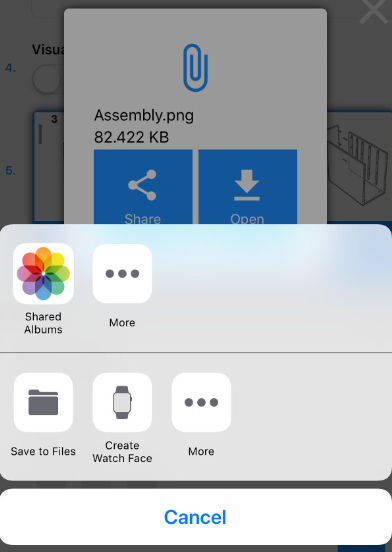
I did a test on an iPhone Xs Max 12.2 simulator:
RhomGit
on 6 Jul 2019
Fixed up and will be in next release.
jamesmontemagno
on 1 Aug 2019
Related issues
 ykoorb
·
3Comments
ykoorb
·
3Comments
 Agredo
·
3Comments
Agredo
·
3Comments
 tsjdev-apps
·
4Comments
tsjdev-apps
·
4Comments
 RogerSchmidlin
·
4Comments
RogerSchmidlin
·
4Comments
 scotru
·
4Comments
scotru
·
4Comments