Essentials: GeoLocation - Android 9 - GetLocationAsync doesn't return without a timeout
Description
When using GeoLocation on Android 9, the GetLocationAsync() method will never return back with a location. It will infinitely hang. It will work properly 100% of the time on Android 8 and lower devices.
When you provide a timeout as part of a GeolocationRequest() object that you pass into GetLocationAsync(), it will then return back the location, but only once it hits the timespan timeout you provide, not when it has a location. If you provide 10 seconds, it will return back in 10 seconds with a location. If you pass in 2 seconds, it returns back in 2 seconds with a location. It's dependent upon the timespan timeout to return rather than just when it receives a location update.
I have found various other people having this issue within StackOverflow and stating adding a timeout was the only way to get it to work.
Steps to Reproduce
PREREQ: Location permissions should be accepted for the app and location enabled. Won't dig into permission handling as it's not part of this issue.
- Use a physical device on Android 9, such as a Samsung Galaxy S9 or Google Pixel 2.
- Use any random Xamarin project with an Android view to spawn an Async task to get location.
- Add code similar to below:
```C#
var location = await Geolocation.GetLocationAsync(new GeolocationRequest(GeolocationAccuracy.Medium), SomeCancellationToken);
var test = location;//throw a breakpoint here for when the above call returns
4. Debug code and set breakpoint for the second line. It will not return back with a location and will hang indefinitely.
5. Adjust code to add a timespan like so:
```C#
var location = await Geolocation.GetLocationAsync(new GeolocationRequest(GeolocationAccuracy.Medium, TimeSpan.FromSeconds(10)), SomeCancellationToken);
var test = location;//throw a breakpoint here for when the above call returns
- Debug code and set breakpoint at second line. It will return back with a location, but only after exactly 10 seconds.
- Adjust the timespan to 2 seconds, and it will return back a location after 2 seconds. Adjust to other values and notice same behavior.
Expected Behavior
- Location will return back once it's received if no timeout is passed.
- If timeout is passed, it should still return back once the location is received, unless the timeout is hit before a location is received
Actual Behavior
- Location never returns back if you don't specify a timeout
- Timeout should just be a max waiting threshold if there's no location. It shouldn't be when the callback returns with a location even if the location was already populated.
Basic Information
- Version with issue: 1.0.1
- Last known good version: None
- IDE: Visual Studio for Mac (2019)
- Platform Target Frameworks:
- Android: 9.0
- Android Support Library Version: 27.0.2.1
- Affected Devices: Samsung Galaxy S9, S10, Pixel 2, Pixel 3 (any on Android 9)
 justinwojo
All 11 comments
Having the same issue on Xiaomi Redmi Note 7 (Android 9).
+ if i deny access to my location, even with an timeout, it doesn't return or throws an Exception, i tried on v1.1.0 and v1.0.0.
Code:
            {
                position = await Xamarin.Essentials.Geolocation.GetLocationAsync(new GeolocationRequest(GeolocationAccuracy.Default, TimeSpan.FromSeconds(2)));
            }
            catch (FeatureNotSupportedException fnsEx)
            {
                // Handle not supported on device exception
            }
            catch (FeatureNotEnabledException fneEx)
            {
                // Handle not enabled on device exception
            }
            catch (PermissionException pEx)
            {
                // Handle permission exception
            }
            catch(Exception ex)
            {
               //Handle exception
            }
 RicardoMoraisPOR
on 24 Apr 2019
RicardoMoraisPOR
on 24 Apr 2019
@justinwojo , @RicardoMoraisPOR can you provide a sample project? I tried to reproduce the error, but it's work fine for me. I attached my sample project in here, and I used an Motorole One with Android 9.0.
GeoTest.zip
 pictos
on 1 May 2019
pictos
on 1 May 2019
@pictos
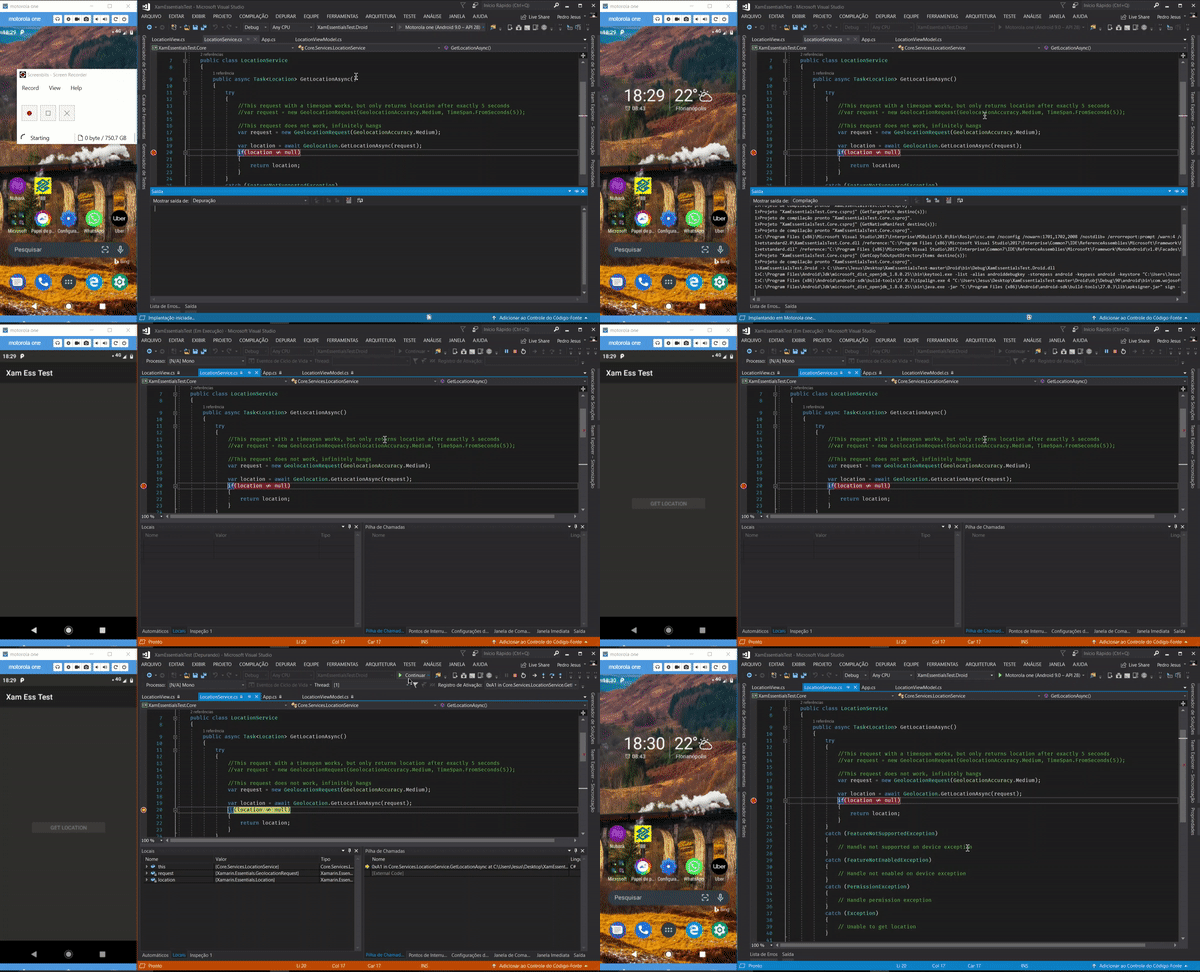
Here is a repo that I was able to reproduce the issue in.
https://github.com/justinwojo/XamEssentialsTest
Surprisingly for some reason, this repo shows that it is broken for me on Android 8 as well. I followed the general template of how we use it in our production app, but it is a little bit different.
Key piece to add breakpoints to and test is the LocationService.cs class:
https://github.com/justinwojo/XamEssentialsTest/blob/master/Core/Services/LocationService.cs
I added a comment for each request, which one works, which one infinitely hangs. I was able to reproduce the same behavior here as well where the timespan version only returns exactly given the time provided in the request.
One more note I forgot to add in the initial request, this is a .net standard project where we're doing the Location request, if that makes a difference.
Let me know if I can offer any more assistance or need me to adjust anything within the project. Thanks!
EDIT:
I was playing around with this some more and noticed it's super inconsistent for it either working or not. I had unhooked the debugger and tried it after a few minutes and it worked fine. Then I tried debugging again and it hung. So far the only thing that I can find that seems to mess with it either working or not is adjusting the location permission and starting the app again. I can get it to break pretty commonly, but sometimes it does work.
I took a look at the logcat during this and it was blowing up with errors when it didn't work as compared to when it does work.
This occurs a ton of times when it fails:
05-01 11:07:35.989: E/IzatSvc_PassiveLocListener(1367): Exiting with error onLocationChanged line 152 "1"
justinwojo
on 1 May 2019
@justinwojo For me your project work very well, I consolidated all projects to use Xamarin.Essentials 1.0.1. So the problem can be in other part of your project or in this specific devices. Can you test in another devices? And if I don't running correctly, please let me know.
I'm using the Motorola One with Android 9.0
pictos
on 1 May 2019
@pictos @justinwojo
I manage to make my project return the correct values in each situation (Denying and Accepting access to my location), i'm sorry because i don't know exactly why this happens, but this is what i did:
While testing my app, i turned on the batery saver mode, and in MIUI 10, that turns off the GPS, (_and i forgot that i was using my mobile data instead of my wifi, but i don't think it matters here_), and i got prompt with a message asking if i wanted to change my Location Mode to Batery saving, in the description it says: _"Use WLAN, Bluethooth, or mobile networks to determine location"_.
After that my project, and the ones added here in the issue are working fine! i also tested the Device Only mode that i supose, was the one ON by default, and yes, the geolocation requests never return any value.

This Settings are (in MIUI 10) under: _Settings>Additional Settings>Privacy>Location_
RicardoMoraisPOR
on 2 May 2019
@pictos
Here are the tests i made on your sample project, i had to make it invoke from the MainThread
Allowing Access and using Batery Saving Mode:

Allowing Access and using Device Only Mode:
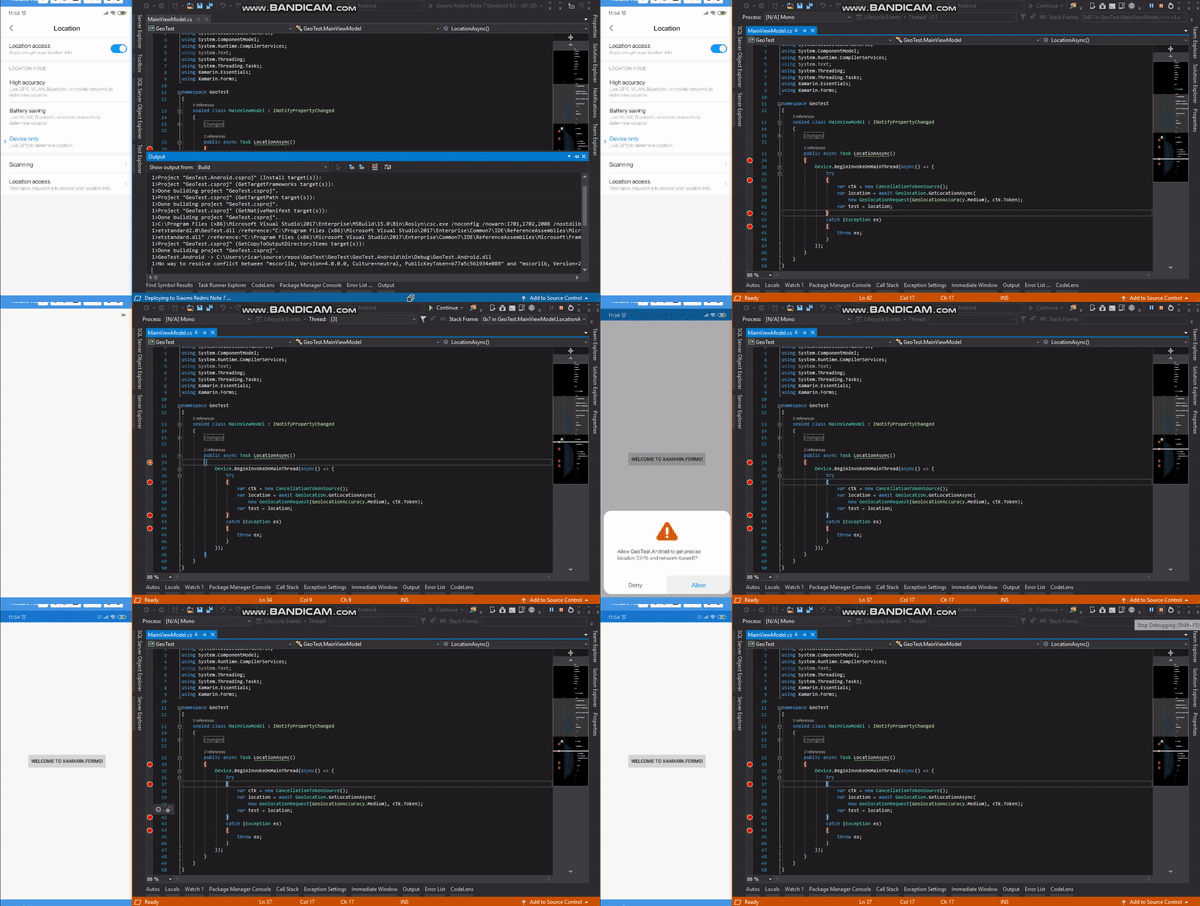
EDIT: i should point out that i tested this with GPS OFF and ON, and had the same results
RicardoMoraisPOR
on 2 May 2019
@RicardoMoraisPOR yeah, use a lot of Tasks to force the error, but they didn't happen. Not use that code in production! (:
pictos
on 3 May 2019
@RicardoMoraisPOR yeah, use a lot of Tasks to force the error, but they didn't happen. Not use that code in production! (:
@pictos we don't :D just for demo purposes
RicardoMoraisPOR
on 3 May 2019
So, the code is working as designed.
If you pass it a timeout it continues to try to get an accurate location based on the specified precision that is set. If you set Best it looks for something extremely accurate that needs a lot of time. if you set the timeout it will return whatever it finds after the timespan specified. If you don't specify a timeout then it will wait forever and attempt to get the location precision based on what it can get. So if you request best and you turn off GPS or put in other modes that limit it then you wont get a result back.
The strategy should be to check the cached location and then query location based on your needs.
 jamesmontemagno
on 15 May 2019
jamesmontemagno
on 15 May 2019
I have encountered the same issue. It doesn't work on Samsung Note 9 (Pie 9) & Xamarin.Essentials.
I had passed in the timeout value, somehow, it still doesn't work.
 hmheng
on 13 Sep 2019
hmheng
on 13 Sep 2019
So, the code is working as designed.
If you pass it a timeout it continues to try to get an accurate location based on the specified precision that is set. If you set Best it looks for something extremely accurate that needs a lot of time. if you set the timeout it will return whatever it finds after the timespan specified. If you don't specify a timeout then it will wait forever and attempt to get the location precision based on what it can get. So if you request best and you turn off GPS or put in other modes that limit it then you wont get a result back.
The strategy should be to check the cached location and then query location based on your needs.
So the recommended strategy is to set ask for a cached location, and if it is null then do a real search with a timeout, even in production code?
And it is by design that a query never finishes if say the GPS is off? There's no way it could detect that and throw an exception?
And it is by design that it doesn't take a cancellation token, but a time span?
 Tommigun1980
on 13 May 2020
Tommigun1980
on 13 May 2020
Related issues
 tsjdev-apps
·
4Comments
tsjdev-apps
·
4Comments
 euquiq
·
3Comments
euquiq
·
3Comments
 scotru
·
4Comments
scotru
·
4Comments
 janusw
·
4Comments
janusw
·
4Comments
 noxe
·
3Comments
noxe
·
3Comments